Kirish
Thank you for choosing the Havit H2233D Gaming Headphone. This manual provides essential information for the proper setup, operation, and maintenance of your new headset. Please read it thoroughly before use to ensure optimal performance and longevity of the product.

Rasm: old view of the Havit H2233D Gaming Headphone, showcasing its black and red design, RGB lighting on the earcups, and an attached microphone.
Mahsulot xususiyatlari
- 50mm Large Caliber Speakers: Designed for clear and powerful audio output, enhancing your gaming and listening experience.
- RGB yoritish: Integrated dynamic RGB lighting on the earcups provides a visually engaging aesthetic.
- All-Inclusive Skin Earmuffs: Engineered for comfort during extended use, these earmuffs also contribute to passive noise reduction.
- High-Precision Smooth Scroll Wheel: Conveniently located for easy and precise volume adjustments.
- Ko'p yo'nalishli mikrofon: A high-sensitivity microphone ensures clear voice capture for effective communication.
- Simli ulanish: Reliable connection via a 3.5mm audio jack for sound and a USB connector specifically for powering the RGB lighting.

Image: Detail of the all-inclusive skin earmuffs, highlighting their design for comfort and passive noise reduction.

Image: Close-up of the high-precision smooth scroll wheel for volume control, located on the earcup.

Rasm: batafsil view of the earcup showcasing the integrated RGB lighting feature.
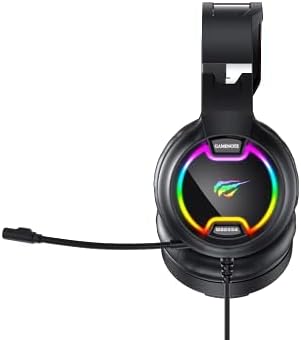
Rasm: View of the adjustable headband and earcup connection, designed for a comfortable fit.
Paket tarkibi
Paketingizda quyidagi narsalar borligiga ishonch hosil qiling:
- Havit H2233D Gaming Headphone
- Foydalanuvchi uchun qo'llanma (ushbu hujjat)
O'rnatish bo'yicha ko'rsatmalar
- Audio kabelni ulang: Plug the 3.5mm audio jack from the headset into the corresponding audio output port on your computer, gaming console, or mobile device. This port is typically marked with a headphone icon. Ensure it is fully inserted for proper audio transmission.
- Connect USB Cable (for RGB Lighting): Plug the USB connector from the headset into an available USB port on your computer or a USB power adapter. This connection is solely for powering the RGB lighting feature. The headset will function for audio and microphone without the USB connected, but the lights will not illuminate.
- Adjust Headset Fit: Gently extend or retract the headband to ensure the earcups sit comfortably and securely over your ears. The all-inclusive earmuffs are designed to provide a snug fit for optimal sound isolation and comfort.
- Mikrofonning joylashuvi: Adjust the flexible microphone boom to a position near your mouth, approximately 2-3 cm away, for clear voice capture.

Rasm: yon view of the Havit H2233D headset, showing the microphone extended and ready for use, along with the wired connection points.
Foydalanish bo'yicha ko'rsatmalar
Ovozni boshqarish
- Ovoz balandligini sozlash: Use the smooth scroll wheel located on the left earcup to increase or decrease the audio volume. Scroll upwards to increase volume, and downwards to decrease.
- Tizim hajmi: In addition to the headset's volume control, ensure your connected device's system volume is also adjusted to an appropriate listening level.
Mikrofondan foydalanish
- Mikrofon ovozini o'chirish: The headset features a dedicated one-touch mute button for the microphone, typically integrated near the volume scroll wheel. Press this button to toggle the microphone on or off.
- Dasturiy ta'minot sozlamalari: For optimal microphone performance, access your operating system's sound settings or your game/communication software's audio input settings. Confirm that the Havit H2233D is selected as the default input device.
RGB yoritish
- The RGB lighting on the earcups will automatically illuminate once the USB cable is connected to a powered USB port. Please note that there are no user-adjustable settings for the RGB lighting patterns or colors directly on the headset.
Xizmat va parvarish
- Tozalash: Use a soft, dry, lint-free cloth to clean the headset's surfaces. Avoid using abrasive cleaners, solvents, or harsh chemicals, as these can damage the finish and components.
- Saqlash: When not in use, store the headset in a cool, dry place, away from direct sunlight, excessive heat, or extreme cold. Proper storage helps preserve material integrity.
- Kabelni parvarish qilish: To prevent damage, avoid sharply bending, twisting, or crimping the cables. Always grasp the plug, not the cable, when connecting or disconnecting the headset from a device.
- Suvga ta'sir qilish: This headset is not designed to be water-resistant. Protect it from exposure to liquids, moisture, and high humidity to prevent internal damage.
Muammolarni bartaraf qilish; nosozliklarni TUZATISH
| Muammo | Yechim |
|---|---|
| Eshitish vositasidan ovoz yo'q. |
|
| Microphone is not working. |
|
| RGB lights are not illuminating. |
|
Texnik xususiyatlari
| Model nomi | Havit H2233D |
| Ulanish texnologiyasi | Wired (3.5mm audio jack for sound, USB for RGB lighting power) |
| Naushniklar Form Faktor | Quloq ustida |
| Dinamik diametri | 50 mm |
| Empedans | 32 Ohm |
| Sezuvchanlik | 94 dB |
| Mikrofon turi | Ko'p yo'nalishli |
| Boshqarish turi | Media Control (Volume Scroll Wheel, Mic Mute Button) |
| Kabel xususiyati | Tangle Free |
| Mos qurilmalar | Devices with 3.5mm audio input |
| Material | Plastik |
| Rang | Qora + Qizil |
| Element og'irligi | 740 gr |
| Suvga chidamlilik darajasi | Suvga chidamli emas |
Kafolat va qo'llab-quvvatlash
For detailed warranty information, technical assistance, or customer support, please visit the official Havit website or contact your authorized Havit retailer. It is recommended to retain your purchase receipt as proof of purchase for any warranty claims.
Ishlab chiqaruvchi: Havit


