1. Kirish
This manual provides comprehensive instructions for the operation and maintenance of your new YAOHUIMI Replacement Remote Control for Fujitsu Air Conditioners. Please read this manual carefully before using the remote control to ensure proper function and longevity. Keep this manual for future reference.
2. Mahsulot tugadiview
The remote control is designed to provide intuitive control over your Fujitsu air conditioner. It features a clear display and ergonomically placed buttons for ease of use.

2.1-rasm: Old view of the remote control, displaying temperature in Fahrenheit.

2.2-rasm: Toʻliq view of the remote control with the lower panel open, showing advanced function buttons.
2.1 Asosiy xususiyatlar
- Direct replacement for various Fujitsu AC remote models.
- Clear digital display with green backlight for visibility in low light.
- Temperature display in both Fahrenheit (°F) and Celsius (°C).
- Essential functions: Mode, Temperature Adjustment, Fan Speed, Swing, Timer, Sleep, Economy, Sensor, Weekly Program, and more.
3. Sozlash
3.1 Batareyani o'rnatish
- Masofadan boshqarish pultining orqa tomonidagi batareya bo'linmasini toping.
- Batareya qopqog'ini suring.
- Insert two new AAA batteries, ensuring the correct polarity (+/-) as indicated inside the compartment.
- Batareya qopqog'ini mahkam yoping.
Eslatma: Do not mix old and new batteries. Do not mix alkaline, standard (carbon-zinc), or rechargeable (nickel-cadmium) batteries. Remove batteries if the remote control will not be used for an extended period.
4. Foydalanish bo'yicha ko'rsatmalar
4.1 Asosiy funksiyalar
- Quvvatni yoqish/oʻchirish: ni bosing Power (⑂/I) konditsionerni yoqish yoki o'chirish uchun tugma.
- Rejim tanlash: ni bosing REJIM button to cycle through available operating modes (e.g., Auto, Cool, Dry, Fan, Heat). The selected mode will be displayed on the screen.
- Haroratni sozlash: dan foydalaning TEMP. ▲ (Yuqoriga) va TEMP. ▼ (Down) buttons to set your desired temperature.
- Fan tezligi: ni bosing MUHLIS button to adjust the fan speed (e.g., Auto, Low, Medium, High).
- Tebranish: ni bosing SWING button to activate or deactivate the louver swing function.
4.2 Advanced Functions (Lower Panel)
Slide down the lower panel of the remote control to access additional functions.

4.1-rasm: Batafsil view of the advanced function buttons on the remote control.
- Energy Saving Program: Activates an optimized setting for reduced energy consumption.
- Sensor: Engages the room temperature sensor for more precise control.
- Outdoor Unit Low Noise: Reduces the noise level of the outdoor unit.
- Weekly / On/Off / Sleep: These buttons are typically used in conjunction with the TAYMER SOZLASH to program specific operational schedules.
- Taymerni sozlash: Allows you to set on/off timers for the air conditioner. Use TANLASH va YUBORISH to configure and activate timer settings.
- Clock Adjust: Masofadan boshqarish pulti displeyida joriy vaqtni o'rnatish uchun ishlatiladi.
- °C/°F Toggle: Press this button to switch the temperature display between Celsius and Fahrenheit.

4.2-rasm: Illustration of the green backlight and the Celsius/Fahrenheit temperature display toggle.
5. Moslik
This replacement remote control is compatible with a wide range of Fujitsu AC Air Conditioner models. Please verify your air conditioner model or original remote control model against the list below to ensure compatibility.
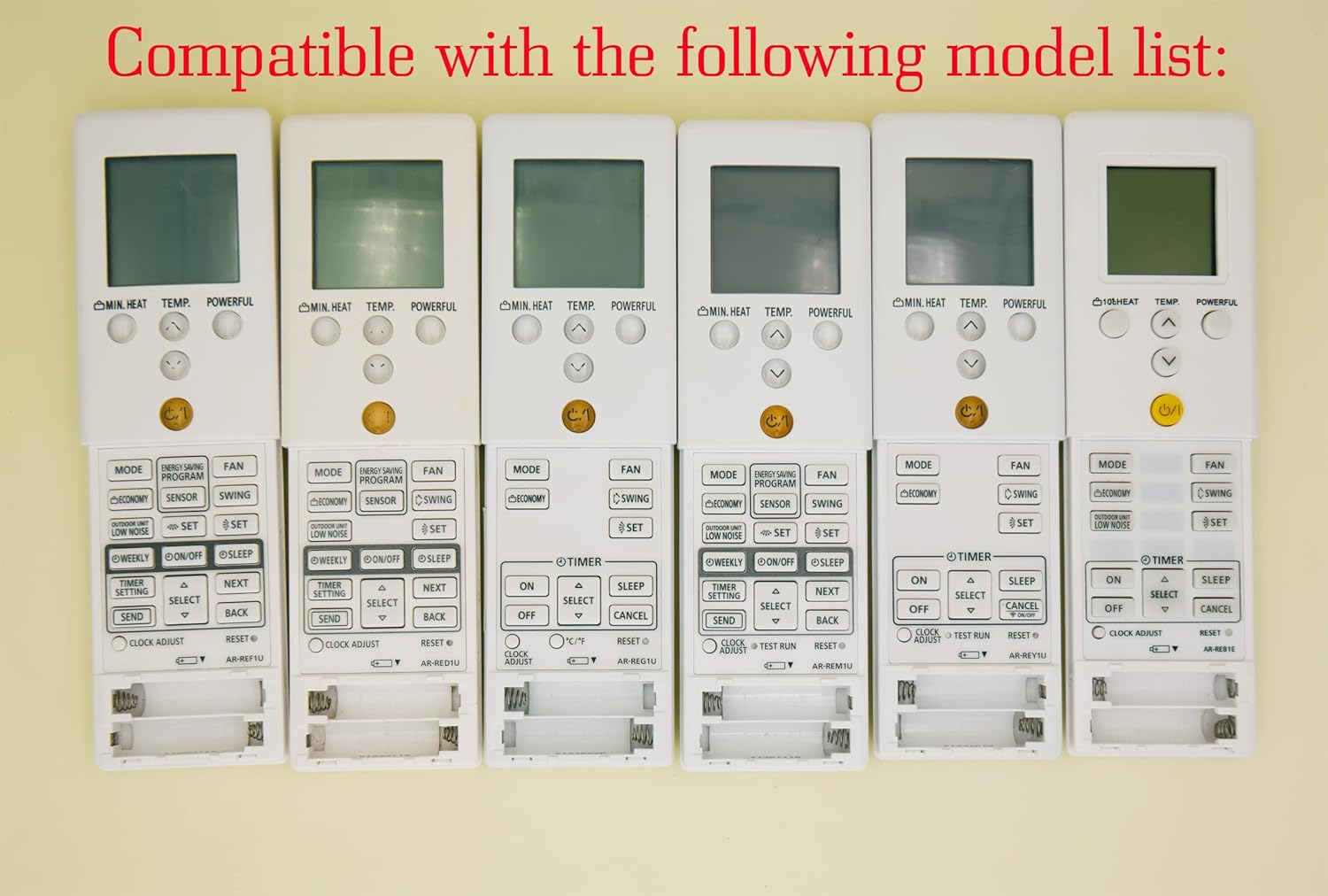
5.1-rasm: Examples of original remote controls compatible with this replacement unit.
5.1 Compatible Fujitsu AC Models
- ASYG14LMCE, ASYG18KLCA, ASYG24KLCA
- ASYG09KMCB, ASYG12KMCB, ASYG14KMCB
- ASYG09KHCA, ASYG12KHCA, ASYG14KHCA
- ASYG09LECB, ASYG12LECB
- And many other Fujitsu models as listed in the product description.
5.2 Compatible Remote Control Models
- AR-RED1U, AR-REF1U, AR-REG1U, AR-REM1U, AR-REY1U
- AR-REA1E, AR-REA2E, AR-REB1E, AR-REB2E
- AR-REF1E, AR-REF2E, AR-REF3E, AR-REF4E
- AR-REJ1E, AR-REM1E, AR-REM2E, AR-REM3E, AR-REM4E, AR-REM5E, AR-REM6E, AR-REM7E
- AR-REW1E, AR-REW2E, AR-REW3E, AR-REW4E
6. Xizmat ko'rsatish
6.1 Tozalash
To clean the remote control, wipe it gently with a soft, dry cloth. Do not use liquid cleaners, abrasive materials, or chemical solvents, as these may damage the remote's surface or internal components.
6.2 Saqlash
When not in use for extended periods, store the remote control in a cool, dry place away from direct sunlight and extreme temperatures. Remove the batteries to prevent leakage and potential damage to the remote control.
7. Muammolarni bartaraf qilish; nosozliklarni TUZATISH
- Masofadan boshqarish pulti javob bermayapti:
- Batareyalar to'g'ri joylashtirilgan yoki to'g'ri qutblanganligini tekshiring.
- Eski batareyalarni yangilariga almashtiring.
- Masofadan boshqarish pulti va konditsioner qabul qilgich o'rtasida hech qanday to'siqlar yo'qligiga ishonch hosil qiling.
- Masofadan boshqarish pulti to'g'ridan-to'g'ri konditsionerga yo'naltirilganligiga ishonch hosil qiling.
- Displey xira yoki bo'sh:
- Batareya quvvati kam bo'lishi mumkin. Ularni almashtiring.
- Ensure the green backlight feature is not interfering with visibility in bright conditions.
- Konditsioner kerakli funktsiyani bajarmaydi:
- Verify that the correct mode (e.g., Cool, Heat) is selected on the remote.
- Check the air conditioner's own display for error codes or operational status.
- Ensure the remote control is compatible with your specific air conditioner model.
8. Texnik shartlar
| Brend | YAOHUIMI |
| Model raqami | A420220127-8IN1-25 |
| Ishlab chiqaruvchi | HUIMIKEJI |
| Quvvat manbai | 2 x AAA batareyalar (qo'shilmagan) |
9. Kafolat va qo'llab-quvvatlash
This replacement remote control is designed for reliable performance. For any issues or questions regarding its operation, please refer to the troubleshooting section of this manual. If further assistance is required, please contact the seller or manufacturer through your purchase platform for support.
Please note that specific warranty terms may vary based on the retailer and region of purchase. Keep your purchase receipt as proof of purchase.


