1. Kirish
This manual provides detailed instructions for the LFF DAB Plus Digital FM Radio. It covers setup, operation, maintenance, and troubleshooting to ensure optimal performance and user experience. Please read this manual thoroughly before using the device.

Old view of the LFF DAB Plus Digital FM Radio, showing the speaker grille, color display, and extended antenna.
2. Paket tarkibi
Paketda quyidagi elementlar mavjudligini tekshiring:
- 1 x LFF DAB Plus Digital FM Radio
- 1 x AC quvvat adapteri
- 1 x Tez boshlash qo'llanmasi
3. Mahsulot tugadiview
Familiarize yourself with the radio's components and controls.
3.1 Asosiy xususiyatlar

This diagram illustrates the radio's key functions: DAB+ radio, 60 station presets, FM radio, sleep timer, headphone jack, Bluetooth connectivity, full-color screen, and dual alarm capability.
3.2 Boshqaruv elementlari va portlar

Yuqori va yon view of the radio, showing control buttons and knobs on the top panel, and the 3.5mm headphone jack located on the side.
Refer to the diagram above for the location of the following:
- Quvvat tugmasi: Radioni yoqadi/o'chiradi.
- Rejim tugmasi: Switches between DAB+, FM, and Bluetooth modes.
- Sozlash/Tanlash tugmasi: Rotates to tune stations or navigate menus, press to select.
- Ovoz balandligi tugmasi: Ovoz balandligini sozlaydi.
- Oldindan o'rnatilgan tugmalar: For saving and recalling favorite stations.
- Alarm/Sleep Timer Button: Budilnik va uyqu taymeri sozlamalariga kiradi.
- Rangli displey: Stansiya ma'lumotlari, vaqt va menyu parametrlarini ko'rsatadi.
- Eshitish vositasi uyasi (3.5 mm): Shaxsiy tinglash uchun.
- DC IN porti: AC quvvat adapterini ulash uchun.
- Teleskopik antenna: Radio qabul qilishni yaxshilash uchun.
4. Sozlash
4.1 Quvvatni yoqish
The radio can be powered by the included AC adapter or by batteries.
- AC quvvati: Connect the AC power adapter to the DC IN port on the back of the radio and plug it into a wall outlet.
- Batareya quvvati: Open the battery compartment on the back of the radio and insert 4 x 1.5V AA (LR6) batteries, ensuring correct polarity.
Orqaga view of the radio, detailing the battery compartment for 4x AA batteries, the AC adapter input (5V/1000mA), and the 360° rotatable antenna. Product dimensions are also indicated.
4.2 Antennani sozlash
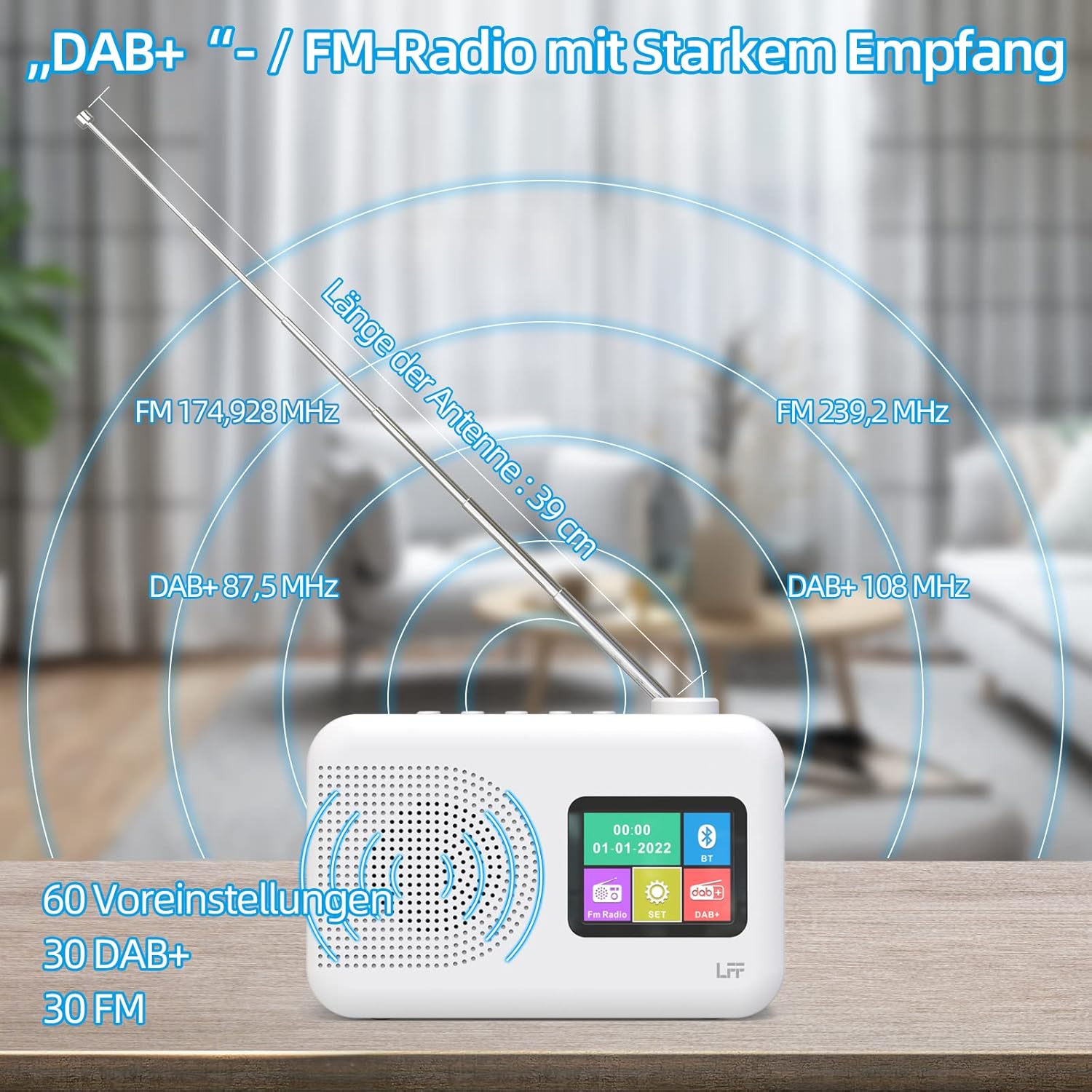
Extend the telescopic antenna fully (approximately 39 cm) and adjust its angle for optimal reception, especially for DAB+ and FM stations.

This diagram illustrates the radio's strong DAB+ and FM reception capabilities with the fully extended 39cm antenna, showing frequency ranges and the capacity for 60 total presets (30 DAB+, 30 FM).
4.3 Initial Scan (DAB+)
- Radioni yoqing.
- Ensure the mode is set to DAB+. If not, press the Rejim almashtirish uchun tugma.
- The radio will automatically perform a full scan for available DAB+ stations. This may take a few minutes.
- Once the scan is complete, the radio will display a list of found stations.
5. Foydalanish bo'yicha ko'rsatmalar
5.1 DAB+ Radio Mode
- ni bosing Rejim button to select DAB+ mode.
- ni aylantiring Sozlash/Tanlash knob to browse through the available stations.
- ni bosing Sozlash/Tanlash Stansiyani tanlash uchun tugmani bosing.
- Oldindan sozlamalarni saqlash: To save a station, press and hold a Oldindan oʻrnatilgan button until the display confirms. To recall, briefly press the corresponding Oldindan oʻrnatilgan button. Up to 30 DAB+ stations can be saved.
5.2 FM radio rejimi
- ni bosing Rejim FM rejimini tanlash uchun tugma.
- ni aylantiring Sozlash/Tanlash chastotani qo'lda sozlash uchun tugma.
- ni bosing va ushlab turing Sozlash/Tanlash knob for a few seconds to auto-scan for the next available station.
- Oldindan sozlamalarni saqlash: Similar to DAB+ mode, press and hold a Oldindan oʻrnatilgan button to save, and briefly press to recall. Up to 30 FM stations can be saved.
5.3 Bluetooth rejimi

This diagram illustrates the three primary playback options for the radio: through its internal speaker, via Bluetooth connection to an external device, or using headphones connected to the headphone jack.
- ni bosing Rejim button to select Bluetooth mode. The display will show "Bluetooth Pairing" or similar.
- On your external device (e.g., smartphone), enable Bluetooth and search for available devices.
- Select "LFF Radio" (or similar name) from the list to pair.
- Once paired, you can play audio from your device through the radio's speaker.
- Eslatma: This radio acts as a Bluetooth receiver. It does not support connecting to Bluetooth headphones or other Bluetooth speakers.
5.4 Kutish taymeri
The sleep timer allows the radio to automatically turn off after a set period.

This image depicts the sleep timer function, offering selectable durations of 15, 30, 45, 60, 90, and 120 minutes before the radio automatically powers off.
- ni bosing Alarm/Sleep Timer button repeatedly to cycle through sleep timer options (15 min, 30 min, 45 min, 60 min, 90 min, 120 min, OFF).
- Select your desired duration. The radio will turn off automatically after this time.
5.5 Budilnik
The radio features a dual alarm function.
- ni bosing va ushlab turing Alarm/Sleep Timer button to enter alarm settings.
- dan foydalaning Sozlash/Tanlash knob to set the alarm time, alarm source (DAB+, FM, or buzzer), and volume.
- ni bosing Sozlash/Tanlash knob to confirm each setting.
- Repeat the process for the second alarm if needed.
5.6 Eshitish vositasidan foydalanish
Plug 3.5mm headphones into the headphone jack on the side of the radio for private listening. The internal speaker will automatically mute.
6. Xizmat ko'rsatish
6.1 Tozalash
- Wipe the radio's surface with a soft, dry cloth.
- Abraziv tozalash vositalari, mumlar yoki erituvchilardan foydalanmang, chunki ular qoplamaga zarar etkazishi mumkin.
6.2 Batareyani almashtirish
When using battery power, replace all four AA batteries when the low battery indicator appears on the display or when performance degrades.
- Ensure the radio is turned off and disconnected from AC power.
- Orqa tarafdagi batareya bo'limi qopqog'ini oching.
- Eski batareyalarni olib tashlang va ularni to'g'ri yo'q qiling.
- Insert new 4 x 1.5V AA (LR6) batteries, observing correct polarity (+/-).
- Batareya bo'limi qopqog'ini mahkam yoping.
6.3 Screen Protection Film
The radio's display comes with a transparent protective film. For optimal clarity, gently peel off this film before first use.
7. Muammolarni bartaraf qilish; nosozliklarni TUZATISH
Muammolarga duch kelsangiz, quyidagi umumiy muammolar va echimlarga murojaat qiling:
| Muammo | Mumkin sabab | Yechim |
|---|---|---|
| Quvvat yo'q | AC adapter not connected, batteries depleted or incorrectly inserted. | AC adapter ulanishini tekshiring. Batareyalarni almashtiring yoki to'g'ri kutupluluğuna ishonch hosil qiling. |
| Yomon radio qabul qilish | Antenna uzaytirilmagan, signal maydoni zaif, shovqin. | Fully extend and adjust the telescopic antenna. Move the radio to a different location. Avoid sources of interference. |
| Bluetooth ulanmayapti | Radio not in Bluetooth mode, device too far, already paired with another device. | Ensure radio is in Bluetooth mode. Keep devices within range. Disconnect from other devices. |
| Ovoz yo'q | Ovoz juda past, naushniklar ulangan, ovozsiz rejim yoqilgan. | Increase volume. Disconnect headphones. Check if mute is active. |
8. Texnik shartlar
- Brend: LFF kengaytmasi
- Model: DAB Plus Digital FM Radio
- Rang: Oq
- Ulanish texnologiyasi: Bluetooth
- Olchamlari (U x G x Y): 16.1 sm x 5.9 sm x 10.9 sm
- Tyuning texnologiyasi: DAB
- Quvvat manbai: AC Adapter (5V/1000mA) or 4 x 1.5V AA (LR6) Batteries
- Qo'llab-quvvatlanadigan radio diapazonlari: DAB+, FM
- DAB+ chastota diapazoni: 174.928 - 239.2 MGts
- FM Chastotani oralig'i: 87.5 - 108 MGts
- Dastlabki sozlamalar: 30 DAB+, 30 FM
- Antenna uzunligi: 39 cm (extendable)
- Maxsus xususiyatlar: DAB Plus Radio, Sleep Timer, Dual Alarm, Headphone Jack, Color Display
- Kiritilgan komponentlar: DAB Digital Radio, AC Power Adapter, Quick Start Guide
9. Kafolat va qo'llab-quvvatlash
For any quality-related issues or technical support, please contact the seller directly. We are committed to resolving any problems you may encounter with your LFF DAB Plus Digital FM Radio.


