1. Kirish
This manual provides comprehensive instructions for the setup, operation, and maintenance of your Cherry MW 9100 Wireless Rechargeable Mouse. The MW 9100 is a compact, versatile mouse offering dual connectivity options (Bluetooth or 2.4 GHz USB receiver) and a convenient rechargeable battery.
Asosiy xususiyatlarga quyidagilar kiradi:
- Compact design with charging functionality.
- Flexible operation: use while charging via USB-C cable.
- Dual connectivity: Bluetooth or 2.4 GHz USB receiver.
- Magnetic storage for the USB receiver, ideal for travel.
- Adjustable DPI settings for varied usage.
2. Paket tarkibi
Paketda barcha elementlar mavjudligiga ishonch hosil qiling:
- Cherry MW 9100 Wireless Rechargeable Mouse
- USB-C zaryadlovchi kabeli
- 2.4 gigagertsli USB qabul qiluvchi
- Himoya sumkasi
- Qo'llanma (bu hujjat)
3. Sozlash
3.1 Sichqonchani zaryadlash
The Cherry MW 9100 mouse features a built-in rechargeable battery. Before initial use, or when the battery is low, connect the included USB-C cable to the mouse and to a USB power source (e.g., computer USB port, USB wall adapter). The mouse can be used normally while charging.

3.1-rasm: Yuqori view of the Cherry MW 9100 mouse, showing the charging indicator light.
3.2 Sichqonchani ulash
The MW 9100 offers two connection methods: 2.4 GHz wireless via USB receiver or Bluetooth.
3.2.1 2.4 gigagertsli simsiz ulanish
- Locate the USB receiver. It is magnetically stored in a compartment on the underside of the mouse.
- USB qabul qilgichni kompyuteringizdagi mavjud USB portiga joylashtiring.
- On the underside of the mouse, slide the switch to the "RF" position.
- Sichqoncha avtomatik ravishda kompyuteringizga ulanishi kerak.
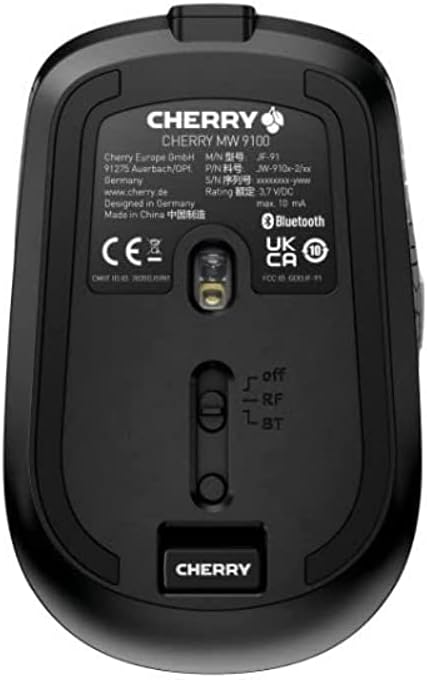
3.2-rasm: Underside of the Cherry MW 9100 mouse, highlighting the USB receiver storage and the connection mode switch.
3.2.2 Bluetooth ulanishi
- On the underside of the mouse, slide the switch to the "BT" (Bluetooth) position.
- Press and hold the small pairing button located near the connection switch on the underside of the mouse until the LED indicator on the mouse starts blinking, indicating pairing mode.
- Kompyuteringizda yoki qurilmangizda Bluetooth sozlamalarini oching va yangi qurilmalarni qidiring.
- Select "Cherry MW 9100" from the list of available devices to complete the pairing process.
4. Foydalanish bo'yicha ko'rsatmalar
4.1 Asosiy funksiyalar
The Cherry MW 9100 mouse features standard left and right click buttons, a scroll wheel (which also functions as a middle click button), and two side buttons for navigation (typically forward/back).
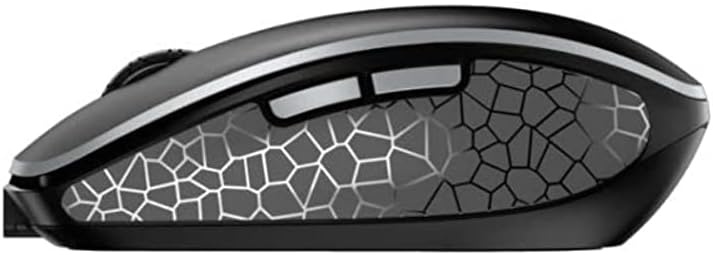
4.1-rasm: Yon view of the Cherry MW 9100 mouse, illustrating the ergonomic design and side buttons.
4.2 DPI sozlash
The mouse includes a DPI (Dots Per Inch) button, usually located near the scroll wheel, allowing you to adjust the cursor sensitivity. Press this button to cycle through different DPI settings to match your preference or task requirements.

4.2-rasm: A hand demonstrating the comfortable grip on the Cherry MW 9100 mouse during use.
5. Xizmat ko'rsatish
To ensure optimal performance and longevity of your Cherry MW 9100 mouse:
- Tozalash: Sichqoncha yuzasini tozalash uchun yumshoq, quruq matodan foydalaning. O'jar axloqsizlik uchun, bir oz damp matodan foydalanish mumkin, lekin qurilmaga namlik kirmasligiga ishonch hosil qiling. Qattiq kimyoviy yoki abraziv materiallardan saqlaning.
- Saqlash: When not in use, especially during travel, store the mouse in the provided protective pouch to prevent scratches and damage.
- Batareya parvarishi: Avoid fully discharging the battery frequently. Recharge the mouse when the low battery indicator appears.
6. Muammolarni bartaraf qilish; nosozliklarni TUZATISH
| Muammo | Mumkin sabab | Yechim |
|---|---|---|
| Sichqoncha javob bermayapti | Low battery, incorrect connection mode, USB receiver not connected, Bluetooth not paired. |
|
| Intermittent connection (Bluetooth) | Interference, device driver issues, distance from device. |
|
| Kursor harakati tartibsiz yoki sekin | Dirty optical sensor, low battery, incorrect DPI setting. |
|
7. Texnik shartlar
| Xususiyat | Tafsilot |
|---|---|
| Brend | Gilos |
| Model raqami | JW-9100US-2 |
| Ulanish texnologiyasi | Bluetooth, 2.4 GHz USB Wireless |
| Harakatni aniqlash | Optik |
| Maxsus xususiyatlar | Lightweight, Portable, Rechargeable |
| Mahsulot o'lchamlari | 4 x 3 x 2 dyuym |
| Element og'irligi | 6.4 untsiya |
| Rang | Qora |
8. Kafolat va qo'llab-quvvatlash
For warranty information and technical support, please refer to the official Cherry website or contact Cherry customer service directly. Keep your proof of purchase for warranty claims.
Ishlab chiqaruvchi: GILOS
Websayt: www.cherry.de


