1. Kirish
The ACT AC7049 Dual Monitor Docking Station transforms your laptop into a complete workstation. This versatile 11-in-1 docking station allows you to connect up to two Full HD displays (max. 2048 x 1152 resolution) to your laptop via HDMI, using a single USB-C/A cable. It expands your laptop's connectivity with a Gigabit LAN port, microphone and headphone jacks, and six additional USB ports. Featuring DisplayLink® technology, it ensures advanced screen display on both MacOS and Windows computers.
2. Asosiy xususiyatlar
- Ikkilamchi monitorni qo'llab-quvvatlash: Connect up to two external displays with HDMI ports, supporting resolutions up to 2048x1152@60Hz.
- Umumiy muvofiqlik: Works with laptops featuring a USB-C or USB-A 3.2 Gen1 (USB 3.0) port, compatible with MacOS and Windows thanks to DisplayLink technology.
- Keng qamrovli ulanish: Includes 2x HDMI, 1x Gigabit Ethernet, 3x USB-A 3.2 Gen 1 (one with fast charging), 4x USB-A 2.0, and 3.5mm audio jacks for microphone and headphones.
- Moslashuvchan joylashtirish: Designed for both vertical and horizontal placement to optimize desk space and port accessibility.
- USB zaryadlash porti: Dedicated USB port for charging smartphones and tablets.
3. Paket tarkibi
Paketda quyidagi elementlar mavjudligini tekshiring:
- ACT AC7049 Docking Station
- USB-C/A 3.2 Gen1 Connection Cable (USB-A to USB-C)
- Quvvat adapteri
- Vertikal stend
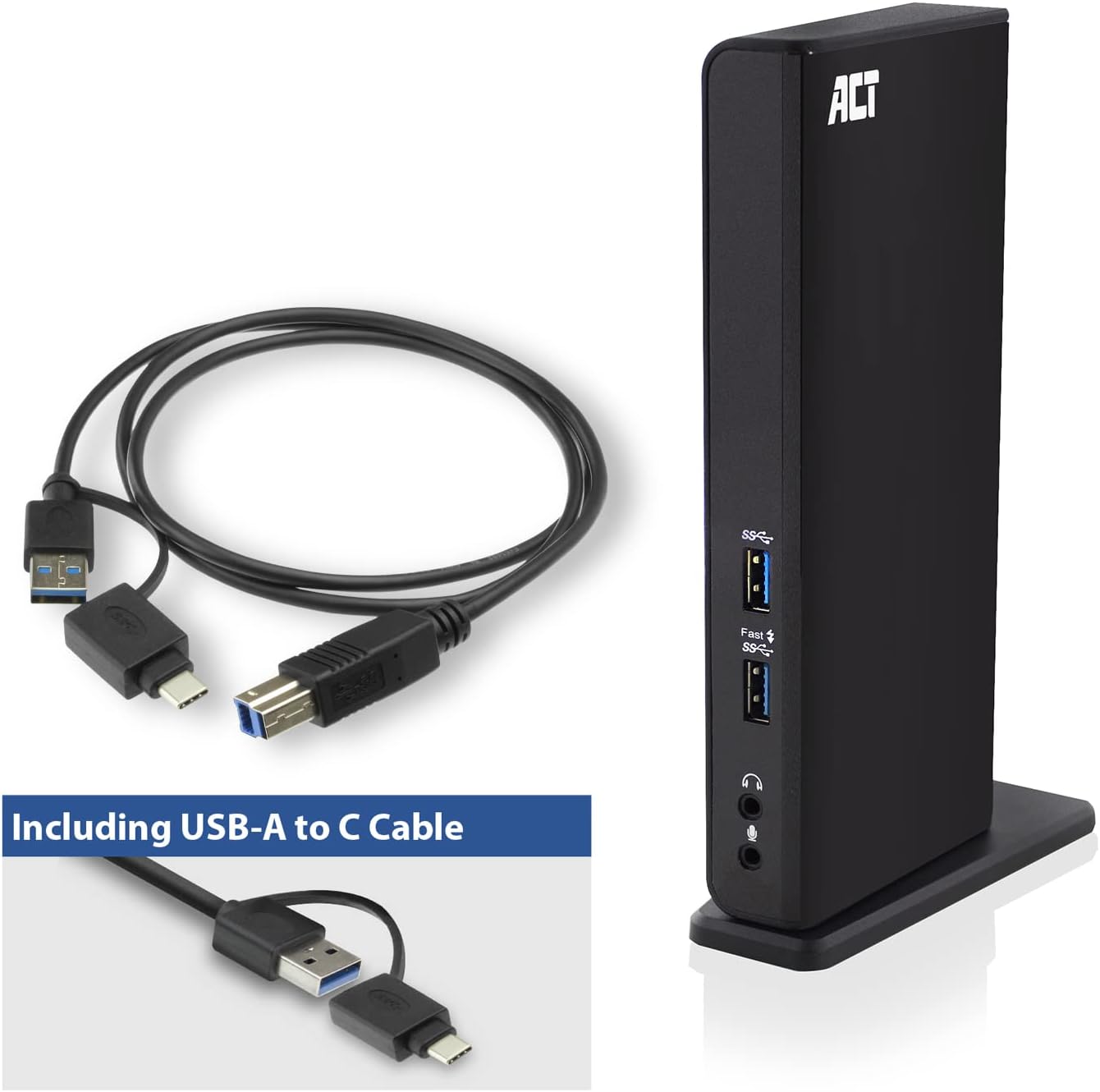
Image: The ACT AC7049 Docking Station shown with its included USB-A to USB-C connection cable and power adapter, highlighting the components provided in the package.
4. O'rnatish bo'yicha qo'llanma
4.1. Quvvat adapterini ulash
- Connect the power adapter to the DC 5V input port on the back of the AC7049 docking station.
- Plug the power adapter into a wall outlet. The docking station will power on.
4.2. Noutbukga ulanish
- Use the provided USB-C/A 3.2 Gen1 connection cable. Connect the USB-B end to the corresponding port on the docking station.
- Connect the other end (USB-A or USB-C, depending on your laptop's port) to an available USB 3.2 Gen1 (USB 3.0) or USB-C port on your laptop.
4.3. Driver Installation (DisplayLink)
The AC7049 utilizes DisplayLink technology for extended monitor functionality. Drivers are typically installed automatically on most operating systems. If not, please follow these steps:
- Rasmiy DisplayLinkga tashrif buyuring websayt (www.displaylink.com/downloads) to download the latest drivers for your operating system (Windows or MacOS).
- Install the downloaded driver package and follow the on-screen instructions.
- Agar so'ralsa, kompyuteringizni qayta ishga tushiring.

Image: The official DisplayLink 'Plug and Display' logo, indicating the technology used for multi-monitor support.
5. Foydalanish bo'yicha ko'rsatmalar
5.1. Connecting External Displays
- Connect your HDMI monitors to the two HDMI ports on the back of the docking station.
- Once connected, your operating system should detect the new displays. You can configure display settings (extend, mirror, primary display) through your computer's display settings.

Image: A visual representation of the docking station enabling both 'Mirror your content' and 'Extend your content' display modes across a laptop and two external monitors.
5.2. USB periferik qurilmalarini ulash
- Old USB portlari: Two USB-A 3.2 Gen1 ports (one with fast charging capability) are located on the front for easy access to frequently used devices like USB drives, smartphones, or tablets.
- Rear USB Ports: Four USB-A 2.0 ports are located on the back for connecting peripherals such as keyboards, mice, printers, or other less frequently connected devices.
5.3. Tarmoqqa ulanish
Connect an Ethernet cable from your router or network switch to the Gigabit Ethernet port on the docking station. Your laptop will automatically gain wired network access.
5.4. Ovozli ulanishlar
Connect your headphones and/or microphone to the dedicated 3.5mm audio jacks on the front of the docking station.

Image: An isometric diagram showcasing the comprehensive connectivity of the ACT AC7049, demonstrating how a laptop, two monitors, a keyboard, mouse, network cable, headphones, and a smartphone can all be connected simultaneously.
6. Joylashtirish imkoniyatlari
The ACT AC7049 docking station offers flexible placement options to suit your workspace:
- Vertikal joylashtirish: Use the included stand to position the docking station vertically. This saves desk space and provides easy access to all ports.
- Gorizontal joylashtirish: The docking station can also be placed horizontally if preferred.

Image: The ACT AC7049 Docking Station positioned vertically on its stand, highlighting its compact design and accessible ports.
7. Xizmat ko'rsatish
To ensure optimal performance and longevity of your ACT AC7049 Docking Station, follow these maintenance guidelines:
- Tozalash: Dok-stansiyaning tashqi qismini tozalash uchun yumshoq, quruq matodan foydalaning. Suyuq tozalagichlar yoki aerozollardan foydalanishdan saqlaning, chunki ular qurilmaga zarar yetkazishi mumkin.
- Ventilyatsiya: Haddan tashqari qizib ketishining oldini olish uchun dok-stansiya yaxshi shamollatiladigan joyga joylashtirilganligiga ishonch hosil qiling. Shamollatish teshiklarini to'sib qo'ymang.
- Saqlash: Uzoq vaqt davomida foydalanilmaganda, o'rnatish stantsiyasini to'g'ridan-to'g'ri quyosh nuri va haddan tashqari haroratdan uzoqroq, salqin va quruq joyda saqlang.
- Kabelni boshqarish: Keep cables organized and free from kinks or excessive bending to prevent damage to the cables and ports.
8. Muammolarni bartaraf qilish; nosozliklarni TUZATISH
If you encounter issues with your ACT AC7049 Docking Station, please refer to the following common troubleshooting steps:
- Displey chiqishi yo'q:
- Ensure the docking station is powered on and correctly connected to your laptop.
- Verify that the HDMI cables are securely connected to both the docking station and the monitors.
- Check your laptop's display settings to ensure the external monitors are detected and configured correctly (e.g., extended or mirrored).
- Reinstall or update the DisplayLink drivers from www.displaylink.com/downloads.
- Muammoni aniqlash uchun bir vaqtning o'zida bitta monitorni ulab ko'ring.
- USB qurilmalari ishlamayapti:
- Ensure the docking station is properly connected to your laptop and powered.
- USB qurilmaning ishlashini tasdiqlash uchun uni to'g'ridan-to'g'ri noutbukga ulab ko'ring.
- Connect the USB device to a different USB port on the docking station.
- Noutbukni qayta ishga tushiring.
- Tarmoqqa ulanish yo'q:
- Verify the Ethernet cable is securely connected to both the docking station and your router/switch.
- Check your laptop's network settings to ensure the wired connection is enabled.
- Iloji bo'lsa, Ethernet kabelini boshqa qurilma bilan sinab ko'ring.
- Ovoz ishlamayapti:
- Ensure headphones/microphone are fully plugged into the correct 3.5mm jacks.
- Check your laptop's sound settings to ensure the docking station's audio output/input is selected as the default device.
9. Texnik shartlar
| Xususiyat | Spetsifikatsiya |
|---|---|
| Model raqami | AC7049 |
| Brend | ACT |
| Rang | Qora |
| Ulanish texnologiyasi | USB-A, USB-C |
| Video chiqishi | 2 x HDMI (Max. 2048 x 1152 @ 60Hz) |
| USB portlari | 3 x USB-A 3.2 Gen 1 (5Gbps, 1x Fast Charging), 4 x USB-A 2.0 (480Mbps) |
| Tarmoq porti | 1 x Gigabit Ethernet (RJ45) |
| Audio portlar | 1 x 3.5mm Headphone Jack, 1 x 3.5mm Microphone Jack |
| Mos qurilmalar | Laptop, Computer (with USB 3.2 Gen1 / USB 3.0 or USB-C port) |
| Operatsion tizimni qo'llab-quvvatlash | Windows, MacOS (via DisplayLink) |
| Olchamlari (U x G x Y) | 10.9 x 6 x 18.1 sm (taxminan) |
| Element og'irligi | 317 gramm |
10. Kafolat va qo'llab-quvvatlash
ACT products are designed for reliability and adhere to international standards and EU legislation. The ACT AC7049 Docking Station comes with a manufacturer's warranty, typically ranging from 2 to 5 years. For specific warranty details and support, please refer to the official ACT websayt yoki chakana sotuvchingizga murojaat qiling.
For technical support or further inquiries, please visit the official ACT connectivity websayt: www.act-connectivity.com