Kirish
This manual provides essential instructions for the setup, operation, and maintenance of your Aideepen ESP32-CAM Dual-core Development Board. The ESP32-CAM is a compact module designed for various Internet of Things (IoT) applications, featuring a powerful ESP32-S chip, an OV2640 camera module, and support for external antennas and TF cards.
It is suitable for projects requiring Wi-Fi control, wireless monitoring, QR code identification, and wireless positioning systems.
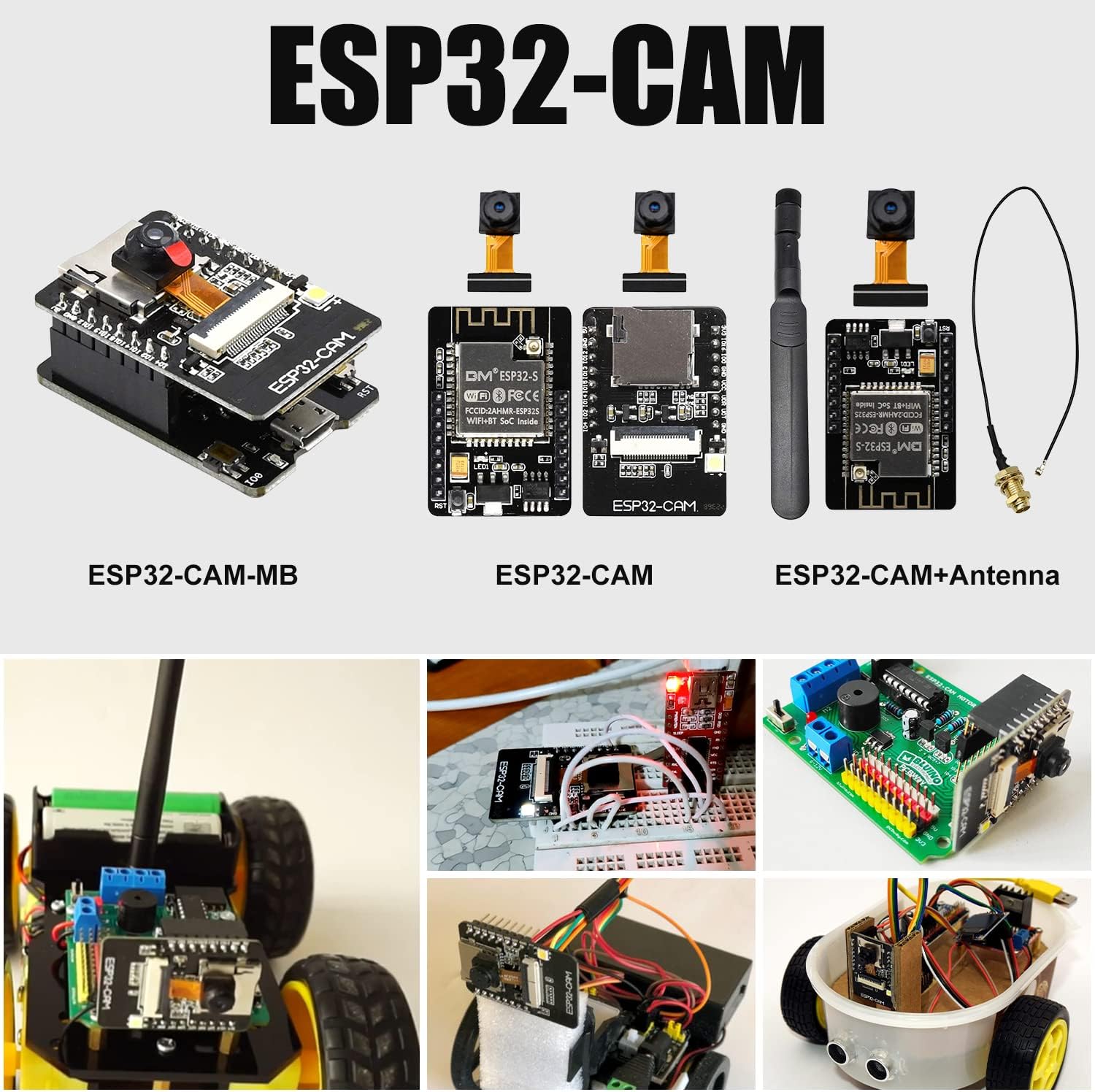
Sozlash; o'rnatish
Follow these steps to set up your ESP32-CAM development board:
- Quvvatlantirish manbai: Connect a stable DC 5V power supply to the module. The ESP32-CAM is DIP packed, allowing direct insertion into a breadboard for prototyping.
- Kamera aloqasi: Carefully connect the OV2640 camera module to the designated camera FPC socket on the ESP32-CAM board. Ensure the ribbon cable is inserted correctly and securely.
- Antenna ulanishi: The onboard antenna is not enabled by default. For reliable wireless communication, an external antenna is required. Connect the provided IPEX to RP-SMA male pigtail cable to the IPEX antenna base on the ESP32-S module, then attach the 8DBI high-gain dual-band antenna to the RP-SMA connector.
- TF kartasi (ixtiyoriy): If your application requires local storage, insert a TF card into the card slot on the ESP32-CAM module.


Sinov diagrammasi
Refer to the following diagram for the pin assignments of the ESP32-CAM module:

Foydalanish bo'yicha ko'rsatmalar
The ESP32-CAM development board supports a variety of interfaces and functionalities for diverse applications:
- Dasturlash: The module can be programmed using standard ESP32 development environments.
- Interfeysni qo'llab -quvvatlash: It supports UART, Serial Peripheral Interface (SPI), I2C, PWM, ADC, and DAC interfaces, allowing integration with various sensors and peripherals.
- Kamera funksiyasi: The board supports both OV2640 and OV7670 camera modules, featuring a built-in flash for improved image capture in low-light conditions.
- Simsiz aloqa: Utilize the integrated Wi-Fi and Bluetooth capabilities for network connectivity and data transmission in IoT projects.
- Saqlash: The TF card slot enables local storage of images, video, or other data.
Xizmat
To ensure the longevity and optimal performance of your ESP32-CAM module, observe the following maintenance guidelines:
- Ishlov berish: Handle the module with care to avoid physical damage to components or pins. Avoid touching the camera lens directly.
- Atrof-muhit: Operate and store the module in a dry environment, away from moisture, extreme temperatures, and direct sunlight.
- Statik elektr: Take precautions against electrostatic discharge (ESD) when handling the board, as it can damage sensitive electronic components.
- Tozalash: If necessary, gently clean the board with a soft, dry brush or compressed air. Do not use liquid cleaners.
Muammolarni bartaraf qilish; nosozliklarni TUZATISH
If you encounter issues with your ESP32-CAM module, consider the following troubleshooting steps:
- No Power/Module Not Responding:
- Verify that the DC 5V power supply is correctly connected and providing stable voltage.
- Check all power connections for loose contacts.
- Wi-Fi/Bluetooth ulanish muammolari:
- Ensure the external antenna is properly connected to the IPEX base. The onboard antenna is not active.
- Check your programming code for correct Wi-Fi/Bluetooth initialization and credentials.
- Camera Not Working/No Image:
- Confirm the OV2640 camera module's ribbon cable is securely and correctly inserted into its socket.
- Verify that your code correctly initializes and accesses the camera.
- Ensure the camera module itself is not damaged.
- TF Card Not Detected:
- Ensure the TF card is fully inserted into the slot.
- Check that the TF card is formatted correctly (e.g., FAT32).
- Verify your code includes proper TF card initialization and read/write functions.
- Module Overheating:
- Ensure adequate ventilation around the module.
- Kiritilgan jildni tekshiringtage is exactly 5V DC; higher voltages can cause overheating.
Texnik xususiyatlari
| Xususiyat | Spetsifikatsiya |
|---|---|
| Model | ESP32-CAM |
| Ishchi jildtage | DC 5V |
| Product Size (without pins) | 27 mm x 40 mm x 4.5 mm |
| Protsessor | Espressif Dual-core |
| Operatsion tizim | FreeRTOS |
| Ram | DDR3 (Contextual system memory) |
| Simsiz ulanish | Wi-Fi, Bluetooth |
| Qo'llab-quvvatlanadigan interfeyslar | UART, SPI, I2C, PWM, ADC, DAC |
| Kamerani qo'llab-quvvatlash | OV2640, OV7670 (2.0MP) |
| Saqlash | TF karta uyasi |
| Antenna | External 8DBI high-gain dual-band antenna via IPEX to RP-SMA |
| Xususiyatlari | Built-in flash, DIP package for breadboard use |


Kafolat va qo'llab-quvvatlash
For warranty information or technical support regarding your Aideepen ESP32-CAM Dual-core Development Board, please contact the seller or manufacturer directly through the platform where the product was purchased. Ensure you have your purchase details and product model number available when seeking assistance.


