1. Kirish
This manual provides detailed instructions for the installation, operation, and maintenance of your Spedal MINIEYE AC1 Dash Cam. Please read this manual thoroughly before using the device to ensure proper functionality and safety. The MINIEYE AC1 is designed to record your driving journey in high definition and offers advanced features for enhanced road safety.
2. Mahsulot tugadiview
2.1 Asosiy xususiyatlar
- 1944P Ultra Full HD Recording: Aniq videoni suratga oladitage with a 140° wide-angle field of view.
- AI ADAS (Advanced Driver-Assistance System): Provides real-time alerts for collision avoidance.
- O'rnatilgan G-sensor: Automatically detects sudden movements or impacts and locks footage.
- 24 soatlik avtoturargoh monitoringi: Monitors your vehicle even when parked (requires hardwire kit, sold separately).
- Kuchli tungi ko'rish: Ensures clear recordings in low-light conditions.
- Loop yozib olish: Eng eski foo-ning ustiga yozaditage xotira kartasi to'lganida, doimiy yozib olishni ta'minlaydi.
- APP nazorati: Sozlamalarni boshqarish, view footage, and download videos via a dedicated mobile application.
2.2 Paket tarkibi
Paketingizda quyida sanab o'tilgan barcha narsalar mavjudligiga ishonch hosil qiling:
- MINIEYE AC1 Dash Cam Unit
- Avtomobil zaryadlovchi
- Quvvat kabeli
- Monitor kabeli
- Host Base
- GPS moduli
- Elektrostatik stiker
- Crowbar (for cable routing)
- Pufak darajasi
- Free 32GB TF Card (MicroSD Card)
- Foydalanuvchi uchun qo'llanma (ushbu hujjat)
2.3 Qurilma komponentlari
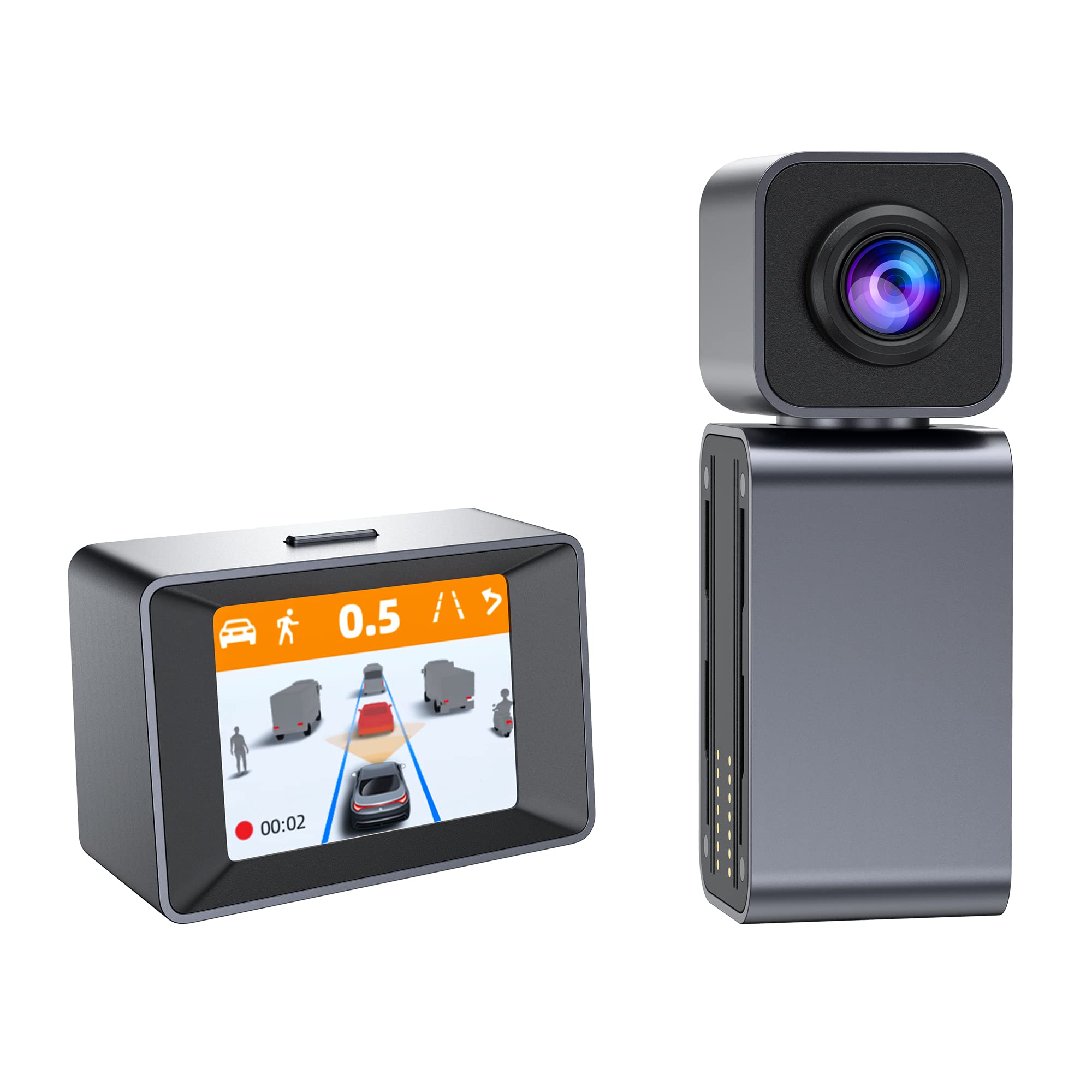
Image: The MINIEYE AC1 Dash Cam showing the main recording unit with its lens and the separate display unit. The display unit shows a simulated traffic scenario with distance warnings, illustrating the ADAS functionality.
3. Sozlash
3.1 O'rnatish
- Prepare the Windshield: Clean the area on your windshield where the dash cam will be mounted. Ensure it is free of dust and grease.
- Apply Electrostatic Sticker: Apply the electrostatic sticker to the cleaned area. This helps in easy removal and prevents residue on the windshield.
- Attach Host Base: Secure the host base to the electrostatic sticker. Use the bubble level to ensure the base is level for optimal camera angle.
- Dash Camni o'rnatish: Attach the MINIEYE AC1 Dash Cam unit to the host base.
- TF kartasini joylashtiring: Insert the provided 32GB TF card into the designated slot on the dash cam. Ensure it is inserted correctly until it clicks into place.
- Quvvatni ulash: Connect the power cable to the dash cam and route it along the windshield edge and dashboard using the crowbar to tuck it neatly. Plug the car charger into your vehicle's cigarette lighter socket.
- Connect Monitor (if applicable): If using an external monitor, connect it using the monitor cable.
- GPS modulini ulang: Attach the GPS module to the dash cam for location and speed data recording.
3.2 Dastlabki quvvatni yoqish va sozlash
- Yoqilgan: Start your vehicle. The dash cam will automatically power on and begin recording.
- TF karta formati: It is recommended to format the TF card upon first use and periodically thereafter to ensure optimal performance. This can usually be done through the device settings or the mobile app.
- Kamera burchagini sozlash: Adjust the camera lens to ensure it captures the road ahead clearly, covering the desired field of view.
3.3 Ilova boshqaruvini sozlash
- Ilovani yuklab olish: Ni qidirish the "MINIEYE" in your smartphone's app store (iOS or Android) and install it.
- Wi-Fi tarmog'iga ulanish: Enable Wi-Fi on your smartphone and connect to the dash cam's Wi-Fi network. The network name and password can typically be found in the dash cam's settings or manual.
- Qurilmani ulash: Open the MINIEYE app and follow the on-screen instructions to pair your dash cam.
- Sozlamalarni sozlash: Use the app to adjust recording resolution, G-sensor sensitivity, parking monitoring settings, and other preferences.
4. Foydalanish bo'yicha ko'rsatmalar
4.1 Asosiy yozish
Once powered on, the MINIEYE AC1 automatically begins continuous loop recording. Video files are saved in segments (e.g., 1, 3, or 5 minutes) to the TF card. When the card is full, the oldest unprotected files ustiga yoziladi.
4.2 G-Sensor and Emergency Recording
The built-in G-Sensor detects sudden impacts or rapid acceleration/deceleration. When triggered, the current video segment is automatically locked and saved to a protected folder, preventing it from being overwritten by loop recording. The sensitivity of the G-Sensor can be adjusted via the mobile app.
4.3 Avtoturargoh monitoringi
With the optional hardwire kit (not included), the dash cam can monitor your vehicle while parked. If an impact or motion is detected, the dash cam will automatically record a short video segment. Ensure this feature is enabled and configured in the app settings.
4.4 ADAS (Advanced Driver-Assistance System)
The AI ADAS features provide real-time alerts to enhance driving safety:
- Oldindan to'qnashuv haqida ogohlantirish (FCW): Alerts you if you are approaching a vehicle ahead too quickly.
- Yo'l chetidan chiqish haqida ogohlantirish (LDW): Notifies you if your vehicle drifts out of its lane without signaling.
- Front Vehicle Start Alert: Informs you when the vehicle in front of you has started moving after a stop.
These alerts are typically visual on the display and/or audible. Calibration may be required for optimal ADAS performance.
4.5 Viewing va Foo yuklab olishtage
Footage bo'lishi mumkin viewed directly on the dash cam's display (if available) or more conveniently through the MINIEYE mobile application. Use the app to browse recorded videos, download important clips to your smartphone, or share them.
5. Xizmat ko'rsatish
- Ob'ektivni tozalash: Regularly clean the camera lens with a soft, lint-free cloth to ensure clear video quality.
- TF karta formati: Format the TF card every 2-4 weeks to prevent data corruption and maintain optimal recording performance. Back up any important files formatlashdan oldin.
- Dasturiy ta'minotni yangilash: Check the MINIEYE app or official website periodically for firmware updates. Keeping your dash cam's firmware updated ensures access to new features and performance improvements.
- Saqlash: Uzoq vaqt davomida ishlatilmaganda, boshqaruv kamerasini salqin, quruq joyda, to'g'ridan-to'g'ri quyosh nurlaridan uzoqroq joyda saqlang.
6. Muammolarni bartaraf qilish; nosozliklarni TUZATISH
- Dash kamerasi yoqilmayapti:
- Check the car charger connection and ensure the vehicle's cigarette lighter socket is functioning.
- Ensure the power cable is securely connected to the dash cam.
- Recording Issues (e.g., freezing, corrupted files):
- TF kartani formatlang.
- Try a different high-speed (Class 10 or U1/U3) TF card.
- Ensure the TF card is not full of locked files.
- Ilova ulanish muammolari:
- Ensure the dash cam's Wi-Fi is enabled.
- Kamerani ham, smartfoningizni ham qayta yoqing.
- Verify you are connecting to the correct Wi-Fi network and using the correct password.
- ADAS Alerts Not Functioning:
- Ensure ADAS features are enabled in the app settings.
- Perform ADAS calibration if available in the app.
- Kamera linzalari toza va to'siqsiz ekanligiga ishonch hosil qiling.
7. Texnik shartlar
| Xususiyat | Tafsilot |
|---|---|
| Model nomi | MINIEYE AC1 |
| Brend | Spedal |
| Video suratga olish ruxsati | 1944p |
| Haqiqiy burchak View | 140 daraja |
| Ulanish texnologiyasi | USB, Wireless (for App Control) |
| Nazorat usuli | Ilova |
| O'rnatish turi | Shlangi tog'i |
| Avtomobillarga xizmat ko'rsatish turi | Avtomobil |
| Ishlab chiqaruvchi | Shenzhen Youjia Innov Tech Co., Ltd |
8. Kafolat va qo'llab-quvvatlash
For warranty information, technical support, or service inquiries, please refer to the warranty card included with your product or visit the official Spedal website. You may also contact Spedal customer service directly through the contact information provided on their website or within the MINIEYE mobile application.
Iltimos, kafolat da'volari uchun sotib olinganligingizni tasdiqlovchi hujjatingizni saqlab qo'ying.


