Kirish
This manual provides comprehensive instructions for the NEWDERY 10000mAh Battery Case, model ZHX-642CW. It covers installation, operation, maintenance, and troubleshooting to ensure optimal performance and longevity of your battery case. Please read this manual thoroughly before using the product.

Image: The NEWDERY 10000mAh Battery Case shown with an iPhone installed, highlighting its design and integrated wireless charging symbol.
Moslik
This battery case is specifically designed for the following 6.1-inch iPhone models:
- iPhone 14 Pro
- iPhone 14
- iPhone 13 Pro
- iPhone 13
Bu holat emas compatible with iPhone 14 Plus, iPhone 14 Pro Max, or iPhone 13 Pro Max (6.7-inch models).

Image: A visual guide illustrating the compatible 6.1-inch iPhone models (iPhone 14 Pro, iPhone 14, iPhone 13 Pro, iPhone 13) and explicitly marking 6.7-inch models (iPhone 14 Plus, iPhone 14 Pro Max, iPhone 13 Pro Max) as incompatible.
Paket tarkibi
Paketni ochgandan so'ng, barcha narsalar mavjudligini tekshiring:
- 1 x NEWDERY 10000mAh Battery Case (Model ZHX-642CW)
- 1 x foydalanuvchi qo'llanmasi
Sozlash; o'rnatish
Installing Your iPhone
- Gently bend the soft rubber top of the battery case backward.
- Slide your iPhone into the case, ensuring the charging port of the phone aligns correctly with the connector inside the case.
- Push the iPhone firmly until it is fully seated and the rubber top snaps back into place.
- To remove, gently bend the rubber top again and slide the iPhone out.

Image: A four-panel diagram illustrating the step-by-step process of installing an iPhone into the battery case by bending the top and sliding it in, and removing it by reversing the steps.
Initial Case Charging
Before first use, fully charge the battery case. Connect the case to a power source using a compatible charging cable (not included). The LED indicators will illuminate to show charging progress.
Operatsiya
iPhone-ni zaryadlash
To begin charging your iPhone using the battery case:
- Ensure your iPhone is securely installed in the case.
- Press and hold the power button on the back of the battery case for approximately 3 seconds.
- The LED indicators will light up, and your iPhone will begin charging.
- To stop charging, press and hold the power button again for 3 seconds.
Simsiz zaryadlash
The battery case supports Qi wireless charging. You can charge both the battery case and your iPhone simultaneously by placing the case on a Qi-compatible wireless charging pad. The iPhone will prioritize charging first.
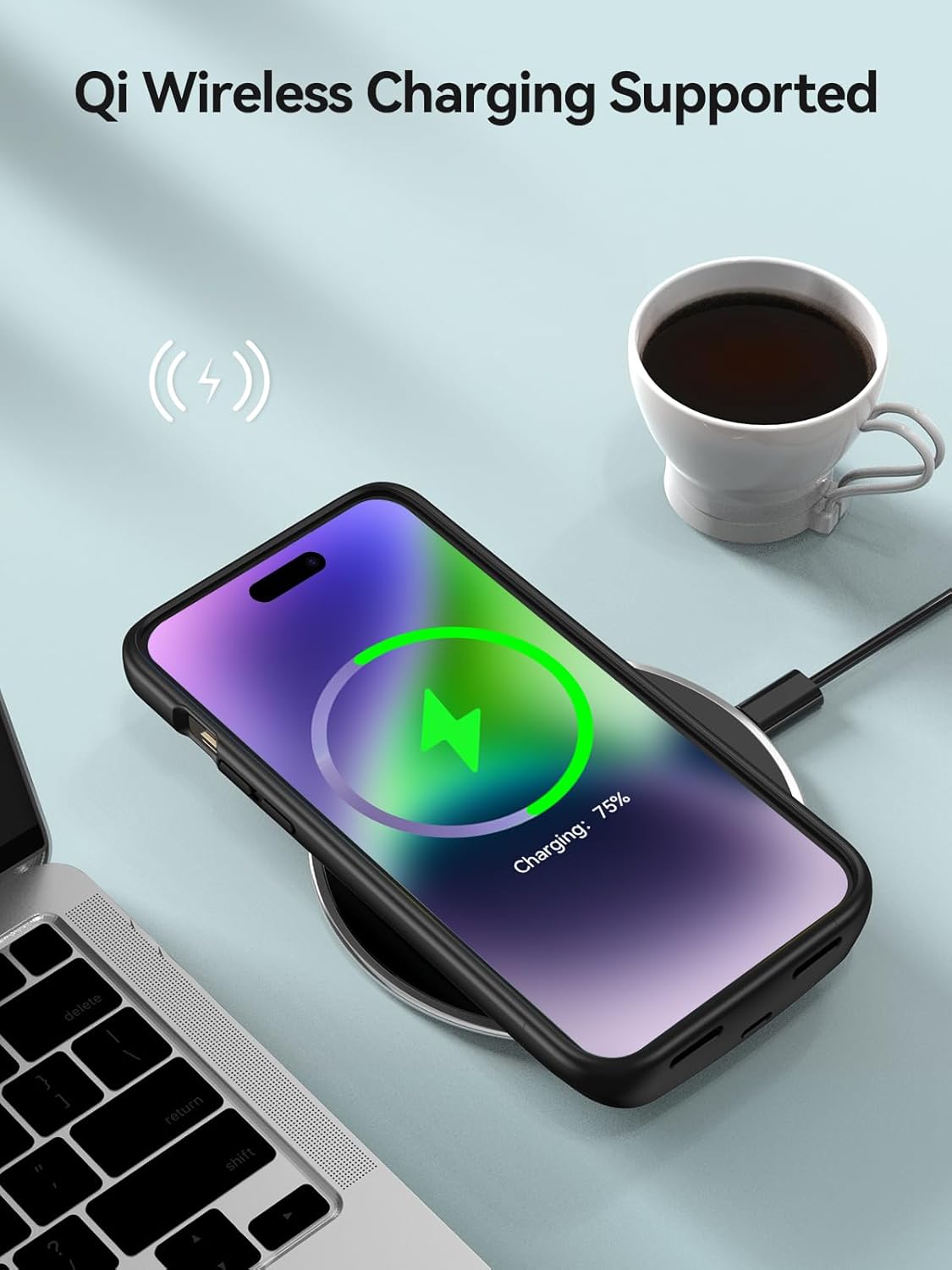
Image: An iPhone, enclosed in the NEWDERY battery case, positioned on a wireless charging pad, with a charging icon displayed on the phone screen.
Bir vaqtning o'zida zaryadlash
You can charge the battery case and your iPhone simultaneously using a wired charging cable. Connect the cable to the case's charging port. The iPhone will receive power first, followed by the battery case.

Image: A split image demonstrating two charging methods: an iPhone in the battery case charging wirelessly on a pad, and another iPhone in the case charging via a wired connection to a wall adapter.
Data Sync and Audio
The battery case allows for data synchronization with a computer and supports wired headsets.
- Maʼlumotlarni sinxronlash: Connect the battery case (with iPhone installed) to your computer using a data cable. You can transfer files without removing the case.
- Wired Headset: The case supports wired earphones, allowing you to listen to audio while your iPhone is in the case.

Image: An iPhone in the battery case connected via cable to a laptop, illustrating data synchronization.

Image: A person listening to music with wired earphones while their iPhone is in the battery case, demonstrating audio compatibility.
Apple Pay
The Apple Pay function remains fully accessible and supported while your iPhone is installed in the battery case.
Quvvat ko'rsatkichlari
The LED indicators on the back of the battery case display the remaining battery charge:
- 4 ta LED: 75% - 100%
- 3 ta LED: 50% - 75%
- 2 ta LED: 25% - 50%
- 1 LED: 0% - 25%
Press the power button once to check the current charge level.

Image: A diagram showing the back of the battery case with its power button and four LED indicators, detailing what each number of lit LEDs signifies in terms of battery charge percentage.
Xizmat
To ensure the longevity and proper function of your battery case:
- Tozalash: Wipe the case with a soft, dry cloth. Avoid using harsh chemicals or abrasive materials.
- Saqlash: Kosonni to'g'ridan-to'g'ri quyosh nuri va haddan tashqari haroratdan uzoqda, salqin, quruq joyda saqlang.
- Xavfsizlik: Do not disassemble, puncture, or expose the battery case to water or fire. Avoid dropping the case from significant heights.
Muammolarni bartaraf qilish; nosozliklarni TUZATISH
If you encounter issues with your NEWDERY battery case, consider the following:
- Case not charging/iPhone not charging:
- Ensure the charging cable and adapter are functioning correctly.
- Verify the iPhone is properly seated in the case, and the connector is aligned.
- Press and hold the power button for 3 seconds to activate charging.
- Try a different charging cable or wireless charging pad.
- "Liquid detected" error:
- This error can sometimes occur without actual liquid exposure. Try cleaning the iPhone's charging port and the case's connector with a dry, soft brush.
- Ensure both the iPhone and case are completely dry.
- Qisqartirilgan batareya quvvati:
- Battery performance can degrade over time. Ensure the case is fully charged before use.
- Environmental factors (extreme cold/heat) can affect battery efficiency.
- Case feels hot during charging:
- It is normal for the case to warm up slightly during charging. If it becomes excessively hot, disconnect it immediately and contact support.
Texnik xususiyatlari
| Xususiyat | Tafsilot |
|---|---|
| Model raqami | ZHX-642CW |
| Batareya quvvati | 10000mAh |
| Mos keladigan telefon modellari | iPhone 14 Pro, iPhone 14, iPhone 13 Pro, iPhone 13 (6.1-inch) |
| Mahsulot o'lchamlari | 5.98 x 3.05 x 1.02 dyuym |
| Element og'irligi | 7 untsiya |
| Material | Polycarbonate, Rubber |
| Maxsus xususiyatlar | Qi Wireless Charging Support, Portable, Data Sync, Wired Headset Support, Apple Pay Support |
| Batareyalar talab qilinadi | 1 Lityum-ion batareya (shu jumladan) |

Image: A visual representation of the battery case's dimensions (length, width, thickness) and its weight, comparing its thickness to approximately three iPhone 14 Pro devices and its weight to one iPhone 14 Pro.
Kafolat va qo'llab-quvvatlash
NEWDERY provides a 1-year warranty for this product. If you experience any issues or require assistance, please contact NEWDERY customer support. Our team is available to provide professional and friendly support.


