Kirish
The TENVIS IP602W is a robust outdoor IP camera designed for reliable surveillance. It offers broad compatibility, supporting not only Windows OS but also Mac OS and other platforms accessible via an internet browser. Its design facilitates easy installation, allowing for wall mounting and wireless connectivity.
Equipped with a 1/4 CMOS image sensor and a 6mm lens, the IP602W delivers video at a maximum frame rate of 30 frames per second, with a resolution of up to 640 x 480 pixels. For low-light and nighttime environments, the camera features 30 infrared LEDs, providing high levels of invisible light for clear visibility. Mobile viewing is supported across multiple platforms via 3G networks, including iPhone, Android, Windows Mobile, and Java phones, enabling remote monitoring from any location with internet access.
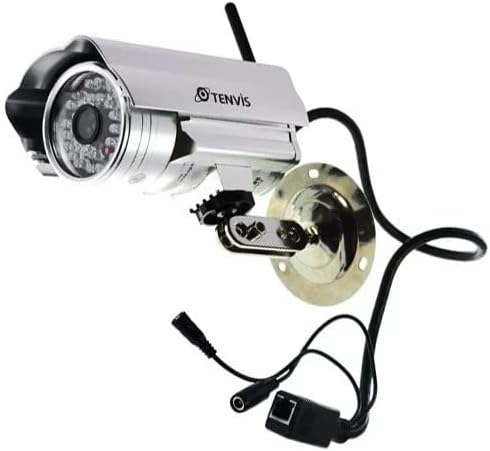
Image: The TENVIS IP602W Outdoor IP Camera, showcasing its durable build, integrated mounting bracket, and connectivity cables.
Qutida nima bor
Paketni ochganingizda, quyidagi barcha tarkibiy qismlarning mavjudligiga ishonch hosil qiling:
- 1 x IP602W WiFi IP Camera
- 1 x Power Adaptor (AU Plug)
- 1 x Wi-Fi antennasi
- 1 x o'rnatish ushlagichi
- 1 x CD (containing software/drivers)
- 1 x Screw Set for mounting
- 1 x foydalanuvchi qo'llanmasi

Image: All components included in the TENVIS IP602W package, laid out for verification.
Mahsulot xususiyatlari
The TENVIS IP602W camera is equipped with several key features to enhance its performance and usability:
- Night Version: Integrated infrared LEDs provide clear visibility in low-light and complete darkness.
- Simsiz qo'llab-quvvatlash: Connects to your network via Wi-Fi for flexible placement.
- Metal and Waterproof Shell: Designed for outdoor use with a durable, weather-resistant casing.
- Harakatni aniqlash: Configurable motion detection alerts for security monitoring.
- O'zaro platformalar mosligi: Qo'llab-quvvatlaydi viewing and control from various operating systems and browsers, including Windows, Mac OS, Firefox, Chrome, and Safari.
- Mobil View: Access live feeds and controls from mobile devices via 3G network, supporting iPhone, Android, Windows Mobile, and Java phones.

Image: Visual representation of the TENVIS IP602W camera, emphasizing its key features such as night vision and wireless capabilities.
O'rnatish va o'rnatish
Komponentni aniqlash
Familiarize yourself with the camera's ports and components before installation:
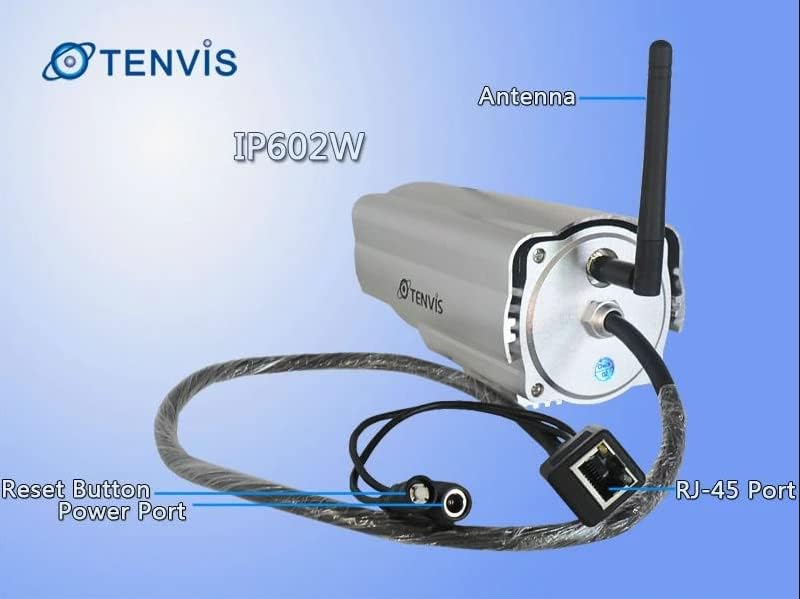
Rasm: batafsil view of the TENVIS IP602W camera's rear, showing the antenna, RJ-45 Ethernet port, power input, and reset button.
- Antenna: Simsiz tarmoq ulanishi uchun.
- RJ-45 porti: For wired Ethernet connection to your router.
- Quvvat porti: Quvvat adapterini shu erga ulang.
- Qayta tiklash tugmasi: Zavod sozlamalarini tiklash uchun ishlatiladi.
Tarmoqqa ulanish
The IP602W can connect to your network wirelessly or via an Ethernet cable. For initial setup, a wired connection is often recommended for stability.

Image: Network diagram showing how the IP602W camera connects to a router, allowing access from a LAN PC, Internet PC, and 3G phone.
- Connect the camera to your router using an Ethernet cable (if using wired setup).
- Connect the power adapter to the camera and plug it into an electrical outlet.
- Allow the camera a few minutes to power on and initialize.
- Refer to the included CD or the TENVIS website for software installation and detailed network configuration instructions, especially for wireless setup.
O'rnatish
The camera comes with a mounting bracket for easy installation on a wall or other suitable surface. Ensure the mounting location provides a clear view and is within range of your Wi-Fi signal or Ethernet cable.
- Choose a suitable outdoor location for mounting.
- Burg'ilash teshiklarini belgilash uchun shablon sifatida o'rnatish braketidan foydalaning.
- Drill the necessary holes and insert wall anchors if required.
- O'rnatish kronshteynini berilgan vintlar yordamida yuzaga mahkamlang.
- Attach the camera to the mounting bracket and adjust its angle for optimal viewing.
Operatsiya
Once the camera is set up and connected to your network, you can begin monitoring. The IP602W supports various viewing methods:
- PC/Mac Access: Use the provided software or a compatible web browser (Firefox, Chrome, Safari) to access the camera's live feed and settings from your computer.
- Mobile Device Access: Download the TENVIS mobile application (if available) or use a compatible mobile browser on your iPhone, Android, Windows Mobile, or Java phone to view the camera remotely via a 3G network connection.
- Video sifati: The camera streams video at up to 640x480 resolution with a frame rate of 30fps, providing clear and smooth surveillance footage.
- Harakatni aniqlash: Configure motion detection settings through the camera's interface to receive alerts when movement is detected in the monitored area.
Xizmat
Regular maintenance helps ensure the longevity and optimal performance of your TENVIS IP602W camera:
- Tozalash: Vaqti-vaqti bilan kamera linzalari va korpusini yumshoq, damp mato. Abraziv tozalash vositalaridan yoki erituvchilardan saqlaning.
- Kabel tekshiruvi: Check all cables (power, Ethernet) for any signs of wear, damage, or loose connections.
- Dasturiy ta'minotni yangilash: Check the TENVIS official website periodically for any available firmware updates. Keeping the firmware updated can improve performance and security.
- Ekologik tekshiruvlar: Ensure the camera's mounting remains secure and that no obstructions are blocking its field of view.
Muammolarni bartaraf qilish; nosozliklarni TUZATISH
If you encounter issues with your IP602W camera, try the following steps:
- Quvvat yo'q: Ensure the power adapter is securely connected to both the camera and a working electrical outlet.
- Tarmoqqa ulanish yo'q:
- Simli ulanish uchun Ethernet kabeli va router holatini tekshiring.
- For wireless connection, ensure the Wi-Fi antenna is properly attached and the camera is within range of your router. Verify Wi-Fi settings in the camera's configuration.
- Cannot Access Camera: Verify the camera's IP address. Ensure your computer or mobile device is on the same network or has proper internet access for remote viewing. Check firewall settings on your computer.
- Video sifati past: Ensure the lens is clean. Check network bandwidth and signal strength.
- Kamerani asl holatiga qaytarish: If issues persist, use the reset button (refer to Component Identification) to restore factory default settings. You will need to reconfigure the camera after a reset.
Texnik xususiyatlari
| Xususiyat | Tafsilot |
|---|---|
| Model nomi | IP602W |
| Brend | TENVIS |
| Ichki/tashqi makonda foydalanish | Ochiq havoda |
| Ulanish texnologiyasi | Simsiz (Wi-Fi) |
| Nazoratchi turi | Android (and other platforms) |
| O'rnatish turi | Devorga o'rnatish |
| Video suratga olish ruxsati | 480p (640 x 480) |
| Kadr tezligi | 30 kadr/s |
| Fotosensor texnologiyasi | CMOS (1/4 dyuym) |
| Ob'ektiv | 6 mm |
| Kam yorug'lik texnologiyasi | Night Color (Infrared LEDs) |
| Ogohlantirish turi | Faqat harakat |
| Mahsulot o'lchamlari | 10 x 9.5 x 4 dyuym |
| GTIN | 06928446299816 |
Kafolat va qo'llab-quvvatlash
For warranty information, technical support, or further inquiries regarding your TENVIS IP602W camera, please refer to the official TENVIS website or contact their customer service directly. The included CD may also contain support contact details.
You can visit the official TENVIS store for more information: TENVIS Store on Amazon


