Mahsulot tugadiview
The EPOS Adapt 361 is an over-ear Bluetooth headset designed for professional use. It features Active Noise Cancellation (ANC) to reduce background noise, optimizing focus in busy environments. The headset is optimized for Unified Communications (UC) and allows seamless switching between multiple devices. Its ergonomic design and comfortable ear pads provide noise dampening and comfort for extended wear. The headset is crafted from high-quality materials with a matt black finish.
Please note: During a brand transition period, products may feature either EPOS | SENNHEISER or EPOS branding.
Qutida nima bor
- EPOS Adapt 361 eshitish vositasi
- BTD 800 USB-C dongle
- USB-C Cable with USB-C Connector
- Audio Cable (2.5 mm Twist Lock and 3.5 mm Jack Plugs)
- Saqlash sumkasi
- Muvofiqlik varaqasi
- Xavfsizlik bo'yicha qo'llanma
O'rnatish uchun qo'llanma
1. Eshitish vositasini zaryadlash
Before first use, fully charge the headset using the provided USB-C cable. Connect the USB-C end to the headset and the other end to a compatible USB power source. The LED indicator on the headset will show charging status.
2. Connecting via Bluetooth (Wireless)
- Eshitish vositasida quvvat.
- Activate Bluetooth pairing mode on the headset (refer to the headset controls for specific button presses, usually a long press on the power button or a dedicated Bluetooth button).
- On your device (PC, smartphone), enable Bluetooth and search for available devices.
- Select "EPOS Adapt 361" from the list to pair.
3. Connecting via USB-C Dongle (BTD 800)
For optimal performance with PC and Microsoft Teams, use the BTD 800 USB-C dongle.
- Plug the BTD 800 USB-C dongle into an available USB-C port on your computer.
- The dongle will automatically pair with your headset. The LED on the dongle will indicate connection status.
- Ensure the headset is selected as the audio input/output device in your computer's sound settings and communication applications (e.g., Microsoft Teams).
4. Connecting via Audio Cable (Wired)
For wired connection, use the provided audio cable.
- Connect the 2.5 mm twist-lock end of the audio cable to the headset.
- Connect the 3.5 mm jack end to the audio output of your device.
Foydalanish bo'yicha ko'rsatmalar
Eshitish vositalarini boshqarish
The EPOS Adapt 361 features intuitive controls for managing calls, media, and headset functions. These are typically touch-sensitive or button-based on the earcups.
- Quvvatni yoqish/oʻchirish: Quvvat tugmasini bosing va ushlab turing.
- Ovozni boshqarish: Use the dedicated volume buttons or touch controls.
- Faol shovqinni bekor qilish (ANC): Toggle ANC on/off to manage ambient noise.
- Microsoft Teams tugmasi: A dedicated button on the BTD 800 USB-C dongle allows for quick access to Microsoft Teams functions.
- Qo'ng'iroqlarni boshqarish: Answer/end calls, mute microphone using designated buttons.
- Media nazorati: Play/pause, skip tracks.
- Ovozli taklif: The headset provides voice prompts for status updates.
Mikrofondan foydalanish
The headset features two advanced microphones optimized for voice pickup, ensuring clear communication during calls.
Ko'p nuqtali ulanish
The headset supports multipoint connectivity, allowing it to be connected to two Bluetooth devices simultaneously, enabling seamless switching between them.
Katlanadigan dizayn
The robust, foldable design allows for easy storage and portability in the included storage pouch.
Xizmat
Tozalash
Wipe the headset with a soft, dry cloth. Avoid using harsh chemicals or abrasive materials. Do not immerse the headset in water.
Saqlash
When not in use, store the headset in the provided storage pouch to protect it from dust and damage. The foldable design facilitates compact storage.
Muammolarni bartaraf qilish; nosozliklarni TUZATISH
- Ovoz yo'q/Ovoz sifati yomon:
- Eshitish vositasining zaryadlangan va yoqilganligiga ishonch hosil qiling.
- Verify Bluetooth connection or dongle connection.
- Check device's audio output settings.
- Ensure the audio cable is securely connected if using wired mode.
- Mikrofon ishlamayapti:
- Mikrofon o'chirilganligini tekshiring.
- Verify headset is selected as the input device in your application settings.
- Ulanish muammolari:
- Restart the headset and the connected device.
- Re-pair the Bluetooth connection or re-insert the USB-C dongle.
- Boshqa qurilmalar Bluetooth signaliga xalaqit bermayotganligiga ishonch hosil qiling.
- Active Noise Cancellation (ANC) Performance:
- ANC faollashtirilganligiga ishonch hosil qiling.
- Check that the earcups are properly seated over your ears for optimal seal.
For advanced troubleshooting and firmware updates, utilize the EPOS Manager and EPOS Connect software.
Texnik xususiyatlari
| Model nomi | ADAPT 300 Series (Model 361) |
| Ulanish texnologiyasi | Simli, Simsiz (Bluetooth 5) |
| Simsiz aloqa texnologiyasi | Bluetooth |
| Chastotaga javob | 22000 Gts |
| Naushniklar Jek | 2.5 mm raz'em |
| Quloqlarni joylashtirish | Quloq ustida |
| Shovqin nazorati | Faol shovqinni bekor qilish |
| Mos qurilmalar | PC |
| Boshqarish turi | Media boshqaruvi, teging |
| Maxsus xususiyatlar | ActiveGard, Comfortable, Detachable Cable, Ergonomic Design, Foldable, Hands-free, Microphone Included, Microsoft Teams Button, Multipoint, Noise Cancellation, Rechargeable Battery, Sub Band Coding (SBC), Unified Communication, Voice Prompt, apt-X Technology |
| Element og'irligi | 8.5 untsiya (241 gramm) |
| Mahsulot o'lchamlari | 7.8 x 5.4 x 4.2 dyuym |
| Batareyalar | 1 Lityum-ion batareya (shu jumladan) |
Mahsulot rasmlari
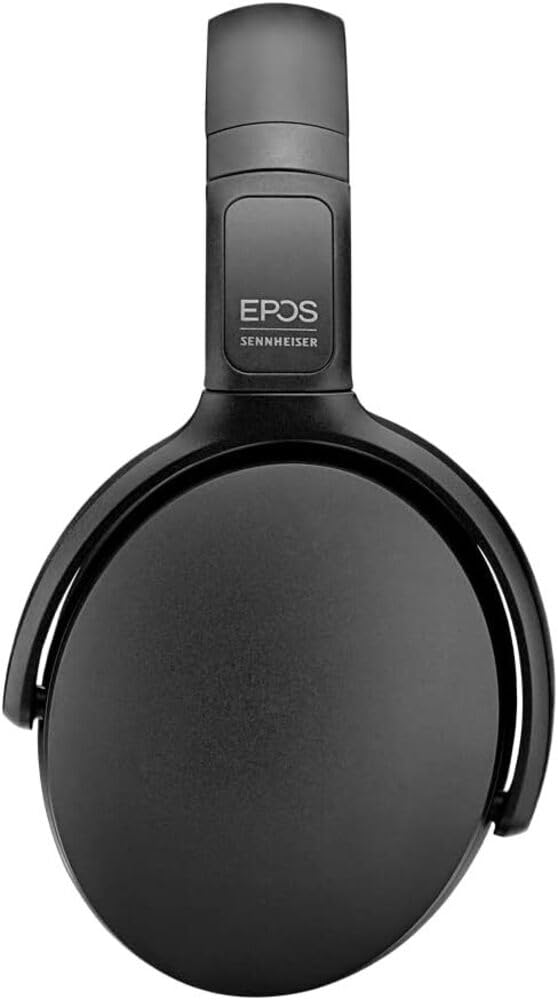
Image 1: The EPOS Adapt 361 Headset, showcasing its sleek black design and comfortable over-ear earcups. The adjustable headband is visible, designed for a secure and personalized fit.
Kafolat va qo'llab-quvvatlash
Kafolat haqida ma'lumot va texnik yordam uchun rasmiy EPOSga murojaat qiling website or contact EPOS customer service. Details regarding specific warranty periods and service procedures can be found in the documentation included with your product or on the manufacturer's support pages.
The included Compliance Sheet and Safety Guide provide additional important information.


