1. Kirish
Thank you for choosing the typecase Touch iPad Keyboard Case. This manual provides detailed instructions for setting up, operating, and maintaining your keyboard case to ensure optimal performance and longevity. Please read this manual thoroughly before use.
2. Moslik
This keyboard case is designed for specific iPad models. Please verify your iPad model number to ensure compatibility.
- iPad 10th Generation (10.9-inch, 2022): A2696, A2757, A2777 modellari
- iPad A16 (11th Generation, 2025): A3354, A3355, A3356 modellari
To verify your iPad model:
- 1-usul: Check the back of your iPad for the model number (e.g., A2696).
- 2-usul: Go to iPad Settings > General > About > Model Number. Tap the model number to display the A-number.
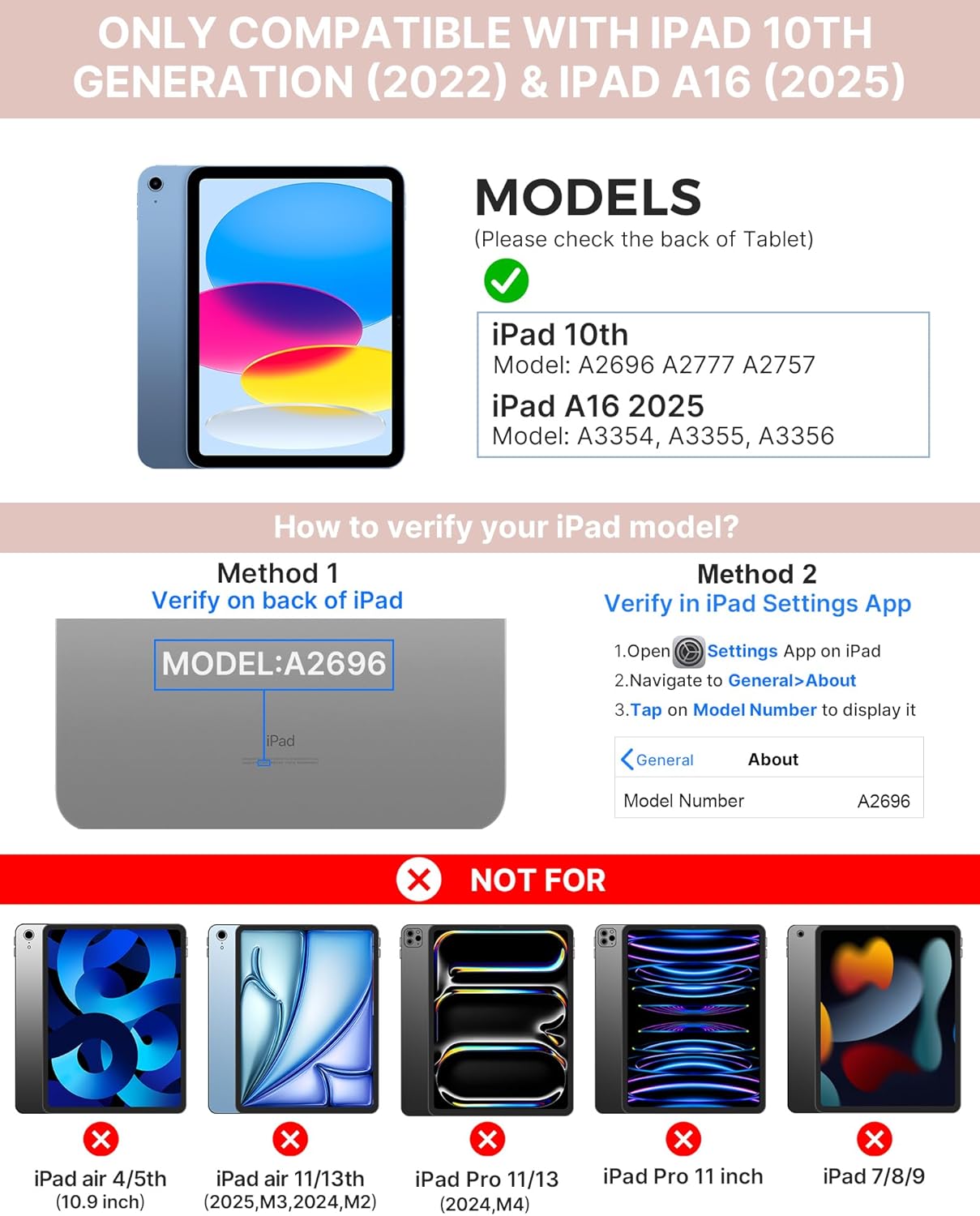
Image: Visual guide for identifying compatible iPad models and verifying the model number on the device or through settings.
3. Paket tarkibi
Paketga quyidagilar kiradi:
- 1 x typecase Touch iPad Keyboard Case
- 1 x USB-C zaryadlovchi kabeli
- 1 x foydalanuvchi qo'llanmasi
4. O'rnatish bo'yicha ko'rsatmalar
4.1 Klaviaturani zaryadlash
Before initial use, fully charge the keyboard. Connect the provided USB-C charging cable to the keyboard's charging port and a power source. The charging indicator light will show the charging status.
- Kuting: 1 yilgacha
- Daytime use (2 hours/day with backlight off): 3 oygacha
- Nighttime use (2 hours/day with backlight on): 2 haftagacha

Image: Close-up of the keyboard's USB-C charging port and battery life specifications.
4.2 Pairing with iPad
- Klaviatura zaryadlanganligiga ishonch hosil qiling.
- Turn on the keyboard by pressing the power button. The Bluetooth indicator light will flash.
- iPad qurilmangizda bu yerga oʻting Sozlamalar > Bluetooth.
- Bluetooth-ni yoqing. iPad mavjud qurilmalarni qidiradi.
- Select "typecase Keyboard" from the list of devices.
- Follow any on-screen prompts to complete the pairing process. The Bluetooth indicator light on the keyboard will turn solid when successfully paired.
5. Foydalanish bo'yicha ko'rsatmalar
5.1 iPad-ni o'rnatish
Gently insert your iPad into the case, ensuring all edges are securely seated. The case provides full protection for your device.
5.2 Klaviatura funksiyalari
The keyboard features a standard 78-key layout with a dedicated row of iPadOS shortcut keys for enhanced productivity.

Rasm: tepada view of the keyboard layout, highlighting the 78-key design and iPadOS shortcuts.
Yoritilgan kalitlar
The keyboard features 11-color RGB LED backlighting with adjustable brightness levels. This allows for comfortable typing in various lighting conditions.
- ni bosing light bulb key to cycle through backlight colors.
- bosing Fn + light bulb key orqa yorug'likni sozlash uchun.
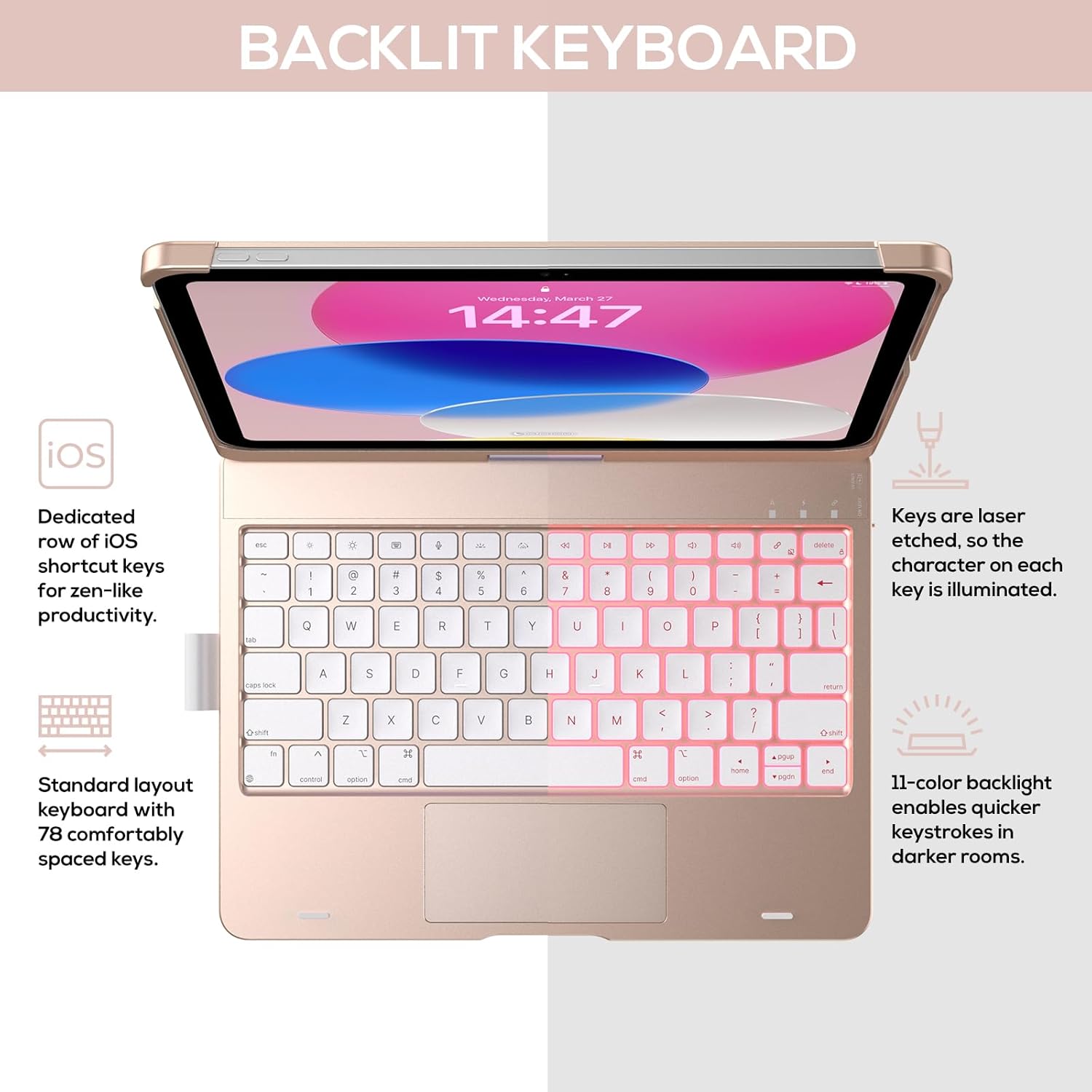
Image: The keyboard with illuminated keys, demonstrating the 11-color backlight and dedicated iOS shortcut keys.
5.3 Ko'p sensorli sensorli panel
The integrated precision trackpad supports multi-gesture controls, enhancing productivity for tasks like document editing, web browsing, and presentation building.
- Bir barmoq bilan teginish: Click/Select
- Ikki barmoq bilan aylantirish: Scroll up/down or left/right
- Kattalashtirish uchun bosing: Kattalashtirish/kichraytirish
- Uch barmoq bilan yuqoriga surish: Ilova almashtirgichni oching
- Uch barmoq bilan pastga surish: Asosiy ekranga qaytish

Image: Diagram showing common multi-touch gestures for the trackpad, including managing files, web browsing, and app switching.
5.4 360° Rotatable Hinge and Use Modes
The patented 360° hinge allows for versatile use of your iPad in 7 unique modes, adapting to various tasks from typing to viewing.
- Noutbuk rejimi: Traditional laptop setup for typing.
- Turish rejimi: uchun ideal viewmazmuni.
- Chodir rejimi: Stable for touch interaction or presentations.
- Planshet rejimi: Fold the keyboard behind the iPad for tablet use. Keys are protected in this mode.
- Corner Mode: Angled for comfortable drawing or writing.
- Ulashish rejimi: Rotate the screen to share content with others.
- Protect Mode: Close the case to fully protect the iPad.
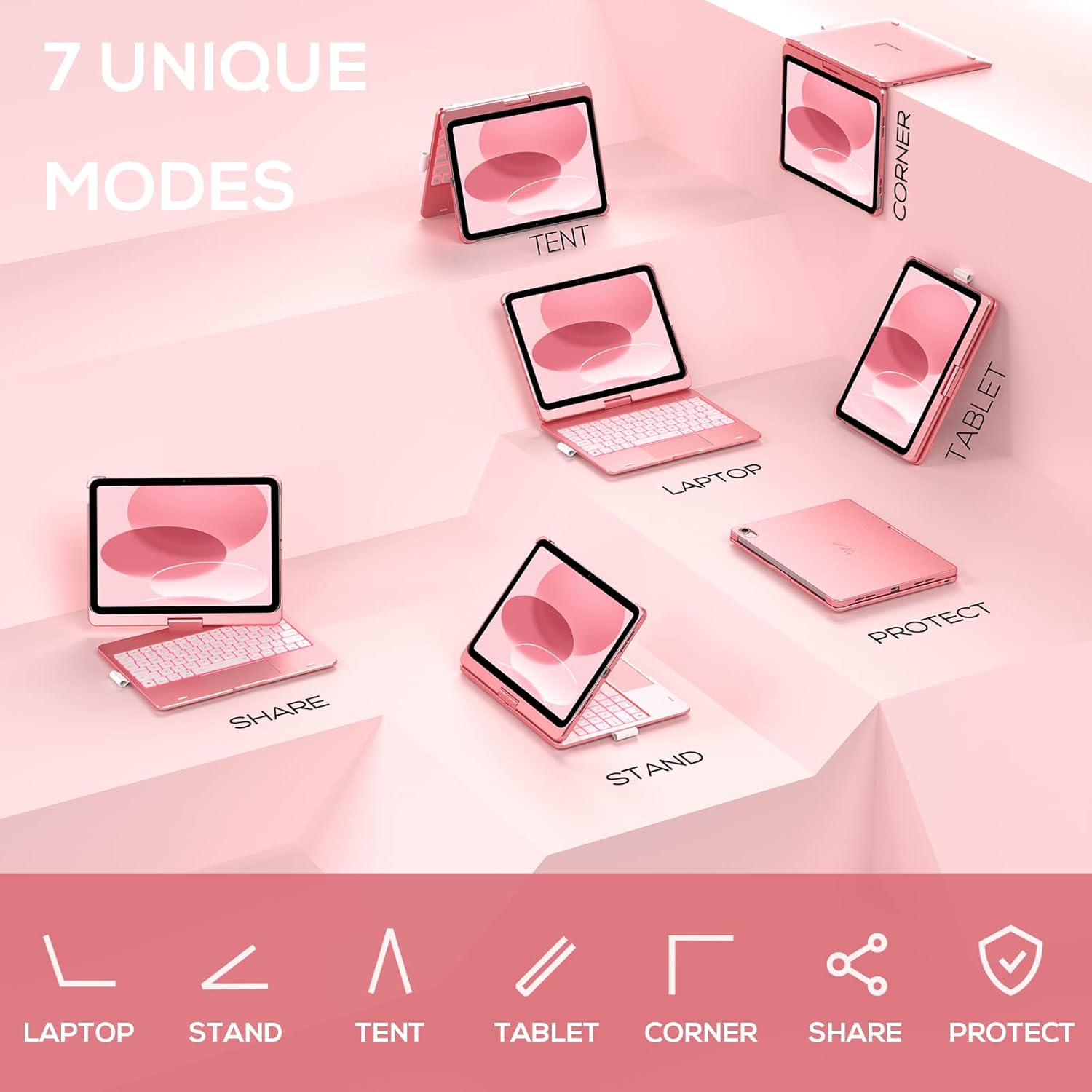
Image: A visual representation of the seven different configurations the keyboard case can be used in, including laptop, stand, and tablet modes.
5.5 Auto Sleep/Wake Function
The case features an auto sleep/wake function. Opening the case will wake your iPad, and closing it will put your iPad to sleep, helping to conserve battery life for both the iPad and the keyboard.

Image: A user's hand on the trackpad, illustrating the built-in trackpad and the auto sleep/wake feature that activates when the case is opened or closed.
5.6 Apple Pencil Holder
An integrated holder is provided for your Apple Pencil, ensuring it is securely stored and easily accessible.
6. Xizmat ko'rsatish
6.1 Tozalash
To clean the keyboard case, use a soft, damp cloth. Avoid using harsh chemicals or abrasive materials, as these may damage the surface. Ensure the charging port is dry before charging.
6.2 Saqlash
When not in use for extended periods, store the keyboard case in a cool, dry place. It is recommended to fully charge the keyboard before long-term storage to maintain battery health.
7. Muammolarni bartaraf qilish; nosozliklarni TUZATISH
7.1 Klaviatura ulanmayapti
- Klaviatura yoqilgan va zaryadlanganligiga ishonch hosil qiling.
- Check that Bluetooth is enabled on your iPad.
- Qurilmani iPad'ingizning Bluetooth sozlamalarida unuting va qayta ulashga harakat qiling.
- iPad va klaviaturangizni qayta ishga tushiring.
7.2 Tugmalar javob bermayapti
- Klaviatura Bluetooth orqali to'g'ri ulanganligiga ishonch hosil qiling.
- Check the keyboard's battery level.
- Kalitlar atrofidagi har qanday axlatni tozalang.
7.3 Sensor paneli ishlamayapti
- Ensure the keyboard is connected.
- Check iPad settings for trackpad functionality (Settings > General > Trackpad).
- Klaviatura va iPad-ni qayta ishga tushiring.
7.4 Orqa yorug'lik ishlamayapti
- Klaviatura yoqilganligiga ishonch hosil qiling.
- Press the backlight control keys (light bulb key, Fn + light bulb key) to activate or adjust.
- Check battery level; low battery may disable backlighting.
8. Texnik shartlar
| Model raqami | KB201T-100 |
| Mahsulot o'lchamlari | 11 x 8.6 x 1.5 dyuym (11"L x 8.6"W x 1.5"H) |
| Element og'irligi | 1.43 funt |
| Ulanish texnologiyasi | Bluetooth |
| Klaviatura tavsifi | Flexible, 78-key layout with iPadOS shortcuts |
| Maxsus xususiyatlar | 360° Rotatable, 11-Color Backlit, Ergonomic, Lightweight, Multi-Touch Trackpad, Auto Sleep/Wake, Apple Pencil Holder |
| Klaviatura orqa yorug'ligi | RGB (11 XNUMX XNUMX rang) |
| Batareya turi | 1 ta lityum polimer batareya (qo'shilgan) |
9. Kafolat va qo'llab-quvvatlash
typecase is committed to product quality and customer satisfaction. This product comes with the following support:
- O'zgartirish xizmati: Within 1 year of purchase.
- To'lovni qaytarish siyosati: Sotib olingandan keyin 30 kun ichida.
For any issues or inquiries, please contact typecase customer support for quick feedback and assistance.

Image: Information on typecase's after-sales service, including replacement, refund, and customer support.


