1. Kirish
Thank you for choosing the AVATTO WT400-16A-B Smart WiFi Thermostat. This device is designed to provide intelligent temperature control for your water heater and gas boiler systems, offering convenience through programmable schedules, app control, and voice commands. Please read this manual carefully before installation and operation to ensure proper use and optimal performance.
2. Xavfsizlik ma'lumotlari
- Always disconnect power to the heating system before installing or servicing the thermostat.
- O'rnatish malakali elektrik yoki isitish bo'yicha mutaxassis tomonidan amalga oshirilishi kerak.
- Termostatni suvga yoki haddan tashqari namlikka ta'sir qilmang.
- Barcha simli ulanishlar xavfsiz va mahalliy elektr kodlariga mos kelishiga ishonch hosil qiling.
- Batareyalarni bolalar qo'li yetmaydigan joyda saqlang. Ishlatilgan batareyalarni ehtiyotkorlik bilan yo'q qiling.
3. Paket tarkibi
Paketingizda barcha narsalar mavjudligini tekshiring:
- AVATTO WT400-16A-B Thermostat Unit
- Foydalanuvchi uchun qo'llanma
- O'rnatish vintlari (2 dona)
- NTC Sensor Cable (3 meters)
4. Mahsulot tugadiview
4.1 Asosiy xususiyatlar
- Smart WiFi Control: Connects directly to 2.4 GHz Wi-Fi for remote control via smartphone app.
- Ovozli boshqaruv: Qo'llarni ishlatmasdan ishlash uchun Amazon Alexa va Google Assistant bilan mos keladi.
- Dasturlashtiriladigan jadvallar: Offers 6 distinct heating programs for weekdays and 2 for weekends, optimizing energy use.
- Heating and Cooling Functionality: Supports both heating and cooling modes for year-round comfort.
- Katta LCD displey: A 4.6-inch screen clearly shows room temperature, set temperature, operating status, battery level, day, and time.
- Oson o'rnatish: Designed for surface mounting with potential-free output (NO, NC, COM).
- Ikki tomonlama quvvat imkoniyatlari: Operates on AAA batteries with an optional Type-C power input.
4.2 Displey va boshqaruv elementlari
The thermostat features a clear LCD screen and an intuitive rotary knob for adjustments.
4.3 Muvofiqlik
This thermostat is designed for use with water heaters and gas boilers that have dry contact connections. Bu not compatible with electric underfloor heating systems or instantaneous electric water heaters.

Image: This diagram illustrates the thermostat's compatibility. It is compatible with gas boilers featuring dry contact connections (indicated by a checkmark) and is not compatible with electric heating systems or actuator valves (indicated by cross marks).
5. Sozlash
5.1 O'rnatish
The thermostat is designed for surface mounting. Choose a suitable location on an interior wall, away from direct sunlight, drafts, or heat sources that could affect temperature readings.
- Quvvatni uzish: Turn off the main power supply to your heating system at the circuit breaker.
- Orqa plitani o'rnatish: Detach the front panel of the thermostat from its backplate. Secure the backplate to the wall using the provided screws.
- Elektr simlari: Connect the heating system wires to the NO (Normally Open), NC (Normally Closed), and COM (Common) terminals on the backplate. Refer to your heating system's manual for specific wiring diagrams. The thermostat provides a potential-free output.
- Old panelni biriktiring: Once wiring is complete and secure, reattach the front panel to the backplate.
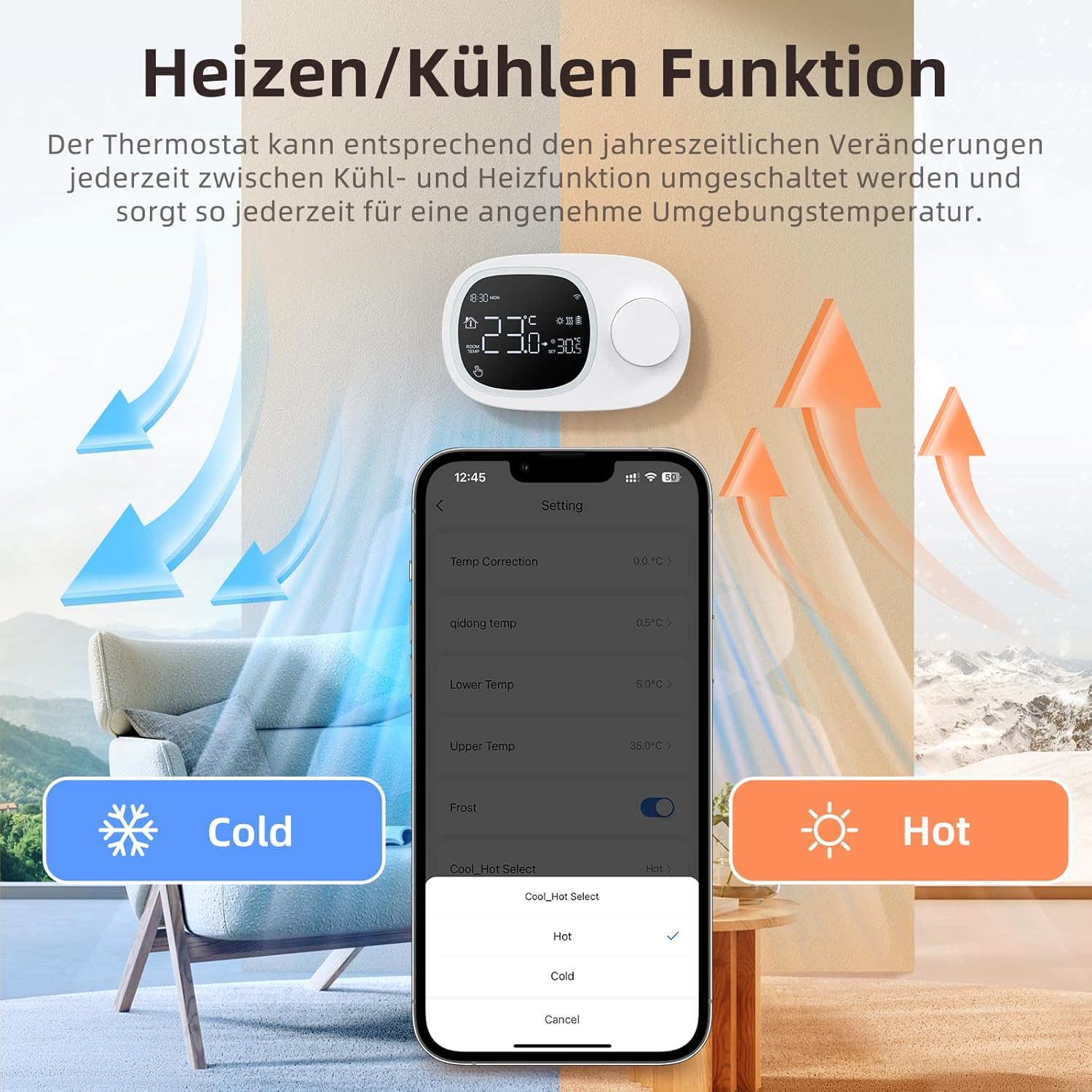
Image: This image shows the thermostat's backplate with wiring terminals and its physical dimensions (13.3 cm width, 8.6 cm height, 2.5 cm depth).
5.2 Elektr ta'minoti
The thermostat can be powered by three AAA batteries or via a Type-C USB connection.
- Batareyani o'rnatish: Open the battery compartment on the back of the thermostat and insert three AAA batteries, observing the correct polarity. The screen will display the battery level. Under normal operation, batteries typically last about 6 months.
- Type-C Power (Optional): For continuous power, you can connect a Type-C USB cable to the designated port.

Image: This image illustrates the battery compartment for AAA batteries and the Type-C port for alternative power input.
5.3 WiFi ulanishi
To enable smart features, connect your thermostat to your home's 2.4 GHz Wi-Fi network.
- Ilovani yuklab olish: Download and install the 'Smart Life' or 'AVATTO' app from your smartphone's app store.
- Ro'yxatdan o'tish / Kirish: Hisob qaydnomasini yarating yoki ilovaga kiring.
- Qurilma qo'shish: In the app, select 'Add Device' or the '+' icon. Choose 'Thermostat' or 'Heating Control'.
- Ulanish rejimi: Follow the in-app instructions to put the thermostat into pairing mode (usually involves pressing and holding a button on the thermostat until a Wi-Fi icon flashes).
- Wi-Fi tarmog'iga ulanish: Ensure your mobile phone is connected to your home's 2.4 GHz Wi-Fi network. Enter your Wi-Fi password in the app.
- Toʻliq sozlash: The app will guide you through the final steps to connect the thermostat.
6. Foydalanish bo'yicha ko'rsatmalar
6.1 Asosiy operatsiya
- Quvvatni yoqish/oʻchirish: Termostatni yoqish yoki o'chirish uchun quvvat tugmasini bosing.
- Haroratni sozlash: Rotate the knob to set your desired room temperature. The display will show both the current room temperature and the set temperature.
6.2 Dasturlashtiriladigan rejimlar
The thermostat allows you to set a weekly schedule to automatically adjust the temperature.
- Weekday Programs: Set up to 6 different heating periods for Monday to Friday.
- Weekend Programs: Set up to 2 heating periods per day for Saturday and Sunday.
- Setting Schedule: Access the programming menu via the thermostat's interface or the Smart Life/AVATTO app to configure your desired times and temperatures for each period.

Image: This image displays the app interface for setting a weekly programmable schedule, showing different time slots and temperatures for each day.
6.3 Ilovalarni boshqarish
Control your thermostat remotely using the Smart Life or AVATTO app.
- Masofadan haroratni sozlash: Change the set temperature from anywhere.
- Jadvalni boshqarish: Easily create, modify, or disable heating schedules.
- Rejimni almashtirish: Switch between heating and cooling modes.
- Qurilma almashish: Share control of the thermostat with family members.
6.4 Ovozli boshqaruv
Integrate your thermostat with Amazon Alexa or Google Assistant for convenient voice commands.
- Hisoblarni bog'lash: Follow the instructions in the Smart Life/AVATTO app to link your account with Alexa or Google Assistant.
- Ovozli buyruqlar: Quyidagi kabi buyruqlardan foydalaning:
- "Alexa, [Termostat nomi] ni 22 darajaga qo'ying."
- "Hey Google, what is the temperature in [Room Name]?"

Image: This image demonstrates remote control via the Smart Life app and voice control using an Alexa device, showing a command to set the room temperature.
6.5 Heating and Cooling Function
The thermostat supports both heating and cooling modes. You can switch between these functions as needed to maintain a comfortable ambient temperature throughout the year.
- Rejim tanlash: The mode can typically be changed through the thermostat's menu settings or directly within the Smart Life/AVATTO app.
- Harorat gisterezi: The thermostat features precise temperature control with adjustable hysteresis (0.5-10°C) to prevent rapid cycling of your heating/cooling system.
- Harorat chegaralari: Set minimum and maximum temperature limits (e.g., 5-35°C) to ensure safe and efficient operation.

Image: This image illustrates the heating and cooling functions, showing temperature arrows and the app interface for selecting 'Hot' or 'Cold' modes.
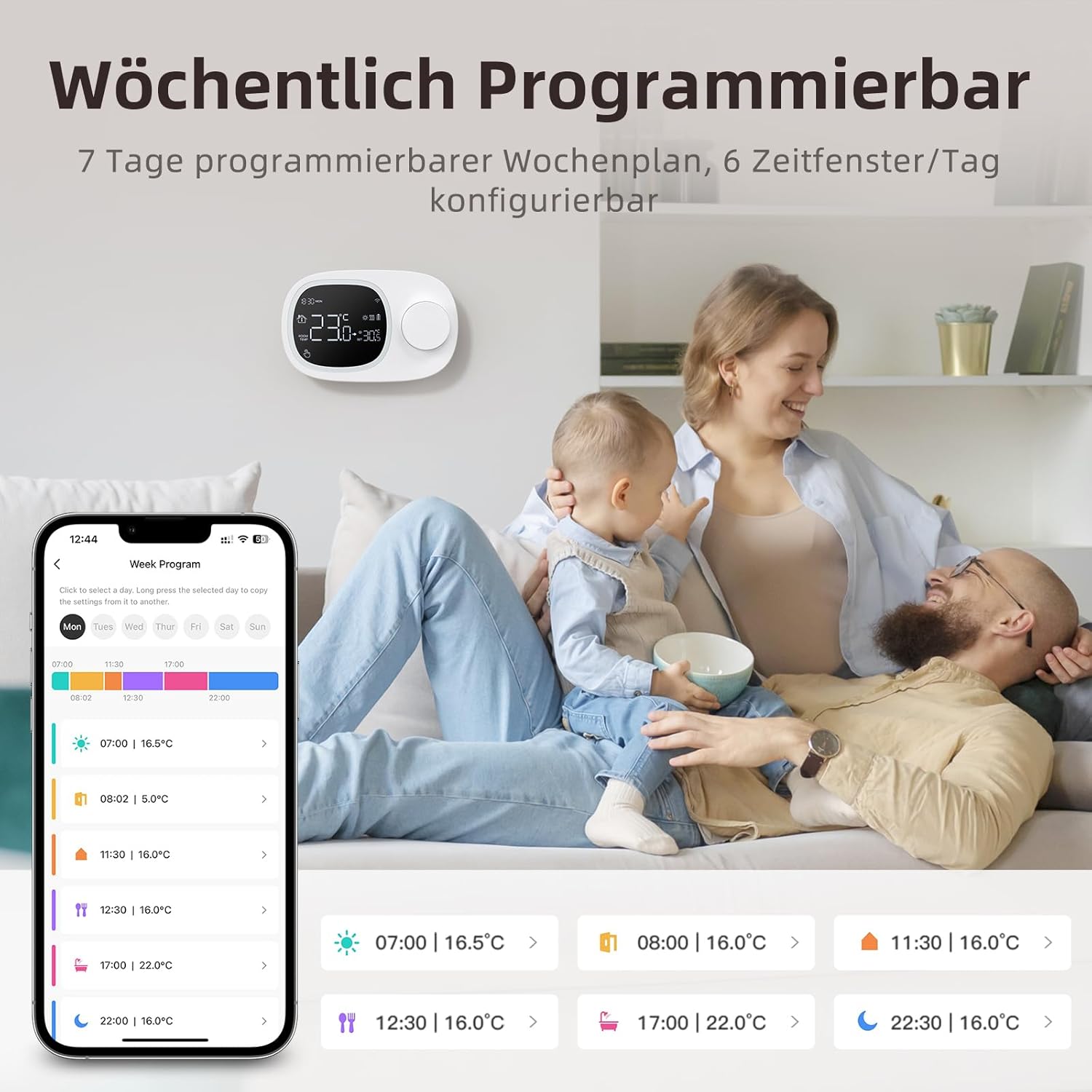
Image: This image highlights the precise temperature control features, including temperature hysteresis (0.5-10°C), minimum temperature setting (0.5°C), and upper/lower temperature limits (5-35°C).
7. Xizmat ko'rsatish
7.1 Batareyani almashtirish
When the battery level indicator on the screen shows low power, replace the three AAA batteries promptly to ensure continuous operation. Refer to section 5.2 for battery installation instructions.
8. Muammolarni bartaraf qilish; nosozliklarni TUZATISH
Agar termostat bilan bog'liq muammolarga duch kelsangiz, quyidagi keng tarqalgan muammolar va yechimlarga murojaat qiling:
| Muammo | Mumkin sabab / yechim |
|---|---|
| Thermostat does not power on. | Check if the AAA batteries are correctly inserted and charged. Ensure the power button is functioning. If using Type-C power, verify the cable connection. |
| Confused characters appear on the screen. | This may indicate an installation issue. Reinstall the device, ensuring all connections are secure. |
| Displayed temperature is inaccurate. | Access the advanced menu mode on the thermostat or the calibration menu in the Smart Life/Tuya app to adjust temperature settings. |
| Device starts normally, but screen does not show output temperature. | Check the connection between the main control board and the power board. Verify that all wiring is correct according to the markings on the device connector. |
| Wi-Fi tarmog‘iga ulanib bo‘lmadi. | Ensure your router is broadcasting a 2.4 GHz Wi-Fi signal. Confirm your mobile phone is connected to the 2.4 GHz network during pairing. Check Wi-Fi password. |
9. Texnik shartlar
- Brend: AVATTO
- Model raqami: WT400-16A-B (also referred to as WT580)
- Rang: Qora
- Dimensions (Thermostat): Taxminan 13.3 x 8.6 x 2.5 sm
- Mahsulot og'irligi: 270 gramm
- Power Output (Heating System): 3800 vattgacha
- jildtage: 240 volt (AC)
- Material: Plastik
- Power Source (Thermostat): 3 x AAA Batteries (sold separately), optional Type-C USB
- Ulanish: Wi-Fi (2.4 GHz), Bluetooth
- Nazorat turi: Amazon Alexa, Google Assistant
- Maxsus xususiyatlar: Voice control, LCD display (temperature, weather, time, date, room temp, heating icon), 0.5°C temperature increments, Silent operation, Smart Life/Tuya Smart remote control.
- Mahsulotning o'ziga xos qo'llanilishi: Water heaters and gas boilers with dry contact.
10. Kafolat va qo'llab-quvvatlash
Information regarding specific warranty details is not available in this document. For technical assistance, troubleshooting, or any questions not covered in this manual, please contact AVATTO customer support. You may also find additional support resources through the Smart Life or AVATTO application.


