1. Kirish
This manual provides essential instructions for the safe and efficient use of your SONY VAIO Pro PK VJPK11 laptop. Please read this manual thoroughly before operating your device and retain it for future reference. It covers setup, operation, maintenance, and troubleshooting to ensure optimal performance and longevity of your laptop.
2. Mahsulot tugadiview
The SONY VAIO Pro PK VJPK11 is a portable computing device designed for productivity and multimedia. Familiarize yourself with its components and features.

2.1-rasm: Old view of the SONY VAIO Pro PK VJPK11 laptop. This image displays the laptop open, revealing the screen, keyboard, and touchpad. The VAIO logo is visible on the screen, and an Intel Core i5 sticker is on the palm rest.
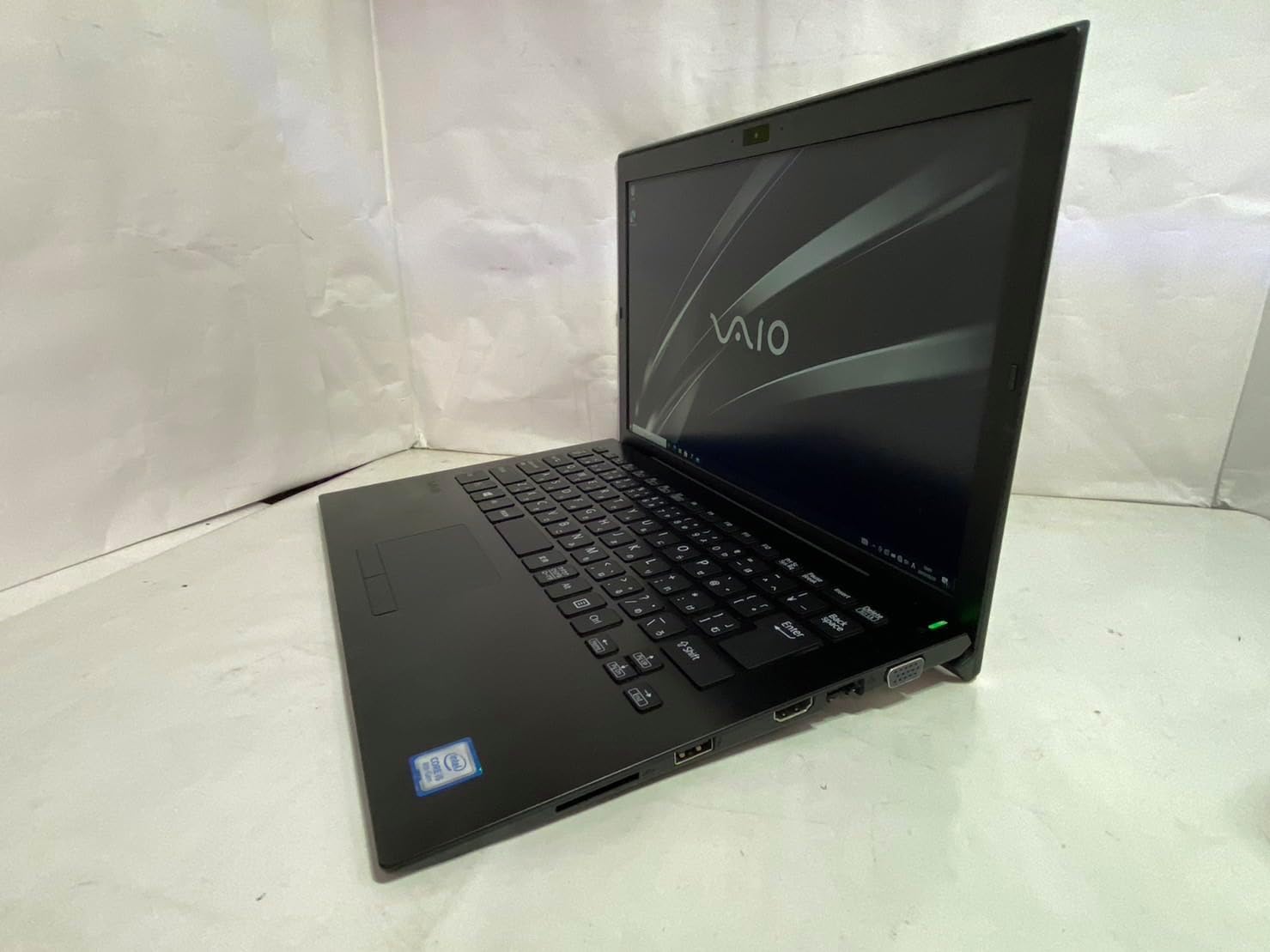
2.2-rasm: Chap tomon view of the SONY VAIO Pro PK VJPK11 laptop. This image shows the left side of the laptop, highlighting various ports such as USB, HDMI, and a VGA port, along with a ventilation grille.

2.3-rasm: Yuqori view of the SONY VAIO Pro PK VJPK11 laptop with the lid closed. This image displays the sleek black finish of the laptop's lid, featuring the prominent silver VAIO logo in the center.
3. Sozlash
3.1 Paketni ochish
Carefully remove the laptop and all accessories from the packaging. Ensure all components are present:
- SONY VAIO Pro PK VJPK11 Laptop
- AC adapteri va quvvat simi
- Hujjatlar (ushbu qo'llanma, kafolat ma'lumotlari)
3.2 Quvvat manbasiga ulanish
- AC adapterini noutbukingizdagi quvvat kirish portiga ulang.
- Plug the power cord into the AC adapter.
- Elektr shnurini yerga ulangan elektr rozetkasiga ulang.
- Allow the battery to charge fully before initial use, or use the laptop while connected to power.
3.3 Initial Boot-Up and Windows Setup
Press the power button to turn on the laptop. Follow the on-screen instructions to complete the Windows 10 Pro setup process. This typically involves selecting your region, language, accepting license agreements, and creating a user account.
4. Foydalanish bo'yicha ko'rsatmalar
4.1 Quvvatni yoqish/o‘chirish
- Yoqish uchun: Laptopda joylashgan quvvat tugmasini bosing.
- O'chirish uchun: Ishga tushirish tugmasini, keyin Quvvat tugmasini bosing va "O'chirish" -ni tanlang.
- Qayta boshlash uchun: Click the Start button, then Power, and select 'Restart'.
- Uxlash uchun: Click the Start button, then Power, and select 'Sleep', or close the laptop lid.
4.2 Klaviatura va sensorli panel
The laptop features a standard QWERTY keyboard and a multi-touch touchpad. Use the touchpad for cursor control and gestures. Refer to Windows settings for customizing touchpad sensitivity and gestures.
4.3 Periferik qurilmalarni ulash
- USB qurilmalari: Connect USB devices (e.g., mouse, external drive) to the available USB 3.0 ports.
- Tashqi displey: Use the HDMI or VGA port to connect an external monitor or projector. Press Windows tugmasi + P ko'rsatish rejimlarini boshqarish uchun.
- Simli tarmoq (LAN): Connect an Ethernet cable to the LAN port for a wired internet connection.
- SD karta: Insert an SD card into the dedicated SD card slot for data transfer.
4.4 Foydalanish Webcam and Bluetooth
- Webkamera: Integratsiyalashgan webcam can be used for video calls and conferencing. Access it through applications like Camera or communication software.
- Bluetooth: Enable Bluetooth in Windows settings to connect wireless devices such as headphones, speakers, or mice.
5. Xizmat ko'rsatish
5.1 Noutbukni tozalash
Bir oz yumshoq, tuklarsiz matodan foydalaning dampened with water or a screen cleaner to clean the display and exterior surfaces. Avoid harsh chemicals or abrasive materials. Ensure the laptop is powered off and unplugged before cleaning.
5.2 Batareyani parvarish qilish
To prolong battery life, avoid extreme temperatures. If storing the laptop for an extended period, ensure the battery is charged to approximately 50%.
5.3 Dasturiy ta'minotni yangilash
Regularly check for and install Windows updates and driver updates from the SONY support webTizim barqarorligi va xavfsizligini ta'minlash uchun sayt.
5.4 Ma'lumotlarni zaxiralash
Periodically back up your important data to an external drive or cloud storage to prevent data loss.
6. Muammolarni bartaraf qilish; nosozliklarni TUZATISH
This section addresses common issues you might encounter with your SONY VAIO Pro PK VJPK11.
6.1 Quvvat yo'q
- Ensure the AC adapter is securely connected to the laptop and a working power outlet.
- Elektr rozetkasining ishlashini boshqa qurilmaga ulash orqali tekshiring.
- Batareya to'liq zaryadsizlangan bo'lsa, yoqishdan oldin uni bir necha daqiqa zaryad qilishiga ruxsat bering.
6.2 Displey muammolari
- If the screen is blank, try adjusting the display brightness using the function keys.
- If an external monitor is connected, ensure the correct display output mode is selected (Windows key + P).
- Laptopni qayta ishga tushiring.
6.3 Wi-Fi ulanish muammolari
- Windows sozlamalarida Wi-Fi yoqilganligiga ishonch hosil qiling.
- Router va modemni qayta ishga tushiring.
- Boshqa qurilmalar bir xil Wi-Fi tarmog'iga ulanishi mumkinligini tekshiring.
- Simsiz tarmoq drayverlarini yangilang.
6.4 Laptop Running Slow
- Orqa fonda ishlaydigan keraksiz ilovalarni yoping.
- Yuqori protsessor yoki RAM sarflaydigan jarayonlar uchun Vazifa menejerini tekshiring.
- Diskni tozalash va defragmentatsiyani ishga tushiring (HDD uchun, SSD uchun kerak emas).
- Windows va drayverlar yangilanganligiga ishonch hosil qiling.
7. Texnik shartlar
Key technical specifications for the SONY VAIO Pro PK VJPK11 laptop:
| Xususiyat | Spetsifikatsiya |
|---|---|
| Model | SONY VAIO Pro PK VJPK11 (VJPK11C11N) |
| Protsessor | Intel Core i5-8250U (1.60GHz) |
| Ram | 8.00 GB DDR3 SDRAM |
| Saqlash | 256GB SSD (SATA) |
| Displey | 14.0-inch Wide (1920x1080 pixels) |
| Grafika | Intel Integrated Graphics |
| Operatsion tizim | Windows 10 Pro 64 bit |
| Portlar | VGA, HDMI, USB 3.0, LAN, SD Card Slot |
| Ulanish | LAN, Bluetooth |
| Webkamera | Integratsiyalashgan Webkamera |
8. Kafolat va qo'llab-quvvatlash
For information regarding your product's warranty, please refer to the warranty card included with your purchase or visit the official SONY support website. For technical assistance, contact SONY customer support or your authorized dealer.
Onlayn qo'llab-quvvatlash: https://www.sony.com/electronics/support


