1. Xavfsizlik bo'yicha muhim ko'rsatmalar
Ushbu jihozni ishlatishdan oldin barcha ko'rsatmalarni diqqat bilan o'qing. Kelajakda foydalanish uchun ushbu qo'llanmani saqlang.
- Ushbu qurilma faqat maishiy foydalanish uchun mo'ljallangan.
- Jihozni suvga yoki boshqa suyuqliklarga botirmang.
- Keep the appliance away from water sources, especially when charging.
- Do not use the appliance if the cord or plug is damaged. Contact customer support for repair.
- Always ensure the appliance is switched off before cleaning or performing maintenance.
- Bolalar qo'li yetmaydigan joyda saqlang. Bu jihoz o'yinchoq emas.
- Harakatlanuvchi qismlar bilan aloqa qilishdan saqlaning.
- Do not use the trimmer on irritated skin or open wounds.
- Faqat jihoz bilan birga kelgan zaryadlovchi adapterdan foydalaning.
2. Mahsulot tugadiview
The HTC AT-206A is a rechargeable hair trimmer designed for precise grooming tasks such as edging, outlining, dry shaving, and light shaping around areas like the neck, ears, and sideburns.

Image 2.1: HTC AT-206A Trimmer and its retail packaging, showing the device and included accessories.
Komponentlar:
- Trimmer Unit (HTC AT-206A)
- Zaryadlovchi kabel
- Tozalash cho'tkasi
- Lubricating Oil Bottle
- Taroqli biriktirma
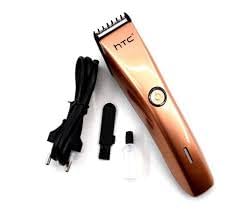
Image 2.2: The HTC AT-206A trimmer displayed with its charging cable, cleaning brush, oil bottle, and comb attachment.
3. Sozlash va zaryadlash
3.1 Dastlabki zaryadlash
- Before first use, fully charge the trimmer for approximately 8-10 hours.
- Trimmer o'chirilganligiga ishonch hosil qiling.
- Zaryadlovchi simni trimmerning zaryadlash portiga ulang.
- Adapterni mos keladigan elektr rozetkasiga ulang.
- Zaryadlash indikatori (agar mavjud bo'lsa) zaryadlash davom etayotganligini ko'rsatish uchun yonadi.
- Once fully charged, disconnect the charger from the outlet and the trimmer.
3.2 Attaching the Comb Attachment
- Trimmer o'chirilganligiga ishonch hosil qiling.
- Align the comb attachment with the trimmer blade.
- Gently push the comb attachment onto the blade until it clicks into place.
- To remove, gently pull the comb attachment away from the blade.
4. Foydalanish bo'yicha ko'rsatmalar
4.1 Asosiy operatsiya
- Trimmer zaryadlanganligiga ishonch hosil qiling.
- Press the power button to turn the trimmer on.
- Trimmerni o'chirish uchun quvvat tugmasini yana bosing.
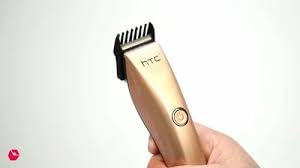
Image 4.1: The HTC AT-206A trimmer held in hand, demonstrating its ergonomic design for ease of use.
4.2 Kesish texnikasi
- Eng yaxshi natijaga erishish uchun trimmerni toza va quruq sochlarga qo'llang.
- Hold the trimmer at a slight angle against the skin.
- Trimmerni soch o'sishi yo'nalishiga qarshi sekin va barqaror ravishda harakatlantiring.
- Use the comb attachment for longer hair lengths (0.5mm-13mm).
- For edging and outlining, use the trimmer without the comb attachment for a closer trim.
- Stretch the skin taut with your free hand to ensure a smooth surface for trimming.
5. Xizmat va tozalash
Regular cleaning and maintenance will ensure optimal performance and extend the life of your trimmer.
5.1 Pichoqlarni tozalash
- Ensure the trimmer is switched off and disconnected from the charger.
- Use the provided cleaning brush to remove any loose hairs from the blades.
- For a more thorough clean, you may carefully detach the blade head (refer to specific instructions if provided with your model for blade removal).
- Do not rinse the entire trimmer under water unless explicitly stated as waterproof.
5.2 Pichoqlarni moylash
- After cleaning, apply 1-2 drops of the provided lubricating oil onto the blades.
- Yog' teng taqsimlanishi uchun trimmerni bir necha soniya yoqing.
- Ortiqcha yog'ni yumshoq mato bilan artib oling.
- Oiling the blades regularly (e.g., after every few uses) helps maintain cutting efficiency and prevents rust.
5.3 Saqlash
Store the trimmer in a cool, dry place, away from direct sunlight and moisture. Ensure it is fully charged before storing for extended periods.
6. Muammolarni bartaraf qilish; nosozliklarni TUZATISH
If you encounter any issues with your trimmer, refer to the following common problems and solutions:
- Trimmer yoqilmaydi:
Ensure the trimmer is fully charged. Check if the charging cable is properly connected and the power outlet is functional. - Poor trimming performance / pulling hair:
The blades may be dull or clogged with hair. Clean and oil the blades as described in the Maintenance section. Ensure the trimmer is adequately charged. - Batareya zaryadni ushlab turmaydi:
Ensure the trimmer is charged for the recommended duration. If the issue persists, the battery may need replacement. Contact customer support. - Haddan tashqari shovqin yoki tebranish:
The blades might be misaligned or require oiling. Clean and oil the blades. If the problem continues, discontinue use and contact customer support.
7. Texnik shartlar
| Xususiyat | Spetsifikatsiya |
|---|---|
| Model raqami | AT-206A (SA-144) |
| Quvvat manbai | Zaryadlanuvchi batareya |
| Pichoq materiali | Stainless Steel (Metal) |
| Cutting Length Range | 0.5mm - 13mm (with comb attachment) |
| Olchamlari (U x G x Y) | 18.7 x 4.9 x 11.2 sm |
| Tavsiya etilgan foydalanish | Dry Shaving, Edging, Light Shaping, Outlining (Neck, Ears, Sideburns, Face) |
| Rang | Qora |
| Ishlab chiqaruvchi | Xitoy |
8. Kafolat va qo'llab-quvvatlash
This product is covered by a standard manufacturer's warranty. Please refer to the product packaging or contact your retailer for specific warranty terms and conditions.
For technical support, troubleshooting assistance, or warranty claims, please contact the retailer or manufacturer directly. Keep your proof of purchase for any warranty-related inquiries.


