Aruba AP-535-US 802.11ax Unified CampAQSh kirish nuqtasi foydalanuvchi qo'llanmasi
Model: AP-535-US (APIN0535)

Old view of the Aruba AP-535-US Access Point, showcasing its sleek design and Aruba branding.
Kirish
This manual provides essential instructions for the setup, operation, maintenance, and troubleshooting of your Aruba AP-535-US (APIN0535) Dual Radio 802.11ax Unified Campus Access Point. The AP-535 Series is designed for high-density Wi-Fi 6 deployments in environments such as large offices, training facilities, and hospitals, offering robust and efficient wireless connectivity.
O'rnatish va o'rnatish
The Aruba AP-535-US supports Zero Touch Provisioning, allowing for simplified deployment without requiring extensive on-site technical expertise. Follow these general steps for installation:
- Qurilmani o'ramidan chiqarib oling: Carefully remove the access point from its packaging.
- O'rnatish: Securely mount the access point in the desired location. Ensure proper ventilation and clearance.
- Quvvatni ulash: Connect the appropriate power source (PoE or external power adapter, if applicable) to the access point.
- Tarmoqqa ulanish: Connect an Ethernet cable from your network infrastructure to the appropriate port on the access point.
- Dastlabki konfiguratsiya: The device can be managed and configured via HPE Aruba Networking Central for centralized control and monitoring.

Orqa view of the Aruba AP-535-US Access Point, showing the Ethernet ports, console port, and power input.
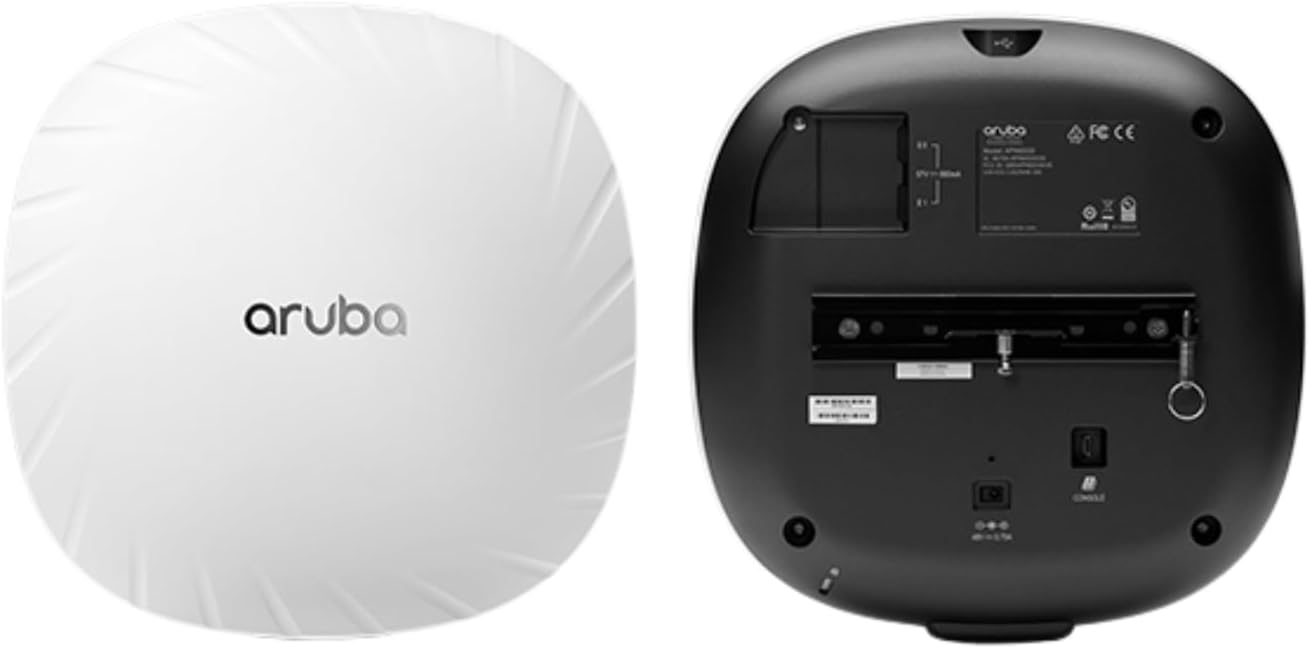
Image showing the Aruba AP-535-US Access Point with its mounting bracket, illustrating how it attaches to a surface.
Operatsiya
The Aruba AP-535-US provides Wi-Fi 6 (802.11ax) connectivity, supporting advanced features for enhanced performance and efficiency:
- OFDMA (Ortogonal Chastotali Bo'linish Ko'p Kirish): Improves efficiency by allowing multiple users to transmit simultaneously on different sub-channels.
- Bidirectional MU-MIMO (Multi-User, Multiple-Input, Multiple-Output): Enables the access point to communicate with multiple client devices concurrently, both uplink and downlink.
- Maqsadli uyg'onish vaqti (TWT): Optimizes power consumption for client devices by scheduling specific times for data transmission.
Management of the access point is typically performed through HPE Aruba Networking Central, which offers a unified platform for wired and wireless network oversight, including AI-powered analytics and automation.
Xizmat
- Dasturiy ta'minotni yangilash: Regularly check for and apply firmware updates through HPE Aruba Networking Central to ensure optimal performance, security, and access to new features.
- Tozalash: Keep the access point clean and free from dust. Use a soft, dry cloth for cleaning. Do not use liquid cleaners or aerosols.
- Atrof-muhit sharoitlari: Ensure the device operates within its specified temperature and humidity ranges to prevent damage and ensure longevity.
Muammolarni bartaraf qilish; nosozliklarni TUZATISH
If you encounter issues with your Aruba AP-535-US, consider the following basic troubleshooting steps:
- Quvvat yo'q: Verify that the power source is connected correctly and providing power (e.g., PoE switch is active, power adapter is plugged in).
- Tarmoqqa ulanish yo'q: Check Ethernet cable connections. Ensure the network port on the switch is active and configured correctly.
- Wi-Fi unumdorligi past: Check for potential interference, ensure optimal placement, and verify configuration settings in HPE Aruba Networking Central.
- Qurilmani asl holatiga qaytarish: If the device is unresponsive, a hard reset may be necessary. Refer to the full product documentation for specific reset procedures.
For more complex issues, consult the comprehensive documentation available on the Aruba support websayt yoki texnik yordamga murojaat qiling.
Texnik xususiyatlari
| Xususiyat | Tafsilot |
|---|---|
| Model | AP-535-US (APIN0535) |
| Qism raqami | JZ337A |
| Simsiz standart | 802.11ax (Wi-Fi 6) |
| Radiolar | Dual Radio 4x4:4 |
| Combined Data Rate | 2.97 Gbit/s gacha |
| Antenna | Ichki |
| Maksimal diapazon | 328 fut (taxminan 100 metr) |
| Mahsulot o'lchamlari | 12 x 11.25 x 4.1 dyuym |
| Ishlab chiqaruvchi | Hewlett Packard Enterprise |
| UPC | 657768598807 |
Kafolat va qo'llab-quvvatlash
The Aruba AP-535 Series includes a cheklangan umr bo'yi kafolat. For detailed warranty terms and conditions, please refer to the official Aruba documentation or contact Aruba support.
For technical assistance, additional documentation, or to register your product, please visit the official Hewlett Packard Enterprise (HPE) Aruba Networking support websayt.


