1. Mahsulot tugadiview
The Level Lock+ (Wi-Fi) Smart Lock integrates advanced security features with a discreet design, allowing for keyless entry and remote access. It is designed to fit most American standard exterior doors and is compatible with various smart home platforms.
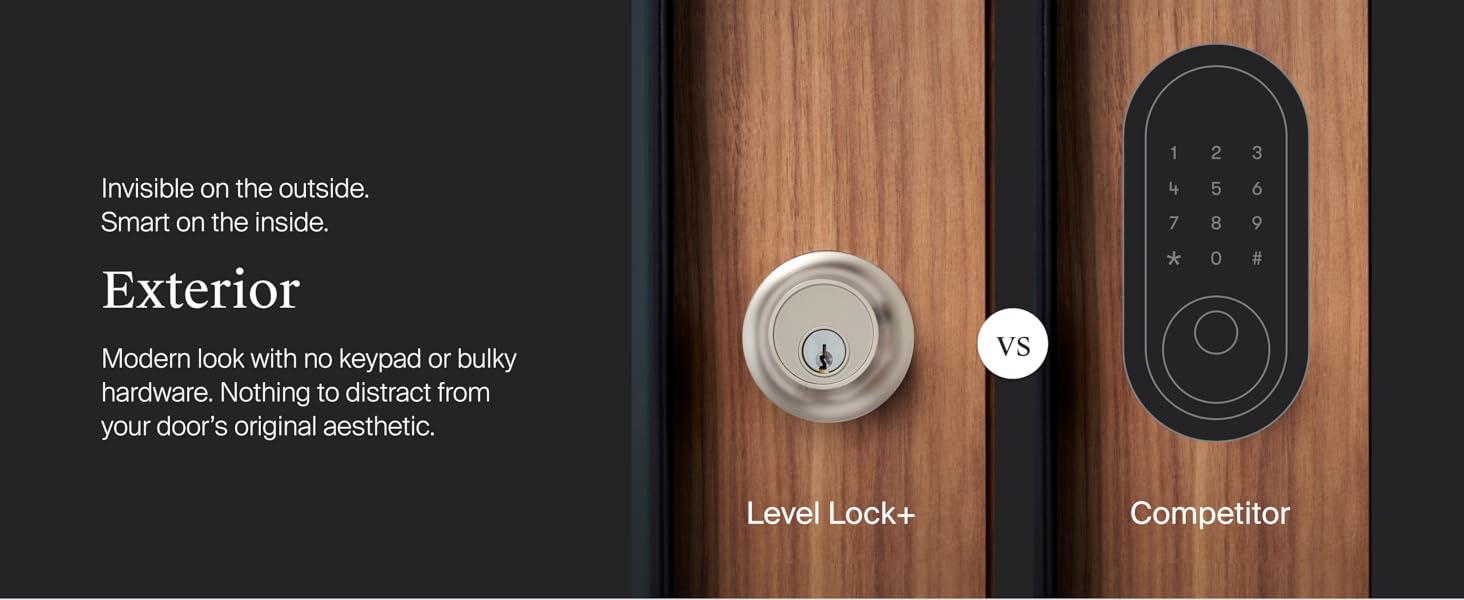
1-rasm: Tashqi ko'rinish view of the Level Lock+ (left) showing its discreet design compared to a competitor's smart lock with a visible keypad (right). The Level Lock+ maintains a modern aesthetic without external technology.
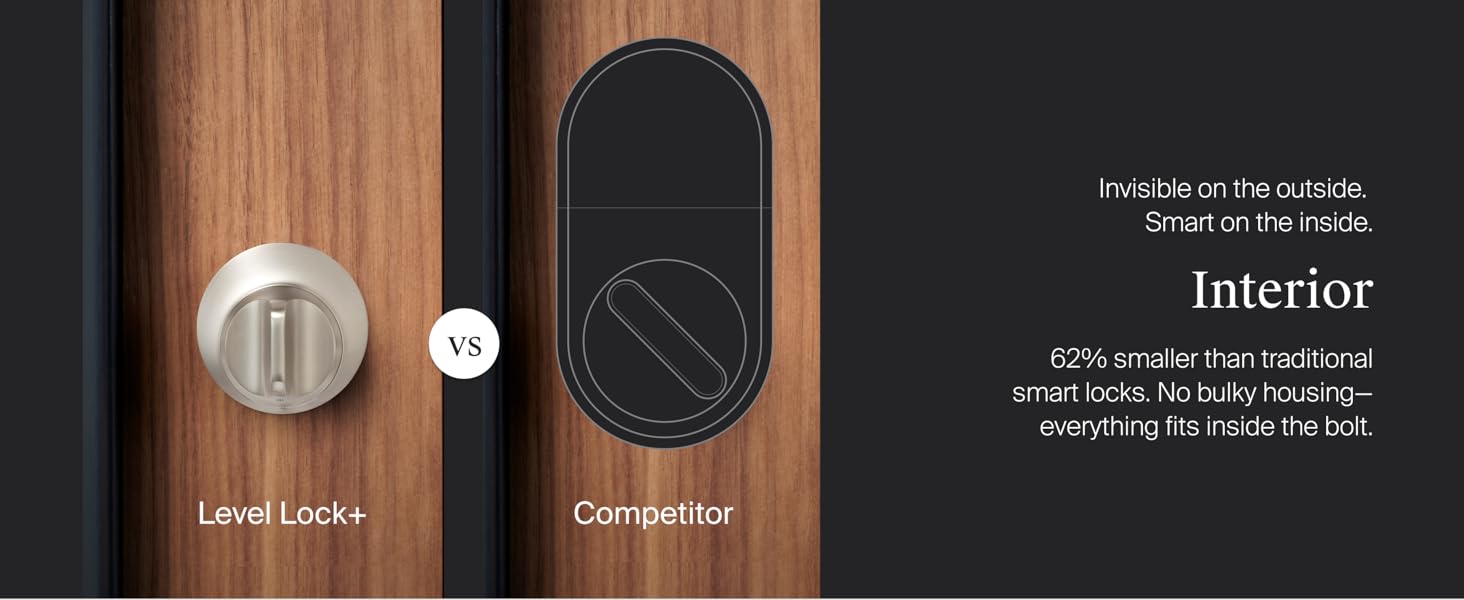
2-rasm: Ichki view of the Level Lock+ (left) demonstrating its compact size, which is 62% smaller than traditional smart locks. All components fit inside the bolt, eliminating bulky housing.
Kiritilgan komponentlar:
- Level Lock+
- Level Connect Wi-Fi Bridge
- CR2 batareyasi
- 2 strike plates
- 2 ta kalit fob
- 2 kalit
- 6 vint

3-rasm: A visual representation of all items included in the Level Lock+ package, such as the lock components, Wi-Fi bridge, battery, strike plates, key fobs, keys, and screws.
2. O'rnatish va o'rnatish
The Level Lock+ is designed for DIY installation and is compatible with most American standard deadbolts. No locksmith is typically required.
O'rnatishdan oldin tekshirish:
- Ensure your current deadbolt operates smoothly without resistance when pushing or pulling the door. If not, address any door alignment issues before proceeding.
- Verify door thickness is between 1.75 and 2 inches.
- Confirm standard profile deadbolt with a backset of 2.375 or 2.75 inches.
- Ensure ANSI standard 2.125 inch bore hole diameter.
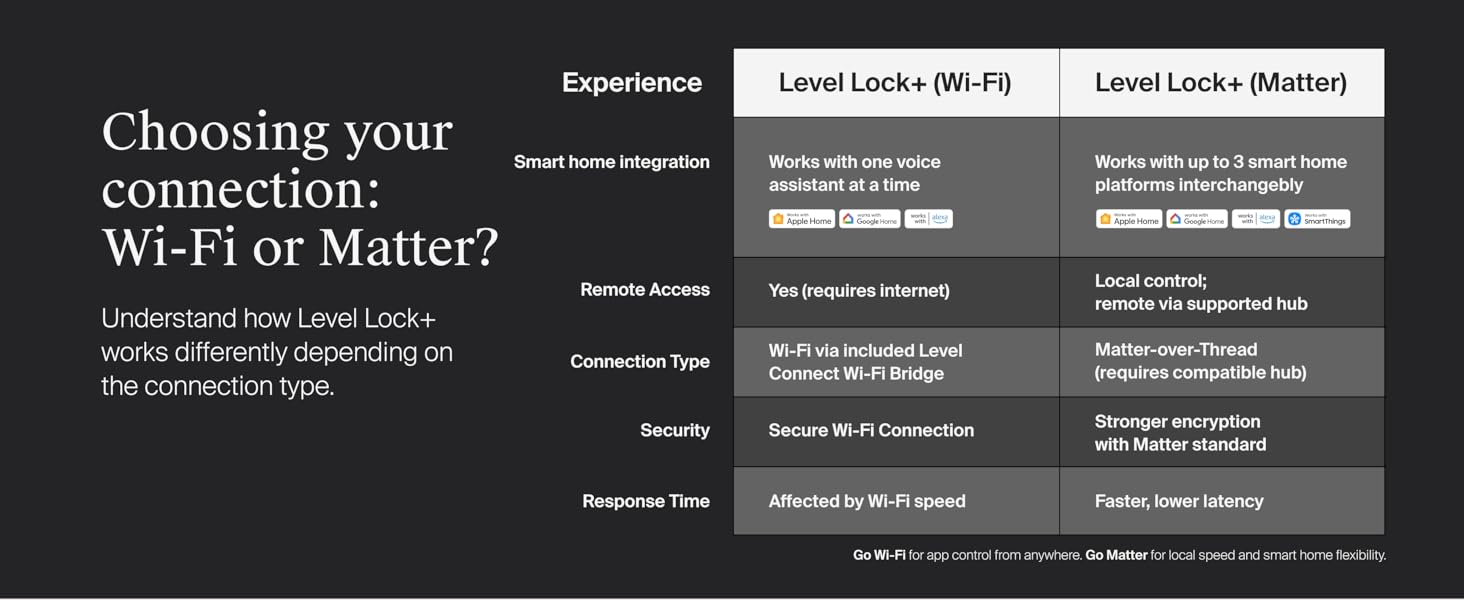
4-rasm: A diagram illustrating the necessary door measurements and compatibility for installing the Level Lock+, including bore hole diameter, backset, and door thickness.
O'rnatish bosqichlari:
- Disassemble Existing Lock: Unscrew and remove your existing lock housing, deadbolt, and strike plate.
- Install Backset: Insert the Level Lock+ backset into the cross bore hole, ensuring the word 'TOP' faces upwards. Secure it to the door with the provided bolt plate screws using a Phillips screwdriver. Avoid using power tools or overtightening.
- Install Motor: Slide the motor onto the backset and tighten the connecting screw.
- Strike Plate o'rnatish: Eshik tokchasiga eng mos keladigan tirqish plitasini taqdim etilgan vintlar bilan mahkamlang.
- Install Housing: Line up the tailpiece of the exterior housing with the horizontal opening in the tailpiece adapter and slide the housing through.
- Install Interior Plate: Line up the horizontal opening of the interior plate with the end of the tailpiece and connect it with the two supplied security screws.
- Qulfni faollashtirish: Unscrew the cap on the end of the bolt and insert the CR2 battery with the negative end towards the cap. If using the long bolt position, use the included long cap. Screw the cap back in. You will hear a welcome chime upon successful activation.
1-video: Official Level Lock+ installation guide demonstrating the step-by-step process of replacing an existing deadbolt with the Level Lock+, including securing the backset, installing the motor, and activating the battery.
Ilovani sozlash:
After physical installation, download the Level Home app for iOS or Android. Create an account and follow the in-app instructions to connect your Level Lock+.
3. Qulfni ishlatish
The Level Lock+ offers multiple convenient ways to lock and unlock your door.
Entry Options:
- Apple Home Keys: Tap your iPhone or Apple Watch to the lock to gain access.
- Level Home App: Use the Level Home app on your iOS or Android device to lock or unlock the door.
- Asosiy Fob: Utilize the provided key fobs for quick keyless entry.
- Jismoniy kalit: A traditional key is included for manual operation.
- Ovozli boshqaruv: Integrate with Apple HomeKit, Google Home, or Amazon Alexa to use voice commands for locking and unlocking.

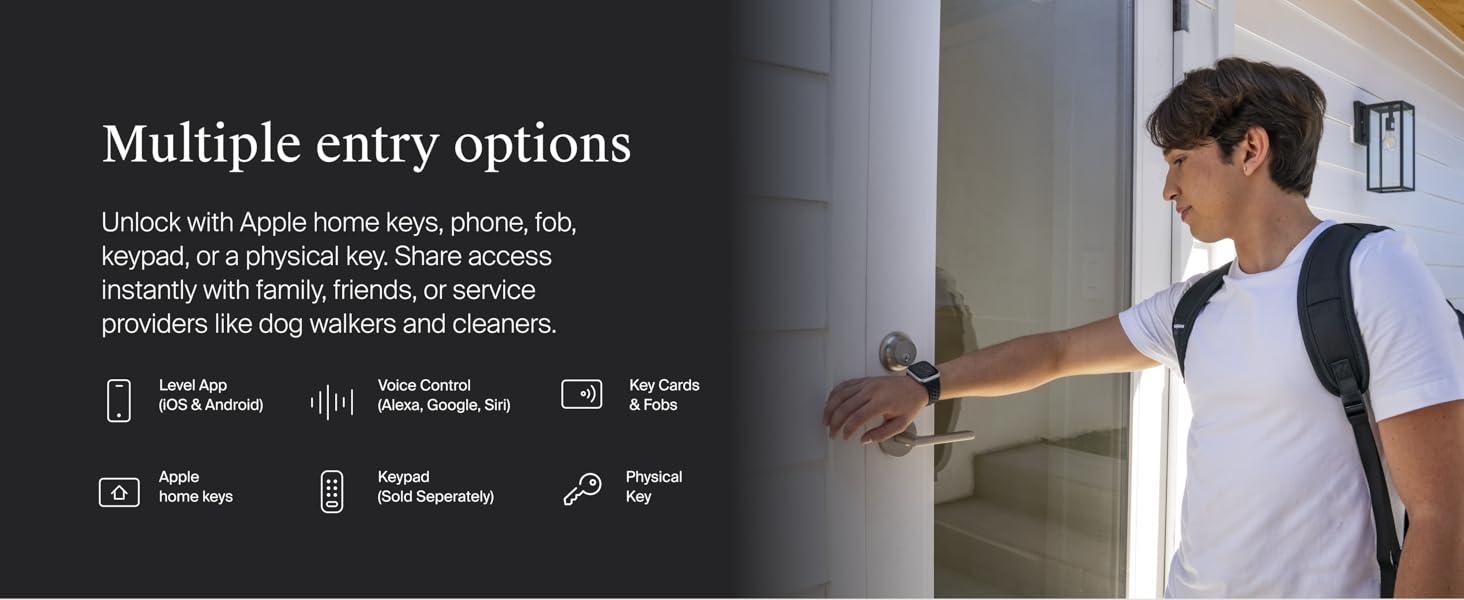
5-rasm: An illustration detailing the various methods for accessing the Level Lock+, including the Level App, Voice Control, Key Cards & Fobs, Apple Home Keys, Keypad (sold separately), and a Physical Key.
Masofaviy kirish:
With the included Level Connect Wi-Fi Bridge, you can remotely lock/unlock your door, view live activity history, and manage key codes from anywhere via the Level Home app. The Wi-Fi Bridge requires a 2.4 GHz Wi-Fi connection and should be plugged in within 20 feet of the lock.
6-rasm: A user demonstrating remote control of the Level Lock+ via the Level Home app on a smartphone, highlighting the ability to lock and unlock from any location.
Aqlli uy integratsiyasi:
The Level Lock+ (Wi-Fi) integrates directly with Apple Home, Google Home, and Amazon Alexa. You can use voice commands to control your lock and incorporate it into your smart home routines.

7-rasm: Two individuals in a kitchen setting, with one using voice commands to control the Level Lock+ through a smart home device, illustrating compatibility with Apple Home, Google Home, and Alexa.
4. Xizmat ko'rsatish
Batareyani almashtirish:
The Level Lock+ uses one CR2 battery (included). The Level Home app will notify you when the battery level is low. To replace the battery, unscrew the cap on the end of the bolt, remove the old battery, insert a new CR2 battery with the negative end towards the cap, and screw the cap back on.
5. Muammolarni bartaraf qilish; nosozliklarni TUZATISH
If you encounter any issues with your Level Lock+, consider the following:
- O'rnatish bilan bog'liq muammolar: If the deadbolt does not throw smoothly after installation, do not force it. Contact Level support for troubleshooting.
- Ulanish muammolari: Ensure the Level Connect Wi-Fi Bridge is plugged in within 20 feet of the lock and connected to a 2.4 GHz Wi-Fi network. Check your router settings if necessary.
- Ilovaning funksionalligi: Ensure your Level Home app is updated to the latest version. Restarting the app or your smartphone can resolve minor glitches.
- Batareya muddati: If the lock is unresponsive, check the battery level in the app or replace the CR2 battery.
For further assistance, refer to the Level Home app's help section or visit the official Level support websayt.
6. Texnik shartlar
| Xususiyat | Tafsilot |
|---|---|
| Brend | Daraja |
| Model nomi | Smart Lock |
| Model raqami | C-F11U-S1 |
| Qulflash turi | Qurilma |
| Material | Metall, zanglamaydigan po'lat |
| Rang | Saten Chrome |
| Buyum oʻlchamlari (U x G x Y) | 4.5 x 2.75 x 2.75 dyuym |
| Element og'irligi | 2.76 funt |
| Maxsus xususiyat | Ob-havoga chidamli |
| Ulanish protokoli | Wi-Fi (via Level Connect Bridge) |
| Nazoratchi turi | Android, Apple HomeKit, Google Assistant, iOS |
| Nazorat usuli | Voice, App, Key Fob, Physical Key, Apple Home Keys |
| Batareya turi | 1 CR2 Lithium Manganese Dioxide battery (included) |
| Xavfsizlik darajasi | BHMA AAA rating, ANSI Grade 1/A |
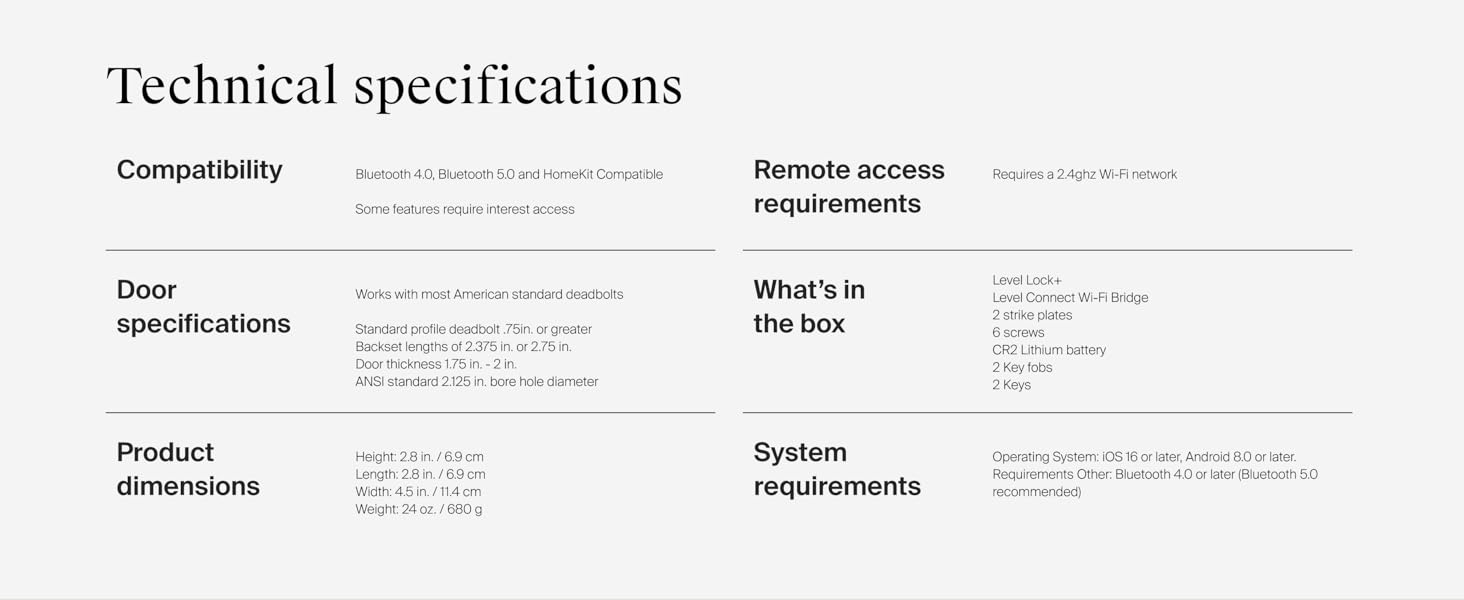
8-rasm: A detailed table outlining the technical specifications of the Level Lock+, including compatibility, door specifications, product dimensions, remote access requirements, what's in the box, and system requirements.
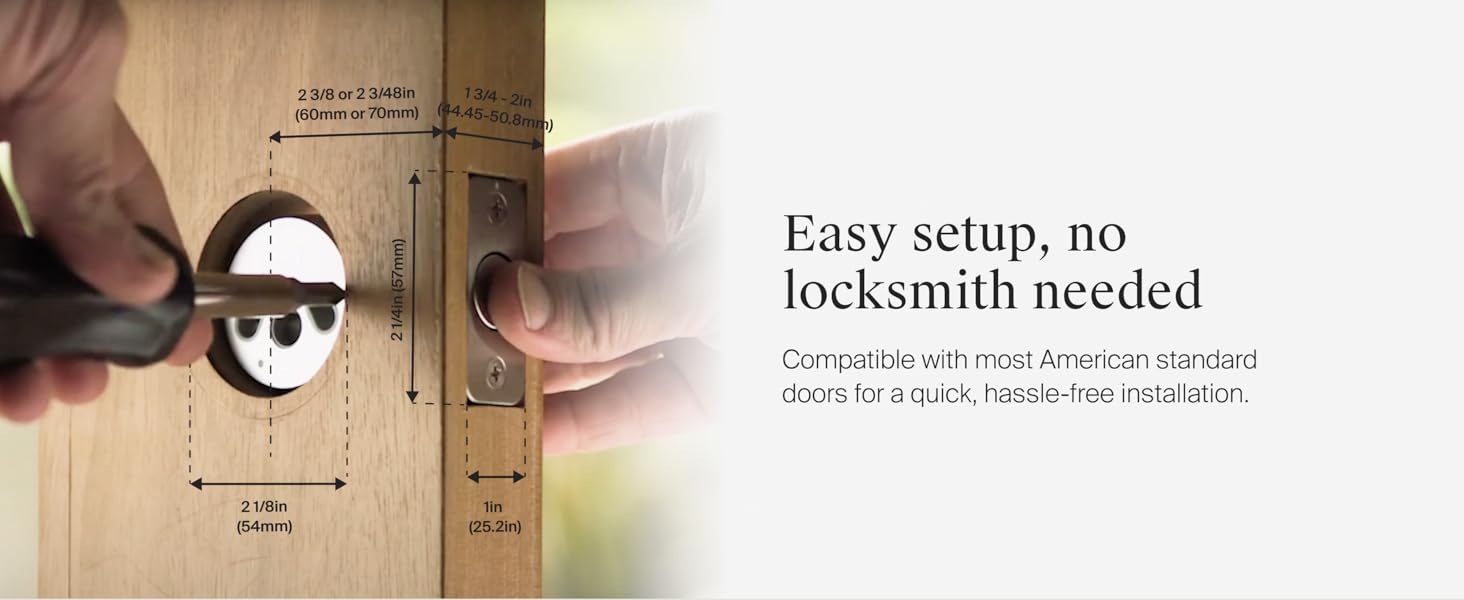
Connectivity Comparison: Level Lock+ (Wi-Fi) vs. Level Lock+ (Matter)
| Xususiyat | Level Lock+ (Wi-Fi) | Level Lock+ (Matter) |
|---|---|---|
| Smart Home integratsiyasi | Works with one voice assistant at a time (Apple Home, Google Home, Alexa) | Works with up to 3 smart home platforms interchangeably (Apple Home, Google Home, Alexa, SmartThings) |
| Masofaviy kirish | Yes (requires internet) | Local control; remote via supported hub |
| Ulanish turi | Wi-Fi via included Level Connect Wi-Fi Bridge | Matter-over-Thread (requires compatible hub) |
| Xavfsizlik | Secure Wi-Fi Connection | Stronger encryption with Matter standard |
| Javob vaqti | Affected by Wi-Fi speed | Faster, lower latency |
Go Wi-Fi for app control from anywhere. Go Matter for local speed and smart home flexibility.
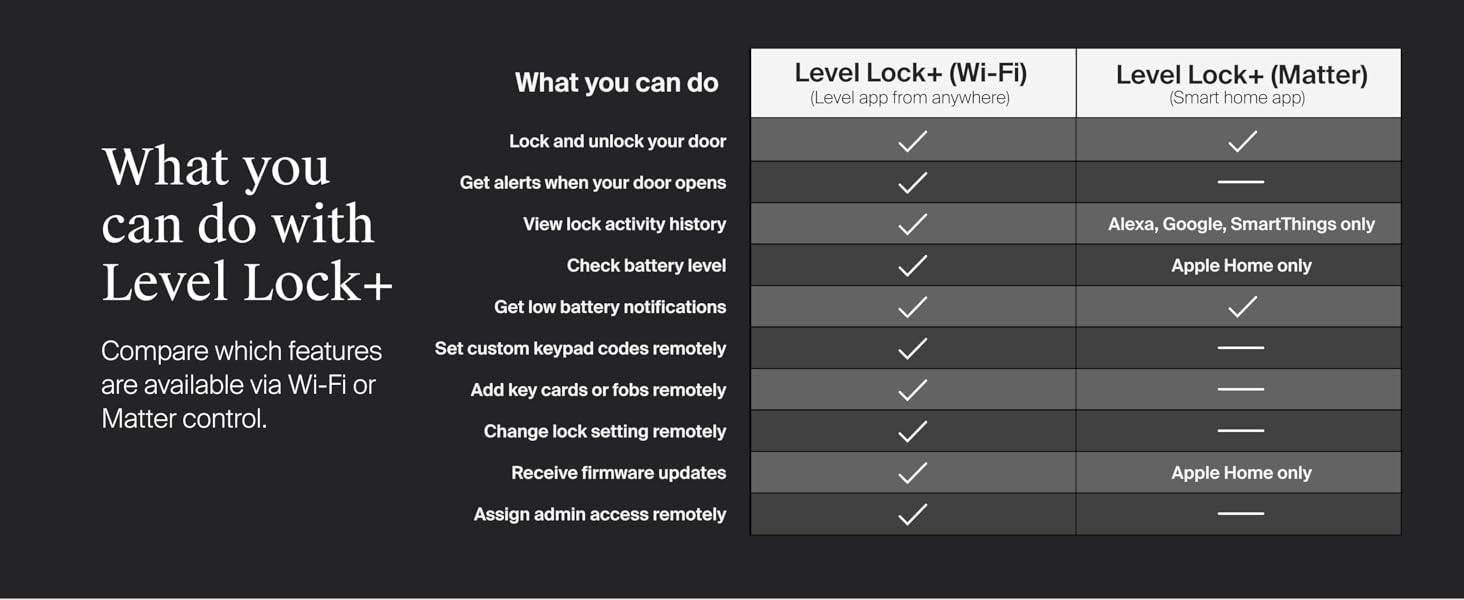
9-rasm: A comparative chart highlighting the differences between the Level Lock+ (Wi-Fi) and Level Lock+ (Matter) versions, focusing on smart home integration, remote access, connection type, security, and response time.
7. Kafolat va qo'llab-quvvatlash
The Level Lock+ is built with 440C stainless steel and strengthened metal alloys, providing high security, durability, and finish with a top AAA rating by BHMA (Builders Hardware Manufacturers Association) industry standards.
10-rasm: Details on the best-in-class security of the Level Lock+, including its construction with 440C stainless steel and strengthened metal alloys, BHMA AAA certification, and ANSI Grade 1/A rating for deadbolt security.
For warranty information, product registration, or technical support, please visit the official Level website or contact Level Home Inc customer service. You can also find additional resources and FAQs within the Level Home app.


