Kirish
This user manual provides essential information for setting up, operating, maintaining, and troubleshooting your VIBOX I-45 Gaming PC. Please read this manual thoroughly before using your new computer to ensure optimal performance and longevity.
1. Sozlash
1.1 Qutidan chiqarish va paket tarkibi
Carefully remove all components from the packaging. Ensure all items listed below are present. Retain the packaging for future transport or service needs.
- VIBOX I-45 Gaming PC (VTX-4 Black Tower)
- Quvvat kabeli
- Wi-Fi Network Adapter (300 Mbps)
- Hujjatlar (ushbu qo'llanma)
1.2 Periferik qurilmalarni ulash
Before powering on your PC, connect all necessary peripherals.
- Monitor: Connect your monitor to the graphics output port (HDMI or DisplayPort) on the rear of the PC. Ensure the monitor is also connected to a power source.
- Klaviatura va sichqoncha: Klaviatura va sichqonchani mavjud USB portlariga ulang.
- Tarmoq: For wired internet, connect an Ethernet cable to the LAN port. For wireless internet, ensure the included Wi-Fi adapter is installed or connected.
- Audio: Connect speakers or a headset to the audio output jacks.
- Quvvat: Connect the power cable to the PC's power input and then to a wall outlet.

Figure 1.2.1: Rear I/O Ports for connecting peripherals.
1.3 Dastlabki yuklash va Windows 11 ni sozlash
After connecting all peripherals, press the power button on the front of the PC. The system will boot into Windows 11 Home. Follow the on-screen instructions to complete the initial setup, including language selection, network connection, and user account creation.

Figure 1.3.1: Windows 11 Home Operating System.
2. Foydalanish bo'yicha ko'rsatmalar
2.1 Quvvatni yoqish/o'chirish va qayta ishga tushirish
- Yoqilgan: Old panelda joylashgan quvvat tugmasini bosing.
- O'chirish; yopish: Windows-da Boshlash tugmasini bosing, so'ngra Quvvat > O'chirish-ni tanlang.
- Qayta ishga tushirish: Windows-da Ishga tushirish tugmasini bosing, keyin Quvvat > Qayta ishga tushirish-ni tanlang.
2.2 Windows 11 Home Features
Your VIBOX I-45 comes pre-installed with Windows 11 Home, offering several features designed to enhance your computing experience:
- DirectStorage: Enables faster game loading times.
- AutoHDR: Automatically enhances visuals for improved graphics.
- Xbox Game Pass Integration: Seamless access to a library of games.
- Optimized CPU Performance: Enhanced performance for various tasks.
2.3 RGB yoritishni boshqarish
The VTX-4 case features Hex RGB Infinity 120mm fans. You can customize the lighting effects and colors using the dedicated RGB change button on the top panel or through compatible software if available.

Figure 2.3.1: Customizable RGB Fans.
3. Xizmat ko'rsatish
3.1 Kompyuteringizni tozalash
Regular cleaning helps maintain performance and extends the lifespan of your computer.
- Tashqi: Yumshoqdan foydalaning, damp tashqi yuzalarni artish uchun mato. Qattiq kimyoviy moddalardan saqlaning.
- Changni tozalash: Periodically use compressed air to clear dust from fan vents and internal components. Ensure the PC is powered off and unplugged before cleaning.
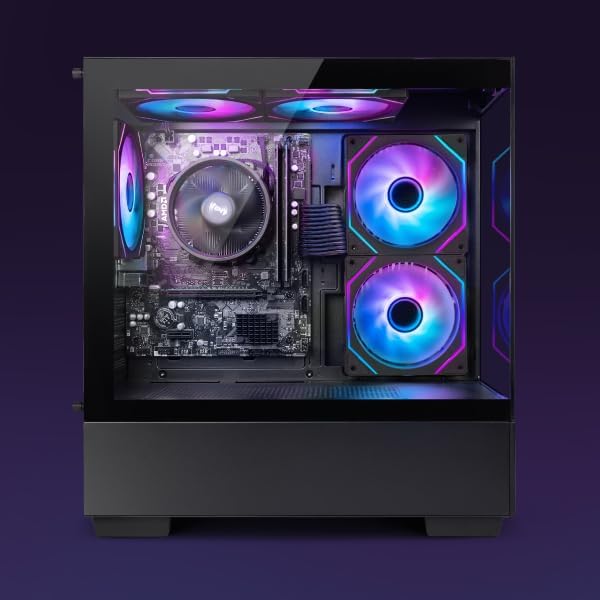
Figure 3.1.1: Internal components of the VIBOX I-45 PC.
3.2 Dasturiy ta'minotni yangilash
Keep your operating system and drivers updated to ensure security, stability, and optimal performance.
- Windows yangilanishlari: Windows 11 automatically checks for updates. You can manually check by going to Settings > Windows Update.
- Haydovchi yangilanishlari: Regularly check the VIBOX support websayt yoki komponent ishlab chiqaruvchilarining websites (AMD for CPU/GPU) for the latest drivers.
3.3 Tizimning zaxira nusxasi
Ma'lumotlar yo'qolishining oldini olish uchun muhim ma'lumotlaringizni tashqi disk yoki bulutli xotiraga muntazam ravishda zaxiralang.
4. Muammolarni bartaraf qilish; nosozliklarni TUZATISH
This section addresses common issues you might encounter. For more complex problems, please contact VIBOX support.
4.1 Quvvat yo'q
- Elektr kabeli kompyuterga ham, rozetkaga ham mahkam ulanganligiga ishonch hosil qiling.
- Boshqa qurilmani ulash orqali rozetkaning ishlashiga ishonch hosil qiling.
- Check the power supply switch on the rear of the PC (if present) is in the 'On' position.
4.2 Monitorda displey yo'q
- Confirm the monitor is powered on and correctly connected to the PC's graphics output port.
- Monitoringizda to'g'ri kirish manbai tanlanganligiga ishonch hosil qiling.
- Try a different display cable if available.
4.3 Sekin ishlash
- Orqa fonda ishlaydigan keraksiz ilovalarni yoping.
- Har qanday kutilayotgan Windows yoki drayver yangilanishlarini tekshiring va o'rnating.
- Run a disk cleanup and defragmentation (for HDD, not typically needed for SSD).
- Zararli dasturlar yoki viruslarni skanerlang.
4.4 Tarmoqqa ulanish muammolari
- Wi-fi: Ensure the Wi-Fi adapter is properly installed and drivers are up to date. Check your router and internet connection.
- Ethernet: Verify the Ethernet cable is securely connected to both the PC and the router/modem. Check router status.
- Restart your router/modem and PC.
5. Texnik shartlar
| Xususiyat | Spetsifikatsiya |
|---|---|
| Brend | VIBOX |
| Model raqami | I-45 |
| Rang | VTX-4 Black |
| Operatsion tizim | Windows 11 Bosh sahifa |
| Protsessor | AMD Ryzen 3 3200G (4 Cores, 3.6 GHz Base, up to 4.0 GHz Max) |
| Grafika | Integrated Radeon Vega 8 Graphics (2GB Shared Memory) |
| Ram | 16 GB DDR4 (3200 MHz Dual Channel) |
| Saqlash | 480 GB SSD |
| Maksimal xotira qo'llab-quvvatlashi | 128 GB |
| Wi-fi | 802.11n (300 Mbps adapter included) |
| HDMI portlari | 1 |
| USB 2.0 portlari | 3 |
| USB 3.0 portlari | 3 |
| Olchamlari (U x G x Y) | 36 x 20 x 41 sm |
| Mos qurilmalar | Headset, Keyboard, Printer, Monitor, Mouse |
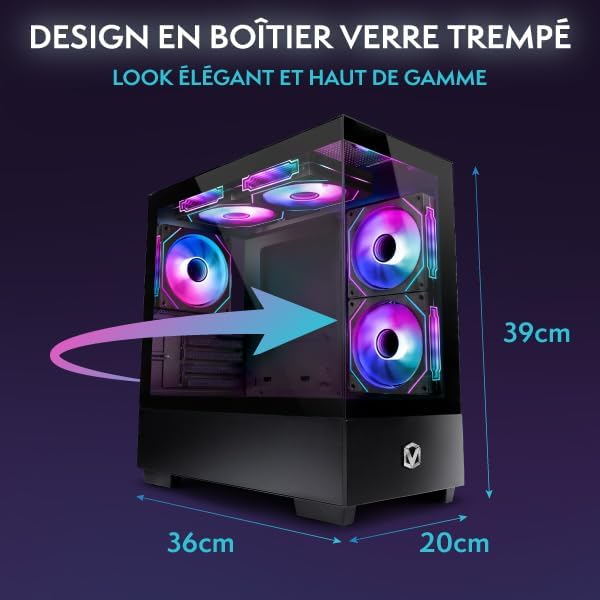
Figure 5.1.1: VIBOX I-45 PC Dimensions.
6. Kafolat haqida ma'lumot
Your VIBOX I-45 Gaming PC comes with a manufacturer's warranty covering:
- Qismlar: 2 yil
- Mehnat: Muddat
Please retain your proof of purchase for warranty claims. For detailed terms and conditions, refer to the warranty card included with your product or visit the official VIBOX websayt.
7. Qo'llab-quvvatlash
For technical assistance, troubleshooting beyond this manual, or warranty inquiries, please contact VIBOX customer support. You can find contact information on the official VIBOX Gaming websayt yoki chakana sotuvchingiz orqali.
Onlayn manbalar:
- ga tashrif buyuring VIBOX Gaming Store on Amazon mahsulot haqida ma'lumot va yangilanishlar uchun.


