1. Mahsulot tugadiview
The SKYWORTH LC2315 is a versatile 5-megapixel Wi-Fi security camera designed for both outdoor and indoor surveillance. It features advanced capabilities such as full-color night vision, 360-degree panoramic viewing, AI-powered human and vehicle detection, motion tracking, and two-way audio communication. This manual provides detailed instructions for setting up, operating, and maintaining your camera to ensure optimal performance and security.

Image: The SKYWORTH LC2315 security camera, showing its dome design and dual antennas.
Asosiy xususiyatlar:
- 5-Megapixel High Resolution: Captures clear and detailed images, allowing for precise identification of faces and license plates.
- To'liq rangli tungi ko'rish: Utilizes advanced technology to provide vivid color images even in complete darkness, surpassing traditional black and white modes.
- 360 daraja panoramali View: Offers comprehensive coverage with 360° horizontal and 75° vertical rotation, eliminating blind spots.
- Sun'iy intellekt inson va transport vositalarini aniqlash: Intelligently distinguishes between humans, vehicles, and other moving objects, reducing false alarms.
- Harakatni kuzatish: Automatically tracks and records moving objects, such as pets or intruders, within its field of view.
- Ikki tomonlama audio: Enables real-time communication through the camera's built-in microphone and speaker, accessible via your smartphone.
- IP66 ob-havoga chidamli: Designed for durability, suitable for both indoor and outdoor environments, resistant to dust and water.
- Smartfon ilovasini boshqarish: Remote monitoring and control of camera functions from your smartphone.
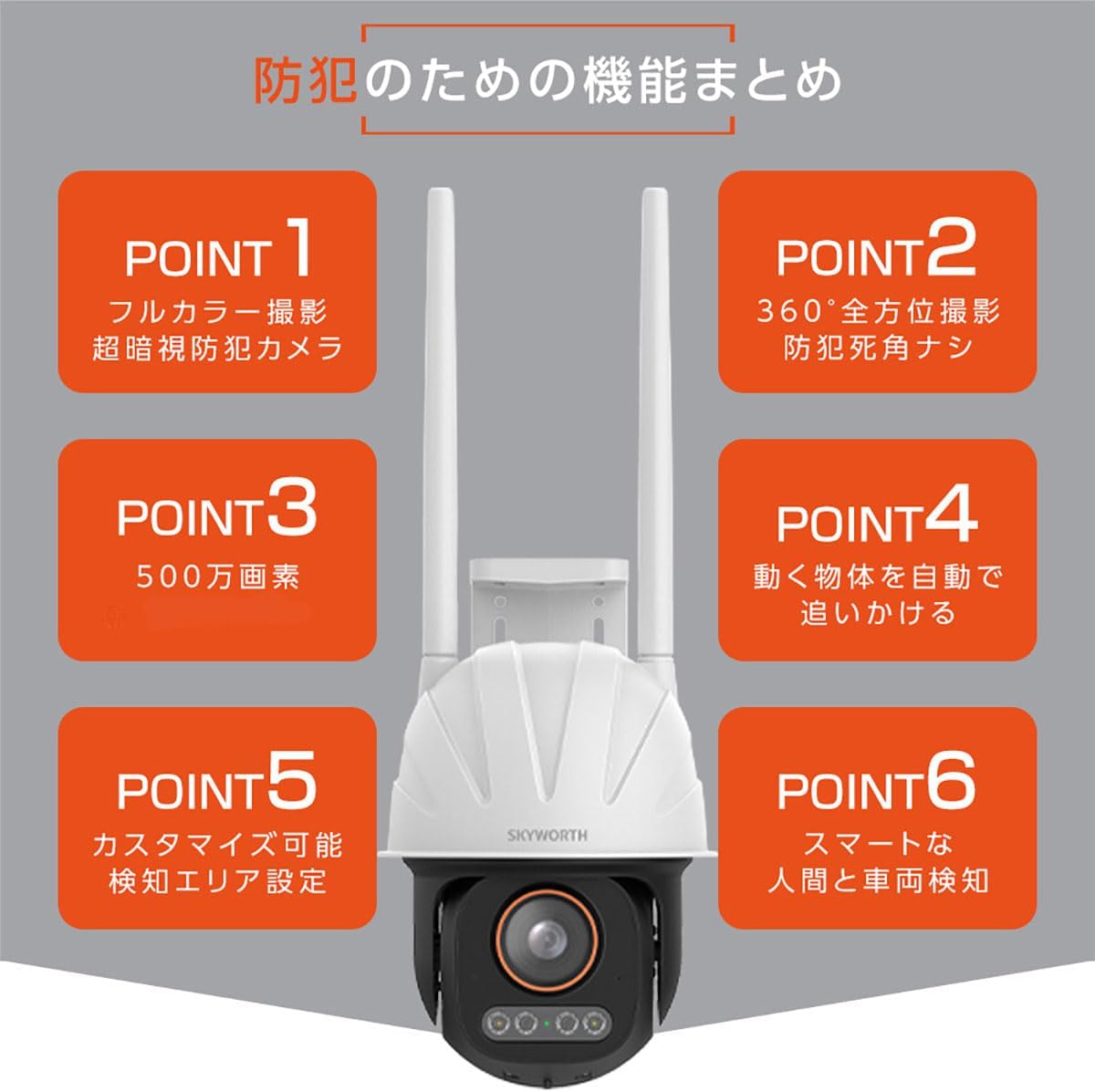
Image: A visual summary highlighting the camera's key features: full-color night vision, 360-degree coverage, 5MP resolution, motion tracking, customizable detection areas, and smart human/vehicle detection.
Durability and Security:

Image: The camera shown in a rainy environment, illustrating its IP66 waterproof and dustproof rating, ensuring reliable operation in various weather conditions.
The LC2315 is built with an IP66-rated enclosure, providing robust protection against dust and water, making it suitable for outdoor installation. Furthermore, it incorporates data security measures including encrypted user login and data transmission to protect your privacy and surveillance footage.

Image: A visual representation of data security, showing a smartphone app interface and encrypted data transmission, emphasizing user login encryption and data transfer encoding.
2. Paket tarkibi
Paketda quyidagi elementlar mavjudligini tekshiring:
- SKYWORTH LC2315 Camera Unit
- Qo'llanma
- Connection Accessories (e.g., power adapter, mounting screws)
3. O'rnatish bo'yicha qo'llanma
3.1. O'rnatish joyi
Choose a suitable location for your camera, considering the desired surveillance area and Wi-Fi signal strength. The camera is designed for wall mounting and is IP66 rated for outdoor use.
3.2. Quvvatga ulanish
- Quvvat adapterini kameraning quvvat kirish portiga ulang.
- Quvvat adapterini standart elektr rozetkaga ulang.
- Wait for the camera to power on and initiate its startup sequence.
3.3. App Download and Account Registration
- Download the official SKYWORTH security camera app from your smartphone's app store (iOS or Android).
- Ilovani oching va yangi foydalanuvchi hisobini yaratish yoki agar sizda mavjud bo'lsa, tizimga kirish uchun ekrandagi ko'rsatmalarga amal qiling.
3.4. Camera Pairing with Wi-Fi
Ensure your smartphone is connected to a 2.4GHz Wi-Fi network. The camera supports 2.4G Wi-Fi only.
- In the app, select "Add Device" or the '+' icon.
- Follow the app's instructions to connect the camera to your Wi-Fi network. This typically involves scanning a QR code displayed on your phone with the camera or entering Wi-Fi credentials.
- Once connected, the camera's status indicator will change, and you will see the camera feed in the app.
4. Foydalanish bo'yicha ko'rsatmalar
4.1. Jonli View va masofadan boshqarish
Access the live video feed from your camera through the smartphone app. You can remotely control the camera's pan (horizontal) and tilt (vertical) movements to adjust the viewkirish burchagi.

Image: A smartphone displaying the camera's live feed and controls, demonstrating remote adjustment of the camera's orientation to achieve a 360-degree view of a house exterior.
4.2. Ikki tomonlama ovozli aloqa
The camera features a built-in microphone and speaker, enabling two-way audio. Tap the microphone icon in the app to speak, and the sound will be transmitted through the camera's speaker. You can also hear audio from the camera's surroundings.

Image: A child playing on a bicycle in a yard, with the camera mounted on the house. Text bubbles indicate two-way communication: "Don't play in the road!" and "Yes!".
4.3. Harakatni aniqlash va ogohlantirishlar
Configure motion detection settings in the app. When motion is detected, the camera can send instant alerts to your smartphone. The AI human and vehicle detection features help minimize false alarms.
- Moslashtirilgan aniqlash zonalari: Kamera ichidagi aniq joylarni belgilang view harakatni aniqlash faol bo'lishi kerak bo'lgan joyda.
- Sezuvchanlikni sozlash: Adjust the sensitivity level to suit your environment and reduce unwanted triggers.
4.4. Motion Tracking
Enable motion tracking in the app to have the camera automatically follow and record moving objects. This ensures that any activity, such as a pet playing or an intruder, remains in frame.

Image: Multiple frames showing children running in a yard, with the camera rotating to follow their movement, illustrating the 360-degree automatic tracking feature.
4.5. Tungi ko'rish rejimlari
The camera offers advanced full-color night vision, providing clear and detailed color images even in low-light conditions. It can also operate in traditional black and white infrared mode if preferred.

Image: A comparison showing a night scene captured by the SKYWORTH camera with "Super Dark Technology" in full color, alongside a conventional camera's black and white image and an iPhone's low-light image, demonstrating superior clarity and color retention.

Image: A garden path illuminated by subtle lighting at night, captured in full color by the camera, showcasing its advanced night vision capabilities.
5. Xizmat ko'rsatish
Regular maintenance ensures the longevity and optimal performance of your SKYWORTH LC2315 camera.
- Tozalash: Kamera linzalari va korpusini yumshoq, d bilan muloyimlik bilan artingamp mato. Qattiq kimyoviy moddalar yoki abraziv materiallardan foydalanishdan saqlaning.
- Dasturiy ta'minotni yangilash: Check the app periodically for available firmware updates. Keeping your camera's firmware up-to-date ensures access to the latest features and security enhancements.
- Quvvat aylanishi: Agar kamerada muammolar yuzaga kelsa, quvvat adapterini rozetkadan uzib, qayta ulab, uni qayta ishga tushirishga harakat qilib ko'ring.
6. Muammolarni bartaraf qilish; nosozliklarni TUZATISH
If you encounter problems with your camera, refer to the following common issues and solutions:
| Muammo | Mumkin yechim |
|---|---|
| Kamera Wi-Fi tarmog'iga ulanmayapti |
|
| Tasvir sifati past |
|
| Harakatni aniqlash ogohlantirishlari yo'q |
|
| Ikki tomonlama audio ishlamayapti |
|
7. Texnik shartlar
| Xususiyat | Tafsilot |
|---|---|
| Model raqami | LC2315 |
| Video suratga olish ruxsati | 5 Megapixels (1920p) |
| Simsiz aloqa texnologiyasi | Wi-Fi (2.4G) |
| Quvvat iste'moli | 12 Vt |
| Mahsulot o'lchamlari (LxWxH) | 12.9 x 12.9 x 34 sm |
| Maxsus xususiyatlar | Motion Sensor, Night Vision (Full-Color) |
| Ichki/tashqi makonda foydalanish | Indoor, Outdoor (IP66 Weatherproof) |
| O'rnatish turi | Devorga o'rnatish |
| Mos qurilmalar | Smartfon |
8. Kafolat va qo'llab-quvvatlash
The SKYWORTH LC2315 camera comes with a 1.5 yillik kafolat. For any inquiries, technical assistance, or warranty claims, please contact our dedicated Japanese support window. Refer to the contact information provided in the product packaging or on the official SKYWORTH websayt.


