1. Kirish
This user manual provides detailed instructions for the Maxcom MM248 4G mobile phone. Please read this manual carefully before using your device to ensure proper operation and to maximize its lifespan. Keep this manual for future reference.
2. Qurilma tugadiview
Familiarize yourself with the physical components of your Maxcom MM248 phone.
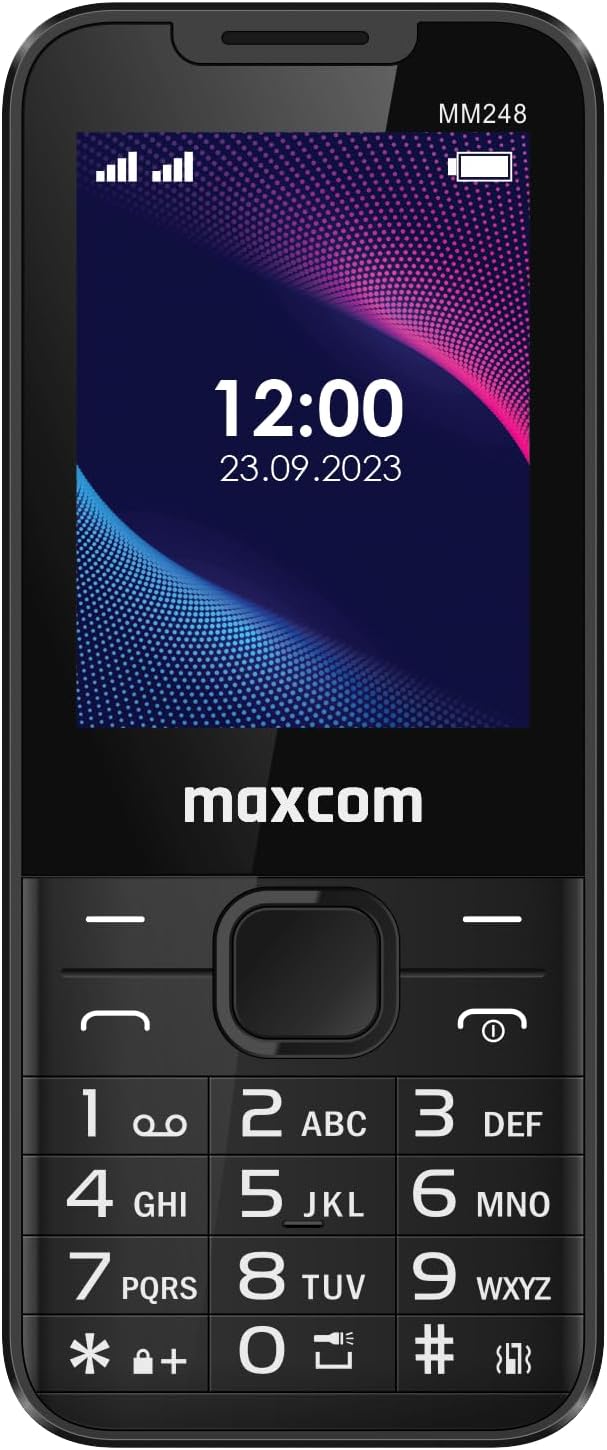
2.1-rasm: Old View of Maxcom MM248
This image displays the front of the Maxcom MM248 phone, highlighting its 2.4-inch screen and traditional alphanumeric keypad. The screen shows the current time and date, along with signal and battery indicators. The Maxcom logo is visible below the screen.

2.2-rasm: yon View of Maxcom MM248
Ushbu rasmda yon prof ko'rsatilganfile of the Maxcom MM248, illustrating its compact and ergonomic design.

2.3-rasm: Pastki View of Maxcom MM248
This image highlights the bottom of the device, featuring the USB Type-C charging port and a 3.5mm headphone jack for audio accessories.

2.4-rasm: Yuqori View of Maxcom MM248
This image shows the top of the phone, where the integrated flashlight is located.
3. Sozlash
3.1. Batareyani o'rnatish
- Carefully remove the back cover of the phone. This may require firm but gentle pressure, as noted by some users.
- Insert the battery into its compartment, ensuring the gold contacts align with the phone's terminals.
- Orqa qopqoqni joyiga qo'ying, u chertib chiqguncha mahkam bosing.
3.2. SIM va xotira kartalarini joylashtirish
The Maxcom MM248 supports SIM cards for network connectivity and a memory card (e.g., microSD) for expanded storage.
- With the back cover and battery removed, locate the SIM card slot(s) and the memory card slot.
- Insert your SIM card(s) into the designated slot(s) with the gold contacts facing down, following the orientation indicated on the phone.
- If using a memory card, insert it into the memory card slot until it is securely seated.
- Batareyani va orqa qopqoqni qayta joylashtiring.
3.3. Batareyani zaryadlash
Birinchi marta ishlatishdan oldin telefon batareyasini to'liq zaryadlang.
- USB Type-C kabelini telefonning pastki qismidagi zaryadlash portiga ulang.
- Connect the other end of the cable to a compatible USB power adapter and plug it into a wall outlet.
- Ekrandagi zaryadlash indikatori zaryadlash holatini ko'rsatadi.
- To'liq zaryadlangandan so'ng, zaryadlovchini ajratib oling.
Eslatma: If the provided charger does not function, please use a compatible USB Type-C charger. Ensure the charger is working correctly before use.
3.4. Quvvatni yoqish/o'chirish
- Yoqish uchun: Ekran yonib ketguncha Quvvat/Qo'ng'iroqni tugatish tugmasini bosib turing.
- O'chirish uchun: Quvvat/Qo‘ng‘iroqni tugatish tugmasini bosing va ushlab turing, so‘ngra ekrandagi variantlardan “Quvvatni o‘chirish” ni tanlang.
4. Foydalanish bo'yicha ko'rsatmalar
4.1. Asosiy navigatsiya
- Use the directional navigation keys (up, down, left, right) to move through menus and options.
- Press the central "OK" or "Select" button to confirm a selection.
- Use the "Back" or "Clear" button to return to the previous screen or delete characters.
4.2. Qo'ng'iroqlarni amalga oshirish va qabul qilish
- Qo'ng'iroq qilish uchun: Enter the phone number using the keypad and press the Green Call button.
- Qo'ng'iroqni qabul qilish uchun: Telefon jiringlaganda yashil qo'ng'iroq tugmasini bosing.
- Qo'ng'iroqni tugatish uchun: Qizil qo'ng'iroqni tugatish tugmasini bosing.
4.3. Xabarlarni yuborish va qabul qilish
- Asosiy menyudan "Xabarlar" ilovasiga o'ting.
- Select "New Message" to compose an SMS. Enter the recipient's number and your message.
- Press the "Send" option.
- Received messages will appear in your inbox.
4.4. Internet Connectivity (4G)
The Maxcom MM248 supports 4G connectivity for internet access via KaiOS.
- Ensure your SIM card has an active data plan.
- Navigate to the "Browser" application from the main menu.
- Use the keypad to type in website addresses or search queries.
4.5. Kameradan foydalanish
The phone includes a basic camera function.
- Access the "Camera" application from the main menu.
- Ekran sifatida foydalanib, suratingizni ramkaga soling viewqidiruvchi.
- Press the central "OK" or "Select" button to capture a photo.
4.6. FM radio
The Maxcom MM248 features an FM radio that does not require headphones to function as an antenna.
- Open the "FM Radio" application.
- Use the navigation keys to scan for stations or tune to a specific frequency.
- Adjust the volume using the dedicated volume keys (if present) or menu options.
4.7. Chiroq
Activate the built-in flashlight for illumination.
- Typically, the flashlight can be activated via a shortcut key or through the main menu's "Tools" or "Utilities" section. Refer to your phone's on-screen prompts for the exact method.
5. Xizmat ko'rsatish
5.1. Qurilmangizni tozalash
- Use a soft, dry cloth to clean the phone's screen and body.
- Avoid using harsh chemicals or abrasive materials, which can damage the device.
5.2. Batareyani parvarish qilish
- Batareya quvvatini uzaytirish uchun telefonni haddan tashqari harorat ta'siriga qo'ymang.
- Do not leave the phone charging for extended periods after it is fully charged.
- Agar batareya olinadigan bo'lsa, uning to'g'ri o'rnatilganligiga ishonch hosil qiling.
5.3. Dasturiy ta'minotni yangilash
While specific software update information is not available, it is generally recommended to keep your device's software updated to ensure optimal performance and security. Check the phone's settings for any available updates.
6. Muammolarni bartaraf qilish; nosozliklarni TUZATISH
6.1. Umumiy muammolar va yechimlar
- Phone not powering on: Ensure the battery is charged and correctly installed. Try connecting the charger.
- Tarmoq signali yo'q: Check if the SIM card is properly inserted and active. Ensure you are in an area with network coverage.
- Zaryadlovchi ishlamayapti: Verify the charger cable and adapter are functional. Try a different compatible USB Type-C charger.
- Difficulty removing back cover: Apply firm, even pressure to the designated opening points. If persistent, consult a service center.
For issues not listed here, please refer to the support section or contact customer service.
7. Texnik shartlar
| Xususiyat | Tafsilot |
|---|---|
| Brend | Maxcom |
| Model nomi | MM248 |
| Operatsion tizim | KaiOS |
| Ekran o'lchami | 2.4 dyuym |
| Uyali aloqa texnologiyasi | 4G |
| Simsiz aloqa operatori | Qulfdan chiqarilgan |
| Ulanish | GSM, 4G, USB Type-C, 3.5mm Connector |
| Maxsus xususiyatlar | Internet access, FM Radio, Flashlight |
| RAM hajmi | 128 MB |
| Saqlash hajmi | 16 GB (likely internal, expandable via microSD) |
| CPU modeli | Korteks |
| Rezolyutsiya | 480 x 800 yoki 480 x 854 |
| Batareya | 1 Non-standard battery required |
| Mahsulot turi | Bar telefon |
| Rang | Black/Red (as per product details, though images show black) |
8. Kafolat va qo'llab-quvvatlash
Specific warranty information for the Maxcom MM248 is not detailed in the product listing. For warranty claims or technical support, please contact your retailer or the manufacturer directly.
- Ehtiyot qismlar mavjudligi: Ehtiyot qismlarning mavjudligi haqida ma'lumot berilmagan.
- Software Updates Guarantee: Information regarding guaranteed software updates is not provided.
Kafolat maqsadida har doim sotib olinganligingizni tasdiqlovchi hujjatni saqlab qo'ying.


