1. Kirish
This manual provides detailed instructions for the safe and effective use of your KKnoon Digital Multimeter, specifically focusing on the FY128 model. This compact and intelligent electrical tester is designed for accurate measurements of various electrical parameters, making it suitable for professionals, educational institutions, and home users. It adheres to the safety requirements of the International Electrotechnical Safety Standard (IEC-61010) for electronic measuring instruments.
The multimeter features a 5999-count backlit LCD for clear readings, along with functions for AC/DC voltage, resistance, frequency, continuity, live wire checking, and Non-Contact Voltage (NCV) aniqlash.

1-rasm: Old view of the KKnoon Digital Multimeter (Model FY128) showing the display and control buttons.
2. Xavfsizlik ma'lumotlari
To ensure safe operation and prevent damage to the meter, please read and follow all safety instructions carefully. Improper use can result in electric shock or damage to the instrument.
- Always verify the meter's functionality before use by testing a known voltage yoki joriy manba.
- Har bir o'lchov diapazoni uchun belgilangan maksimal kirish qiymatlaridan oshmang.
- Ensure test leads are in good condition, free from cracks or damaged insulation, before connecting them to any circuit.
- Never use the meter if it appears damaged or if the casing ochiq.
- Vol. bilan ishlashda juda ehtiyot bo'lingtag30V AC RMS, 42V tepalik yoki 60V DC dan yuqori. Bu jildtagzarba xavfini keltirib chiqaradi.
- Remove test leads from the circuit before changing functions or ranges.
- Batareya quvvati kamligi indikatori paydo bo'lganda, aniq ko'rsatkichlarni ta'minlash uchun batareyalarni darhol almashtiring.
- Hisoblagichni portlovchi gaz, bug 'yoki changli muhitda ishlatmang.
3. Mahsulot xususiyatlari
The KKnoon Digital Multimeter offers a range of features designed for convenience and accuracy:
- Ko'p funktsiyalilik: O'lchovlar AC/DC Voltage, Resistance, Frequency, Continuity, Live Wire Checking, and NCV (Non-Contact Voltagva).
- Two Measurement Modes:
- Avtomatik identifikatsiya: Automatically detects and measures AC/DC voltage, frequency, resistance, and continuity.
- Qo'lda almashtirish: Allows selection of specific functions including AC/DC voltage, frequency, resistance, continuity, diode, capacitance (FY129C only), and LIVE NCV.
- Maʼlumotlarni saqlash: Lock the current measurement reading on the display with a single button press.
- Katta LCD displey: Provides clear and easy-to-read values with a 5999-count resolution.
- Flashlight & Screen Backlight: Kam yorug'lik sharoitida ko'rinishni yaxshilaydi.
- Compact Design with Bracket: Portable and includes a built-in support bracket for hands-free operation.
- Xavfsizlik talablariga muvofiqligi: Designed and produced according to IEC-61010 safety standards.

Figure 2: The multimeter's large LCD display clearly shows various measurement functions.

Figure 3: The integrated support bracket allows for convenient hands-free use.
4. Paket tarkibi
Upon opening your package, please verify that all items listed below are present and in good condition:
- 1 x KKnoon Digital Multimeter (Model FY128)
- 1 x Sinov simlari juftligi (qizil va qora)
- 1 x Foydalanuvchi qo'llanmasi (ingliz tili)
5. Sozlash
5.1 Batareyani o'rnatish
The multimeter requires 2 x 1.5V AAA batteries (not included). To install or replace batteries:
- Multimetr o'chirilganligiga va sinov simlari uzilganligiga ishonch hosil qiling.
- Qurilmaning orqa tarafidagi batareya bo'limi qopqog'ini toping.
- Batareya bo'linmasini ochish uchun tornavida foydalaning.
- Bo'lim ichida ko'rsatilganidek, to'g'ri kutupluluğa (+/-) rioya qilib, ikkita 1.5 V AAA batareyani joylashtiring.
- Batareya bo'limi qopqog'ini joyiga qo'ying va uni vint bilan mahkamlang.
5.2 Sinov simlarini ulash
The multimeter comes with a pair of test leads (red and black). Connect them as follows:
- Qora sinov simini 'COM' (Umumiy) kirish ulagichiga joylashtiring.
- Ko'pgina o'lchovlar uchun qizil sinov simini 'INPUT' uyasiga kiriting (Voltage, Resistance, Frequency, Continuity, Diode, Capacitance).

Figure 4: Labeled diagram of the multimeter's functions and input jacks.
6. Foydalanish bo'yicha ko'rsatmalar
6.1 Quvvatni yoqish/o‘chirish
Press the red power button (Yoqish tugmasi) to turn the multimeter on or off. The device features an auto-shutdown function to conserve battery life after a period of inactivity.
6.2 O'lchash rejimlari
The multimeter offers two primary measurement modes:

Figure 5: The multimeter supports both auto identification and manual switching modes.
- Auto Identification Mode: When powered on, the meter defaults to auto identification. In this mode, it automatically detects and measures AC/DC voltage, frequency, resistance, and continuity. Simply connect the test leads to the circuit, and the meter will display the relevant measurement.
- Qo'lda almashtirish rejimi: To access specific functions not covered by auto identification or to manually select a range, press the 'NCV/LIVE' button (or other function buttons if available on your specific model, e.g., FY129C for Diode/Capacitance). This allows you to cycle through AC/DC voltage, frequency, resistance, continuity, LIVE, and NCV.
6.3 AC/DC ni o'lchash Voltage
- Connect the black test lead to the 'COM' jack and the red test lead to the 'INPUT' jack.
- If in auto identification mode, the meter will automatically detect voltage. If in manual mode, select the appropriate AC or DC voltage funktsiyasi.
- Connect the test leads in parallel across the component or circuit to be measured.
- jildini o'qingtagLCD displeydagi e qiymati.
6.4 Qarshilikni o'lchash
- Qarshilikni o'lchashdan oldin kontaktlarning zanglashiga olib tashlanganligiga ishonch hosil qiling.
- Connect the black test lead to 'COM' and the red test lead to 'INPUT'.
- If in auto identification mode, the meter will automatically detect resistance. If in manual mode, select the resistance function (Ω).
- Connect the test leads across the component whose resistance you wish to measure.
- LCD displeydagi qarshilik qiymatini o'qing.
6.5 O'lchash chastotasi
- Connect the black test lead to 'COM' and the red test lead to 'INPUT'.
- If in auto identification mode, the meter will automatically detect frequency. If in manual mode, select the frequency function (Hz).
- Connect the test leads to the circuit where frequency is to be measured.
- LCD displeyda chastota qiymatini o'qing.
6.6 Uzluksizlik testi
- Zanjirning quvvatsizlanganligiga ishonch hosil qiling.
- Connect the black test lead to 'COM' and the red test lead to 'INPUT'.
- If in auto identification mode, the meter will automatically detect continuity. If in manual mode, select the continuity function (★)).
- Touch the test leads to the two points of the circuit or component you want to test.
- A continuous beep indicates a low resistance path (continuity). The display will show the resistance value.
6.7 Live Wire Checking
This function helps identify live AC wires.
- Connect the black test lead to 'COM' and the red test lead to 'INPUT'.
- Press the 'NCV/LIVE' button until 'LIVE' is indicated on the display.
- Insert the red test lead into the socket or touch it to the wire you suspect is live.
- The meter will beep and the display will indicate 'LIVE' if a live wire is detected.
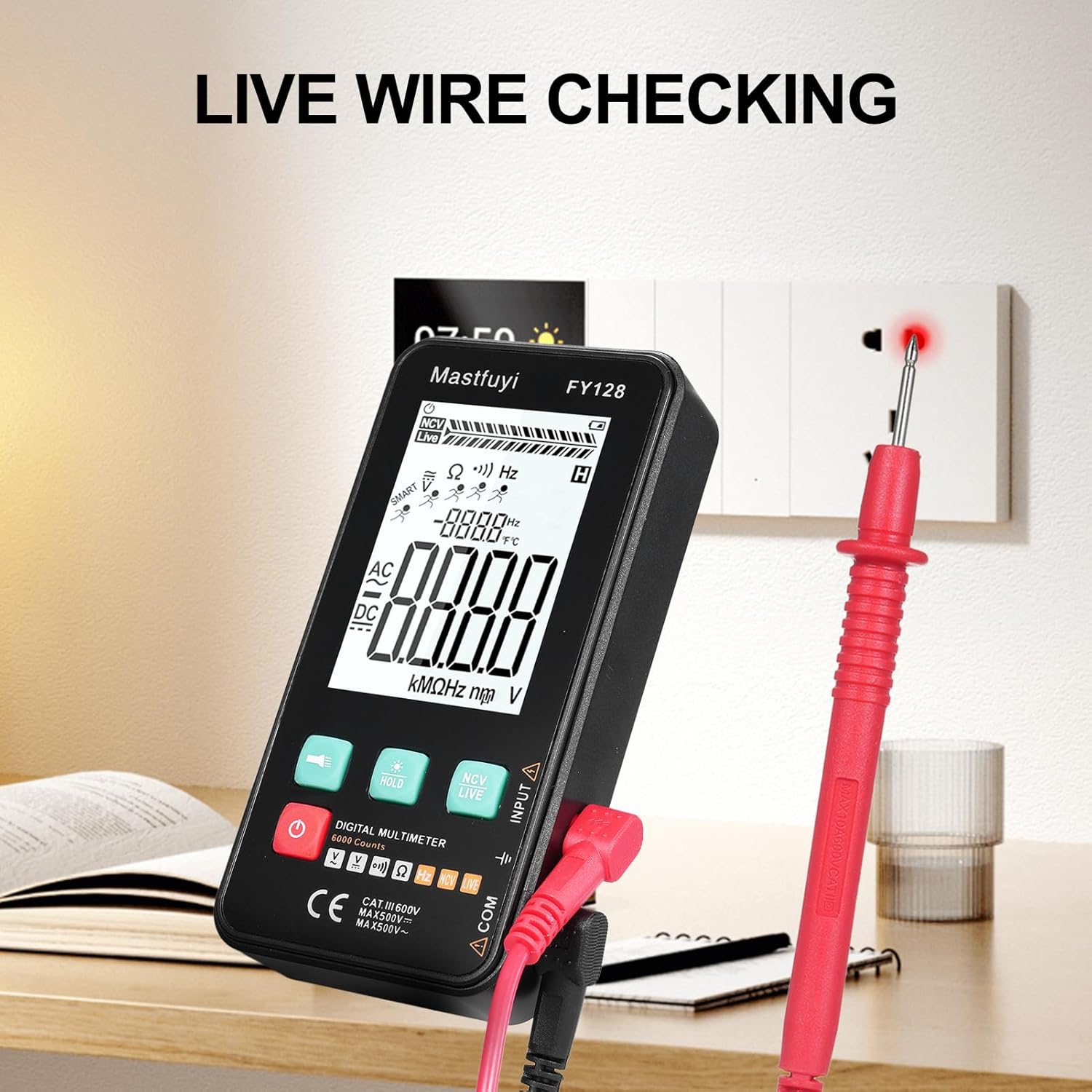
Figure 6: Using the multimeter for live wire detection.
6.8 NCV (Kontaktsiz jildtage) Sinov
NCV funktsiyasi AC hajmini aniqlash imkonini beraditage to'g'ridan-to'g'ri aloqa qilmasdan.
- Press the 'NCV/LIVE' button until 'NCV' is indicated on the display.
- Bring the top front part of the multimeter close to the wire or electrical outlet.
- The meter will beep and the NCV indicator on the display will illuminate or increase in intensity as it detects AC voltage.

7-rasm: Kontaktsiz jildtage (NCV) aniqlash davom etmoqda.
6.9 Ma'lumotni ushlab turish funksiyasi
To freeze the current reading on the display, press the 'HOLD' button. Press it again to release the hold and resume live measurements.
6.10 Flashlight & Backlight
Press the flashlight button (🔦) to turn on the built-in flashlight. Long press the 'HOLD' button to activate the screen backlight for improved visibility in dark environments.
7. Xizmat ko'rsatish
7.1 Batareyani almashtirish
When the low battery indicator appears on the display, replace the batteries as described in Section 5.1. Always use new 1.5V AAA batteries.
7.2 Tozalash
Multimetrni tozalash uchun korpusni reklama bilan artib olingamp cloth and a mild detergent. Do not use abrasives or solvents. Ensure the device is completely dry before use.
7.3 Saqlash
If the multimeter is not used for an extended period, remove the batteries to prevent leakage and corrosion. Store the device in a cool, dry place, away from direct sunlight and extreme temperatures.
8. Muammolarni bartaraf qilish; nosozliklarni TUZATISH
If you encounter issues with your multimeter, refer to the following common problems and solutions:
| Muammo | Mumkin sabab | Yechim |
|---|---|---|
| Displey yoki xira displey yo'q | Batareyalar quvvati kam yoki o'lik; Batareya noto'g'ri o'rnatilgan | Batareyalarni almashtiring; Batareya qutblanishini tekshiring |
| Noto'g'ri o'qishlar | Low batteries; Damaged test leads; Incorrect function selected | Replace batteries; Inspect/replace test leads; Select correct measurement function |
| Davomiylik testi signal bermaydi | Open circuit; High resistance; Incorrect function | Ensure circuit is closed; Check for breaks; Select continuity function |
| Meter javob bermayapti | Frozen display (Data Hold); Internal fault | Press 'HOLD' button to release; Contact customer support if issue persists |
9. Texnik shartlar
The following specifications apply to the KKnoon Digital Multimeter Model FY128 (and FY128C, unless specified for FY129C):
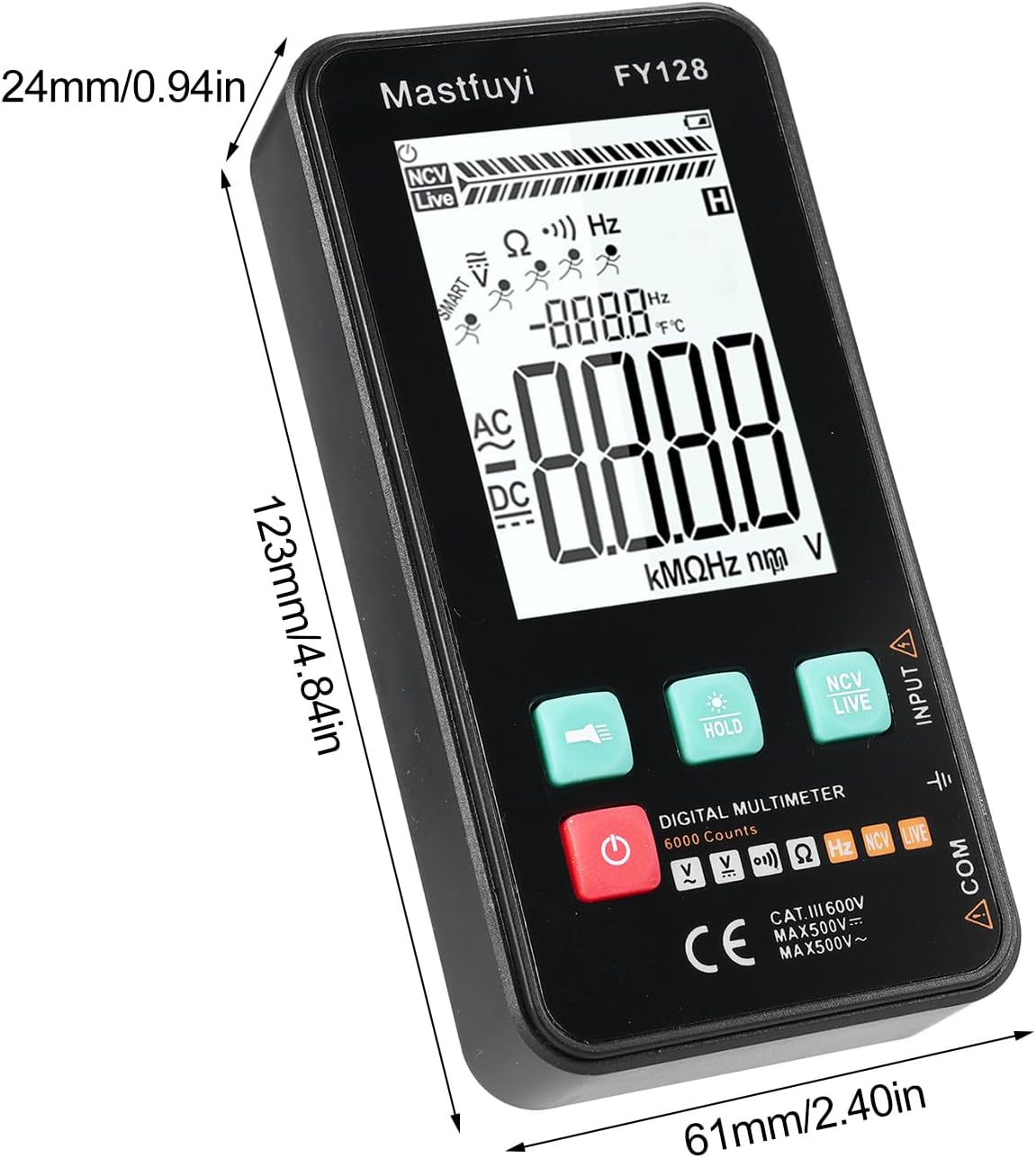
Figure 8: Physical dimensions of the KKnoon Digital Multimeter.
| Parametr | Specification (FY128/FY128C) | Specification (FY129C - if different) |
|---|---|---|
| AC jildtage | 1V~500V, ±(1.5%+3) | 0.8V~500V, ±(1.5%+5) |
| DC voltage | 0.5V~500V, ±(1.2%+5) | 0.8V~500V, ±(1.2%+5) |
| Qarshilik | 30Ω~10000KΩ, ±(2%+5) | 30Ω~60000KΩ, ±(2%+5) |
| Chastotasi | 40Hz~1000Hz, ±(2.5%+5) | 10Hz~6000Hz, ±(2.5%+5) |
| Imkoniyatlar | Yoʻq | 6nf~60000µf, ±(2.5%+5) |
| Harorat | Yoʻq | -20℃~1000℃, ±(5%+4) |
| Atrof-muhit harorati | Yoʻq | 0℃~70℃ |
| Diyot | Yo'q | Ha |
| Davomiylik | Ha | Ha |
| NCV | Ha | Ha |
| Live Wire Checking | Ha | Ha |
| Avtomatik o'chirish | Ha | Ha |
| Quvvatlantirish manbai | 2 * 1.5V AAA batteries (Not included) | 2 * 1.5V AAA batteries (Not included) |
| Element hajmi | 123 * 61 * 24 mm / 4.84 * 2.40 * 0.94 dyuym | 123 * 61 * 24 mm / 4.84 * 2.40 * 0.94 dyuym |
| Element og'irligi | 113 g / 3.98 oz | 113 g / 3.98 oz |
10. Kafolat va qo'llab-quvvatlash
For warranty information or technical support, please refer to the product packaging or contact your retailer. Keep your purchase receipt as proof of purchase. For general inquiries, you may visit the KKnoon brand page on Amazon.
