1. Kirish
Thank you for choosing the Darmoshark N3PRO 8K Wireless Gaming Mouse. This manual provides detailed instructions for setting up, operating, and maintaining your new gaming mouse. Please read this manual thoroughly before use to ensure optimal performance and longevity of the product.
2. Paket tarkibi
- Darmoshark N3PRO Wireless Gaming Mouse
- USB-C-USB-A zaryadlovchi simini
- 2.4G USB qabul qiluvchi
- Foydalanuvchi uchun qo'llanma

Image: The Darmoshark N3PRO wireless gaming mouse shown with its accompanying 2.4G USB receiver.
3. Mahsulot tugadiview
The Darmoshark N3PRO features a lightweight, ergonomic design with multiple connectivity options and programmable buttons.
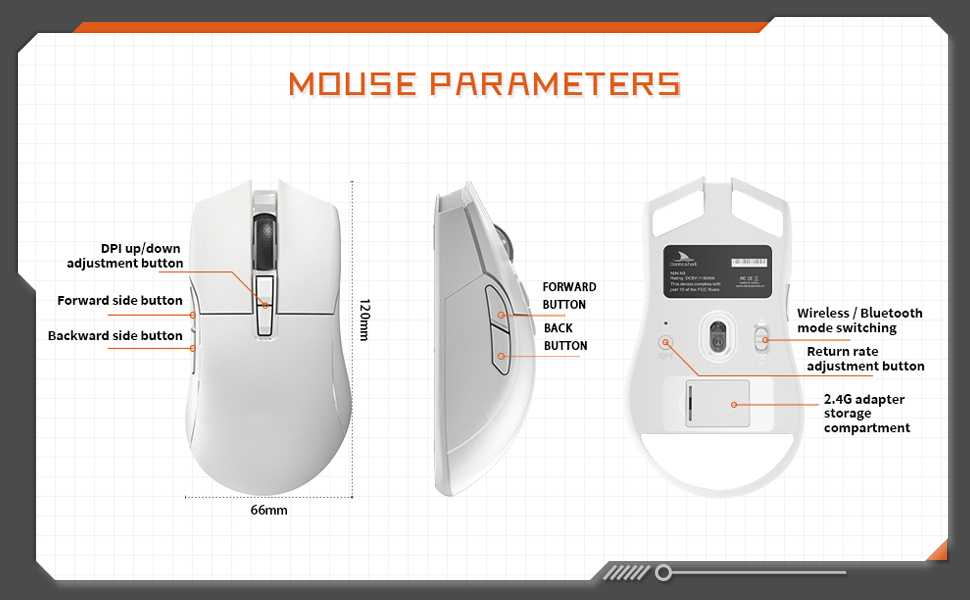
Image: A diagram illustrating the Darmoshark N3PRO mouse from top, side, and bottom views, with labels for buttons and dimensions. Key labels include DPI up/down adjustment button, forward side button, backward side button, forward button, back button, wireless/Bluetooth mode switching, return rate adjustment button, and 2.4G adapter storage compartment.
Tugma funktsiyalari:
- Chap tugmasini bosish tugmasi: Sichqonchaning chap tugmasi standart funksiyasi.
- O'ng tugmasini bosing: Sichqonchaning o'ng tugmasi bilan standart funksiya.
- O'tkazish g'ildiragi: Scroll up/down, and middle click function.
- DPI Up/Down Adjustment Buttons: Adjust the mouse's sensitivity (DPI) levels.
- Forward Side Button: Default function is 'Forward' in web brauzerlar/ilovalar.
- Backward Side Button: Default function is 'Back' in web brauzerlar/ilovalar.
- Mode Switch (Bottom): Toggles between 2.4G wireless and Bluetooth modes.
- Return Rate Adjustment Button (Bottom): Adjusts the polling rate.
4. Sozlash
The Darmoshark N3PRO supports three connection modes: Wired (USB-C), 2.4G Wireless, and Bluetooth 5.0. You can connect up to 3 devices simultaneously.

Image: The Darmoshark N3PRO mouse connected to a laptop via a 2.4G receiver, to a device via USB-C cable, and wirelessly to a smartphone via Bluetooth 5.0, illustrating its tri-mode connectivity.
4.1 Simli ulanish
- Connect the USB-C end of the charging cable to the mouse.
- Connect the USB-A end of the charging cable to an available USB port on your computer.
- Sichqoncha avtomatik ravishda aniqlanadi va foydalanishga tayyor bo'ladi. Ushbu rejim sichqonchani ham zaryadlaydi.
4.2 2.4G simsiz ulanish
- Locate the 2.4G USB receiver, typically stored in a compartment on the underside of the mouse.
- 2.4G USB qabul qilgichni kompyuteringizdagi mavjud USB portiga ulang.
- Slide the mode switch on the bottom of the mouse to the 2.4G position.
- The mouse will connect automatically.
4.3 Bluetooth ulanishi
- Slide the mode switch on the bottom of the mouse to the Bluetooth position.
- Kompyuteringizda yoki qurilmangizda Bluetooth sozlamalarini oching.
- Ni qidirish new devices and select "Darmoshark N3PRO" from the list.
- Ulanish jarayonini yakunlash uchun ekrandagi har qanday ko‘rsatmalarga amal qiling.
5. Foydalanish bo'yicha ko'rsatmalar
5.1 DPI sozlash
The mouse features a PAW3395 optical sensor with adjustable DPI settings up to 26000 DPI. Use the dedicated DPI adjustment buttons on the top of the mouse to cycle through preset DPI levels. The current DPI level may be indicated by an LED color change or through the software.
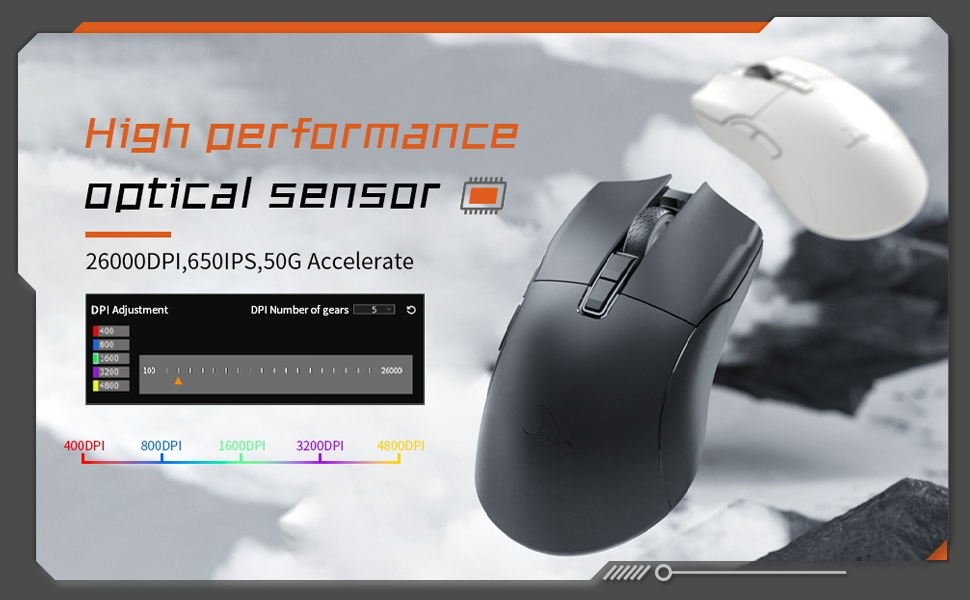
Image: The Darmoshark N3PRO mouse with a blue glowing light, highlighting its adjustable DPI (up to 26000) and IPS (650) settings for precision and speed.
5.2 Ovoz berish darajasini sozlash
The polling rate can be adjusted using the button on the underside of the mouse or through the customization software. The N3PRO supports polling rates up to 8000Hz for ultra-responsive tracking.
5.3 Programmable Buttons and Software Customization
The Darmoshark N3PRO features 7 programmable buttons. To customize button functions, DPI settings, macros, and other advanced features, download the official Darmoshark software from the manufacturer's website. The software allows for personalized configurations to suit your preferences.
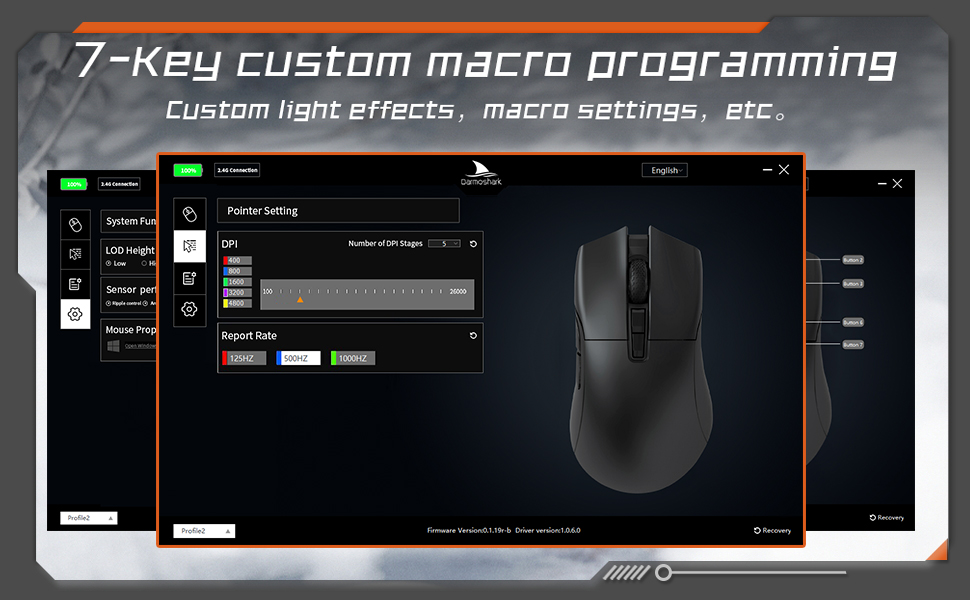
Image: A screenshot of the Darmoshark N3PRO customization software interface, showing options for DPI settings, polling rate, and button assignments, with a visual representation of the mouse.
5.4 Sichqonchani zaryadlash
Connect the mouse to your computer using the provided USB-C cable. The mouse will charge automatically. A full charge provides approximately 80 hours of battery life (depending on usage and polling rate). The mouse is equipped with a 300mAh Lithium Ion battery.

Image: A close-up of the Darmoshark N3PRO mouse, indicating its 300mAh battery capacity.
6. Xizmat ko'rsatish
- Tozalash: Sichqonchani tozalash uchun yumshoq, quruq matodan foydalaning. O'jar axloqsizlik uchun, bir oz damp cloth can be used, ensuring no liquid enters the mouse.
- Sensor: Keep the optical sensor on the underside of the mouse clean and free from dust or debris for accurate tracking.
- Saqlash: When not in use for extended periods, store the mouse in a dry, cool place.
- Batareya parvarishi: Avoid fully discharging the battery frequently. Charge the mouse when the battery indicator is low.
7. Muammolarni bartaraf qilish; nosozliklarni TUZATISH
| Muammo | Yechim |
|---|---|
| Sichqoncha javob bermayapti (Simli) |
|
| Mouse not responding (2.4G Wireless) |
|
| Sichqoncha javob bermayapti (Bluetooth) |
|
| Noto'g'ri kuzatuv yoki kursorning kechikishi |
|
| Tugmalar kutilganidek ishlamayapti |
|
8. Texnik shartlar
- Model: N3PRO
- Ulanish: Tri-Mode (2.4G Wireless, Bluetooth 5.0, USB-C Wired)
- Sensor: PAW3395 optik sensori
- DPI: 26000 dpi gacha
- Kuzatuv tezligi: 650IPS
- Tezlashtirish: 50G
- Saylov darajasi: Up to 8000Hz (wired/2.4G, depending on settings)
- Tugmalar: 7 ta dasturlashtiriladigan tugmalar
- Og'irligi: Taxminan 64 g
- O'lchamlari: 120mm x 66mm x 40mm (Length x Width x Height)
- Batareya: 300mAh Lityum-ion (Qayta zaryadlanuvchi)
- Tugmacha bosish muddati: 60 million clicks (approx.)
- Moslik: PC, Laptop, Windows, Linux (Bluetooth for various devices)
9. Kafolat va qo'llab-quvvatlash
Darmoshark products are designed for reliability and performance. For warranty information, technical support, or to download the latest software and drivers, please visit the official Darmoshark websayt yoki mijozlarga xizmat ko'rsatish bilan bog'laning. Kafolat da'volari uchun xaridingizni tasdiqlovchi hujjatingizni saqlang.
Izoh: Mahsulotning texnik xususiyatlari va xususiyatlari oldindan ogohlantirmasdan o'zgartirilishi mumkin.


