X9 Full-Size Bluetooth Keyboard with Phone Holder
Model: X9RBBLKBDOCKS | Brand: X9 Performance
Kirish
The X9 Full-Size Bluetooth Keyboard with Phone Holder is a versatile input device designed for enhanced productivity across multiple platforms. It features a full 110-key layout, integrated phone/tablet holder, and multi-device connectivity via 2.4G wireless and Bluetooth. This manual provides detailed instructions for setting up, operating, maintaining, and troubleshooting your keyboard.
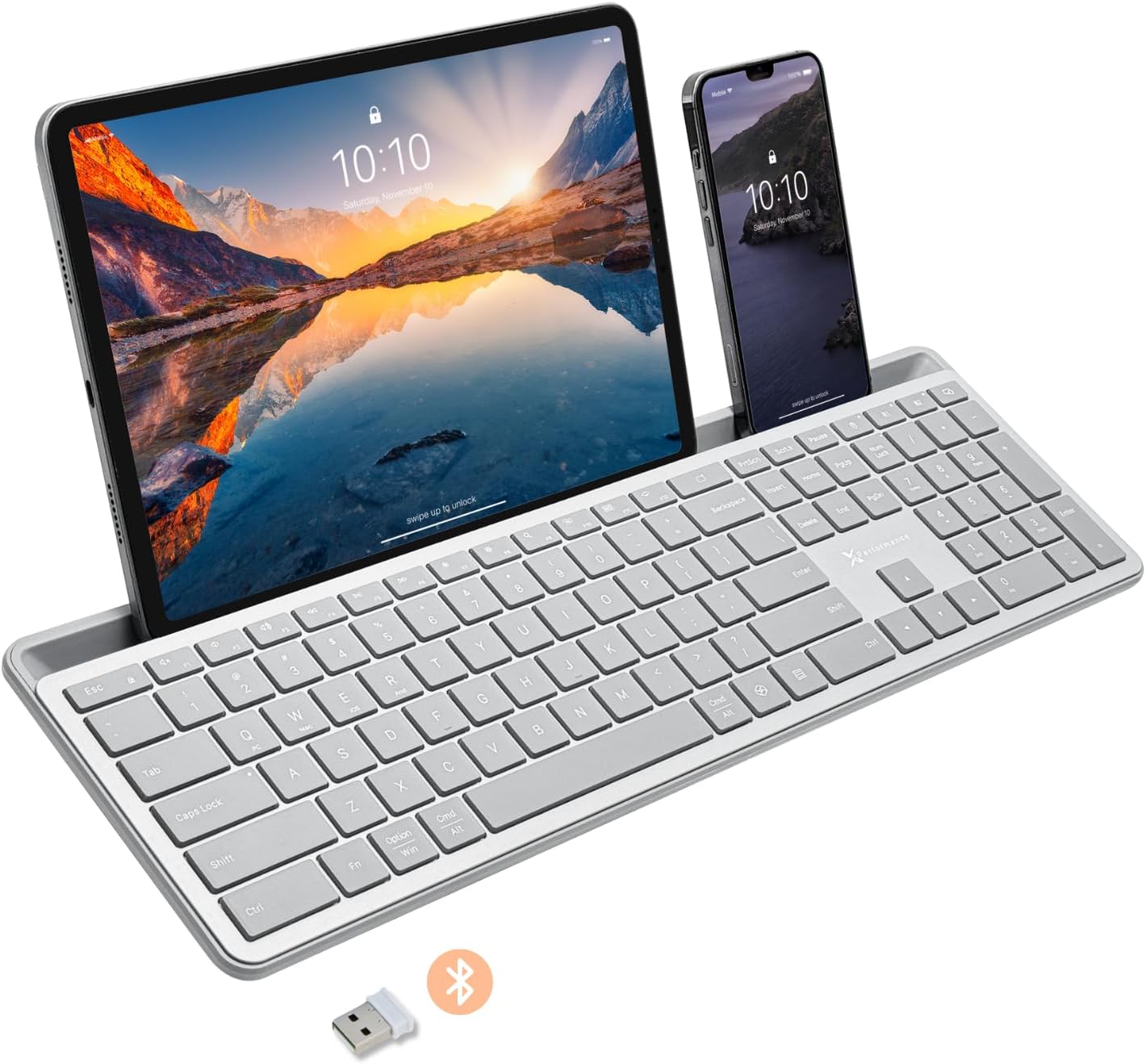
Image: The X9 Full-Size Bluetooth Keyboard in silver, featuring an integrated dock holding a tablet and a smartphone. A USB dongle and Bluetooth symbol are visible below the keyboard.
Asosiy xususiyatlar
- Uch rejimli ulanish: Seamlessly connect up to three devices using 2.4G wireless (via included USB dongle) and two independent Bluetooth channels.
- Integrated Device Dock: An extra-long dock (16.75" long x 0.45" wide) securely holds your smartphone and tablet simultaneously, allowing for easy transitions between devices. Note: May not fit devices with thick cases.
- Yoritilgan kalitlar: Crisp white LED backlighting with 3 adjustable brightness levels for comfortable typing in various lighting conditions.
- Zaryadlanuvchi batareya: Equipped with a 1000 mAh rechargeable battery for extended use, with a USB-C charging cable included.
- Toʻliq oʻlchamli tartib: A complete 110-key layout including a numeric keypad for efficient data entry and productivity.
- Ko'p OS mosligi: Designed for Windows and Mac users, with seamless compatibility across macOS, iOS, and Android operating systems.
- Sokin tugmalar: Keys are designed for a quiet typing experience.

Image: Diagram illustrating the keyboard's ability to pair with up to three devices: a smartphone via Bluetooth (channel 1), a desktop monitor via 2.4GHz wireless (channel 2), and a laptop via Bluetooth (channel 3).

Rasm: yaqindan view of the keyboard's integrated dock, highlighting its extra-long design and a note indicating its dimensions (0.45" width) and potential incompatibility with thick device cases.

Image: A close-up of the keyboard's side, showing a USB-C cable plugged into the charging port, with text indicating a 1000mAh rechargeable battery.
Paket tarkibi
Iltimos, paketda barcha narsalar mavjudligiga ishonch hosil qiling:
- X9 Full-Size Bluetooth Keyboard
- USB-C zaryadlovchi kabeli
- 2.4G USB simsiz dongle
O'rnatish uchun qo'llanma
1. Klaviaturani zaryadlash
Before first use, fully charge the keyboard. Connect the included USB-C charging cable to the keyboard's charging port and the other end to a USB power source (e.g., computer USB port, USB wall adapter). The charging indicator light will show charging status and turn off when fully charged.
2. Qurilmalarga ulanish
The X9 keyboard supports three connection channels: one 2.4G wireless channel and two Bluetooth channels (B1 and B2).
2.1. 2.4G simsiz ulanish
- Locate the 2.4G USB wireless dongle, typically stored in a compartment on the keyboard.
- USB dongle-ni kompyuteringizdagi mavjud USB portiga ulang.
- Turn on the keyboard. The keyboard should automatically connect to your computer via the 2.4G dongle.
2.2. Bluetooth Connection (B1 / B2)
- Klaviaturani yoqing.
- ni bosing va ushlab turing B1 or B2 key for 3-5 seconds until the corresponding indicator light (B1 or B2) starts blinking rapidly. This indicates the keyboard is in pairing mode.
- Qurilmangizda (smartfon, planshet, kompyuter) Bluetooth sozlamalariga o'ting va Bluetooth-ni yoqing.
- Ni qidirish new devices. The keyboard should appear as "X9 Keyboard" or similar.
- Select the keyboard from the list to pair. Follow any on-screen prompts to complete the pairing process. The indicator light will stop blinking and remain solid for a few seconds, then turn off, indicating successful connection.
- Repeat these steps for the second Bluetooth channel (B2) if you wish to connect another device.
Foydalanish bo'yicha ko'rsatmalar
1. Ulangan qurilmalar o'rtasida almashish
To switch between your connected devices, simply press the corresponding connection key:
- bosing 2.4G key to switch to the device connected via the USB dongle.
- bosing B1 key to switch to the device connected via Bluetooth Channel 1.
- bosing B2 key to switch to the device connected via Bluetooth Channel 2.
2. Adjusting Backlight Brightness
The keyboard features three levels of backlight brightness. To adjust:
- ni bosing Fn kalit + Chiroq lampasi key (usually located near the F12 key) repeatedly to cycle through the brightness levels (Low, Medium, High, Off).

Image: A close-up of the keyboard in a dark setting, showcasing its clear backlit keys. Indicators for Low, Medium, and High brightness levels are shown below the keyboard.
3. Using the Copilot AI Key
The keyboard includes a dedicated Copilot AI key for quick access to AI functionalities on compatible systems. Press this key to activate Copilot or similar AI features.
4. Operating System Specific Functions
The keyboard is optimized for various operating systems. Some function keys may behave differently or require the Fn key to access secondary functions depending on your OS (Windows, macOS, iOS, Android).
- For optimal compatibility, ensure your device's operating system is updated.
- Some systems may require specific key combinations (e.g., Fn + Option + R for Android, as mentioned in customer reviews for specific app compatibility). Refer to your device's documentation for advanced keyboard settings.
Xizmat
To ensure the longevity and optimal performance of your X9 keyboard, follow these maintenance guidelines:
- Tozalash: Bir oz yumshoq, tuklarsiz matodan foydalaning dampened with water or a mild cleaning solution to wipe the surface of the keyboard. Avoid excessive moisture. For cleaning between keys, use compressed air.
- Saqlash: Klaviaturani salqin, quruq joyda, to'g'ridan-to'g'ri quyosh nuri va haddan tashqari haroratdan uzoqroq joyda saqlang.
- Batareya parvarishi: Avoid fully discharging the battery frequently. For long-term storage, charge the battery to about 50% to preserve its lifespan.
- To'kilishdan saqlaning: Ichki qismlarga zarar yetkazmaslik uchun suyuqliklarni klaviaturadan uzoqroq tuting.
Muammolarni bartaraf qilish; nosozliklarni TUZATISH
If you encounter issues with your X9 keyboard, refer to the following common problems and solutions:
| Muammo | Mumkin sabab / yechim |
|---|---|
| Klaviatura yoqilmaydi. | Battery is depleted. Connect the keyboard to a power source using the USB-C cable and allow it to charge. |
| Klaviatura Bluetooth orqali ulanmaydi. |
|
| 2.4G wireless connection not working. |
|
| Tugmalar javob bermayapti yoki noto'g'ri kiritilmoqda. |
|
| Orqa yorug'lik ishlamayapti. |
|
Texnik xususiyatlari
| Xususiyat | Tafsilot |
|---|---|
| Model raqami | X9RBBLKBDOCKS |
| Ulanish texnologiyasi | 2.4G Simsiz, Bluetooth |
| Mos qurilmalar | Laptop, PC, Mac, iOS, Android (Smartphone, Tablet) |
| Klaviatura tartibi | Full-Size, 110-key |
| Orqa yoritish | Single Color (White), 3 Brightness Levels |
| Batareya quvvati | 1000 mA / soat (zaryadlanuvchi) |
| Mahsulot o'lchamlari (U x G x Y) | 17.33" x 5.56" x 0.89" (44.02 sm x 14.12 sm x 2.26 sm) |
| Element og'irligi | 2.25 funt (1.02 kg) |
| Device Dock Dimensions (L x W) | 16.75" x 0.45" |
| Ishlab chiqaruvchi | X9 ishlashi |

Rasm: tepalik view of the X9 keyboard with measurements indicating its length (17.3"), width (5.55"), and height (0.89").
Kafolat haqida ma'lumot
X9 Performance products are designed for reliability and performance. For specific warranty terms and conditions, please refer to the warranty card included with your product or visit the official X9 Performance websayt. Odatda, mahsulotlar sotib olingan kundan boshlab ma'lum bir muddat davomida materiallar va ishlov berishdagi nuqsonlarga qarshi qoplanadi.
Qo'llab-quvvatlash
For further assistance, technical support, or to inquire about replacement parts, please contact X9 Performance customer support:
- Websayt: Visit the official X9 Performance website for FAQs, drivers, and support resources.
- Aloqa: Mahsulot o'ramida yoki rasmiy shaxsda ko'rsatilgan aloqa ma'lumotlariga murojaat qiling webtelefon yoki elektron pochta orqali yordam uchun sayt.
Please have your product model number (X9RBBLKBDOCKS) and purchase details ready when contacting support.


