1. Kirish
This manual provides essential information for the proper installation, configuration, and operation of your HGLRC ELRS Gemini RX Dual Diversity 2.4GHz ExpressLRS Nano Receiver. Please read this manual thoroughly before use to ensure optimal performance and safety.
2. Qutida nima bor
Paketga quyidagi komponentlar kiradi:
- 1x HGLRC ELRS GEMINI RX (2.4/915) dual reception receiver
- 1x Long antenna (2.4G/915M)
- 1x Short antenna (2.4G/915M)
- 1x Heat shrink tube
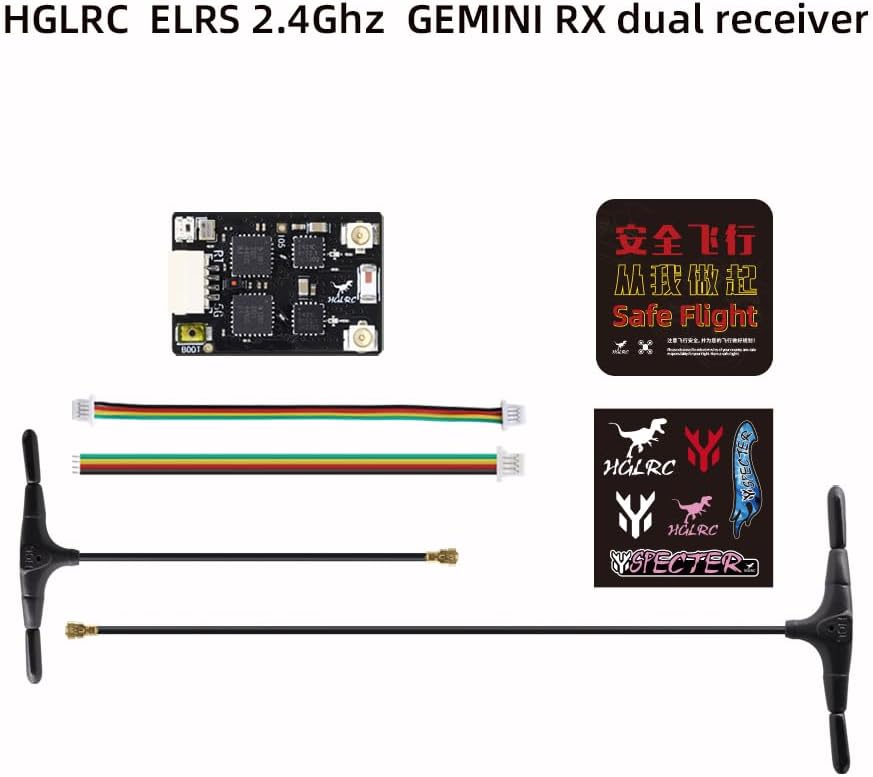
2.1-rasm: Contents of the HGLRC ELRS Gemini RX package, showing the receiver, two antennas (long and short), connecting wires, and stickers.
3. Mahsulot tugadiview va Xususiyatlar
The HGLRC ELRS Gemini RX is a high-performance dual diversity receiver designed for FPV drones, offering enhanced signal reliability and range. Key features include:
- Dual Communication Link: Antennas operate simultaneously at different frequencies for superior anti-interference performance.
- True Diversity Dual Reception: Integrates dual-channel SX1276 (2.4G version SX1281) and dual-channel PA/LNA for robust signal acquisition.
- TCXO Temperature-Compensated Crystal Oscillator: Ensures accurate frequency stability, preventing signal loss in extreme temperatures.
- Direct Plug-in Connection: Facilitates easy installation and quick replacement without soldering, while retaining pad design for flexibility.
- High Return Power: ELRS 2.4G version offers up to 100mW return power (915M version up to 50mW).
- Advanced ELRS Protocol: Provides long-distance remote control, low latency, and refresh rates up to 1000Hz (200Hz for 915M).

3.1-rasm: Yuqori view of the HGLRC ELRS 2.4G Gemini RX V1.0 receiver board, showing the main chip, antenna connectors, and power/signal pads (GND, 5V, TX, RX).

3.2-rasm: The Gemini RX receiver connected to two antennas, illustrating the dual communication link feature where antennas operate simultaneously at different frequencies for improved signal anti-interference.

3.3-rasm: Yaqindan suratga olish view of the HGLRC Gemini RX board, highlighting the true diversity dual reception with two SX1276 (or SX1281 for 2.4G) chips, indicating dual-channel operation.

3.4-rasm: Batafsil view of the Temperature Compensated Crystal Oscillator (TCXO) components on the HGLRC Gemini RX, which ensures stable and accurate frequency performance across varying temperatures.

3.5-rasm: The HGLRC Gemini RX receiver with its dual antennas strategically mounted on a drone frame, demonstrating how the dual antenna setup helps avoid signal blind spots on the fuselage for improved reception.
4. Texnik shartlar
| Parametr | Qiymat |
|---|---|
| Mahsulot o'lchamlari | 0.86 x 0.6 x 0.03 dyuym |
| Element og'irligi | 1.44 untsiya |
| Model raqami | ELRS 2.4Ghz GEMINI RX |
| Ishlab chiqaruvchi | HGLRC |
| Chastotasi | 2.4GHz (ExpressLRS) |
| Qabul qiluvchining turi | Dual Diversity Nano Receiver |
| Antennalar | 2 (Long and Short) |
| Kristalli osilator | TCXO (Temperature-Compensated) |
| Return Power (2.4G) | 100 mVt gacha |
| Refresh Rate (2.4G) | 1000 Gts gacha |
5. Sozlash
5.1. Ulanish sxemasi
Connect the receiver to your flight controller according to the following diagram. Ensure correct polarity for power connections (GND, 5V) and proper assignment for serial communication (TX, RX).

5.1-rasm: Wiring diagram showing connections for the HGLRC ELRS Gemini RX receiver (GND, 5V, TX2, RX2) and a Specter flight controller (10V, GND, CAM, BB-, LED, 5V, GND, TX1, RX1, VTX).
- GND: Yerga ulanish.
- 5V: Power input (5 Volts).
- TX: Transmitter data output from receiver (connect to RX on flight controller).
- RX: Receiver data input to receiver (connect to TX on flight controller).
5.2. Bog'lash tartibi
To bind your HGLRC ELRS Gemini RX receiver to your ExpressLRS transmitter, follow these steps:
- Power on your receiver three times in quick succession. The LED on the receiver should start flashing with an orange double flash, indicating it is in binding mode.
- Ensure your ExpressLRS transmitter module is also in binding mode. Refer to your transmitter's manual for specific instructions.
- Once the receiver and transmitter successfully bind, the receiver's LED will turn solid, indicating a stable connection.
Eslatma: If the RGB LED flashes orange three times after binding, it indicates that the model matching settings do not align. You may need to adjust the Model Match (ID:X) setting on your remote control (SYS → TOOLS → ExpressLRS → Model Match ON (ID:X)) or set it to Model Match OFF (ID:X).
5.3. Mikrodasturni yangilash
The HGLRC ELRS Gemini RX uses ExpressLRS firmware. For optimal performance and access to the latest features, it is recommended to keep your receiver's firmware updated. Firmware updates are typically performed via the ExpressLRS Configurator. Connect the receiver to your computer using a USB-to-UART adapter (not included) and follow the instructions provided by the ExpressLRS project.
For detailed instructions on firmware updates, visit the official ExpressLRS documentation websayt: ExpressLRS Official Websayt
6. Foydalanish bo'yicha ko'rsatmalar
6.1. Ko'rsatkich holati
The receiver features an RGB LED that indicates its current status. Understanding these indicators is crucial for proper operation and troubleshooting.

6.1-rasm: Table detailing the RGB LED indicator status descriptions and a color gradient for 2.4G refresh rates on the HGLRC ELRS Gemini RX.
| RGB rangi | Holat tavsifi |
|---|---|
| Rainbow color gradient | O'z-o'zini yoqish sinovi |
| Green and orange lights flash | Entering WiFi upgrade mode |
| Qizil chiroq tez yonadi | Radio frequency chip not detected |
| Orange double flash | Bog'lash rejimi |
| Three orange flashes | Connected, but model matching settings do not match* |
| Flashing orange slowly | Ulanish kutilmoqda |
| Steady on (color varies) | Connected. Color indicates the refresh rate. |
* If RGB orange flashes three times, you can enter the remote control SYS → TOOLS → ExpressLRS → Model Match ON (ID:X), or set it to Model Match OFF (ID:X).
6.2. Refresh Rate Indication
When the receiver is connected, the steady LED color indicates the current refresh rate. Refer to the color gradient provided in Image 6.1 for specific refresh rate interpretations (e.g., F1000, F500, D500, D250, 500Hz, 333Hz, 250Hz, 150Hz, 100Hz, 50Hz).
Eslatma: F1000 and F500 are refresh rates in FLRC mode, offering faster modulation and lower latency. D500 and D250 are refresh rates in DVDA (Deja Vu Diversity A/D) mode, suitable for competition, where the receiver sends the same data packet multiple times for enhanced reliability.
For more details on refresh rates, visit: ExpressLRS Packet Rate and Telemetry Ratio
7. Xizmat ko'rsatish
- Qabul qilgichni toza va chang va axlatdan xoli tuting.
- Qabul qilgichni haddan tashqari harorat yoki namlik ta'siriga duchor qilishdan saqlaning.
- Regularly inspect antenna connections for damage or loose fittings.
- Ensure the heat shrink tube is properly applied to protect the receiver from short circuits and environmental elements.
8. Muammolarni bartaraf qilish; nosozliklarni TUZATISH
- Quvvat yo'q: Check all power connections (GND, 5V) to ensure they are secure and correctly polarized. Verify the power source is providing the correct voltage.
- No Connection (Flashing Orange Slowly): Ensure your transmitter is powered on and transmitting. Re-attempt the binding procedure (Section 5.2).
- Radio Frequency Chip Not Detected (Red Light Flashes Quickly): This indicates a hardware issue. Ensure the receiver is correctly powered and inspect for any visible damage. If the issue persists, contact support.
- Model Matching Issue (Three Orange Flashes): Adjust the Model Match setting on your remote control as described in Section 5.2.
- Poor Range/Signal Loss:
- Check antenna placement and orientation. Ensure they are not obstructed by carbon fiber or other conductive materials.
- Inspect antennas for damage.
- Verify that the transmitter power output is set correctly.
- Ensure both receiver and transmitter firmware are up to date.
9. Xavfsizlik ma'lumotlari
Please follow the instructions to use this product safely. Improper use can lead to damage to the product or other components. Always ensure proper wiring and power connections before operation.
10. Kafolat va qo'llab-quvvatlash
For warranty information and technical support, please refer to the official HGLRC websayt yoki chakana sotuvchingizga murojaat qiling. Kafolat da'volari uchun xaridingizni tasdiqlovchi hujjatingizni saqlang.
Official HGLRC Store: Visit the HGLRC Store on Amazon
For general ExpressLRS information and community support, visit: ExpressLRS Official Websayt


