1. Kirish
This manual provides detailed instructions for the safe installation, operation, and maintenance of your PHORUS 48-inch Modern White Ceiling Fan with Lights and Remote/APP Control. Please read all instructions carefully before beginning installation and retain this manual for future reference.
2. Xavfsizlik ma'lumotlari
- O'rnatish yoki xizmat ko'rsatishdan oldin elektr toki o'chirgichda elektr uzilganligiga ishonch hosil qiling.
- Barcha simlar milliy va mahalliy elektr qoidalariga muvofiq bo'lishi kerak. Agar siz simlar bilan tanish bo'lmasangiz, malakali elektrikchiga murojaat qiling.
- Ventilyator poldan pichoqning orqa chetigacha kamida 7 fut (2.1 metr) masofada o'rnatilishi kerak.
- O'rnatish konstruktsiyasi ventilatorning og'irligini (taxminan 13.4 funt) ko'tara olishi kerak.
- O'rnatish yoki tozalash paytida pichoq ushlagichlarini egmang.
- Ushbu fan ichki foydalanish uchun mo'ljallangan.
3. Paket tarkibi
O'rnatishni boshlashdan oldin barcha komponentlar mavjudligini tekshiring:
- Ventilatorlar motorini yig'ish
- Osiladigan taxta
- 5 ta fan pichoqlari
- LED Lampsoya
- Masofadan boshqarish pulti (2 ta AAA batareya bilan)
- Screws and Mounting Hardware
- Qo'llanma

4. Texnik shartlar
| Xususiyat | Spetsifikatsiya |
|---|---|
| Brend | FORUS |
| Model nomi | #8907 |
| Hajmi | 48 dyuym |
| Rang | Oq |
| Material | Akril, plastmassa |
| Dvigatel turi | DC Motor (30W) |
| Nur manbai | LED (28 Vt) |
| Yengil ranglar | 3 (White, Warm, Neutral) |
| Karartma diapazoni | Stepless (10%-100%) |
| Shamol tezligi | 6 |
| Nazorat usuli | Remote Control, APP Control |
| Maxsus xususiyatlar | Reversible Function, 2-Hour Timer, Memory Function |
| Ovoz darajasi | 35 dB dan past |
| Mahsulot o'lchamlari | 48"L x 48"W x 10.83"Y |
| Element og'irligi | 13.4 funt |
5. O'rnatish va o'rnatish
5.1 O'rnatishdan oldin nazorat ro'yxati
- Ensure the power supply is turned off at the main circuit breaker.
- Confirm you have all necessary tools (screwdriver, drill, wire strippers, etc.).
- Verify that the ceiling junction box is securely mounted and capable of supporting the fan.
5.2 Bosqichma-bosqich o'rnatish
- Attach Blades to Motor Assembly: Secure each of the five fan blades to the motor assembly using the provided screws. Ensure the 'THIS SIDE UP' marking on the blade attachment is facing upwards.
- Install LED Light Board: Carefully place the LED light board into the designated area on the motor assembly and secure it with screws. Connect the LED wires.
- Attach LED Lampsoya: LEDni joylashtiring lampshade over the light board and twist it clockwise until it is securely fastened.
- Mount Hanging Board: Secure the hanging board to your ceiling junction box using appropriate screws. Ensure it is firmly attached.
- Simlarni ulash: Connect the fan's electrical wires to your household wiring. The typical connections are: Black (Live) to Black (Live), White (Neutral) to White (Neutral), and Yellow/Green (Ground) to Green (Ground). Use the provided wire connectors.
- Secure Fan to Hanging Board: Lift the fan assembly and attach it to the hanging board, ensuring all wires are tucked safely inside the canopy. Secure the fan with the provided screws.
6. Foydalanish bo'yicha ko'rsatmalar
6.1 Masofadan boshqarish funksiyalari
The included remote control allows for convenient operation of your ceiling fan:
- Quvvatni yoqish/oʻchirish: Ventilyator va chiroqni yoqish yoki o'chirish uchun quvvat tugmasini bosing.
- Fan tezligi: Select from 6 wind speeds (1-6) to adjust airflow.
- Chiroqni yoqish/o'chirish: Control the light independently from the fan.
- Rang harorati: Cycle through 3 light colors: White (6000K), Neutral (4500K), and Warm (3000K).
- Karartma: Adjust light brightness from 10% to 100%.
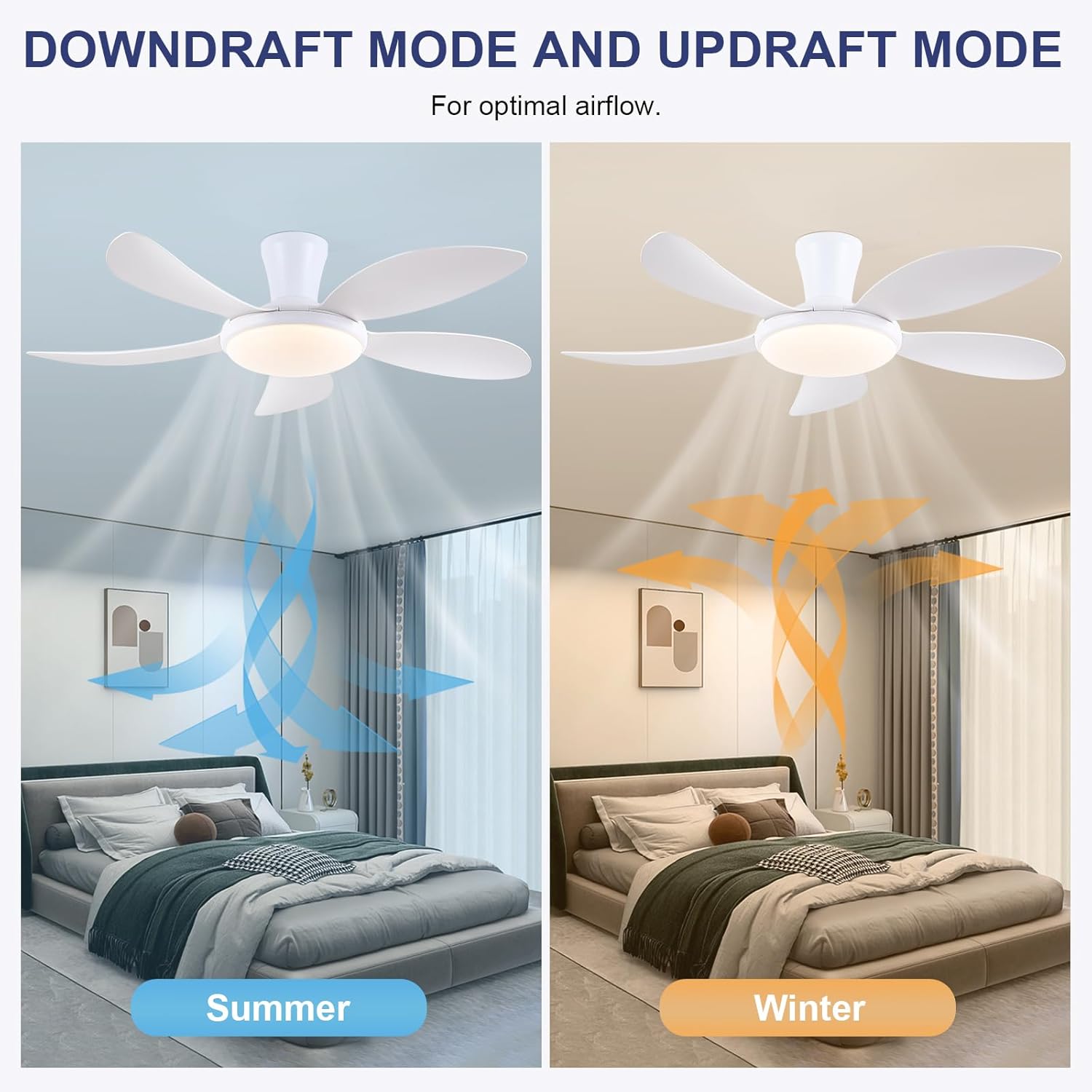
- Qaytariladigan funksiya: Press the F/R key to change the blade rotation direction for summer (downdraft) or winter (updraft) modes. The fan will stop briefly before reversing.
- Taymer: Set a 2-hour timer for automatic shutdown.
- Tungi rejim: Activates a low-speed fan and dim light setting.

6.2 Remote Code Pairing
If the remote control is not responding, it may need to be paired:
- Turn off the main power supply to the fan for one minute.
- Turn on the main power supply and simultaneously long-press the 'Code Key' button on the remote control for 3-5 seconds.
- The fan light will blink 2-3 times, indicating successful code matching. The remote can now be operated normally.
6.3 APP boshqaruvi
Control your fan using the 'Fan Lamp Pro' mobile application:
- APP-ni yuklab oling: Scan the QR code provided in the product images or search for "Fan Lamp Pro" in your app store.
- Bluetooth orqali ulanish: Telefoningizning Bluetooth funksiyasi yoqilganligiga ishonch hosil qiling.
- Qurilmani ulash: Open the app, add a new device, and follow the on-screen instructions to connect to your fan. The fan light will blink twice upon successful connection.
- Funksiyalari: The app allows control over fan speeds, light colors, dimming, reverse function, and timer settings, similar to the remote control.
6.4 Fan Speed and Airflow
- 1-2 darajalar: Low Comfortable Wind, suitable for sleep.
- 3-4 darajalar: Medium Natural Wind, suitable for daily life.
- 5-6 darajalar: High Cooling Wind, suitable for hot weather.

6.5 Yorug'lik sozlamalari
- The LED light source supports stepless dimming and memory function, retaining your last brightness and color temperature setting.
- Choose from 3 color temperatures: 3000K (Warm Light), 4500K (Natural Light), and 6000K (White Light).

6.6 Qaytariladigan funksiya
The reversible DC motor allows you to change the direction of the fan seasonally:
- Yozgi rejim (pastga tushirish): Blades rotate counter-clockwise, pushing cool air downwards.
- Qish rejimi (yuqoriga tortish): Blades rotate clockwise, drawing cool air up and circulating warm air downwards.
7. Xizmat ko'rsatish
- Tozalash: Fanni tozalash uchun yumshoq mato bilan artib oling, damp mato. Abraziv tozalash vositalarini yoki erituvchilarni ishlatmang.
- Pichoqni parvarish qilish: The ABS blades are designed to be easy to clean and resistant to deformation.
- Muntazam tekshiruvlar: Barcha ulanishlarni va vintlarni ishonchliligini tekshirish uchun vaqti-vaqti bilan tekshiring.
8. Muammolarni bartaraf qilish; nosozliklarni TUZATISH
Agar fanatingiz bilan bog'liq muammolarga duch kelsangiz, quyidagi keng tarqalgan muammolar va echimlarga murojaat qiling:
- Ventilyator ishlamaydi: Check power supply, ensure all wiring connections are secure, and verify remote control pairing.
- Nur ishlamaydi: Check power supply, ensure light wires are connected, and verify remote control pairing.
- Ventilyator shovqinli: Ensure all screws are tightened, especially on the blades and mounting bracket. Check for any obstructions.
- Masofadan boshqarish pulti ishlamayapti: Replace batteries, ensure line of sight to the fan, and re-pair the remote control as per section 6.2.
- APP connection issues: Ensure Bluetooth is on, the app is updated, and try re-pairing the device.
9. Kafolat va qo'llab-quvvatlash
PHORUS provides a one-year quality warranty for this product. For any damage or quality problems, free replacement service is offered. If you have any questions or require assistance, please contact PHORUS customer service. You will receive a satisfactory answer within 24 hours.
For additional support and resources, please visit the official PHORUS websaytga kiring yoki xaridingiz bilan birga ko'rsatilgan aloqa ma'lumotlariga qarang.


