Kirish
The Stinger HORIZON10 is a state-of-the-art 10.1-inch universal car stereo designed to enhance your in-vehicle entertainment and connectivity. Featuring a 1280x800 HD weather-resistant touchscreen, wireless Apple CarPlay and Android Auto, advanced audio controls, and multiple camera inputs, the HORIZON10 provides a comprehensive and intuitive user experience. This manual provides detailed instructions for setting up, operating, maintaining, and troubleshooting your new car stereo.

Image: The Stinger HORIZON10 Infotainment System, showcasing o'zining zamonaviy dizayni va foydalanuvchi interfeysi.
Qutida nima bor
Upon unboxing your Stinger HORIZON10, please verify that all the following components are included:
- 10.1" Multimedia Touchscreen Display
- Radio moduli
- Ko'rsatkich qavs
- Nose Bracket - Radio Bracket
- LVDS ulagichi Orqa qopqoq
- Vintlar
- Suv o'tkazmaydigan vilka
- 16 pinli AV simi
- 12 pinli oldindan chiqish jabduqlari
- 14 pinli ma'lumotlar simi
- 26 Pin Power Harness LVDS Display Cable
- Tashqi mikrofon
- GPS antenna
- GPS Mounting Plate
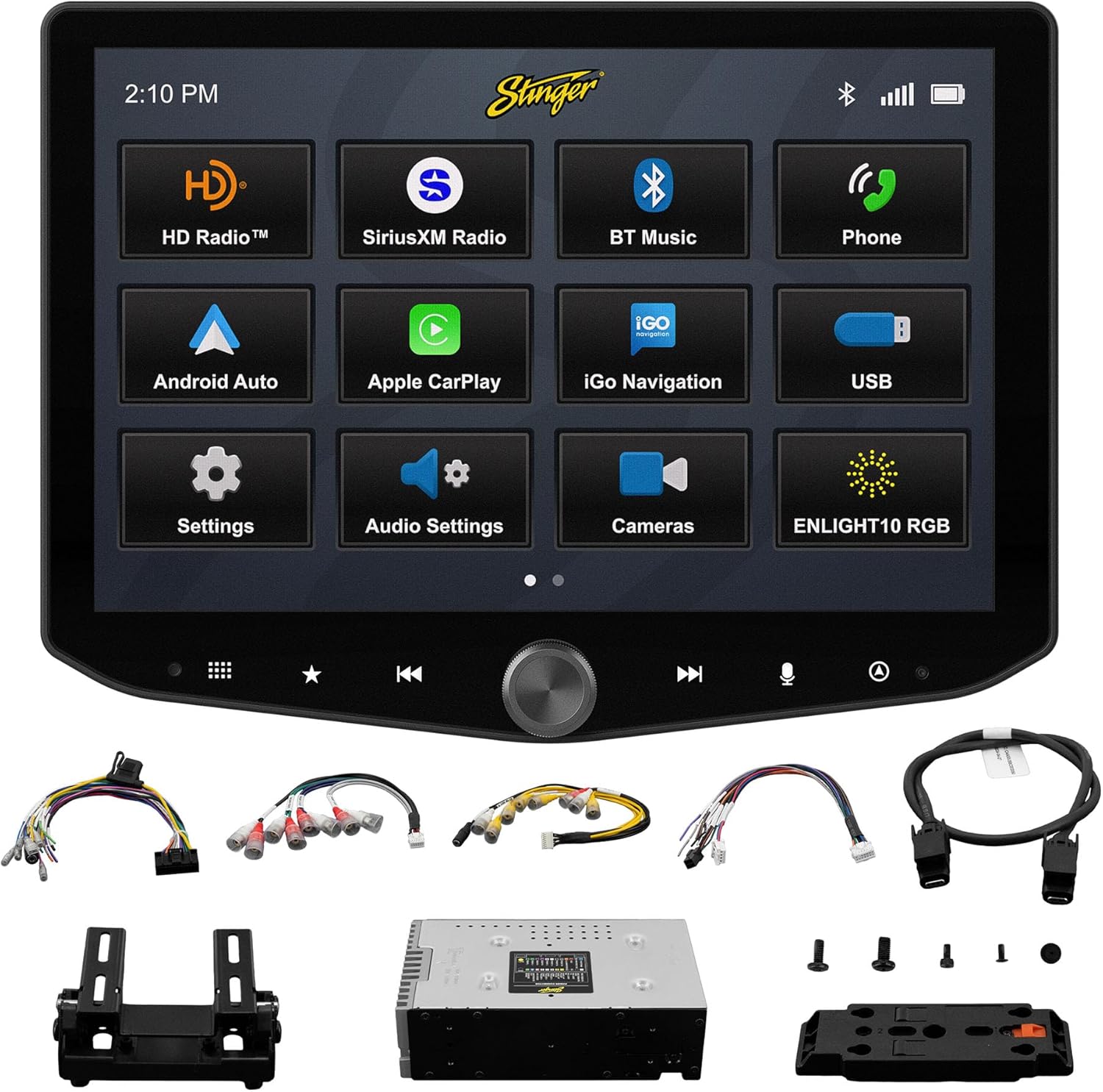
Image: All components included with the Stinger HORIZON10 car stereo system.
O'rnatish va o'rnatish
Professional installation is highly recommended for the Stinger HORIZON10 to ensure proper functionality and integration with your vehicle's electrical system. This unit is designed for universal compatibility, but specific vehicle dash kits, wiring harness interfaces, or antenna adapters may be required and are sold separately.
Dastlabki sozlash bosqichlari:
- O'rnatish: Securely mount the display and radio module using the provided brackets and screws. Ensure proper ventilation around the unit.
- Elektr simlari: Connect the 16-pin AV harness, 12-pin pre-out harness, 14-pin data harness, and 26-pin power harness LVDS display cable to the corresponding ports on the radio module and your vehicle's wiring system. Refer to your vehicle's specific wiring diagram if necessary.
- Tashqi ulanishlar: Connect the external microphone for hands-free calling and the GPS antenna for navigation functionality.
- Yoqilgan: Once all connections are secure, power on your vehicle to initiate the stereo. The unit should boot up and display the Stinger logo.
- Dastlabki konfiguratsiya: Follow any on-screen prompts for initial setup, such as language selection and time zone.
Foydalanish bo'yicha ko'rsatmalar
Sensorli ekran interfeysi
The HORIZON10 features a large 10.1" 1280x800 HD floating touchscreen with anti-glare and anti-fingerprint film protection. Navigate through menus and applications by tapping, swiping, and pinching on the screen. The capacitive touch panel buttons and machined aluminum anodized knob provide additional tactile control.

Rasm: batafsil view of the Stinger HORIZON10 touchscreen, highlighting its capacitive touch buttons and anodized knob.
Simsiz Apple CarPlay va Android Auto
Connect your iPhone or Android phone wirelessly to access navigation, calls, messages, music, and more directly on the HORIZON10 display. Wired connections are also supported via the USB-C input, which also provides fast 3A phone charging.

Image: The Stinger HORIZON10 displaying the Apple CarPlay interface wirelessly connected to an iPhone.

Image: The Stinger HORIZON10 displaying the Android Auto interface wirelessly connected to an Android phone.
Bluetooth 5.1 & Wi-Fi Connectivity
The unit supports dual phone connections for fast hands-free calling and music streaming via Bluetooth 5.1 A2DP. Wi-Fi connectivity enables additional features and updates.
Kengaytirilgan audio xususiyatlari
Customize your sound experience with the 15-band adjustable EQ, 6 user EQ presets, and built-in crossover with HPF & LPF. The system offers 4.5 Vrms & 8ch RCA outputs with subwoofer control, and a Toslink (optical) audio output (48 kHz variable) for high-fidelity sound.

Image: Screenshot of the Stinger HORIZON10's advanced audio settings, showing the 15-band equalizer.
Kamera kirishlari
Integrate up to four cameras (front/rear dashcam, blind spot cameras, backup camera) for enhanced safety and visibility. The system supports both AHD 720p and CVBS 480p camera inputs.

Image: The Stinger HORIZON10 displaying multiple camera views, illustrating its 4 camera input capability.
Radio tyuner
Enjoy a wide variety of audio content with the built-in HD AM/FM radio tuner. The unit is also SiriusXM-Ready (SiriusXM Tuner Sold Separately).

Image: The Stinger HORIZON10 displaying the HD Radio interface, showing available stations.
USB & HDMI Inputs
The unit includes two USB-A inputs, one USB-C input (with 3A charging), and one HDMI input for media playback or mirroring.
Moslashtirish
Personalize your experience by changing the background image and rearranging Home screen icons for easier access to your most used features.
onX Offroad App
The HORIZON10 includes a free 3-month trial of the onX GPS navigation off-roading map app. Register on the Stinger website to activate your trial.
Mahsulot videosi tugadiview
Video: amaldor tugadiview of the Stinger HORIZON10's key features and capabilities.
Xizmat
To ensure the longevity and optimal performance of your Stinger HORIZON10, follow these maintenance guidelines:
- Ekranni tozalash: Sensorli ekranni ohista artib olish uchun yumshoq, tuklarsiz matodan foydalaning. O'jar dog'lar uchun, bir oz damplattaga suv yoki ekran uchun xavfsiz tozalagich soling. Aşındırıcı materiallardan yoki qattiq kimyoviy moddalardan saqlaning.
- Ob-havoga qarshilik: While the display is IP65 weather-resistant, the radio chassis is not. Avoid direct exposure of the main unit to water or excessive moisture.
- Umumiy parvarish: Keep the unit free from dust and debris. Ensure all connections remain secure.

Image: The Stinger HORIZON10 display with water droplets, demonstrating its IP65 weather-resistant feature.
Muammolarni bartaraf qilish; nosozliklarni TUZATISH
If you encounter issues with your Stinger HORIZON10, refer to the following common problems and solutions:
| Muammo | Mumkin sabab | Yechim |
|---|---|---|
| Quvvat yo'q | Bo'shashgan quvvat ulanishi, yonib ketgan sug'urta, avtomobil akkumulyatori muammosi. | Check all power connections. Inspect vehicle fuses. Ensure vehicle battery is charged. |
| Ovoz chiqishi yo'q | Incorrect audio settings, loose speaker wires, ampko'taruvchi muammo. | Verify audio settings (volume, mute, source). Check speaker wire connections. Consult an audio specialist if using an external amphayotiyroq. |
| CarPlay/Android Auto ulanmayapti | Bluetooth/Wi-Fi off on phone, incorrect pairing, phone software issue. | Ensure Bluetooth and Wi-Fi are enabled on your phone. Re-pair the device. Restart both the phone and the HORIZON10 unit. Update phone OS. |
| Sensorli ekran javob bermayapti | Temporary software glitch, excessive dirt/moisture on screen. | Perform a soft reset (refer to device settings for reset option). Clean the screen thoroughly. If persistent, contact support. |
| Radioni yomon qabul qilish | Antenna ulanmagan, shikastlangan antenna, zaif signal maydoni. | Check antenna connection. Consider a signal booster if in a weak reception area. |
If the problem persists after attempting these solutions, please contact Stinger customer support.
Texnik xususiyatlari
| Xususiyat | Tafsilot |
|---|---|
| Model raqami | 10.1" - IX210 |
| Mahsulot o'lchamlari | 12.75 x 7.5 x 9.75 dyuym |
| Element og'irligi | 6.98 funt |
| Displey hajmi | 10.1 dyuym |
| Displey ravshanligi | 1280x800 HD |
| Ob-havoga qarshilik | IP65 (Display only) |
| Ulanish texnologiyasi | Bluetooth 5.1 A2DP, Wi-Fi |
| Nazoratchi turi | Smartphone, Touchscreen |
| USB kirishlari | 2x USB-A, 1x USB-C (3A charging) |
| HDMI portlari | 1 |
| Kamera kirishlari | 4 (AHD 720p / CVBS 480p compatible) |
| Audio chiqish rejimi | Stereo |
| Surround ovoz kanali konfiguratsiyasi | 7.1 |
| Kanallar soni | 8 |
| EQ | 15-band adjustable EQ, 6 user presets |
| RCA chiqishlari | 4.5 Vrms & 8ch with subwoofer control |
| Optik audio chiqishi | Toslink (48 kHz variable) |
Kafolat haqida ma'lumot
For detailed warranty information regarding your Stinger HORIZON10, please refer to the warranty card included with your product or visit the official STINGER website. Warranty terms and conditions may vary and are subject to the manufacturer's policy.
Mijozlarni qo‘llab-quvvatlash
Should you require further assistance, technical support, or have questions not covered in this manual, please contact STINGER customer service through their official websayt yoki mahsulot hujjatlari bilan birga taqdim etilgan aloqa ma'lumotlari.
STINGER rasmiysi Websayt: www.stinger.com


