1. Kirish
This manual provides essential information for the installation, operation, and maintenance of your ZOTAC GAMING GeForce RTX 4070 Ti SUPER SOLID OC 16GB graphics card. Please read this manual thoroughly before installation to ensure proper functionality and to prevent damage.

Image 1.1: ZOTAC GAMING GeForce RTX 4070 Ti SUPER SOLID OC 16GB Graphics Card and its retail packaging.
2. Paket tarkibi
Paketda barcha elementlar mavjudligiga ishonch hosil qiling:
- ZOTAC GAMING GeForce RTX 4070 Ti SUPER SOLID OC 16GB Graphics Card
- GPU qo'llab-quvvatlash stendi
- Foydalanuvchi uchun qo'llanma (ushbu hujjat)
- Power Adapter Cable (if applicable, check your specific model)
3. Tizim talablari
- Bitta ikkita kenglikdagi x16 grafik uyasi bilan PCI Express-mos keladigan anakart
- Minimum 750W power supply with three available 8-pin PCIe power connectors (or equivalent 12VHPWR connector)
- Minimum 16GB system memory
- Microsoft Windows 10/11 64-bit or Linux 64-bit operating system
- Internet connection for driver installation
4. O'rnatish bo'yicha qo'llanma
4.1. Tayyorgarlik
- Kompyuteringizni o'chiring va quvvat simini ajratib oling.
- Kompyuteringizning korpusini oching.
- Ground yourself to discharge any static electricity.
4.2. Installing the Graphics Card
- Anakartingizda mavjud bo'lgan PCI Express x16 uyasini toping.
- Kompyuteringiz korpusidan kerakli kengaytirish uyasi qopqoqlarini olib tashlang.
- Carefully insert the graphics card into the PCIe x16 slot until it is fully seated. Ensure the retention clip locks into place.
- Grafik kartani vintlar bilan korpusga mahkamlang.
- Connect the required power cables from your power supply to the graphics card. This model typically requires three 8-pin PCIe power connectors or a single 12VHPWR connector. Ensure all connections are secure.
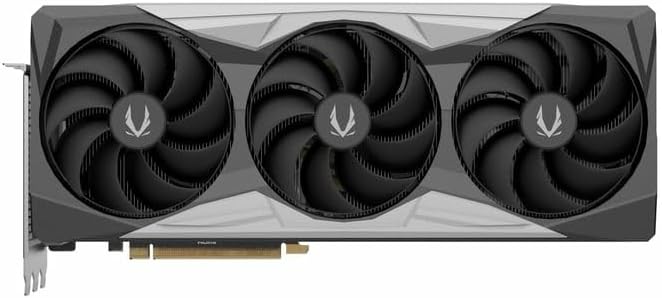
4.1-rasm: Old view of the graphics card, showing the triple fan design.
4.3. Installing the GPU Support Stand
The included GPU support stand helps prevent sag and provides additional stability for the graphics card. Follow the instructions provided with the stand for proper installation within your PC case.
4.4. Closing the Case and Connecting Peripherals
- Kompyuteringizning ishini yoping.
- Connect your monitor(s) to the display outputs on the graphics card (DisplayPort or HDMI).
- Reconnect the power cable and other peripherals to your computer.

4.2-rasm: orqa view of the graphics card, showing three DisplayPort outputs and one HDMI output.
5. Foydalanish bo'yicha ko'rsatmalar
5.1. Drayv o'rnatish
- Kompyuteringizni yoqing.
- Once the operating system loads, download the latest graphics drivers from the official NVIDIA websayt (www.nvidia.com/drivers) or the ZOTAC websayt (www.zotac.com/support).
- Drayverni o'rnatishni yakunlash uchun ekrandagi ko'rsatmalarga amal qiling. Tizimni qayta ishga tushirish talab qilinishi mumkin.
5.2. Utilita dasturiy ta'minot
ZOTAC provides utilities such as FireStorm for monitoring and adjusting graphics card settings, including fan speed control (Active Fan Control, FREEZE Fan Stop) and performance profiles. These can be downloaded from the ZOTAC websayt.
6. Xizmat ko'rsatish
- Changni tozalash: Periodically clean dust from the graphics card fans and heatsink using compressed air. Ensure the computer is powered off and unplugged before cleaning.
- Haydovchi yangilanishlari: Keep your graphics drivers updated to ensure optimal performance and compatibility.
- Harorat monitoringi: Use monitoring software to keep track of the graphics card's temperature during operation. Excessive temperatures can indicate poor airflow or dust buildup.

Rasm 6.1: Burchakli view of the graphics card, highlighting its robust cooling solution.
7. Muammolarni bartaraf qilish; nosozliklarni TUZATISH
- Displey chiqishi yo'q:
- Monitor kabelining grafik karta va monitorga mahkam ulanganligiga ishonch hosil qiling.
- Grafik karta PCIe uyasiga to'liq joylashtirilganligiga ishonch hosil qiling.
- Check that all power cables are properly connected to the graphics card.
- Iloji bo'lsa, boshqa monitor yoki kabel bilan sinab ko'ring.
- Tizimning beqarorligi yoki ishdan chiqishi:
- Ensure graphics drivers are correctly installed and up to date.
- Check for adequate power supply capacity.
- Haddan tashqari issiqlikning oldini olish uchun haroratni kuzatib boring.
- Verify system memory (RAM) stability.
- Ventilyator shovqini yoki nosozligi:
- Clean dust from the fans and heatsink.
- Ensure no cables are obstructing fan rotation.
- Use ZOTAC FireStorm utility to check fan speed settings.
8. Texnik shartlar
| Xususiyat | Tafsilot |
|---|---|
| Model raqami | ZT-D40730R-10P |
| Grafik protsessor | NVIDIA GeForce RTX 4070 Ti SUPER |
| Video xotira | 16 GB GDDR6X |
| Xotira interfeysi | 256-bit |
| Xotira soati | 21000 MHz (Effective) |
| Dvigatel soati | Kuchaytirish: 2640 MGts |
| Displey chiqishlari | 3 x DisplayPort 1.4a, 1 x HDMI 2.1a |
| HDCP-ni qo'llab-quvvatlash | Ha |
| Max Digital Resolution | Up to 4K (7680x4320 @60Hz) |
| PCI Express | PCI Express 4.0 x16 |
| Tavsiya etilgan quvvat manbai | 750 Vt |
| Quvvat ulagichlari | 1 x 12VHPWR (or 3 x 8-pin PCIe via adapter) |
| Olchamlari (UxKxY) | 16.73 x 11.54 x 3.94 dyuym (taxminan) |
| Og'irligi | 2.2 funt (taxminan) |
| Sovutish tizimi | IceStorm 2.0 Advanced Cooling, Triple 100mm Fans, FREEZE Fan Stop, Active Fan Control |
| Xususiyatlari | NVIDIA DLSS 3.5, Ray Tracing, Metal Backplate, GPU Support Stand |
9. Kafolat va qo'llab-quvvatlash
For detailed warranty information, please refer to the warranty card included with your product or visit the official ZOTAC website's support section. ZOTAC provides technical support and resources for their products.
- ZOTAC Support Websayt: www.zotac.com/support
- Mahsulotni ro'yxatdan o'tkazish: Register your product on the ZOTAC website to activate your warranty and receive product updates.


