1. Kirish
This manual provides comprehensive instructions for the installation, operation, maintenance, and troubleshooting of your PowMr M25A-12V/24V 25A MPPT Solar Charge Controller. This device is designed to efficiently manage power flow from your solar panels to your 12V or 24V battery system, supporting various battery types including lead-acid and lithium batteries.

Figure 1: PowMr M25A-12V/24V 25A MPPT Solar Charge Controller. This image shows the front view of the solar charge controller with its LCD screen and four control buttons.
2. Xavfsizlik bo'yicha ko'rsatmalar
- O'rnatish va ishlatishdan oldin barcha ko'rsatmalarni diqqat bilan o'qing.
- Ensure all power sources are disconnected before wiring to prevent electric shock.
- Use appropriate tools and wear protective gear during installation.
- Install the controller in a well-ventilated, dry environment, away from flammable materials.
- Ensure correct polarity when connecting batteries and solar panels. Incorrect wiring can damage the controller and other components.
- Tekshirgichni o'zingiz qismlarga ajratmang yoki ta'mirlashga urinmang. Xizmat ko'rsatish uchun malakali xodimlar bilan bog'laning.
- The controller is designed for 12V/24V battery systems. Do not connect to other voltage tizimlari.

Figure 2: Intelligent Protection Features. This image illustrates the nine built-in electronic protections of the PowMr solar controller, including over-discharging, overcharging, overload, short circuit, reverse current, temperature compensation, and reverse polarity protection.
3. O'rnatish va o'rnatish
Follow these steps for proper installation of your solar charge controller. Adhering to the correct connection sequence is crucial for system safety and functionality.
3.1. Tayyorgarlik
- Quyosh paneli: Ensure your solar panel's voltage and power output are compatible with the controller and battery system.
- Batareya: Use a compatible battery type (e.g., AGM, Gel, Flooded, Lithium) for your 12V or 24V system.
- Kabellar: Use appropriately sized cables to minimize power loss and prevent overheating. Ensure proper fusing for all connections.
3.2. Simlarni ulash ketma-ketligi
The correct wiring order is essential. Always connect the battery first, then the solar panels, and finally the load (if applicable).
- Connect the Battery to the Controller:
First, connect the positive (+) terminal of the battery to the battery positive (+) terminal on the charge controller. Then, connect the negative (-) terminal of the battery to the battery negative (-) terminal on the charge controller. Ensure correct polarity. The controller's display should illuminate, indicating a successful battery connection.
- Connect the Solar Panels to the Controller:
Connect the positive (+) lead from your solar panel array to the PV positive (+) terminal on the charge controller. Then, connect the negative (-) lead from your solar panel array to the PV negative (-) terminal on the charge controller. Ensure the solar panels are receiving sufficient sunlight for power generation.
- DC yukini ulang (ixtiyoriy):
If you are using the DC load output, connect the positive (+) lead of your DC load to the load positive (+) terminal on the charge controller, and the negative (-) lead to the load negative (-) terminal. Refer to the operating section for load control settings.
O'chirish ketma-ketligi: To disconnect the system, reverse the order: first disconnect the load, then the solar panels, and finally the battery.

Figure 3: Basic Wiring Diagram. This diagram illustrates the connection of the solar charge controller to solar panels and a battery bank, showing the flow of power.

Figure 4: Simplified 2-Step Connection. This image provides a simplified visual guide for connecting the battery first, then the solar panels, and finally showing the charging process.
4. Operatsiya
The PowMr M25A-12V/24V controller features an intuitive LCD screen and four buttons for easy monitoring and configuration.
4.1. LCD displey va tugmalar
The backlit LCD screen displays real-time system status, including PV input, battery voltage, charging current, and load status. The four buttons (PV, BAT/▲, DC/▼, SET/⚙) allow navigation and parameter adjustment.

Figure 5: Backlit LCD Screen. This image shows the controller's LCD display, indicating PV input, battery status, and load output, along with the control buttons.
4.2. Battery Type Settings
The controller supports various battery types. To set the battery type:
- ni uzoq bosib turing BAT/▲ key to enter the setting program.
- dan foydalaning BAT/▲ va DC/▼ keys to toggle through the battery type options.
- ni bosing SET/⚙ key to save and confirm your selection.
Pre-set options include Sealed, Gel, Flooded, and Lithium (LFP). A "User customize" option is available for specific parameter adjustments.

Figure 6: Compatible Battery Types. This image displays the controller's compatibility with various battery types, including AGM, GEL, FLD (Flooded), LI (Lithium), and SLA (Sealed Lead-Acid).
4.3. Load Work Modes
The controller offers multiple load work modes to manage your DC output:
- 00 soat: Load Turn OFF (Load is always off).
- 24 soat: Load always Turn ON (Load is continuously on).
- 01H~23H: Time control (Set the duration for which the load remains ON).
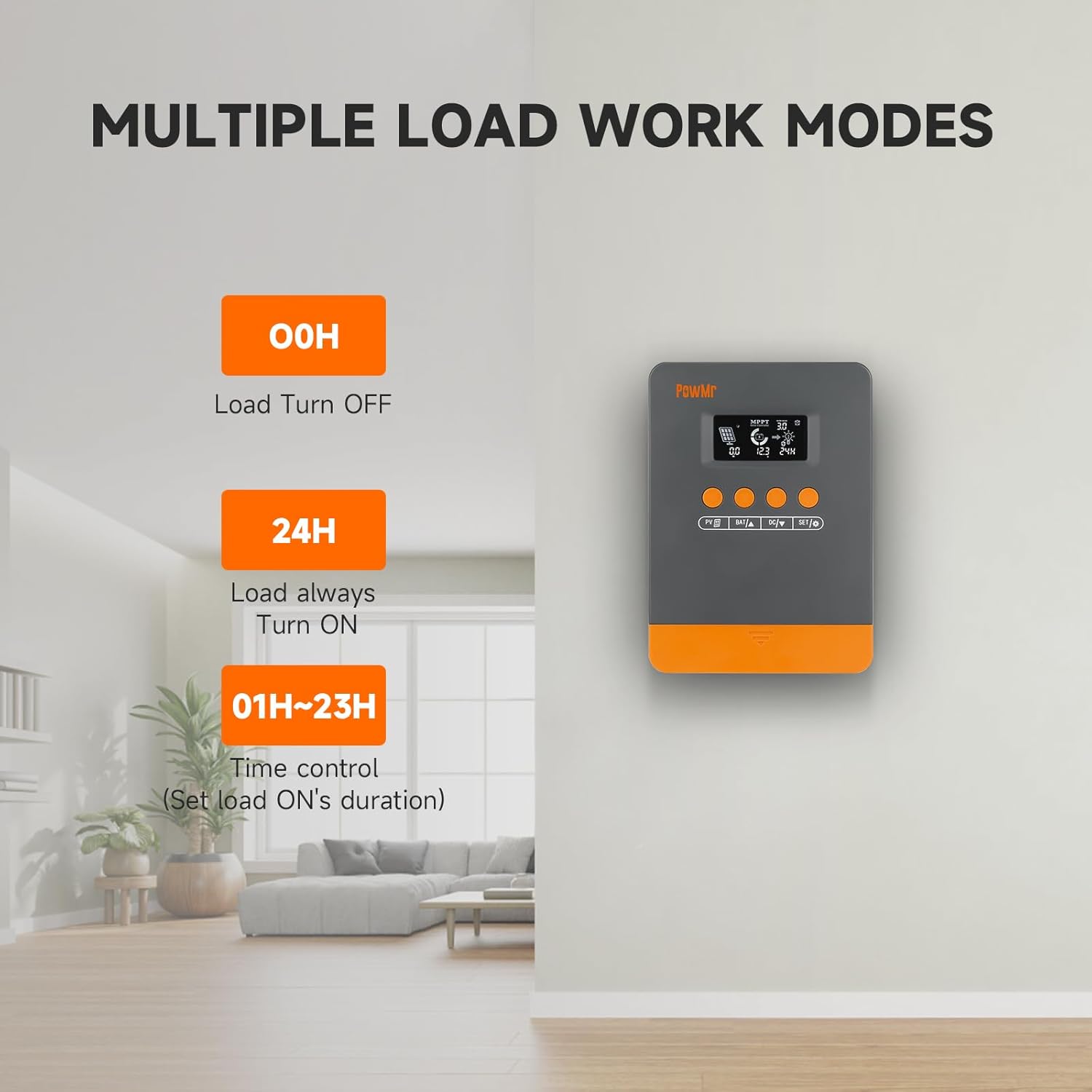
Figure 7: Load Work Modes. This image illustrates the different operational modes for the DC load output, including always off, always on, and time-controlled duration.
4.4. Calibrating Battery Voltage
Batareya hajmi o'rtasida nomuvofiqlik bo'lsatage monitored by the controller and a multimeter reading, you can calibrate the controller's voltage:
- ni uzoq bosib turing BAT/▲ key to enter the setting program.
- dan foydalaning BAT/▲ va DC/▼ qiymatni sozlash uchun tugmalar.
- ni bosing SET/⚙ saqlash va tasdiqlash uchun tugma.

8-rasm: Batareya hajmitage Calibration. This image shows the controller's display during the battery voltage calibration process, allowing users to adjust the displayed voltage to match an external measurement.
5. Xizmat ko'rsatish
Regular maintenance ensures optimal performance and longevity of your solar charge controller and system.
- Ulanishlarni tekshiring: Periodically check all wiring connections for tightness and corrosion. Loose connections can lead to power loss or damage.
- Toza boshqaruvchi: Keep the controller clean and free from dust and debris. Use a dry cloth for cleaning. Ensure ventilation openings are not obstructed.
- Batareyani tekshirish: Regularly inspect your batteries for signs of damage, leakage, or swelling. Ensure battery terminals are clean.
- Quyosh panelini tozalash: Clean solar panels periodically to remove dirt, dust, or snow that may reduce efficiency.
- Ishlash monitoringi: Observe the controller's display for any unusual readings or error codes.
6. Muammolarni bartaraf qilish; nosozliklarni TUZATISH
This section provides guidance for common issues and their solutions. Refer to the LCD screen for specific error codes.
6.1. Error Codes and Solutions
| Xato kodi | Sabab | Yechim |
|---|---|---|
| 18 | Input photovoltaic voltage juda past | Increase the number of solar panels or connect them in series to raise the photovoltaic input voltage. |
| 60 | Haddan tashqari haroratdan himoya qilish | Allow the equipment to cool to below the recovery temperature to resume normal charging and discharging. |
| 63 | Batareya hajmitage juda baland | Batareya quvvati mavjudligini tasdiqlash uchun o'lchangtage nominal hajmdan oshaditage and disconnect photovoltaic array circuit breaker. |
| 65 | Batareya hajmitage juda past | Batareyani ovoz balandligigacha zaryadlangtage pastki voltdan oshaditage recovery point. Refer to "3.7 Default/Parameters for Different Battery Types" for specific details. |
| 71 | Input photovoltaic voltage juda baland | Reduce the number of photovoltaic arrays connected to the controller to lower photovoltaic input, or adjust series and parallel connections to reduce voltage yoki joriy qiymatlar. |
| 73 | Overcharging current | Reduce output terminal load to ensure total load is within rated limits of the controller and battery. |
| 72 | Overdischarging current | Reduce output terminal load to ensure total load is within rated limits of the controller and battery. |
6.2. General Troubleshooting Tips
- Displey/quvvat yo'q: Check battery connections and ensure the battery has sufficient charge. Verify polarity.
- Batareya quvvatlanmaydi:
- Ensure solar panels are connected correctly and receiving adequate sunlight.
- Quyosh paneli voltage va joriy.
- Verify battery type settings on the controller.
- Yuk ishlamayapti:
- Check load connections and ensure the load is within the controller's rated capacity.
- Verify the load work mode setting (00H, 24H, or time control).
- Batareyaning yetarli zaryadlanganligiga ishonch hosil qiling.
- Noto'g'ri o'qishlar: Calibrate battery voltage 4.4-bo'limda tavsiflanganidek.
7. Texnik shartlar
| Xususiyat | Tafsilot |
|---|---|
| Model | M25A-12V/24V (POW-M25-PRO) |
| Brend | PowMr |
| Tizim jilditage | 12V / 24V Avtomatik |
| Max. PV Input Power (12V System) | 300 Vt |
| Max. PV Input Power (24V System) | 600 Vt |
| Maks. PV Open-Cruit Voltage | <60V |
| Nominal zaryad oqimi | 25A |
| Kuzatuv samaradorligi | 98% gacha |
| Peak Conversion Efficiency | 97% gacha |
| Qo'llab-quvvatlanadigan batareya turlari | Sealed, Gel, Flooded, Lithium (LFP), User-defined |
| Mahsulot o'lchamlari (U x G x Y) | 4.52" x 2" x 7" (11.48 sm x 5.08 sm x 17.78 sm) |
| Element og'irligi | 1.1 funt (500 gramm) |
| Birinchi mavjud sana | 3 yil 2024 sentyabr |

Figure 9: System Wiring and Model Specifications. This image provides a detailed schematic for connecting solar panels, battery, and load, alongside a table outlining specifications for various PowMr MPPT controller models, including the M25A-12V/24V.
8. Kafolat va qo'llab-quvvatlash
For warranty information and technical support, please refer to the official PowMr websayti yoki bevosita mijozlarga xizmat ko'rsatish bilan bog'laning. Kafolat da'volari uchun xarid kvitansiyasini saqlang.


