Kirish
This manual provides detailed instructions for the safe and effective use of your Nanlite PavoSlim 60CL 2X.5 RGBWW LED Panel. Please read this manual thoroughly before operation and retain it for future reference.
The Nanlite PavoSlim 60CL is an exceptionally slim and lightweight RGBWW LED panel designed for professional lighting applications. It offers impressive output, accurate color rendition (CRI 96, TLCI 97), and flicker-free performance, suitable for high-frame-rate shooting. The unit supports both AC power and battery operation (NP-F and V-Mount) for versatile use on location.

Figure 1: Nanlite PavoSlim 60CL LED Panel with Softbox
Paket tarkibi
Quyida sanab o'tilgan barcha narsalar paketingizga kiritilganligini tekshiring. Agar biron bir narsa etishmayotgan yoki shikastlangan bo'lsa, iltimos, dileringizga murojaat qiling.
- PavoSlim 60CL LED Panel
- Boshqarish birligi
- Pop-up Softbox
- Fabric Grid (Eggcrate)
- 2 x Diffusion Cloths
- 2 x o'rnatish qavslari
- Super Clamp
- AC quvvat kabeli
- Kabellarni ulash
- Yuk ko'tarish qutisi

Figure 2: Complete PavoSlim 60CL Kit Contents
Xavfsizlik bo'yicha ko'rsatmalar
- Chiroq yonib turganida yorug'lik manbasiga to'g'ridan-to'g'ri qaramang.
- Do not place the product in direct sunlight or near heating devices.
- Mahsulotni namlikka yoki yomg'irga ta'sir qilmang.
- Tozalash yoki texnik xizmat ko'rsatishdan oldin har doim quvvatni uzing.
- Haddan tashqari issiqlikning oldini olish uchun ish paytida to'g'ri shamollatishni ta'minlang.
- Use only approved power adapters and accessories.
- Bolalar qo'li etmaydigan joyda saqlang.
Sozlash; o'rnatish
1. Mounting the LED Panel
- Attach the appropriate mounting bracket to the PavoSlim 60CL LED Panel.
- Secure the panel to a light stand using the mounting bracket and super clamp. Ensure it is stable.
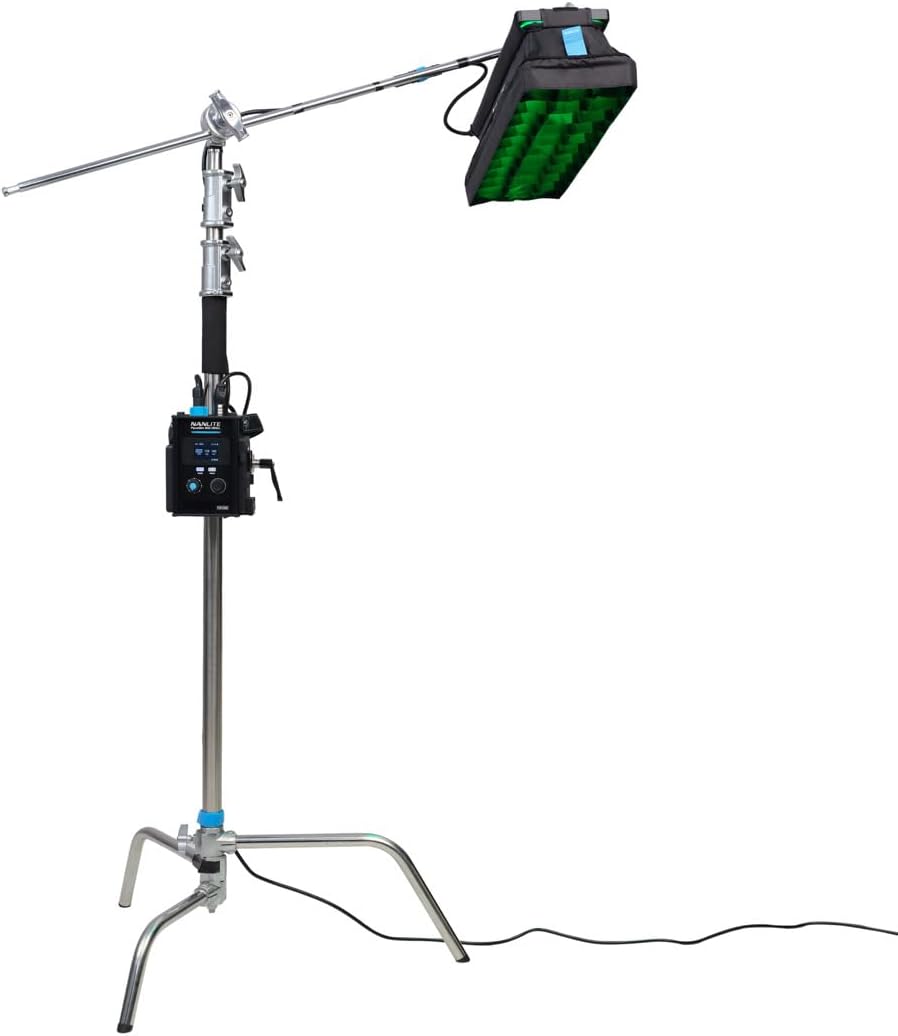
Figure 3: Panel Mounted on a C-Stand
2. Attaching the Softbox and Grid
- Unfold the pop-up softbox and attach it to the front of the LED panel.
- If desired, attach one or both diffusion cloths inside the softbox for softer light.
- For more directional light, attach the fabric grid (eggcrate) to the front of the softbox.

Figure 4: Panel with Softbox and Grid
3. Jihozni quvvat bilan ta'minlash
- AC quvvati: Connect the AC power cable to the control unit, then plug it into a suitable power outlet.
- Batareya quvvati: Insert compatible NP-F batteries into the designated slots on the control unit, or connect a V-Mount battery to the V-Mount plate.

Figure 5: Control Unit with V-Mount Battery
Foydalanish bo'yicha ko'rsatmalar
Boshqaruv bloki tugadiview

Figure 6: PavoSlim 60CL Control Unit
- Displey ekrani: Shows current settings (brightness, color temperature, mode, etc.).
- MODE tugmasi: Cycles through different lighting modes (CCT, HSI, RGBW, Effects).
- MENU tugmasi: Accesses system settings and advanced options.
- Boshqarish tugmalari: Adjust parameters such as brightness, color temperature, hue, saturation, and intensity depending on the selected mode.
Asosiy operatsiya
- Quvvatni yoqish/oʻchirish: Press and hold the power button on the control unit.
- Yorqinlikni sozlash: In any mode, use the designated control knob to increase or decrease the light intensity.
- Change Color Temperature (CCT Mode): Press the MODE button until CCT mode is selected. Use the control knob to adjust the color temperature from warm to cool white light.
- Adjust Color (HSI Mode): Press the MODE button until HSI mode is selected. Use the control knobs to adjust Hue, Saturation, and Intensity.
- Maxsus effektlar: Press the MODE button to cycle through various built-in lighting effects. Refer to the on-screen display for effect names and parameters.

Figure 7: Panel Emitting Red Light
Bluetooth ulanishi
The PavoSlim 60CL supports Bluetooth connectivity for remote control via the Nanlink APP. Download the Nanlink APP from your device's app store and follow the in-app instructions to pair your light.
Xizmat
- Tozalash: Use a soft, dry cloth to clean the surface of the LED panel and control unit. Do not use abrasive cleaners or solvents.
- Saqlash: When not in use, store the unit in its carry case in a cool, dry place, away from direct sunlight and moisture.
- Batareya parvarishi: If using batteries, ensure they are charged regularly and stored according to battery manufacturer guidelines. Remove batteries if the unit will not be used for an extended period.
Muammolarni bartaraf qilish; nosozliklarni TUZATISH
| Muammo | Mumkin sabab | Yechim |
|---|---|---|
| Chiroq yoqilmaydi. | No power supply; loose cable connection; dead battery. | AC quvvat ulanishini yoki batareya zaryadini tekshiring. Barcha kabellar xavfsiz ulanganligiga ishonch hosil qiling. |
| Yorug'lik miltillaydi. | Unstable power supply; incorrect settings. | Ensure stable power source. Reset settings or try a different mode. |
| Bluetooth orqali ulanib bo'lmadi. | Bluetooth not enabled; incorrect pairing procedure; interference. | Ensure Bluetooth is enabled on both devices. Follow Nanlink APP pairing instructions. Move closer to the light. |
| Nur juda xira. | Brightness set too low; power limitation. | Increase brightness setting. Ensure adequate power supply (e.g., fully charged batteries or AC). |
Texnik xususiyatlari
| Xususiyat | Tafsilot |
|---|---|
| Model | PavoSlim 60CL |
| Model raqami | 9742634 |
| Mahsulot o'lchamlari | 24 x 6 x 0.73 dyuym |
| Element og'irligi | 4.4 funt |
| Rang harorati | Adjustable (CCT Mode) |
| Color Rendition Index (CRI) | 96 |
| Televizor yoritilishining izchillik indeksi (TLCI) | 97 |
| Ulanish | Bluetooth |
| Quvvat manbai | AC or Battery (NP-F, V-Mount) |
Kafolat haqida ma'lumot
The Nanlite PavoSlim 60CL comes with a 2-year limited warranty. This warranty can be extended to 3 years with online registration. The warranty covers defects in materials and workmanship under normal use. It does not cover damage caused by misuse, accident, unauthorized modification, or improper storage.
For warranty claims or to register your product, please visit the official Nanlite website or contact Nanlite customer support.
Mijozlarni qo‘llab-quvvatlash
If you encounter any issues or have questions not covered in this manual, please contact Nanlite customer support:
- Websayt: www.nanlite.com
- Email: Rasmiyga murojaat qiling webelektron pochta orqali bog'lanish uchun sayt.
- Telefon: Rasmiyga murojaat qiling website for contact phone number.
ga ham tashrif buyurishingiz mumkin NANLITE Store on Amazon qo'shimcha mahsulot haqida ma'lumot va qo'llab-quvvatlash resurslari uchun.
Muhim eslatmalar
No official product videos from the seller were found in the provided data. Therefore, no videos are embedded in this manual.


