1. Kirish
Thank you for choosing the EvoFox Ronin Wired Mechanical Gaming Keyboard. This manual provides detailed instructions for setting up, operating, and maintaining your keyboard to ensure optimal performance and longevity. The EvoFox Ronin is designed for a superior typing and gaming experience, featuring advanced sound dampening, customizable switches, and dynamic RGB lighting.

Image 1.1: EvoFox Ronin Wired Mechanical Gaming Keyboard (Black)
Asosiy xususiyatlar:
- 9-Layer Gasket Structure: Advanced design for reduced noise, improved stability, and enhanced tactile feedback.
- Hot-Swappable Outemu Red Silent Switches: Customizable, durable, and smooth typing experience with included switch puller.
- Har bir tugmachada RGB orqa yoritish: 21 effects and Audio Sync Mode for personalized and immersive lighting.
- Dedicated Volume Knob: Convenient control over audio levels.
- Powerful Windows Software: Program keys, create macros, control backlighting, and manage profiles with onboard memory.
- O'zaro platformalar mosligi: Easily switch between Windows and Mac modes.
- Detachable Braided USB-C Cable: Robust 1.5m cable with EMI ring for reliable connection and portability.
2. Paket tarkibi
Iltimos, paketingizda barcha narsalar mavjudligini tekshiring:
- 1 x EvoFox Ronin Mechanical Gaming Keyboard
- 1 x Klaviatura qopqog'ini tortuvchi
- 4 x Outemu Red Switches (Spare)
- 1 x foydalanuvchi qo'llanmasi
3. Mahsulot tugadiview
3.1 Qistirma tuzilishi
The EvoFox Ronin features an advanced 9-layer gasket structure. This design incorporates silicone gaskets, a mounting plate, and multiple layers of vibration and sound dampening materials to provide a stable, quiet, and comfortable typing experience by minimizing unwanted noise and resonance.
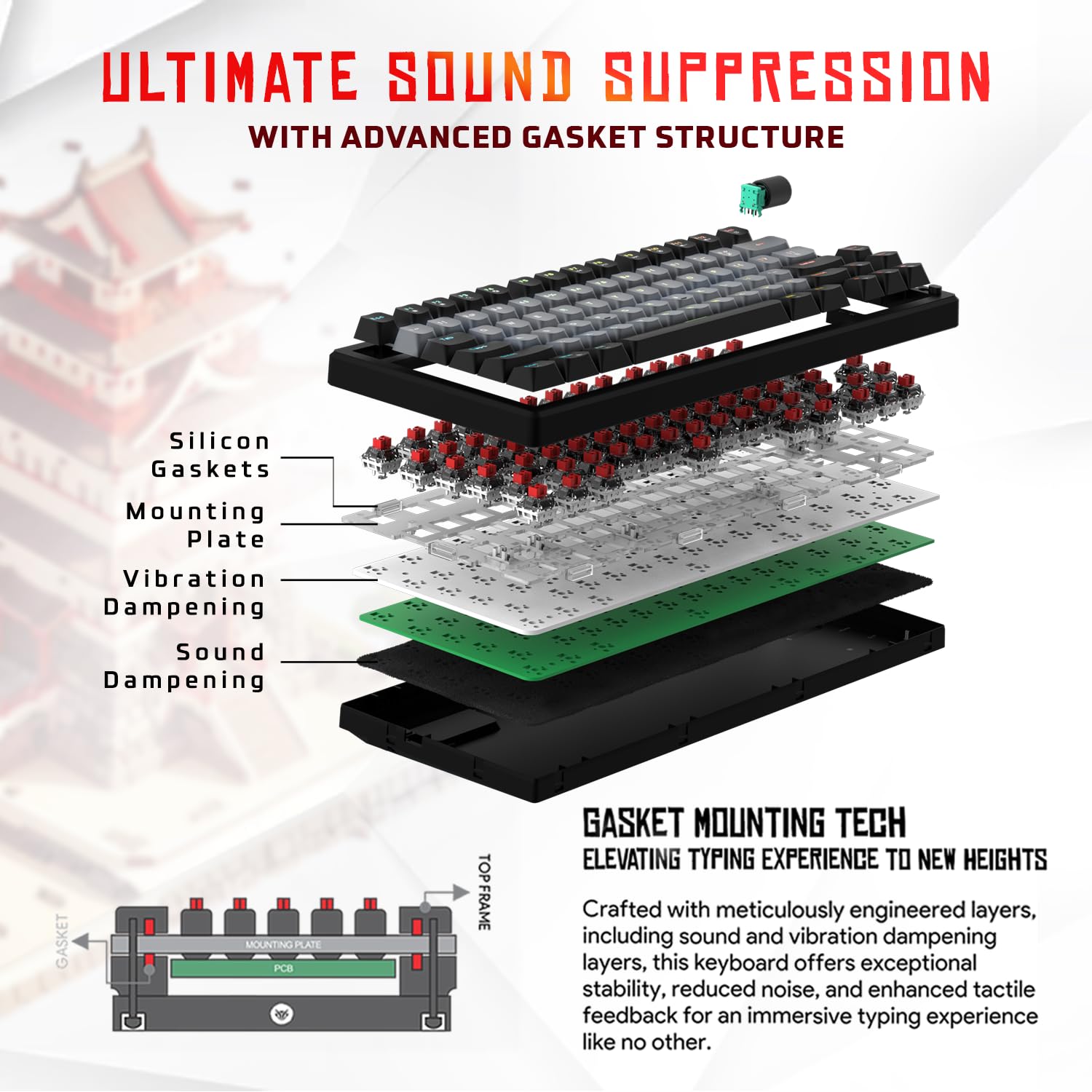
3.1-rasm: portlagan view of the 9-layer gasket structure, showing silicone gaskets, mounting plate, and damppardozlash qatlamlari.
3.2 Outemu Red Silent Switches
The keyboard is equipped with Outemu Red Dust Proof Switches, known for their linear and silent operation. These switches are hot-swappable, allowing users to easily replace them with other compatible 3-pin mechanical switches without soldering, enabling full customization of the typing feel.
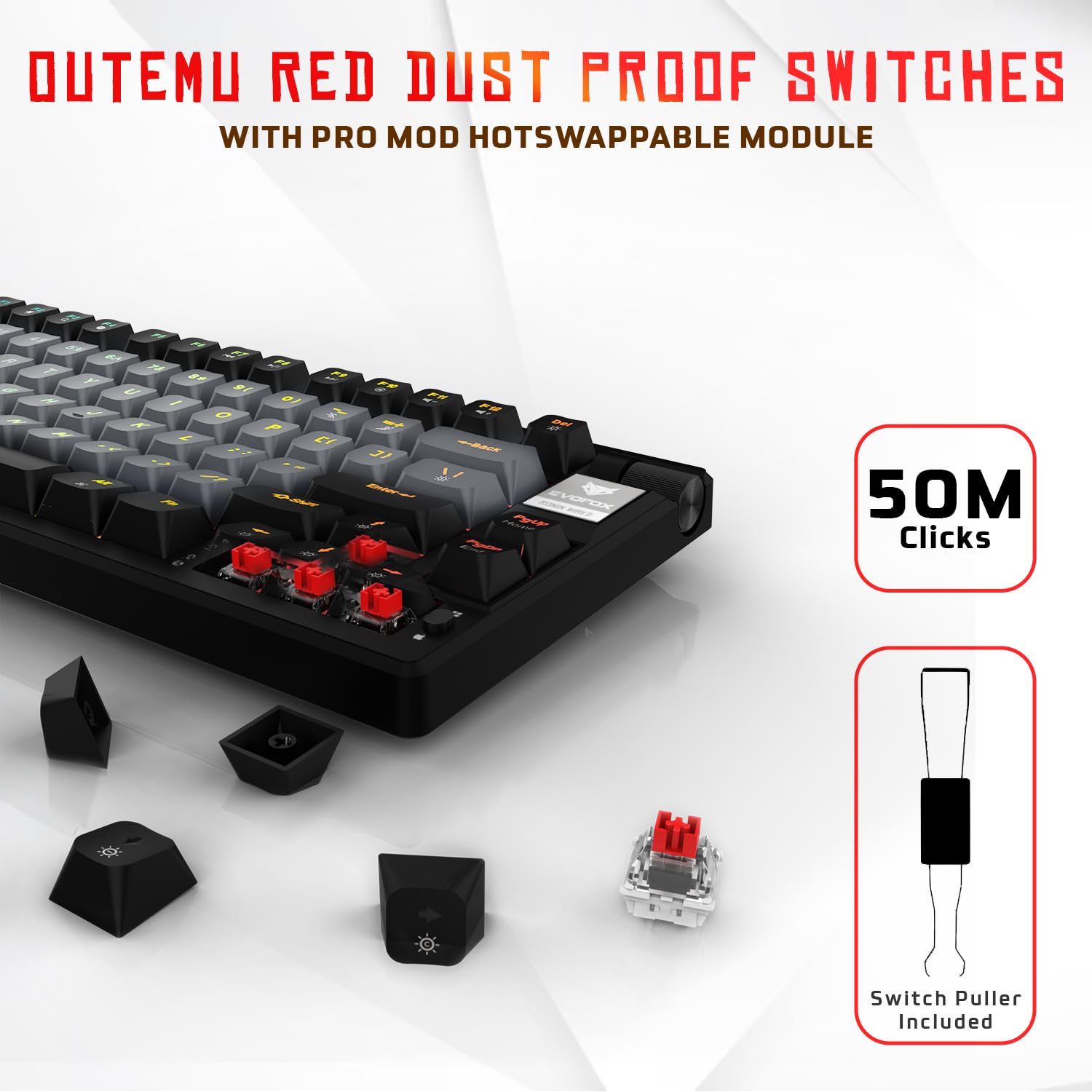
Image 3.2: Close-up of Outemu Red switches and the included switch puller, demonstrating hot-swappable functionality.
3.3 Per-Key RGB Backlighting
Each key on the EvoFox Ronin features individual RGB backlighting, offering 16 million colors and 21 pre-set lighting effects. The lighting can be customized directly on the keyboard or through the dedicated software, including an Audio Sync Mode that reacts to sound.

Image 3.3: The EvoFox Ronin keyboard showcasing har bir tugma uchun moslashtirilgan RGB yoritgichi.
3.4 Dedicated Volume Knob
A metal volume knob is integrated into the keyboard for quick and precise audio adjustments. Rotate to change volume, and press to mute/unmute.
3.5 Detachable USB-C Cable
The keyboard connects via a robust 1.5-meter braided USB-C cable, which is detachable for easy portability and storage. The cable includes an EMI ring to minimize signal interference.

Image 3.4: Features of the EvoFox Ronin, including the volume knob, detachable USB-C cable, and double-height adjustable legs.
4. O'rnatish bo'yicha ko'rsatmalar
Follow these steps to set up your EvoFox Ronin keyboard:
- Klaviaturani o'ramdan chiqarib oling: Klaviatura va barcha aksessuarlarni o'ramdan ehtiyotkorlik bilan olib tashlang.
- USB-C kabelini ulang: Insert the USB-C end of the provided cable into the port on the back of the keyboard.
- Kompyuterga ulanish: Plug the USB-A end of the cable into an available USB port on your computer (PC or Mac).
- Haydovchi o'rnatish: Klaviatura "ulang va ishga tushiring" rejimida ishlaydi. Operatsion tizimingiz kerakli drayverlarni avtomatik ravishda aniqlab, o'rnatishi kerak.
- Ixtiyoriy dasturiy ta'minotni o'rnatish: For advanced customization, download the dedicated Windows software from the official EvoFox websayt.
5. Foydalanish bo'yicha ko'rsatmalar
5.1 Asosiy kalit funktsiyalari
The EvoFox Ronin functions as a standard TKL (Tenkeyless) keyboard. All keys perform their labeled functions. The keyboard supports N-Key Rollover, ensuring every key press is registered accurately, even during rapid input.
5.2 Multimedia va funksiya tugmalari
Access multimedia and additional functions by pressing the Fn key in combination with the designated F-keys or other keys. Refer to the keycap legends for specific functions (e.g., Fn + F1 for media player, Fn + F2 for volume down).
5.3 RGB yoritishni boshqarish
You can control the RGB lighting directly from the keyboard:
- O'zgartirish effektlari: Foydalanish Fn + \| 21 xil yorug'lik effektlarini almashtirish.
- Yorqinlikni sozlash: Foydalanish Fn + Yuqoriga strelka yorqinligini oshirish va Fn + Pastga strelka yorqinlikni kamaytirish uchun.
- Tezlikni sozlash: Foydalanish Fn + Chap strelka to decrease effect speed and Fn + o'ngga strelka to increase effect speed.
- Audio Sync Mode: Activate specific modes that react to audio input.
5.4 Dasturiy ta'minotni sozlash
The dedicated Windows software allows for comprehensive customization:
- Asosiy dasturlash: Remap any key to a different function.
- Makro yaratish: Record and assign complex key sequences to a single key.
- Backlighting Effects: Fine-tune RGB colors, effects, brightness, and speed.
- Profile Boshqaruv: Bir nechta professionalni yarating va saqlangfiles turli ilovalar yoki o'yinlar uchun.
- Saylov darajasi: Adjust the polling rate up to 1000Hz.

Image 5.1: Screenshot of the EvoFox Ronin's dedicated software, showing options for light settings, button settings, and macro management.
5.5 Platformalararo moslik
The keyboard supports both Windows and Mac operating systems. Use the designated key combination (typically Fn + Win or similar, refer to keycap legends) to switch between modes, ensuring correct key mapping for your OS.
6. Xizmat ko'rsatish
6.1 Klaviaturani tozalash
Klaviaturaning tashqi ko'rinishi va funksionalligini saqlab qolish uchun:
- Tozalashdan oldin klaviaturani kompyuteringizdan uzing.
- Klaviatura qopqoqlari orasidagi chang va qoldiqlarni olib tashlash uchun siqilgan havo idishidan foydalaning.
- Klaviatura qopqog'i va klaviatura yuzasini yumshoq, ozgina d bilan artib olingamp mato. Haddan tashqari namlikdan saqlaning.
- Qattiq kimyoviy yoki abraziv tozalash vositalarini ishlatmang.
6.2 Kalitlarni almashtirish
The EvoFox Ronin features hot-swappable switches, allowing for easy replacement without soldering:
- Klaviaturani kompyuteringizdan uzing.
- Use the included keycap puller to gently remove the desired keycap.
- Use the included switch puller to carefully grip the top and bottom clips of the switch and pull it straight up.
- Align the pins of the new switch with the holes on the PCB and gently press it down until it clicks into place. Ensure the pins are not bent.
- Klaviatura qopqog'ini almashtiring.

Image 6.1: A keycap being removed from the keyboard using a keycap puller.
7. Muammolarni bartaraf qilish; nosozliklarni TUZATISH
If you encounter issues with your EvoFox Ronin keyboard, refer to the following common solutions:
- Klaviatura javob bermayapti:
- USB-C kabeli klaviatura va kompyuterga mahkam ulanganligiga ishonch hosil qiling.
- Klaviaturani kompyuteringizdagi boshqa USB portiga ulab ko'ring.
- Kompyuterga xos muammoni istisno qilish uchun klaviaturani boshqa kompyuterda sinab ko'ring.
- Kompyuteringizni qayta ishga tushiring.
- RGB yoritgichi ishlamayapti/noto'g'ri:
- Check the on-board lighting controls (Fn key combinations) to ensure brightness is not set to zero or an effect is not disabled.
- If using the software, ensure it is running and the correct profile faoldir.
- Reinstall the keyboard software if issues persist.
- Ro'yxatdan o'tmagan kalitlar:
- Klaviatura qopqog'i yoki tugmachasi ostiga hech qanday axlat tushmaganligiga ishonch hosil qiling.
- If a specific key is not working, try replacing its switch (refer to Section 6.2).
- Check for bent pins on the switch if you recently replaced one.
- Software Issues (e.g., Antivirus Flagging):
- Ensure you download the software from the official EvoFox website to avoid unofficial versions.
- If your antivirus flags the software, you may need to add an exception for the software's executable file. Proceed with caution and only if you trust the source.
- Contact EvoFox support for the latest software version or assistance.
8. Texnik shartlar
| Xususiyat | Tafsilot |
|---|---|
| Brend | EvoFox |
| Model nomi | EvoFox Ronin TKL Wired |
| Klaviatura tavsifi | Mexanik |
| Ulanish texnologiyasi | USB-C (simli) |
| Kalitlar | Outemu Red Silent Dust Proof Switches (Hot-Swappable) |
| Orqa yoritish | Per-Key RGB (16 Million Colors, 21 Effects, Audio Sync Mode) |
| Saylov darajasi | 1000 Gts gacha |
| Kalitni aylantirish | N-Key Rollover (All Anti-Ghosting Keys) |
| Maxsus xususiyatlar | Advanced Gasket Structure, Compact TKL Design, Multimedia Keys, Pro Mod Hotswap Module, Powerful Windows Software, Dedicated Volume Controller |
| Mos qurilmalar | Noutbuk, kompyuter |
| Uskuna platformasi | PC/Mac/Linux/Unix |
| Kabel uzunligi | 1.5m Detachable Braided Type-C with EMI Ring |
| Material | Plastik |
| Mahsulot o'lchamlari | 32 x 13.5 x 2.6 sm |
| Element og'irligi | 640 gr |
| Ishlab chiqaruvchi mamlakat; ta'minotchi mamlakat | Xitoy |
9. Kafolat va qo'llab-quvvatlash
The EvoFox Ronin Mechanical Gaming Keyboard comes with a standard manufacturer's warranty. Please refer to the warranty card included in your package for specific terms and conditions, including warranty period and coverage details.
For technical support, troubleshooting assistance, or warranty claims, please contact EvoFox customer support. You can find contact information on the official EvoFox website or through the manufacturer, Allied Electronics & Magnetics Private Limited.
Ishlab chiqaruvchi: Allied Electronics & Magnetics Private Limited kompaniyasi
Manzil: C-64/4, Okhla Phase - 2, Yangi Dehli - 110020


