1. Kirish
Thank you for choosing the darkFlash DS900 ATX Full View Dual Tempered Glass PC Case. This manual provides detailed instructions for the installation, operation, and maintenance of your new PC case, including the integrated PWM ARGB fans. Please read this manual thoroughly before beginning assembly to ensure proper setup and optimal performance.

Figure 1.1: The darkFlash DS900 ATX PC Case, showcasing its full view tempered glass panels and pre-installed ARGB fans.
2. Mahsulot xususiyatlari
- Optimum Performance and Cooling: Equipped with four PWM ARGB fans, supporting up to 10 fans and a 360MM radiator for efficient cooling. Includes additional G24 PWM magnetic fans for enhanced heat dissipation.
- To'siqsiz View: Features a 270° panoramic tempered glass panel for an expansive view of internal hardware and RGB lighting. High-strength tempered glass ensures clarity and durability.
- Thoughtful Design for Performance: Includes a magnetic top dust filter and a panel filter for component cleanliness. Anti-slip bottom prevents sliding. G24 hydro-bearing fans maintain low noise levels (33.5 dBA) and offer extended lifespan.
- Enhanced Cable Management: Tool-less design features and ample space for expansion simplify upgrades and maintenance. Magnetic fan mounting system allows for quick installation.
- Moslashtirilgan estetika: G24 PC Fans feature ARGB lighting compatible with most addressable RGB motherboards (e.g., Aura Mystic Light, Polychrome Sync) for synchronized visual effects.

2.1-rasm: portlagan view illustrating the upgraded design with high light transmittance, explosion-proof glass, and screwless disassembly on three sides.

Figure 2.2: The ARGB fans offer all-inclusive compatibility for light color synchronization with major motherboard RGB systems.
3. O'rnatish va o'rnatish
3.1 Komponentlarning mosligi
The DS900 case supports a wide range of components. Please refer to the diagram below for maximum component dimensions and fan/radiator placements.

Figure 3.1: Internal layout indicating support for 360mm radiators, CPU coolers up to 170mm, GPUs up to 425mm, and various storage drives (2.5" SSD, 3.5" HDD).
3.2 Fan Installation and Airflow
The case comes with four 120mm ARGB fans pre-installed. Additional fans can be added for optimized airflow. The magnetic fan mounting system simplifies installation.

Figure 3.2: Illustration of the included 4 x 120mm ARGB fans, with 3 fans typically mounted on the side and 1 fan in the rear. Note: RGB Hub Controller is not included.

Figure 3.3: High-airflow performance is achieved through 4 dedicated airflow channels, supporting efficient cooling and radiator integration.
The newly designed magnetic suction fans feature magnets and metal contacts on the side, reducing the need for extensive wire connections and simplifying fan installation and cable management.

Figure 3.4: Magnetic suction fans designed to reduce wire connections, featuring magnets and metal contacts for streamlined setup.
4. Foydalanish bo'yicha ko'rsatmalar
4.1 ARGB Lighting Synchronization
The G24 PC Fans support ARGB lighting synchronization with compatible motherboards. Connect the ARGB cables from the fans to your motherboard's 3-pin 5V ARGB header. Use your motherboard's software (e.g., ASUS Aura Sync, MSI Mystic Light Sync, ASRock Polychrome Sync) to customize lighting effects and colors.
4.2 Ventilyator tezligini boshqarish (PWM)
The PWM (Pulse Width Modulation) fans allow for dynamic speed control based on system temperature. Connect the fan PWM cables to your motherboard's 4-pin fan headers. Fan speed can be managed through your motherboard's BIOS settings or dedicated fan control software.
5. Xizmat ko'rsatish
Regular maintenance ensures the longevity and optimal performance of your PC case and components.
- Chang filtrini tozalash: The DS900 features a magnetic top dust filter and other panel filters. Periodically remove and clean these filters to prevent dust buildup inside the case, which can impede airflow and component cooling. Use compressed air or a soft brush.
- Kosonni tozalash: Wipe down the exterior and tempered glass panels with a soft, lint-free cloth. For stubborn smudges on glass, a mild glass cleaner can be used, applied to the cloth first, not directly to the glass.
- Fanni tozalash: Gently clean fan blades with compressed air or a soft brush to remove dust. Ensure fans are not spinning during cleaning.
6. Muammolarni bartaraf qilish; nosozliklarni TUZATISH
Ushbu bo'lim siz duch kelishi mumkin bo'lgan umumiy muammolarni ko'rib chiqadi.
| Muammo | Mumkin sabab | Yechim |
|---|---|---|
| Fans not spinning or no RGB lighting. |
|
|
| Excessive dust buildup inside case. |
|
|
| High system temperatures. |
|
|
7. Texnik shartlar
Detailed specifications for the darkFlash DS900 PC Case and included fans.
| Xususiyat | Tafsilot |
|---|---|
| Brend | darkFlash |
| Model nomi | DS900 |
| Ish turi | Minora |
| Anakartning muvofiqligi | ATX |
| Rang | Oq |
| Sovutish usuli | Havo |
| Muxlislar kiritilgan | 4 x 120mm PWM ARGB Fans (G16) |
| Maks Fanni Qo'llab-quvvatlash | 10 tagacha muxlis |
| Radiatorni qo'llab-quvvatlash | 360 mm gacha |
| GPUni tozalash | 425 mm gacha (16.7 dyuym) |
| CPU sovutgichini tozalash | 170 mm gacha |
| Fan Speed (G16) | ≤2200 RPM |
| Fan Air Capacity (G16) | ≤52.96 CFM |
| Fan Pressure (G16) | ≤1.96 MMH2O |
| Noise Level (G24 Hydro-bearing fans) | 33.5 dBA |
| USB 3.0 portlari | 4 |

Figure 7.1: Detailed specifications for the G16 120mm ARGB & PWM fans, including fan speed, air capacity, and pressure.
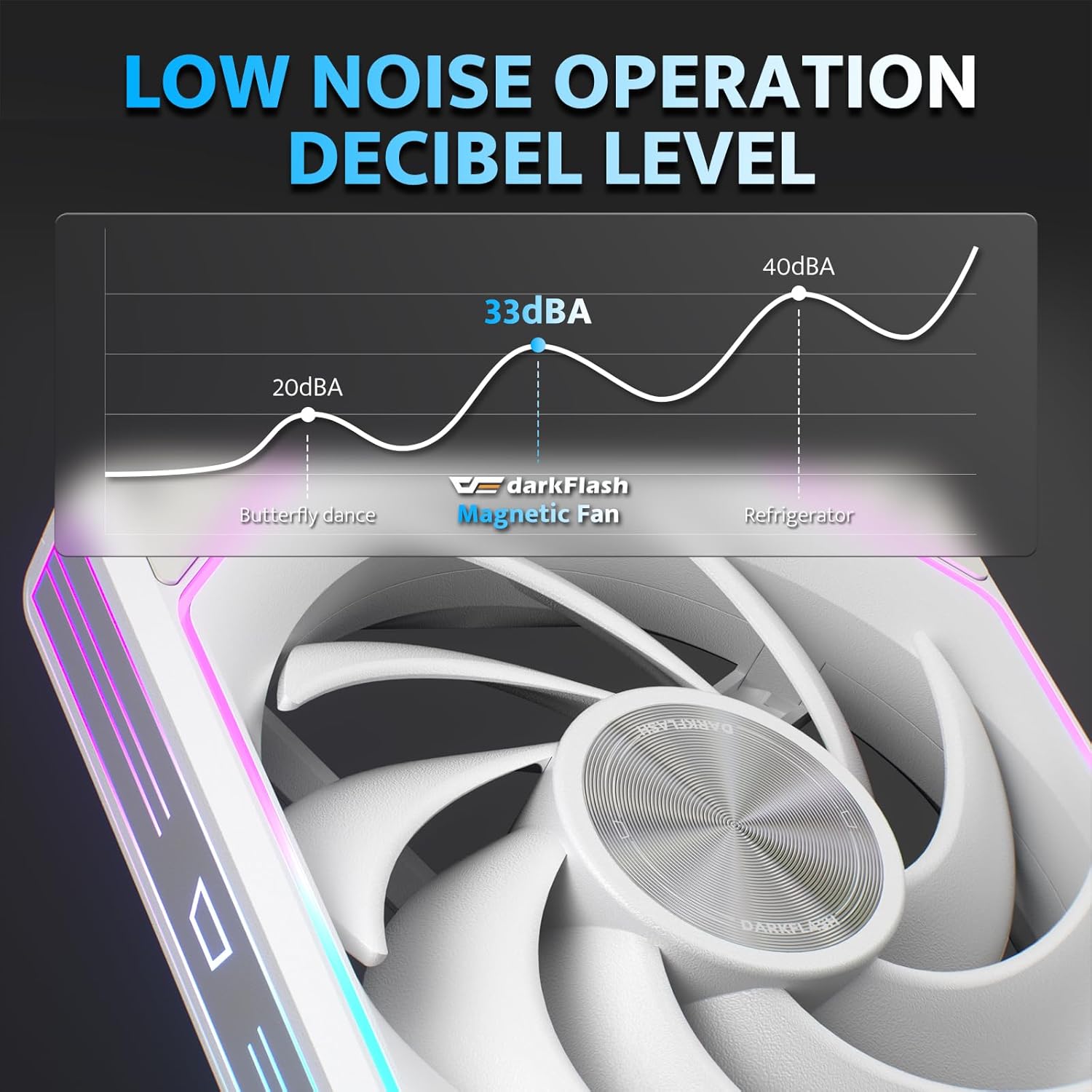
Figure 7.2: Noise level comparison, highlighting the low noise operation of the darkFlash magnetic fans at approximately 33 dBA.
8. Kafolat va qo'llab-quvvatlash
Specific warranty details are not provided in this manual. For warranty information, technical support, or further assistance, please contact darkFlash customer service or visit the official darkFlash websayt.
You can find more information and support resources on the darkFlash Amazon Store: darkFlash Store.
9. Video manbalar
No official product videos from the seller were available in the provided data. Please check the darkFlash official website or their Amazon store for any available video guides or demonstrations.


