Kirish
Welcome to the user manual for your NITHO NEXUS Wireless Controller. This manual provides detailed instructions on how to set up, operate, maintain, and troubleshoot your controller, ensuring you get the most out of its advanced features. The NEXUS controller is designed for a superior gaming experience across multiple platforms, including PC, iOS, and Android devices.
Key features include a precise 6-axis gyroscope, customizable RGB lighting effects, Hall effect triggers for enhanced precision, and an adjustable turbo function.
Paket tarkibi
- NITHO NEXUS Wireless Controller
- USB toifa-C zaryadlovchi kabeli
- Foydalanuvchi uchun qo'llanma (ushbu hujjat)
Mahsulot tugadiview
Familiarize yourself with the various components of your NITHO NEXUS Wireless Controller.
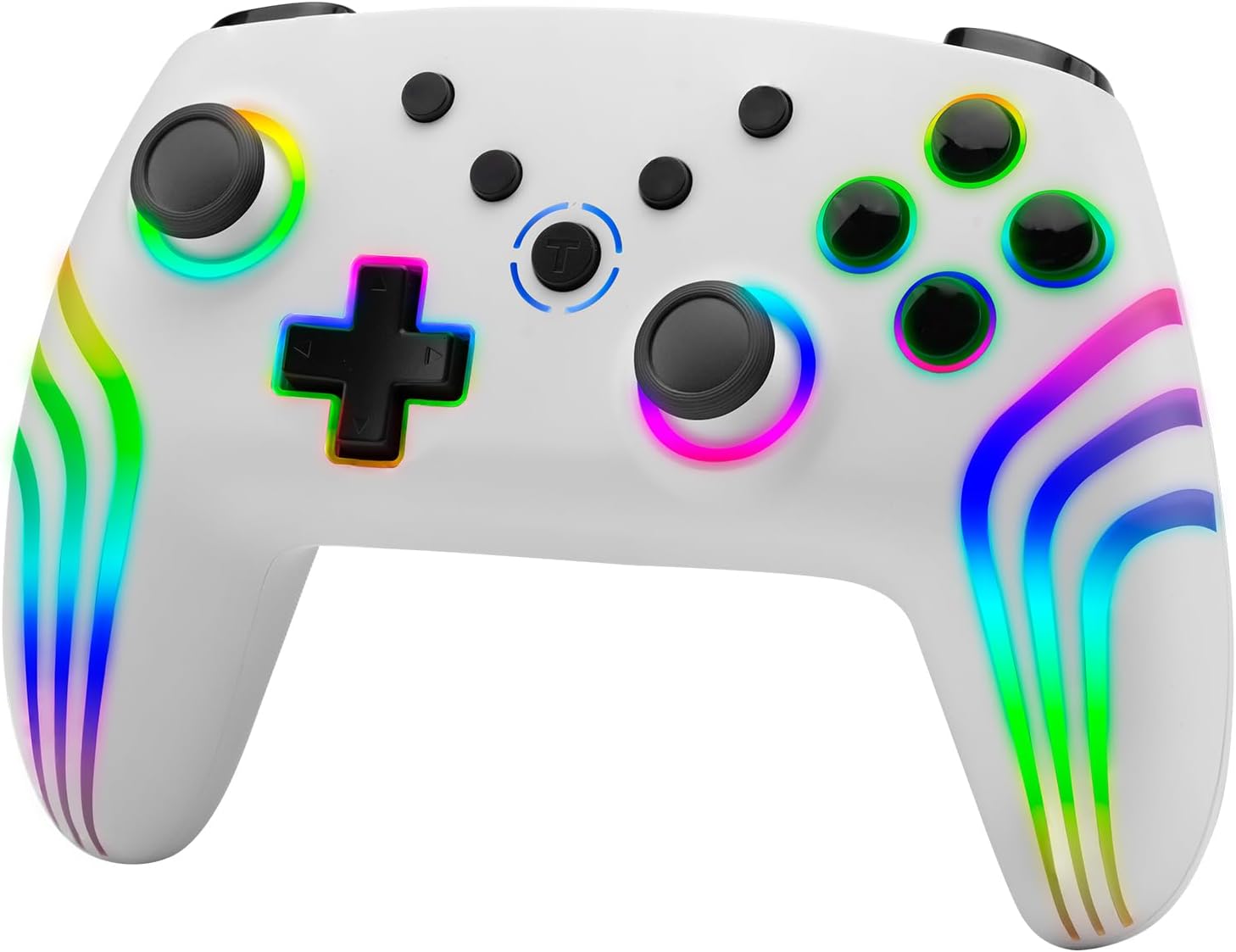
1-rasm: Old view of the NITHO NEXUS Wireless Controller, showcasing its ergonomic design and vibrant RGB lighting along the handles and around the joysticks and buttons.

2-rasm: The controller highlighting its long battery life, capable of up to 8 hours of continuous playtime on a single charge.

3-rasm: Rasmni yaqinlashtirib olish view of the high-quality analog mini sticks, designed for precise control and durability.

4-rasm: Illustration of the Hall Effect Triggers, which provide accurate and responsive input for an enhanced gaming experience.

5-rasm: Diagram illustrating the 6-axis motion sensor capability, allowing for motion-controlled gameplay.

6-rasm: Ichki view highlighting the dual motor vibration system, providing immersive haptic feedback during gameplay.

7-rasm: Close-up of the programmable turbo and auto turbo buttons, allowing for rapid, customizable input sequences.

8-rasm: The controller showcasing its dynamic RGB LED light effects, which can be customized to personal preference.

9-rasm: Dimensional drawing of the NITHO NEXUS Wireless Controller, indicating its physical measurements (161mm x 111mm x 65mm).
Sozlash; o'rnatish
1. Tekshirish moslamasini zaryadlash
Before first use, fully charge the controller. Connect the included USB Type-C cable to the controller's charging port and the other end to a USB power source (e.g., PC, USB wall adapter).
- Zaryadlash vaqti: Taxminan 2.5 dan 3 soatgacha.
- Battery life: Up to 8 hours of playtime on a full charge.
2. Qurilmalar bilan ulash
The NITHO NEXUS controller supports wireless connection via Bluetooth for PC, iOS, and Android devices.
2.1. Pairing with PC (Windows)
- Ensure Bluetooth is enabled on your Windows PC.
- Tekshirish moslamasida tugmasini bosing va ushlab turing Ulanish tugmasi (refer to Product Overview for location) until the indicator lights begin to flash rapidly.
- Shaxsiy kompyuteringizda ga o'ting Sozlamalar > Qurilmalar > Bluetooth va boshqa qurilmalar.
- bosing Bluetooth yoki boshqa qurilmani qo'shing va tanlang Bluetooth.
- Select "NITHO NEXUS Controller" from the list of available devices.
- Once paired, the indicator light on the controller will become solid.
2.2. Pairing with iOS Devices
- Ensure Bluetooth is enabled on your iOS device (iPhone, iPad).
- Tekshirish moslamasida tugmasini bosing va ushlab turing Ulanish tugmasi until the indicator lights begin to flash rapidly.
- iOS qurilmangizda quyidagiga o'ting: Sozlamalar > Bluetooth.
- Under "OTHER DEVICES", select "NITHO NEXUS Controller".
- Once paired, the indicator light on the controller will become solid.
2.3. Pairing with Android Devices
- Android qurilmangizda Bluetooth yoqilganligiga ishonch hosil qiling.
- Tekshirish moslamasida tugmasini bosing va ushlab turing Ulanish tugmasi until the indicator lights begin to flash rapidly.
- Android qurilmangizda bu yerga o'ting Sozlamalar > Ulangan qurilmalar > Bluetooth.
- ga teging Yangi qurilmani ulang and select "NITHO NEXUS Controller" from the list.
- Once paired, the indicator light on the controller will become solid.
Foydalanish bo'yicha ko'rsatmalar
1. Quvvatni yoqish/o‘chirish
- Yoqish uchun: tugmasini bosing Uy tugmasi.
- Oʻchirish uchun: tugmasini bosing va ushlab turing Uy tugmasi for 3 seconds until the indicator lights turn off. The controller will also automatically power off after 5 minutes of inactivity.
2. Vibratsiya intensivligini sozlash
The controller features 4 adjustable vibration intensity modes.
- Modes: None, Weak, Medium, Strong.
- To adjust: Refer to the controller's specific button combination for vibration adjustment (usually a combination of a function button and a directional pad input). (Note: Specific button combination not provided in source, general instruction given.)
3. 6 o'qli harakat sensori
The built-in high-sensitivity 6-axis gyroscope detects motion, tilt, and rotation, enhancing gameplay in supported titles.
- Ensure the game you are playing supports motion controls.
- Calibrate the gyroscope if you experience drift or inaccurate motion sensing. (Note: Calibration method not provided in source, general instruction given.)
4. Adjustable Turbo Function
The turbo function allows for rapid, repetitive button presses. It can be set to manual turbo or auto turbo.
- Turbo tezliklari: 8, 15, or 25 shots per second.
- Turbo sozlamalari:
- ni bosing va ushlab turing Turbo tugmasi.
- While holding Turbo, press the desired action button (e.g., A, B, X, Y) to assign turbo to it.
- Release both buttons. The assigned button will now activate turbo when pressed.
- Avtomatik turboni sozlash:
- Follow steps for setting Turbo.
- ni bosing Turbo tugmasi again, then press the already turbo-assigned action button. This will toggle it to auto turbo.
- The button will now continuously activate without needing to be held down.
- Turbo tezligini sozlash:
- ni bosing va ushlab turing Turbo tugmasi.
- dan foydalaning Yuqoriga/pastga directional pad to cycle through the turbo speeds.
- Disabling Turbo:
- ni bosing va ushlab turing Turbo tugmasi.
- Press the turbo-assigned action button twice to disable turbo for that specific button.
- Barcha turbo sozlamalarini tozalash uchun tugmasini bosib ushlab turing Turbo tugmasi va Minus (-) tugmasi bir vaqtning o'zida 3 soniya davomida.
5. RGB LED Lighting Effects
The controller features customizable multi-color RGB LED lighting effects.
- To cycle through lighting modes: Press the RGB tugmasi (if available) or a specific button combination. (Note: Specific button combination not provided in source, general instruction given.)
- To turn off/on lights: Press and hold the RGB tugmasi or relevant combination.
Xizmat
Proper maintenance ensures the longevity and optimal performance of your NITHO NEXUS Wireless Controller.
- Tozalash: Tekshirish moslamasini tozalash uchun yumshoq, quruq matodan foydalaning. O'jar axloqsizlik uchun, bir oz dampsuv bilan mato. Qattiq kimyoviy moddalar yoki abraziv tozalash vositalaridan foydalanmang.
- Saqlash: Tekshirgichni to'g'ridan-to'g'ri quyosh nuri va haddan tashqari haroratdan uzoqda, salqin va quruq joyda saqlang.
- Batareya parvarishi: Avoid fully discharging the battery frequently. If storing for an extended period, charge the controller to about 50% every few months to preserve battery health.
- Damlamalardan saqlaning: Tekshirish moslamasini ichki qismlarga zarar etkazishi mumkin bo'lgan jismoniy zarbalar va tushishlardan saqlang.
Muammolarni bartaraf qilish; nosozliklarni TUZATISH
| Muammo | Mumkin sabab | Yechim |
|---|---|---|
| Tekshirish moslamasi yoqilmaydi. | Kam batareya. | Charge the controller using the provided USB Type-C cable. |
| Controller does not pair with device. | Bluetooth is off on the device; Controller not in pairing mode; Interference. | Ensure Bluetooth is enabled. Put controller into pairing mode (flashing lights). Move closer to the device. Try restarting both controller and device. |
| Kirish kechikishi yoki ulanishning uzilishi. | Low battery; Too far from device; Wireless interference. | Charge the controller. Move closer to the device. Avoid obstacles between controller and device. Reduce other wireless activity. |
| Tugmalar yoki joystiklar javob bermayapti. | Software glitch; Physical damage. | Restart the controller. If problem persists, contact customer support. |
| Motion controls are inaccurate. | Gyroscope calibration needed. | Perform gyroscope calibration (refer to device or game settings, or controller manual if specific steps are provided). |
Texnik xususiyatlari
| Xususiyat | Tafsilot |
|---|---|
| Model raqami | MLT-NEXS-W |
| Moslik | PC (Windows), iOS, Android |
| Ulanish | Simsiz (Bluetooth) |
| Batareya turi | Lityum-ion (shu jumladan) |
| Batareya muddati | 8 soatgacha o'ynash vaqti |
| Zaryadlash vaqti | Taxminan 2.5 - 3 soat |
| Olchamlari (U x G x Y) | 16.1 x 6.5 x 11.1 sm (6.34 x 2.56 x 4.37 dyuym) |
| Og'irligi | 250 g (0.55 funt) |
| Sensorlar | 6-axis Gyroscope, Accelerometer |
| Triggerlar | Hall effekti triggerlari |
| Tebranish | Dual Motor Vibration (4 intensity modes) |
| Yoritish | RGB LED Lighting Effects |
| Maxsus xususiyatlar | Adjustable Turbo Function (8, 15, 25 shots/sec) |
Kafolat va qo'llab-quvvatlash
Kafolat haqida ma'lumot
NITHO products are covered by a limited warranty against defects in materials and workmanship. Please refer to the warranty card included with your product or visit the official NITHO webmintaqangiz uchun batafsil kafolat shartlari va shartlari uchun sayt.
This warranty does not cover damage caused by accident, abuse, misuse, natural disaster, or unauthorized modification or repair.
Mijozlarni qo‘llab-quvvatlash
If you encounter any issues or have questions not covered in this manual, please contact NITHO customer support. For the most up-to-date contact information, please visit:
Please have your product model number (MLT-NEXS-W) and purchase information ready when contacting support.


