1. Mahsulot tugadiview
The MOBAPAD N1 HD is a versatile wireless controller designed for an enhanced gaming experience across multiple platforms. It features advanced technologies such as Hall Effect Joysticks for precise control, ALPS Dual-Axis Motors for immersive HD vibration, and six-axis motion control. This controller is compatible with Nintendo Switch, PC, iOS, and Android devices, offering seamless connectivity and responsive performance.

Rasm: old view of the MOBAPAD N1 HD Wireless Controller, showcasing uning ergonomik dizayni va tugmalar joylashuvi.
2. Asosiy xususiyatlar
- Ko'p platformali muvofiqlik: Fully compatible with Nintendo Switch, PC, iOS, and Android devices, ensuring broad usability.
- Hall effektli joystiklar: Provides smooth, precise, and durable control with minimal wear, ideal for accurate gaming.
- ALPS Dual-Axis Motors with HD Vibration: Delivers realistic and immersive haptic feedback for enhanced gameplay.
- Olti o'qli harakatni boshqarish: Built-in gyroscope enables enhanced motion control for compatible games.
- NFC for Amiibo Scanning: Supports NFC technology for scanning Amiibo figures on Nintendo Switch.

Image: The controller illustrating its immersive motion control capabilities with swirling lines around it.

Image: The controller positioned in front of a collection of Amiibo figures, highlighting its NFC scanning function.

Image: The controller shown alongside icons for Switch, Android/iOS, and PC, demonstrating its multi-device compatibility.
3. Sozlash va ulanish
Follow these steps to connect your MOBAPAD N1 HD controller to your desired device.
3.1. Connecting to Nintendo Switch
- HOME menyusidan tanlang Kontrollerlar, keyin Tutqich/tartibni o'zgartiring.
- While the screen is displaying "Press L + R on the controller", press and hold the Uy tugmasi on the MOBAPAD N1 HD controller for 3-5 seconds until the player LEDs begin to flash.
- Once connected, the player LED(s) corresponding to the controller number will remain lit.
3.2. Kompyuterga ulanish (Windows)
- Connect the controller to your PC using a USB-C cable. The controller will be recognized as a wired controller.
- For wireless connection, ensure your PC has Bluetooth enabled. Go to Bluetooth & other devices settings.
- "Bluetooth yoki boshqa qurilma qo'shish" -ni tanlang va keyin "Bluetooth" -ni tanlang.
- ni bosing va ushlab turing Uy tugmasi on the controller until the LEDs flash rapidly, indicating pairing mode.
- Select "MOBAPAD N1 HD" from the list of available devices.
3.3. Connecting to iOS/Android Devices
- iOS yoki Android qurilmangizda Bluetooth-ni yoqing.
- Go to Bluetooth settings and search for new devices.
- ni bosing va ushlab turing Uy tugmasi on the controller until the LEDs flash rapidly.
- Select "MOBAPAD N1 HD" from the list of available devices to pair.
4. Tekshirgichni ishlatish
Familiarize yourself with the controller's layout and functions for optimal gameplay.
4.1. Tugma joylashuvi
- Chap analog tayoq: For movement and camera control. Features Hall Effect technology.
- O'ng analog tayoq: For camera control and aiming. Features Hall Effect technology.
- D-Pad: Directional input for menu navigation and specific game actions.
- A/B/X/Y tugmalari: Standart harakat tugmalari.
- L/R tugmalari: Yelka tugmalari.
- ZL/ZR tugmalari: Trigger tugmalari.
- Minus (-) tugmasi: Typically for opening in-game menus or specific functions.
- Plyus (+) tugmasi: Typically for opening in-game menus or specific functions.
- Uy tugmasi: Returns to the system's home screen. Also used for pairing and NFC scanning.
- Rasmga tushirish tugmasi: Takes screenshots or video clips (Nintendo Switch).
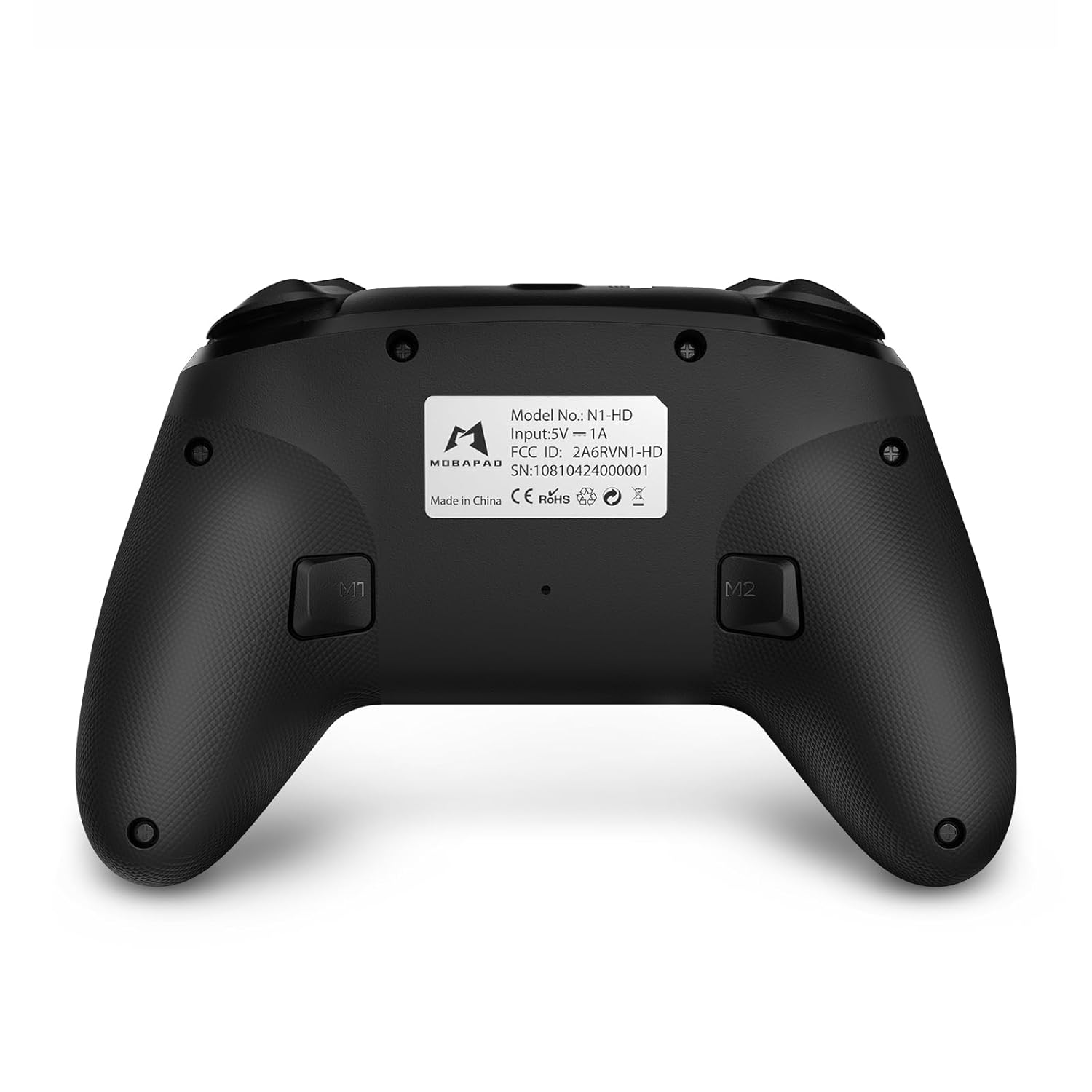
- M1/M2 tugmalari: Programmable back buttons for custom macros or remapping.
Rasm: Batafsil old qism view of the MOBAPAD N1 HD controller, showing all buttons and joysticks.

Rasm: orqaga view of the MOBAPAD N1 HD controller, highlighting the M1 and M2 programmable buttons and product label.
4.2. NFC Functionality (Amiibo Scanning)
To use the NFC function for Amiibo scanning on Nintendo Switch:
- Ensure your controller is connected to the Nintendo Switch.
- In a compatible game, when prompted to scan an Amiibo, place the Amiibo figure directly over the Uy tugmasi area on the controller.
- Hold the Amiibo in place until the game registers the scan.
5. Xizmat va parvarish
To'g'ri parvarishlash sizning kontrolleringizning uzoq umr ko'rishini va optimal ishlashini ta'minlaydi.
- Tozalash: Tekshirish moslamasini tozalash uchun yumshoq, quruq matodan foydalaning. O'jar axloqsizlik uchun, bir oz dampsuv bilan mato. Qattiq kimyoviy yoki abraziv materiallardan saqlaning.
- Saqlash: Tekshirgichni to'g'ridan-to'g'ri quyosh nuri va haddan tashqari haroratdan uzoqda, salqin va quruq joyda saqlang.
- Batareya parvarishi: The controller contains a Lithium Ion battery. Avoid fully discharging the battery frequently. If storing for extended periods, charge the battery to about 50% to prolong its lifespan. Do not expose the battery to fire or extreme heat.
- Ishlov berish: Tekshirgichni tashlab qo'ymang yoki uni kuchli zarbalarga duchor qilmang, chunki bu ichki qismlarga zarar etkazishi mumkin.
6. Muammolarni bartaraf qilish; nosozliklarni TUZATISH
If you encounter issues with your MOBAPAD N1 HD controller, refer to the following common solutions.
| Muammo | Mumkin sabab | Yechim |
|---|---|---|
| Tekshirish moslamasi ulanmayapti. | Low battery, out of range, incorrect pairing mode, interference. | Charge the controller fully. Ensure it is within range of the device. Re-enter pairing mode (hold Home button). Move closer to the device or away from other wireless devices. |
| Tugmalar yoki joystiklar javob bermayapti. | Software glitch, physical obstruction, damage. | Restart the controller and the connected device. Check for any debris around the buttons/joysticks. If issues persist, contact customer support. |
| Vibration is weak or absent. | Vibration setting off, game does not support vibration, motor issue. | Check in-game settings and system settings to ensure vibration is enabled. Verify if the game supports vibration feedback. |
| NFC scanning fails. | Incorrect placement, game not prompting scan, controller not connected. | Ensure the Amiibo is placed directly over the Home button area. Confirm the game is prompting for an Amiibo scan. Verify controller is properly connected to the Switch. |
7. Texnik shartlar
| Xususiyat | Tafsilot |
|---|---|
| Model raqami | Mobapad N1 HD Black |
| Olchamlari (U x G x Y) | 5.91 x 2.36 x 3.94 dyuym |
| Og'irligi | 7.05 untsiya |
| Batareya turi | 1 Lityum-ion batareya (shu jumladan) |
| Ulanish | Wireless (Bluetooth), USB-C (wired) |
| Moslik | Nintendo Switch, PC, iOS, Android |
| Maxsus xususiyatlar | Hall Effect Joysticks, ALPS Dual-Axis Motors, HD Vibration, Six-Axis Gyroscope, NFC |
8. Kafolat va qo'llab-quvvatlash
For warranty information or technical support, please contact MOBAPAD customer service. Refer to the official MOBAPAD webkafolat shartlari va aloqa ma'lumotlari uchun saytga yoki xarid hujjatlaringizga qarang.
You can visit the official MOBAPAD store on Amazon for more information: MOBAPAD Store


