1. Kirish
This manual provides essential information for the installation, operation, and maintenance of the Cisco IE-3400-8T2S-E Catalyst IE3400 Rugged Series Network Essential Switch. This device is designed for industrial environments, offering robust network connectivity. Please read this manual thoroughly before operating the device.
2. Xavfsizlik ma'lumotlari
Jihozlarga zarar yetkazmaslik va shikastlanishning oldini olish uchun quyidagi xavfsizlik choralariga rioya qiling:
- Qurilmaning to'g'ri erga ulanganligiga ishonch hosil qiling.
- Disconnect power before performing any maintenance or installation procedures.
- Operate the switch within the specified environmental conditions (temperature, humidity).
- Ushbu uskunani faqat malakali xodimlar o'rnatishi va ularga xizmat ko'rsatishi kerak.
- Qurilmani namlik yoki haddan tashqari haroratga ta'sir qilishdan saqlaning.
3. Paket tarkibi
Paketingizda quyidagi elementlar mavjudligiga ishonch hosil qiling:
- Cisco IE-3400-8T2S-E Catalyst IE3400 Rugged Series Network Essential Switch
- Hujjatlar (Tezkor ishga tushirish bo'yicha qo'llanma, xavfsizlik ma'lumotlari)
- Mounting hardware (if included with specific model variant)
- Power connector terminal blocks
Agar biron bir narsa etishmayotgan yoki shikastlangan bo'lsa, darhol yetkazib beruvchiga murojaat qiling.
4. Jismoniy tugashview
The following diagram illustrates the front panel components of the Cisco IE-3400-8T2S-E switch.
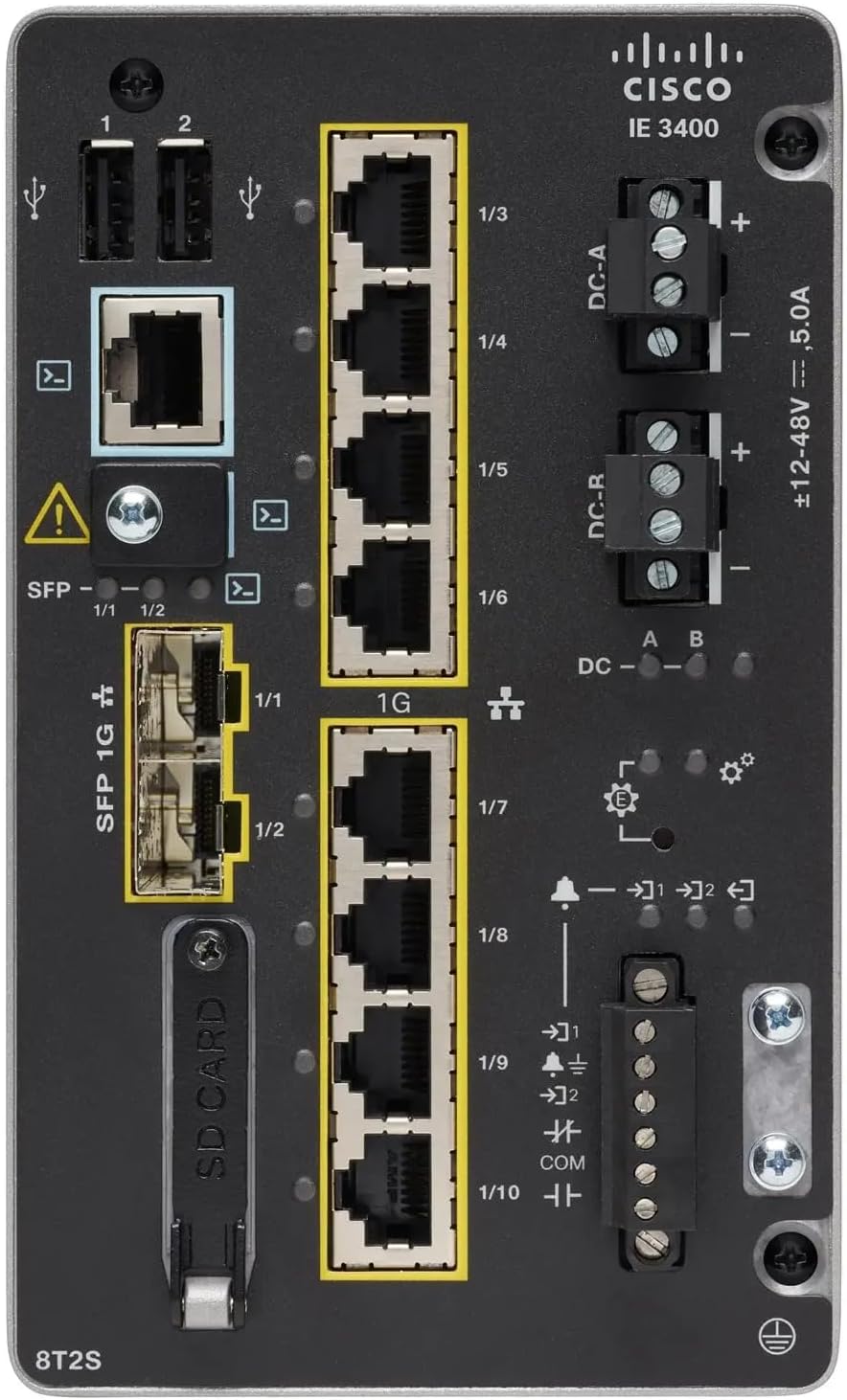
1-rasm: Front Panel Layout of the Cisco IE-3400-8T2S-E Switch
4.1. Front Panel Components Description
- USB Ports (1, 2): Two USB ports for connecting external devices or for configuration.
- Konsol porti: An RJ45 console port for local management and initial configuration.
- SFP 1G Ports (1/1, 1/2): Two Small Form-Factor Pluggable (SFP) ports supporting 1 Gigabit Ethernet for fiber optic connections.
- 1G Ethernet Ports (1/3 - 1/10): Eight 1 Gigabit Ethernet RJ45 ports for standard network connections.
- DC Power Inputs (DC-A, DC-R): Redundant DC power input terminals, supporting a voltage range of ±12-48V at 5.0A.
- Topraklama vinti: Terminal for connecting the chassis to earth ground.
- SD karta uyasi: Slot for an SD card, typically used for configuration backup or software storage.
- Alarm/Relay Ports (1/9, 1/10): Terminals for connecting external alarm systems or relay controls.
- LED ko'rsatkichlari: Various LEDs indicating power status (DC A/B), system status, link/activity for ports, and alarm status.
5. Sozlash
5.1. Kommutatorni o'rnatish
The IE3400 series switches are designed for industrial environments and typically support DIN rail or wall mounting. Refer to the specific mounting instructions provided with your mounting kit for detailed steps.
5.2. Quvvatni ulash
- Ensure the power source is off before connecting.
- Connect the DC power cables to the DC-A and/or DC-R terminal blocks, observing polarity (+ and -). The switch supports redundant power inputs.
- Connect the grounding wire to the grounding screw on the front panel.
- Once all connections are secure, apply power to the switch. The DC-A and/or DC-B LEDs should illuminate.
5.3. Tarmoq ulanishlari
- Ethernet portlari: Connect standard RJ45 Ethernet cables from your network devices to the 1G Ethernet ports (1/3 - 1/10).
- SFP portlari: Insert compatible SFP transceivers into the SFP 1G ports (1/1, 1/2) and connect fiber optic cables as required.
- Konsol porti: For initial configuration, connect a console cable from your management workstation to the RJ45 console port.
6. Foydalanish bo'yicha ko'rsatmalar
6.1. Dastlabki quvvatlanish
Upon applying power, the switch will perform a power-on self-test (POST). The system LED will indicate the boot status. Once the boot process is complete, the switch will be ready for configuration.
6.2. Configuration Access
The switch can be configured via the console port using a terminal emulator or remotely via Telnet/SSH once an IP address is assigned. Refer to the Cisco IOS documentation for detailed configuration commands and procedures.
6.3. LED ko'rsatkichlari
Monitor the LED indicators on the front panel to understand the switch's operational status:
- DC-A/DC-B LEDs: Indicate the status of the primary and redundant DC power inputs.
- Tizim LED: Indicates the overall operational status of the switch (e.g., green for normal operation, amber for warning, red for fault).
- Havola/Faoliyat LEDlari (har bir port uchun): Indicate network link status and data activity on each Ethernet and SFP port.
- Signal LED: Illuminates when a critical system alarm is triggered.
7. Xizmat ko'rsatish
7.1. Tozalash
Periodically clean the exterior of the switch with a soft, dry cloth. Do not use liquid or aerosol cleaners. Ensure ventilation openings are free from dust and debris.
7.2. Mikrodasturlarni yangilash
Cisco qo'llab-quvvatlashini muntazam ravishda tekshirib turing website for the latest firmware updates. Applying updates can improve performance, add features, and address security vulnerabilities. Follow Cisco's official procedures for firmware upgrades.
7.3. Atrof-muhitga oid mulohazalar
Ensure the switch operates within its specified temperature and humidity ranges. Proper airflow around the device is crucial for heat dissipation.
8. Muammolarni bartaraf qilish; nosozliklarni TUZATISH
Ushbu bo'limda umumiy muammolarni hal qilishning asosiy bosqichlari keltirilgan.
8.1. Quvvat yo'q
- Verify that the power source is active and the power cables are securely connected to the DC-A/DC-R terminals.
- Check the DC-A/DC-B LEDs. If they are off, there is no power or a power supply issue.
8.2. No Network Link
- Ensure Ethernet or fiber optic cables are properly connected to both the switch port and the connected device.
- Check the Link/Activity LED for the specific port. If it is off, there is no link.
- Ulangan qurilma yoqilganligini va to'g'ri ishlayotganligini tekshiring.
8.3. System Alarm
- If the Alarm LED is illuminated, consult the Cisco IOS documentation for specific alarm codes and their meanings.
- Check system logs via the console or network management interface for detailed error messages.
9. Texnik shartlar
| Xususiyat | Spetsifikatsiya |
|---|---|
| Model | IE-3400-8T2S-E |
| Ishlab chiqaruvchi | Cisco |
| Ethernet portlari | 8 x 1 Gigabit RJ45 |
| SFP portlari | 2 x 1 Gigabit SFP |
| Interfeys turi | RJ45, SFP, PoE, PoE+ (model dependent) |
| Quvvat kiritish | ±12-48V DC, 5.0A (Redundant) |
| Mahsulot o'lchamlari | 36 x 9 x 55 sm |
| Element og'irligi | 2.28 kilogramm |
| Mos qurilmalar | Ish stoli, noutbuk, printer |
| UPC | 703670760433 |
10. Kafolat va qo'llab-quvvatlash
This product is offered as an Amazon Renewed item. Warranty and return policies are typically managed by the reseller (Amazon Renewed) for a specified period. Please refer to your purchase documentation or contact Amazon Renewed support for details regarding your specific warranty coverage.
For technical documentation, software downloads, and advanced support for the Cisco IE-3400-8T2S-E switch, please visit the official Cisco support website and search for your specific model.


