1. Kirish va yanaview
This manual provides essential information for the safe and effective use of your Sharp Humidifying Air Purifier, model KI-TS50-W. This appliance combines air purification with humidification, featuring Sharp's unique Plasmacluster 25000 technology and an efficient Coanda airflow system. Its slim design is suitable for various room sizes, including single rooms and bedrooms.

Image: The Sharp KI-TS50-W Humidifying Air Purifier positioned in a modern living space, highlighting its slim profile.
2. Xavfsizlik ma'lumotlari
Jihozni ishlatishdan oldin shikastlanish yoki shikastlanmaslik uchun barcha xavfsizlik ko'rsatmalarini diqqat bilan o'qing. Kelajakda foydalanish uchun ushbu qo'llanmani saqlang.
- Always connect the appliance to a power outlet with the specified voltage.
- Do not block the air inlet or outlet vents. Ensure adequate space around the unit for proper airflow.
- Do not insert fingers or objects into any openings.
- Qurilmani yonuvchan gazlar yoki yonuvchan materiallar yaqinida ishlatmang.
- Unplug the power cord before cleaning, maintenance, or when not in use for extended periods.
- Qurilmani bolalar va uy hayvonlari qo'li etmaydigan joyda saqlang.
- Use only clean tap water in the water tank. Do not add chemicals or aromatic substances.
3. Mahsulot komponentlari
Familiarize yourself with the main parts of your air purifier:
- Asosiy birlik: Houses the fan, motor, and control panel.
- Suv idishi: Removable tank for humidification.
- Oldindan filtrlash: Captures large dust particles. Located on the rear panel.
- Electrostatic HEPA Filter: Captures fine particles.
- Double Deodorizing Filter: Absorbs various odors.
- Namlovchi filtr: Used for humidification.

Rasm: old view of the Sharp KI-TS50-W Humidifying Air Purifier, showing the main unit and control panel.

Rasm: orqa view of the Sharp KI-TS50-W Humidifying Air Purifier, showing the air intake and pre-filter location.

Rasm: portlagan view of the internal filter assembly, showing the pre-filter, electrostatic HEPA filter, and double deodorizing filter.
4. Sozlash
Havo tozalagichni sozlash uchun quyidagi amallarni bajaring:
- Paketdan chiqarish: Carefully remove the unit from its packaging. Retain packaging for future transport or storage.
- Filtrni o'rnatish: Open the rear panel. Ensure all filters (pre-filter, HEPA filter, deodorizing filter) are correctly installed and any protective plastic bags are removed. Close the rear panel securely.
- Joylashtirish: Place the unit on a stable, flat surface. Ensure there is at least 20 cm of space from walls or furniture to allow for optimal airflow. Avoid placing it in direct sunlight or near heat sources.
- Fill Water Tank (for humidification): Remove the water tank from the side of the unit. Fill it with clean tap water up to the maximum fill line. Reinsert the tank firmly into the unit.
- Quvvat ulanishi: Elektr simini yerga ulangan elektr rozetkaga ulang.
5. Foydalanish bo'yicha ko'rsatmalar
The control panel on top of the unit allows you to manage various functions.

Image: Close-up of the top control panel with various buttons and indicators.
- Quvvatni yoqish/oʻchirish: Jihozni yoqish yoki o'chirish uchun quvvat tugmasini bosing.
- Rejim tanlash: Cycle through available modes such as Air Purification Only, Humidifying Air Purification, and various fan speed settings.
- Fan tezligi: Adjust the fan speed (e.g., Silent, Medium, High, Auto). The 'Silent' mode operates at a low noise level, ideal for bedrooms.
- Plasmacluster Operation: The Plasmacluster 25000 function operates automatically in most modes to release ions into the air, helping to purify and deodorize.
- Coanda Airflow: The unit utilizes Coanda airflow to efficiently draw in dust and particles from a wide area, enhancing air purification performance.

Image: Diagram showing the Coanda airflow pattern, where air is circulated to draw in dust from a wide area, combined with Plasmacluster ion release.
The unit is designed for low-noise operation, achieving approximately 43dB even during strong humidification, ensuring a comfortable environment.

Image: Visual representation of humidification mist being released from the top of the unit, emphasizing quiet operation.
6. Xizmat ko'rsatish
Doimiy texnik xizmat ko'rsatish havo tozalagichingizning optimal ishlashini va uzoq umr ko'rishini ta'minlaydi.
- Filtrdan oldingi tozalash: The large pre-filter on the rear panel can be easily cleaned by vacuuming directly without removing the panel. Clean approximately once a month or as needed.

Image: A person demonstrating how to clean the pre-filter on the rear of the air purifier using a vacuum cleaner attachment.
- Suv idishini tozalash: Clean the water tank regularly to prevent mold and bacteria growth. Rinse with clean water and wipe dry.
- Humidifying Filter Cleaning: The humidifying filter should be cleaned periodically. Refer to the detailed instructions in the full manual for specific cleaning methods and frequency.
- Electrostatic HEPA Filter & Double Deodorizing Filter: These filters are not washable and should be replaced according to the recommended schedule (typically every 10 years, depending on usage and environment).

Image: Diagram showing the three filter layers: the pre-filter, the double deodorizing filter, and the electrostatic HEPA filter.

Image: Illustration of the double deodorizing filter and various odors it is designed to absorb, such as tobacco smoke, pet odors, cooking smells, and VOCs.
7. Muammolarni bartaraf qilish; nosozliklarni TUZATISH
Havo tozalagich bilan bog'liq muammolarga duch kelsangiz, quyidagi keng tarqalgan muammolar va echimlarga murojaat qiling:
- Qurilma yoqilmaydi: Check if the power cord is securely plugged into the outlet. Ensure the rear panel and water tank are correctly installed.
- No humidification: Check if the water tank is filled with water and correctly inserted. Ensure the humidification mode is selected.
- G'ayrioddiy shovqin: Check for any foreign objects in the air inlets or outlets. Ensure filters are properly seated. If the noise persists, contact customer support.
- Reduced airflow or purification: Clean the pre-filter. Check if other filters need replacement.
- Indicator lights flashing: Refer to the full instruction manual for specific error codes or indicator light patterns. This often indicates a need for cleaning or water refill.
If the problem persists after attempting these solutions, please contact Sharp customer support.
8. Texnik shartlar
| Xususiyat | Spetsifikatsiya |
|---|---|
| Model raqami | KI-TS50-W |
| Brend | O'tkir |
| Recommended Plasmacluster Area (approx.) | 13 tatami mats (approx. 21.5 m²) |
| Recommended Air Purification Area (approx.) | 23 tatami mats (approx. 38 m²) |
| Maximum Humidification Capacity | 600 ml/soat |
| Air Purification Time (8 tatami mats) | 12 daqiqa |
| Ishlash shovqin darajasi | 17-51 dB |
| Olchamlari (G x D x Y) | 38.4 x 23 x 61.9 sm |
| Mahsulot og'irligi | 7.9 kg |
| Quvvat manbai | AC quvvat simi |
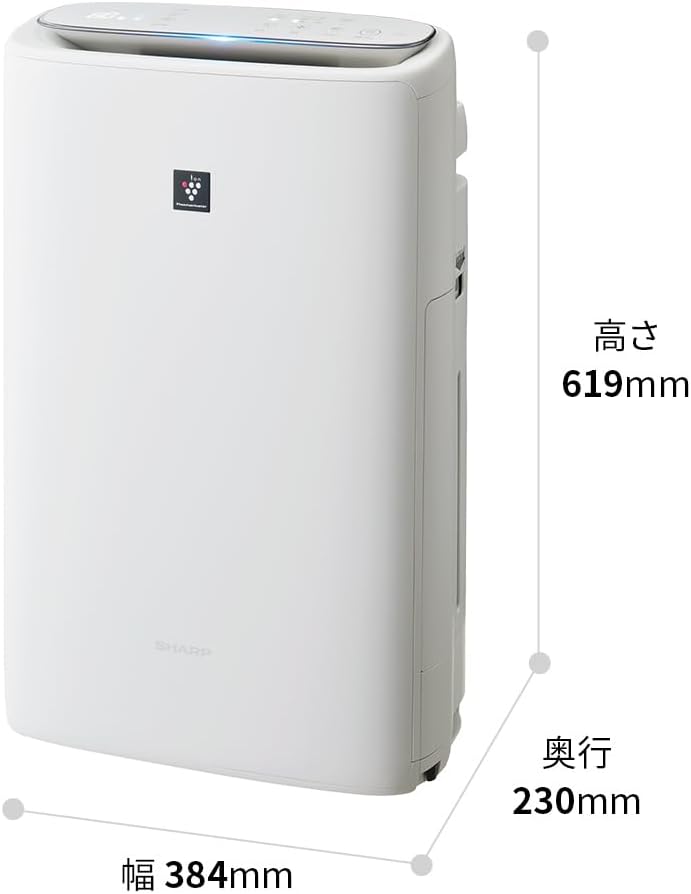
Image: Diagram illustrating the width (384mm), depth (230mm), and height (619mm) of the Sharp KI-TS50-W unit.
9. Kafolat va qo'llab-quvvatlash
For warranty information, please refer to the separate warranty card included with your product. For technical support, replacement parts, or further assistance, please contact Sharp customer service. Contact details can typically be found on the manufacturer's websayt yoki kafolat hujjatlarida.


