1. Kirish
Thank you for choosing the TECPHILE K936 Wireless Keyboard and Mouse Combo. This product is designed to provide versatile and efficient input for multiple devices, featuring both Bluetooth 5.0 and 2.4GHz USB connectivity. This manual will guide you through the setup, operation, and maintenance of your new keyboard and mouse.
2. Paket tarkibi
- TECPHILE K936 Wireless Keyboard
- TECPHILE Wireless Mouse
- USB Receiver (stored in the mouse battery compartment)
- USB-C zaryadlovchi kabeli
- Keyboard Protective Cover
- Foydalanuvchi uchun qo'llanma
3. Mahsulot tugadiview
Familiarize yourself with the components of your TECPHILE K936 Wireless Keyboard and Mouse Combo.

3.1-rasm: The TECPHILE K936 Wireless Keyboard and Mouse Combo in Grey. The keyboard features a full layout with a numeric keypad, and the mouse is a compact, ergonomic design.

3.2-rasm: Diagram showing the dimensions of the keyboard (368mm x 121mm) and mouse (110mm x 63mm x 30mm).
Klaviatura xususiyatlari:
- Multi-device connectivity: 3 x Bluetooth 5.0, 1 x 2.4GHz USB
- Dedicated function keys (F1-F12) with multimedia controls
- Qayta zaryadlanadigan 300mAh lityum batareyasi
- Type-C zaryadlash porti
- Automatic sleep mode for power saving
- Scissor-leg key structure for comfortable typing
- Transparent protective cover included
Sichqoncha xususiyatlari:
- Dual-mode connectivity: 1 x Bluetooth, 1 x 2.4GHz USB
- Optical movement detection technology
- Ikki tomonlama dizayn
- Quiet click buttons
4. Sozlash
4.1 Dastlabki zaryadlash
Before first use, fully charge both the keyboard and mouse. Connect the provided USB-C charging cable to the charging port on the keyboard and mouse, and the other end to a 5V/1A power adapter (not included) or a computer USB port. The charging indicator light will show charging status and turn off when fully charged.
Note: Only use a 5V/1 Amp power adapter for charging to ensure optimal battery life.

4.1-rasm: Illustration of the keyboard's battery specifications: 2-4 hours charging time, 300mAh battery capacity, and up to 180 days standby time.
4.2 Klaviaturani ulash
The keyboard supports up to three Bluetooth connections and one 2.4GHz USB connection.

4.2-rasm: Diagram illustrating the keyboard's ability to connect to multiple devices via Bluetooth (3 channels) and 2.4GHz USB.
2.4GHz USB Connection:
- USB qabul qilgichni sichqonchaning batareya bo'limi ichidan toping.
- USB qabul qilgichni kompyuteringiz yoki qurilmangizdagi mavjud USB portiga ulang.
- Turn on the keyboard. The keyboard should automatically connect.
Bluetooth Connection (BT1, BT2, BT3):
- Klaviaturani yoqing.
- ni bosing va ushlab turing Fn key and one of the Bluetooth keys (BT1, BT2, yoki BT3) for 3-5 seconds until the corresponding indicator light flashes rapidly. This indicates pairing mode.
- Qurilmangizda (kompyuter, planshet, smartfon) Bluetooth sozlamalariga o'ting va yangi qurilmalarni qidiring.
- Select "TECPHILE Keyboard" from the list of available devices to pair.
- Once paired, the indicator light will stop flashing and remain solid for a few seconds before turning off.
- Repeat for other Bluetooth channels to connect to additional devices.
4.3 Sichqonchani ulash
The mouse supports one Bluetooth connection and one 2.4GHz USB connection.
2.4GHz USB Connection:
- Ensure the USB receiver is plugged into your device.
- Switch the mouse to 2.4GHz mode using the switch on the bottom of the mouse.
- Sichqoncha avtomatik ravishda ulanishi kerak.
Bluetooth ulanishi:
- Switch the mouse to Bluetooth mode using the switch on the bottom of the mouse.
- Press and hold the Bluetooth pairing button on the bottom of the mouse for 3-5 seconds until the indicator light flashes.
- On your device, go to Bluetooth settings and search for new devices.
- Select "TECPHILE Mouse" from the list to pair.
5. Foydalanish bo'yicha ko'rsatmalar
5.1 Switching Between Devices (Keyboard)
To switch between connected devices on the keyboard, simply press the Fn key along with the corresponding connection key (BT1, BT2, BT3, yoki 2.4G for USB). The keyboard will switch to the selected device instantly.
5.2 Switching Between Devices (Mouse)
To switch between 2.4GHz USB and Bluetooth modes on the mouse, use the toggle switch located on the bottom of the mouse.
5.3 Function Keys (Keyboard)
The keyboard features dedicated function keys (F1-F12) that can be used in conjunction with the Fn key for various multimedia and system controls.
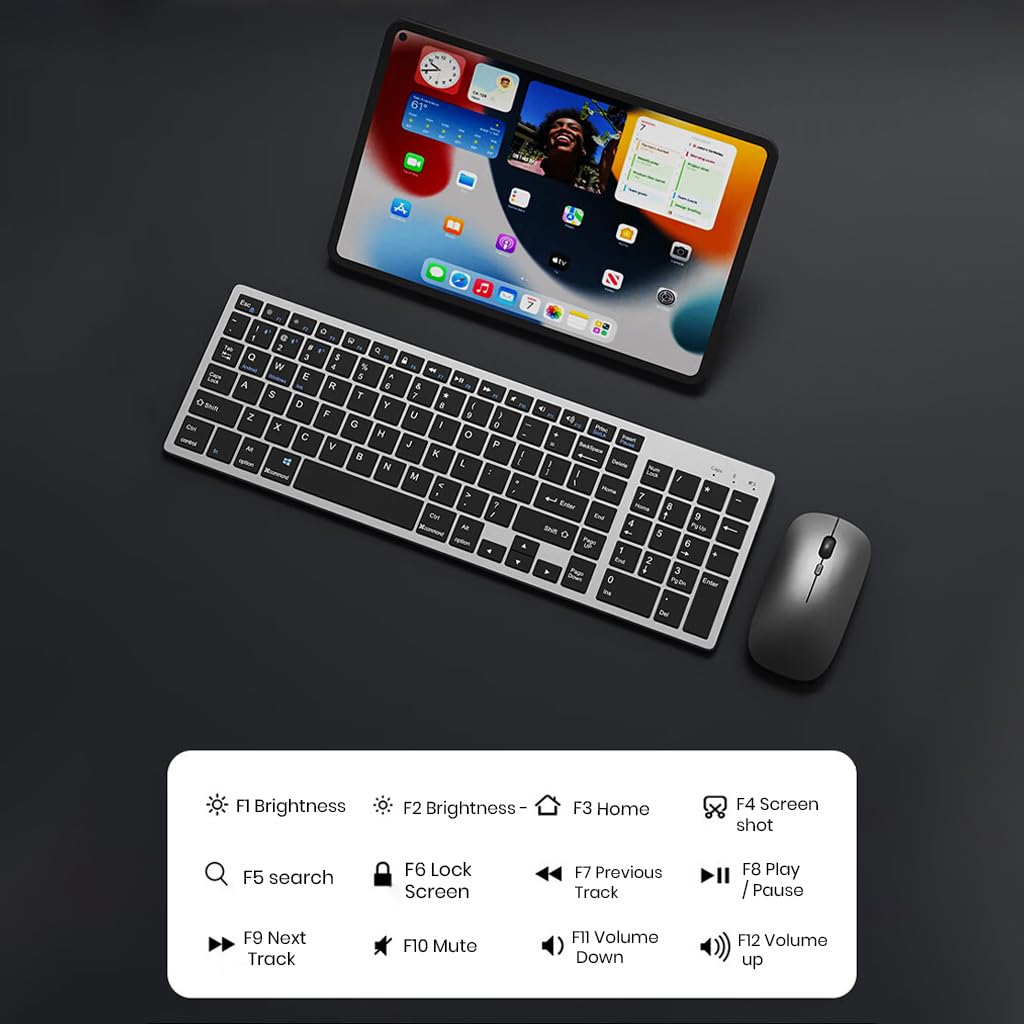
5.1-rasm: The keyboard displaying its function keys and their associated actions, such as brightness control, home, screen shot, search, lock screen, media playback, and volume control.
- Fn+F1: Yorqinlik past
- Fn+F2: Yorqinlik yuqoriga
- Fn+F3: Uy
- Fn+F4: Skrinshot
- Fn+F5: Qidirish
- Fn+F6: Ekranni qulflash
- Fn+F7: Oldingi trek
- Fn+F8: Oʻynatish/toʻxtatib turish
- Fn+F9: Keyingi trek
- Fn+F10: Ovozsiz
- Fn+F11: Ovozni pasaytirish
- Fn+F12: Ovozni oshirish
5.4 Quvvat tejash rejimi
The keyboard and mouse are equipped with an automatic sleep mode to conserve battery life. If inactive for 10 minutes, the devices will enter sleep mode. To wake them up, simply press any key on the keyboard or move/click the mouse.

5.2-rasm: Diagram illustrating the auto-sleep mode and how to reactivate the keyboard and mouse by pressing any key.
6. Xizmat ko'rsatish
- Tozalash: Use a soft, dry cloth to clean the keyboard and mouse. For stubborn dirt, a slightly damp Qurilmaga suyuqlik kirmasligini ta'minlash uchun matodan foydalanish mumkin.
- Himoya qoplamasi: Utilize the included transparent protective cover for the keyboard to guard against dust and accidental spills.
- Saqlash: Qurilmalarni salqin, quruq joyda, to'g'ridan-to'g'ri quyosh nuri va haddan tashqari haroratdan uzoqroq joyda saqlang.
- Zaryadlash: Always use a 5V/1A power adapter for charging to prevent damage and ensure battery longevity.

6.1-rasm: The keyboard shown with its transparent protective keyskin, designed to prevent dust and spills.
7. Muammolarni bartaraf qilish; nosozliklarni TUZATISH
| Muammo | Mumkin sabab | Yechim |
|---|---|---|
| Keyboard/Mouse not connecting via 2.4GHz USB. | USB receiver not properly inserted, low battery, incorrect mode selected. |
|
| Keyboard/Mouse not connecting via Bluetooth. | Not in pairing mode, device's Bluetooth is off, already connected to max devices, low battery. |
|
| Kechikish yoki uzilishli ulanish. | Interference, distance from receiver/device, low battery. |
|
| Klaviatura tugmalari javob bermayapti. | Low battery, device in sleep mode, connection issue. |
|
8. Texnik shartlar
| Xususiyat | Tafsilot |
|---|---|
| Brend | TEXNIKA |
| Model | K936 |
| Ulanish texnologiyasi | Keyboard: 3 x Bluetooth 5.0, 1 x 2.4GHz USB; Mouse: 1 x Bluetooth, 1 x 2.4GHz USB |
| Mos qurilmalar | Noutbuk, shaxsiy kompyuter, smartfon, planshet |
| Operatsion tizim | Android, iOS, Windows, macOS |
| Klaviatura batareyasi | 300mAh Lityum-ion (Qayta zaryadlanuvchi) |
| Zaryadlash porti | USB Type-C |
| Zaryadlash vaqti | 2-4 soat (taxminan) |
| Kutish vaqti | 180 kungacha |
| Klaviatura o'lchamlari (UzunlikxKxB) | 36 x 13 x 1.5 sm |
| Sichqoncha o'lchamlari (UzunlikxKxB) | 11 x 6.3 x 3 sm (taxminan) |
| Element og'irligi | 661 g (combo) |
| Harakatni aniqlash texnologiyasi | Optik |
| Qo'lni yo'naltirish | Ikki tomonlama |
9. Kafolat va qo'llab-quvvatlash
TECPHILE products come with a standard warranty. For warranty claims, technical support, or any product-related inquiries, please contact TECPHILE customer service through the retailer where the product was purchased or visit the official TECPHILE webaloqa ma'lumotlari uchun sayt.
Iltimos, kafolat uchun sotib olinganligingizni tasdiqlovchi hujjatni o'zingizda saqlang.
Manufacturer/Importer: TECPHILE, 2nd Floor, A36, Block B, Naraina Industrial Area Phase 2, Naraina, New Delhi, Delhi, 110028


