1. Xavfsizlik bo'yicha muhim ko'rsatmalar
Please read and follow all safety instructions before using your Maypug P7 Projector to prevent injury or damage to the device.
- Shamollatish teshiklarini to'sib qo'ymang. Proyektor atrofida etarli havo oqimini ta'minlang.
- Yong'in yoki elektr toki urishi xavfini kamaytirish uchun projektorni yomg'ir yoki namlikda qoldirmang.
- l bo'lganda to'g'ridan-to'g'ri proyektor linzalariga qarashdan saqlaningamp is on, as this may cause eye damage.
- Faqat ishlab chiqaruvchi tomonidan belgilangan qo'shimchalar/aksessuarlar foydalaning.
- Chaqmoq chaqishi paytida yoki uzoq vaqt ishlatilmaganda proyektorni elektrdan uzing.
- Barcha xizmat ko'rsatishni malakali xizmat ko'rsatish xodimlariga topshiring.
2. Paket tarkibi
Paketingizda barcha narsalar mavjudligini tekshiring:
- Maypug P7 Projector
- Masofadan boshqarish
- Quvvat kabeli
- Foydalanuvchi uchun qo'llanma
3. Mahsulot tugadiview
Familiarize yourself with the components and ports of your Maypug P7 Projector.

3.1-rasm: Old view of the Maypug P7 Projector with remote control and projected interface.
3.1. Portlar va ulanishlar
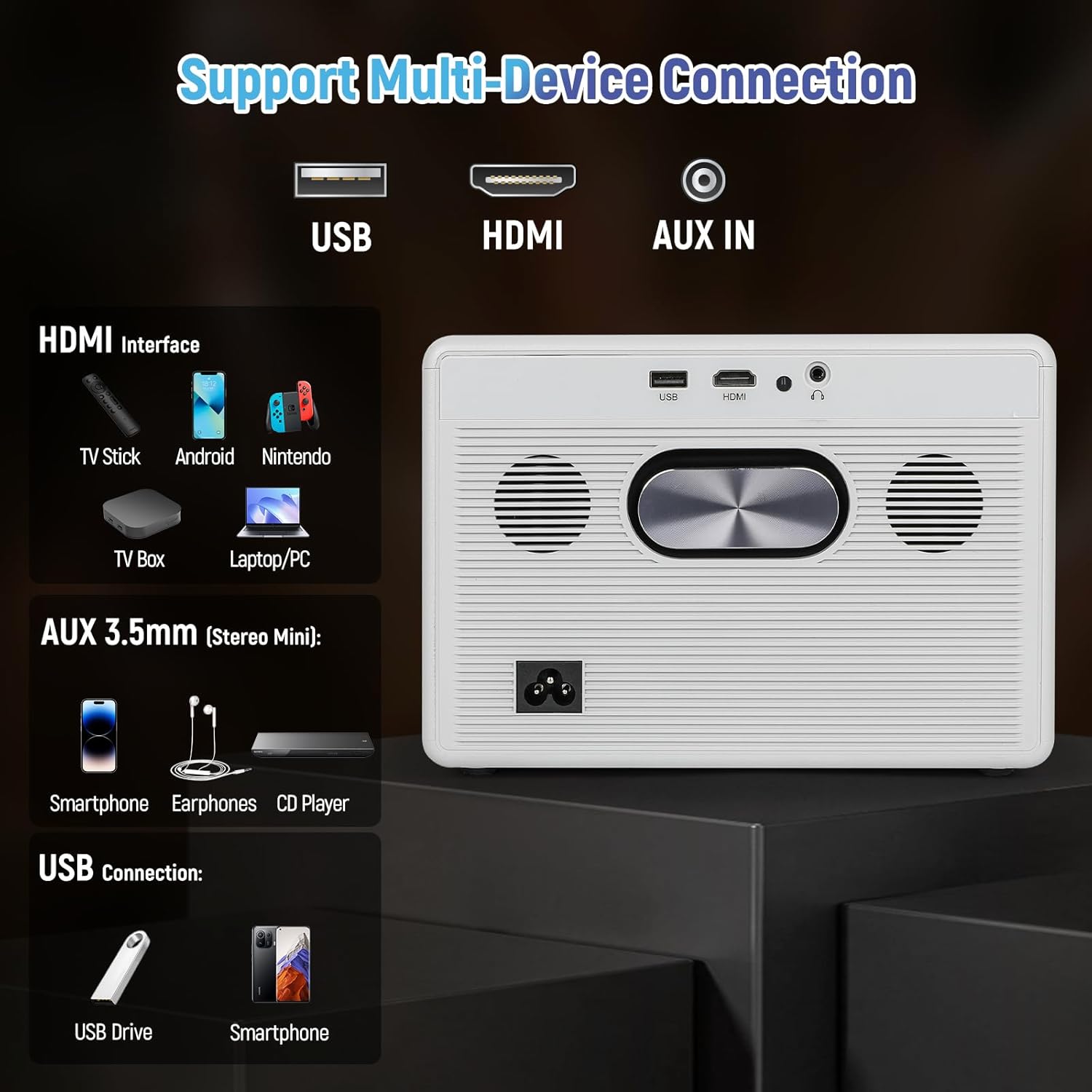
Figure 3.2: Rear panel connections including USB, HDMI, and AUX IN.
- USB port: USB xotira qurilmalarini ulash uchun.
- HDMI porti: For connecting external video sources like TV sticks, gaming consoles, or laptops.
- AUX IN (3.5mm Audio Jack): Tashqi audio qurilmalar yoki minigarnituralarni ulash uchun.
- Kirish quvvati: Elektr kabelini ulash uchun.
4. Sozlash
4.1. Quvvatga ulanish
- Quvvat kabelini proyektorning quvvat manbaiga ulang.
- Elektr kabelining ikkinchi uchini devordagi rozetkaga ulang.
- Yoqish uchun proyektor yoki masofadan boshqarish pultidagi quvvat tugmasini bosing.
4.2. Fokus va asosiy toshni sozlash
The Maypug P7 features automatic vertical keystone correction and electric focus for a clear image from various angles.

Figure 4.1: Illustration of automatic keystone correction and electric focus features.
- Avtomatik kalit tosh: The projector will automatically adjust vertical distortion (±30°).
- Qo'lda kalit tosh: For further adjustments, navigate to the settings menu to manually correct keystone up to ±50°.
- Elektr fokus: Use the remote control to fine-tune the image sharpness.
4.3. Network Connection (WiFi & Bluetooth)
Connect your projector to a wireless network and Bluetooth devices.
- Wi -Fi ulanishi:
- Go to the "Settings" menu on the Lilac OS interface.
- Select "WiFi" and choose your desired network.
- Enter the password if prompted. The projector supports dual-band WiFi 6.
- Bluetooth ulanishi:
- Go to the "Settings" menu.
- Select "Bluetooth" and turn it on.
- Select your Bluetooth device (e.g., external speakers, headphones) from the list to pair. The projector supports Bluetooth 5.4.
5. Foydalanish bo'yicha ko'rsatmalar
5.1. Navigating Lilac OS and Built-in Apps
The Maypug P7 runs on Lilac OS, providing a user-friendly interface with pre-installed streaming applications.

Figure 5.1: Lilac OS interface displaying pre-installed and downloadable applications.
- Use the Bluetooth remote control to navigate the interface.
- Access pre-installed apps like Netflix, Prime Video, and YouTube directly.
- Download additional applications from Google Play and the TV Store.
5.2. Simsiz proyeksiya
Mirror content from your mobile devices wirelessly.
- Miracast (Android): For Android devices, select Miracast from the apps menu and follow the on-screen instructions to connect.
- AumiCast (Android/iOS): For both Android and iOS devices, select AumiCast and follow the pairing instructions.
5.3. Tashqi qurilmalarni ulash
Connect devices via HDMI or USB for expanded content options.
- HDMI: Connect TV sticks, gaming consoles, Blu-ray players, or laptops to the HDMI port. The projector supports 4K inputs and 120Hz refresh rates for gaming.
- USB: Media fayllarni ijro etish uchun USB diskini USB portiga joylashtiring files to'g'ridan-to'g'ri.
5.4. Ovoz sozlamalari
The projector includes built-in 5W stereo speakers. For external audio, use Bluetooth or the AUX IN port.

Figure 5.2: The projector's integrated 5W stereo speakers provide clear audio.
- Masofadan boshqarish pulti yordamida ovoz balandligini sozlang.
- Connect Bluetooth speakers/headphones as described in Section 4.3.
- Connect wired headphones or external speakers via the 3.5mm AUX IN port.
5.5. Kattalashtirish funksiyasi
Adjust the projected image size without moving the projector.
- Use the remote control to access the zoom function.
- The projector supports 50-100% digital zoom.
6. Xizmat ko'rsatish
6.1. Tozalash
- Proyektorning tashqi qismini yumshoq, quruq mato bilan arting.
- For the lens, use a lens cleaning cloth and specialized lens cleaning solution. Do not use abrasive cleaners.
6.2. Dust-Proof Sealed Optical Engine
The Maypug P7 features a fully sealed optical engine designed to prevent dust ingress, ensuring consistent performance and extending the lifespan of internal components. This reduces the need for frequent internal cleaning.
6.3. Saqlash
- Proyektorni salqin, quruq joyda, to'g'ridan-to'g'ri quyosh nuri va haddan tashqari haroratdan uzoqroq joyda saqlang.
- If storing for an extended period, cover the projector to protect it from dust.
7. Muammolarni bartaraf qilish; nosozliklarni TUZATISH
| Muammo | Mumkin sabab | Yechim |
|---|---|---|
| Hech qanday rasm ko'rsatilmagan | Power cable loose; Input source incorrect; Lens cap on. | Check power connection; Select correct input source (HDMI/USB); Remove lens cap. |
| Tasvir loyqa | Fokus sozlanmagan; Proyektor ekranga juda uzoq/yaqin. | Use electric focus via remote; Adjust projector distance. |
| Tasvir buzilgan (trapezoid shakli) | Keystone sozlanmagan. | Allow auto keystone to correct; Adjust manual keystone in settings. |
| Ovoz yo'q | Volume too low; External audio device not connected/paired; Mute enabled. | Increase volume; Check Bluetooth/AUX connection; Disable mute. |
| WiFi/Bluetooth connection issues | Out of range; Incorrect password; Interference. | Move closer to router/device; Re-enter password; Reduce interference. |
8. Texnik shartlar
| Xususiyat | Tafsilot |
|---|---|
| Brend | Maypug |
| Model raqami | M-P7 |
| Displey ravshanligi | Native 1920 x 1080 (1080P), 4K Supported |
| Yorqinlik | 2000 ta ANSI lyumeni |
| Kontrast nisbati | 20,000:1 |
| Yangilanish tezligi | 60Hz (up to 120Hz for HDMI input) |
| Operatsion tizim | Lilac OS with built-in apps (Netflix, Prime Video, YouTube) |
| Simsiz ulanish | Dual-Band WiFi 6, Bluetooth 5.4, Miracast, AumiCast |
| Keystone tuzatish | Automatic Vertical (±30°), Manual (±50°) |
| Diqqat | Elektr fokus |
| Kattalashtirish funktsiyasi | 50-100% Digital Zoom |
| Audio | Built-in 5W Stereo Speakers with Hi-Fi audio |
| Optik dvigatel | Fully Sealed, Dust-Proof |
| LEDning ishlash muddati | 50,000 soat |
| Element og'irligi | 6.73 funt |
| O'lchamlari | 10.5 x 9.15 x 9.15 dyuym (paket o'lchamlari) |
Note: Item weight and dimensions are approximate.
9. Kafolat va qo'llab-quvvatlash
Your Maypug P7 Projector is backed by a 3 yillik kafolatTexnik yordam yoki kafolat talablari uchun, iltimos, bizning kompaniyamizga murojaat qiling 24/7 US-based support jamoa.
Contact information can typically be found on the official Maypug websayt yoki sotib olish hujjatlari.


