1. Kirish
This manual provides instructions for the setup, operation, and maintenance of your Machenike G1 Pro Wireless PC Gaming Controller. This controller features TMR Effect Sticks and Triggers, 1000Hz polling rate, and tri-mode connectivity (2.4G, Bluetooth, Wired) for multi-platform compatibility across PC, Windows, Android, iOS, and Nintendo Switch devices.
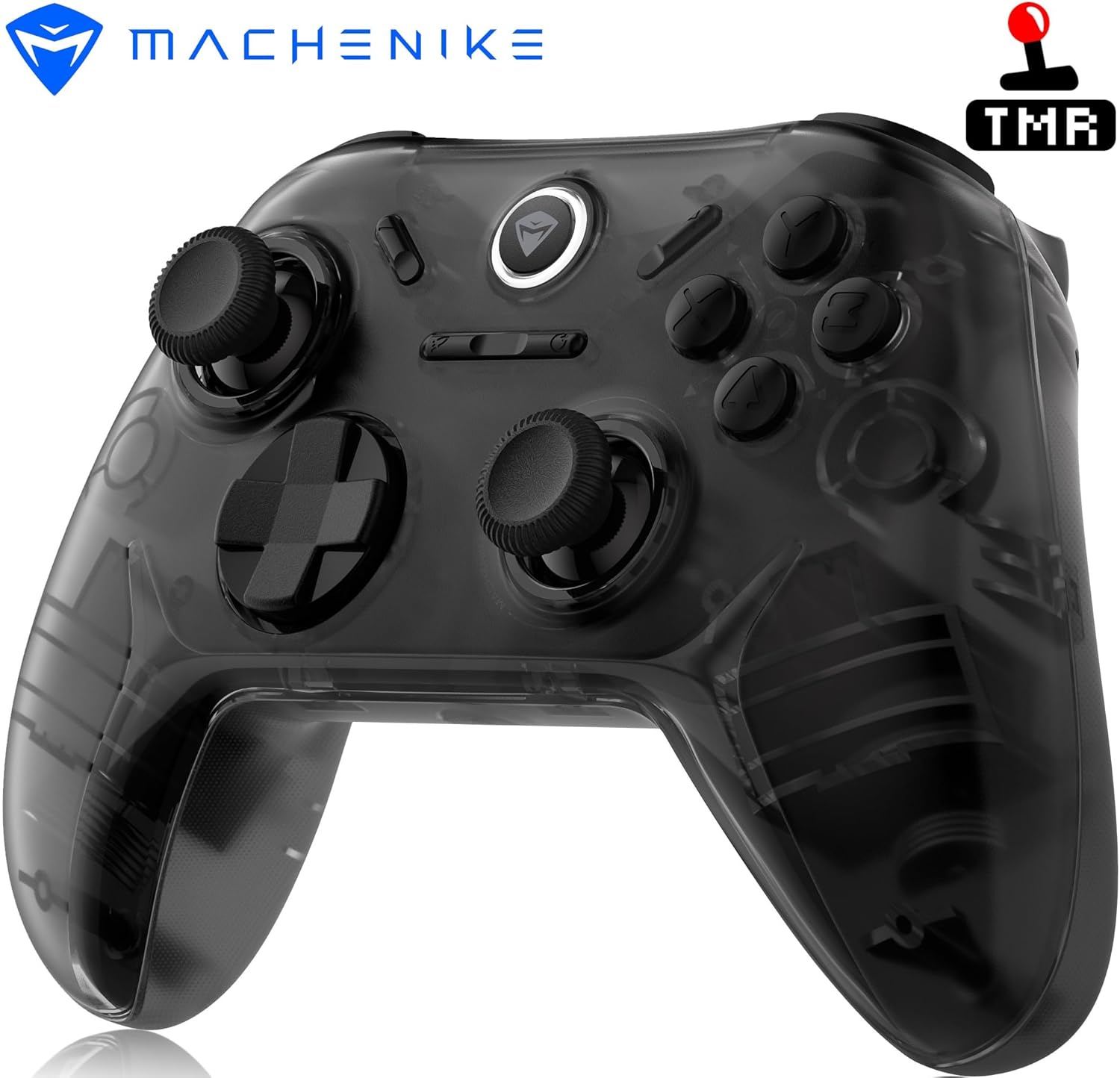
Rasm: old view of the Machenike G1 Pro Wireless Gaming Controller.
2. Paket tarkibi
Paketda barcha elementlar mavjudligiga ishonch hosil qiling:
- Machenike G1 Pro Wireless Gaming Controller
- USB-C zaryadlash/ma'lumot kabeli
- 2.4 gigagertsli simsiz dongle
- Foydalanuvchi uchun qo'llanma (ushbu hujjat)
3. Controller Layout
The Machenike G1 Pro features an Xbox-style asymmetrical layout for ergonomic comfort and precise control. Familiarize yourself with the button placement:

Rasm: Batafsil old qism view of the Machenike G1 Pro controller, showing joysticks, D-pad, ABXY buttons, and function buttons.
- Chap joystik: Asymmetrical placement for natural thumb positioning.
- O'ng joystik: Standard placement.
- D-Pad: Yo'nalishli kiritish.
- ABXY tugmalari: Premium conductive silicone buttons, force-tested for durability.
- Shoulder Buttons (LB, RB) & Triggers (LT, RT): Located on the top edge. The triggers utilize TMR Effect technology for precise input.
- Funktsiya tugmalari: Start, Select, Home, and other specific buttons for various platforms.
- USB-C porti: For wired connection and charging, located on the top edge.

Rasm: yon view of the Machenike G1 Pro controller, highlighting the USB-C port and shoulder buttons/triggers.
4. Sozlash va ulanish
4.1 Tekshirgichni zaryadlash
Before first use, fully charge the controller. Connect the supplied USB-C cable to the controller's USB-C port and the other end to a USB power source (e.g., PC, wall adapter). The LED indicator will show charging status and turn off or change color when fully charged. The 600mAh battery provides up to 8 hours of wireless gameplay.
4.2 Tri-Mode Connectivity
The G1 Pro supports three connection modes:
- Simli (USB-C): Connect the controller directly to your device using the USB-C cable. This mode supports a 1000Hz polling rate for ultra-low latency.
- 2.4 gigagertsli simsiz: Use the included 2.4GHz wireless dongle for a stable, high-performance connection with a 1000Hz polling rate.
- Bluetooth: For convenient wireless connectivity with various devices.

Image: Diagram showing the three connectivity modes: Wired, 2.4GHz Wireless, and Bluetooth.
4.3 Ulanish bo'yicha ko'rsatmalar
Specific pairing methods vary by connection mode and platform:
- 2.4 gigagertsli simsiz: Insert the 2.4GHz dongle into a USB port on your PC or compatible device. Turn on the controller. It should automatically connect.
- Bluetooth:
- Tekshirish moslamasi o'chirilganligiga ishonch hosil qiling.
- ni bosing va ushlab turing X tugmasi va Uy tugmasi simultaneously until the central LED indicator begins to flash rapidly.
- On your device (PC, Android, iOS, Switch), navigate to Bluetooth settings and search for new devices.
- Select "Machenike G1 Pro" or a similar name from the list to pair.
- The LED indicator will become solid when successfully paired.
- Simli: Connect the USB-C cable from the controller to your device. The controller will be recognized automatically.
4.4 Ko'p platformali moslik
The G1 Pro is compatible with a wide range of platforms:
- PC (Windows 7/10/11, SteamOS, Linux)
- Nintendo Switch
- Android qurilmalari
- iOS qurilmalari

Image: Visual representation of the G1 Pro's compatibility with PC, Nintendo Switch, TV, Mobile/Tablet, and In-Car systems.
5. Operatsion va xususiyatlar
5.1 TMR Effect Joysticks and Triggers
The G1 Pro incorporates Quad TMR (Tunnel MagnetoResistance) technology in both joysticks and triggers. This design provides drift-free accuracy, high resolution, and consistent performance, surpassing traditional potentiometer and Hall Effect sensors in sensitivity and lifespan.

Image: Diagram detailing the Dual TMR Joysticks with POM material, wear-resistant rings, and independent customization options.

Image: Diagram explaining Dual TMR Triggers, highlighting sub-millimeter precision and linear output compared to Hall Triggers.
5.2 1000Hz Polling Rate
Experience ultra-low latency with a 1000Hz polling rate (1ms response time) when using wired USB-C or 2.4GHz wireless connections. This ensures rapid input registration for competitive gaming.

Image: Diagram showing the controller with blue rings indicating the 1000Hz wireless polling rate.
5.3 Dual Vibration Motors
Asymmetric rotor motors provide immersive vibration feedback, synchronized with in-game events, to enhance your gaming experience.

Image: Diagram showing the controller with blue rings indicating the location and effect of dual vibration motors.
5.4 Optimized ABXY Buttons
The ABXY buttons are constructed with premium conductive silicone, engineered for durability and a responsive tactile feel. Each button is rigorously tested for over 1 million presses.

Image: Diagram explaining the optimized ABXY button feel, including a force testing curve and lifespan claim.
5.5 Laser-Textured Grip
The controller features a laser-textured grip designed for ergonomic comfort, ensuring a secure hold and reducing strain during extended gaming sessions.

Image: Diagram showing a hand gripping the controller, highlighting the laser-textured grip for ergonomic comfort.
6. Keylinker 2.0 App Customization
Personalize your gaming experience using the Keylinker 2.0 App. This application allows for detailed adjustments to various controller settings:
- Tugmani sozlash: Remap buttons to suit your preferences.
- Tebranish intensivligi: Adjust the strength of the dual vibration motors.
- Joystick Sensitivity: Fine-tune joystick response for precision control.
- Trigger Functionality: Customize trigger response and dead zones.
- Turbo funksiyalari: Configure turbo settings for rapid button presses.
- Sinov: Perform diagnostic tests on controller inputs.

Image: Screenshots of the Keylinker 2.0 App, displaying options for button settings, joystick sensitivity, and vibration intensity.
7. Xizmat ko'rsatish
To ensure the longevity and optimal performance of your Machenike G1 Pro controller, follow these maintenance guidelines:
- Tozalash: Tekshirish moslamasini tozalash uchun yumshoq, quruq matodan foydalaning. O'jar axloqsizlik uchun, bir oz dampsuv bilan mato. Qattiq kimyoviy yoki abraziv materiallardan saqlaning.
- Saqlash: Tekshirgichni to'g'ridan-to'g'ri quyosh nuri va haddan tashqari haroratdan uzoqda, salqin va quruq joyda saqlang.
- Batareya parvarishi: To preserve battery life, avoid fully discharging the controller frequently. If storing for an extended period, charge the battery to approximately 50% every few months.
- Jismoniy ta'sirlardan saqlaning: Protect the controller from drops or strong impacts, which can damage internal components.
8. Muammolarni bartaraf qilish; nosozliklarni TUZATISH
If you encounter issues with your G1 Pro controller, refer to the following common solutions:
- Kontroller ulanmayapti:
- Tekshirish moslamasi zaryadlanganligiga ishonch hosil qiling.
- Verify the correct connection mode (2.4GHz, Bluetooth, Wired) is selected and properly initiated.
- For Bluetooth, ensure the device's Bluetooth is enabled and the controller is in pairing mode. Try removing and re-pairing the device.
- For 2.4GHz, ensure the dongle is securely inserted and try a different USB port.
- Try connecting via USB-C cable to confirm basic functionality.
- Kirish kechikishi yoki javob bermaslik:
- Ensure you are within range for wireless connections.
- Boshqa simsiz qurilmalardan shovqinlarni minimallashtiring.
- For optimal performance, use wired or 2.4GHz wireless modes which offer a 1000Hz polling rate.
- Check battery level; low battery can affect performance.
- Joystick Drift yoki Noto'g'ri Kiritish:
- The G1 Pro uses TMR technology designed to prevent drift. If issues occur, use the Keylinker 2.0 App's testing feature to calibrate or diagnose the joysticks.
- Ensure the controller's firmware is up to date (check the Machenike webyangilanishlar uchun sayt).
- Javob bermaydigan tugmalar:
- Use the Keylinker 2.0 App's testing feature to verify button functionality.
- Ensure no button remapping has inadvertently occurred.
9. Texnik shartlar
| Xususiyat | Tafsilot |
|---|---|
| Model nomi | Machenike G1 Pro Tri-mode Wireless Gaming Controller |
| Model raqami | G5 PRO V2 |
| Ulanish usullari | 2.4G / Bluetooth / Wired (USB-C) |
| Batareya quvvati | 600mAh Lithium Metal |
| Tebranish | Adjustable Dual Asymmetric Motors |
| Platformani qo'llab-quvvatlash | PC (Windows/SteamOS/Linux), Nintendo Switch, Android, iOS, HarmonyOS, Car Systems |
| Triggerlar | TMR Triggers (Contactless, 255-level linear adjustment) |
| Joystiklar | TMR Joysticks (Zero Drift, Ultra-Smooth, Highly Durable) |
| Asosiy tugmalar | Conductive Silicone (1 Million+ press lifespan) |
| D-Pad | Supero'tkazuvchilar silikon |
| Joystick Polling Rate | Wired: 1000Hz, 2.4G: 1000Hz, Bluetooth: 125Hz |
| Joystick Sampling rezolyutsiyasi | Linear 512 levels (12-bit analog sticks) |
| Mahsulot o'lchamlari | 17 x 13.5 x 6 sm |
| Element og'irligi | 205 gr |
| Ishlab chiqaruvchi | Machenike |
| Ishlab chiqaruvchi mamlakat; ta'minotchi mamlakat | Xitoy |
10. Kafolat va qo'llab-quvvatlash
Kafolat haqida ma'lumot va texnik yordam uchun rasmiy Machenike kompaniyasiga murojaat qiling websaytida yoki mahalliy sotuvchingizga murojaat qiling. Kafolat da'volari uchun xaridingizni tasdiqlovchi hujjatingizni saqlang.
Ishlab chiqaruvchi: Machenike
Import qiluvchi (Hindiston): Machenike India, Qingdao Thunderbot Machenike Technology, Qingdao


