1. Kirish
The Wingtech Celero 5G smartphone is designed to provide reliable performance and connectivity. This manual offers comprehensive guidance on its features, setup, operation, and maintenance to ensure optimal use of your device.
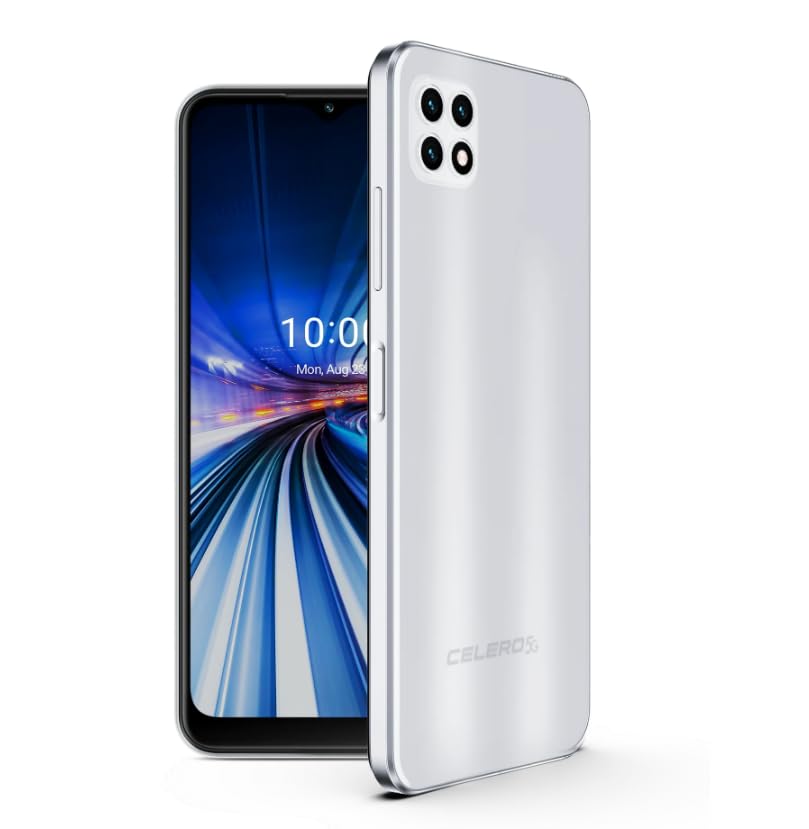
Figure 1: Wingtech Celero 5G Smartphone (Silver)
2. Qutida nima bor
Mahsulot o'ramida barcha elementlar mavjudligini tekshiring:
- Wingtech Celero 5G Smartphone
- USB kabeli
- SIM karta tepsisini chiqarish
- Tez boshlash qo'llanmasi (alohida kiritilishi mumkin)
3. Sozlash
3.1. SIM kartani o'rnatish
- Qurilmangiz yonidagi SIM karta tepsisini toping.
- SIM-karta tepsisini chiqarish vositasini patnis yonidagi kichik teshikka soling va laganda chiqib ketguncha sekin suring.
- Nano-SIM-karta(lar)ni va/yoki microSD-kartangizni oltin kontaktlari pastga qaragan holda taglikka joylashtiring.
- Tovoqni qurilmaga ehtiyotkorlik bilan qayta joylashtiring.
3.2. Dastlabki yoqish va sozlash
- Press and hold the Power button until the device vibrates and the screen turns on.
- Tilingizni tanlash, Wi-Fi tarmog‘iga ulanish va Google hisobingizni sozlash uchun ekrandagi ko‘rsatmalarga amal qiling.
- Complete the setup wizard to personalize your device settings.
4. Operatsion
4.1. Asosiy navigatsiya
- Bosh ekran: Turli bosh ekran panellariga kirish uchun chapga yoki o'ngga suring.
- Ilovalar tortmasi: Asosiy ekrandan yuqoriga suring view barcha o'rnatilgan ilovalar.
- Bildirishnomalar paneli: Bildirishnomalar va tezkor sozlamalarga kirish uchun ekranning yuqori qismidan pastga suring.
4.2. Qo'ng'iroqlar qilish va xabarlar yuborish
- ga teging Telefon icon to open the dialer and make calls.
- ga teging Xabarlar icon to send and receive text messages.
4.3. Kameradan foydalanish
- ga teging Kamera icon to launch the camera application.
- Select different modes (Photo, Video, Portrait, etc.) by swiping across the screen.
- Rasmga tushirish yoki video yozishni boshlash/to‘xtatish uchun deklanşör tugmasini bosing.
5. Texnik shartlar
| Xususiyat | Tafsilot |
|---|---|
| Model nomi | Celero 5G |
| Model raqami | DSH98123 |
| Operatsion tizim | Android 11.0 |
| Ekran o'lchami | 6.52 dyuym |
| Rezolyutsiya | 1920 x 1080 |
| Xotirani saqlash hajmi | 4 GB (RAM) |
| Ichki xotira | 64GB (as per product title, though description mentions 64GB built-in memory) |
| Batareya quvvati | 4000 mlnamp Soat |
| Ulanish texnologiyasi | 5G |
| Rang | Kumush |
| Ishlab chiqaruvchi | Wingtech |
6. Xizmat ko'rsatish
- Qurilmangizni yumshoq va quruq mato bilan toza tuting.
- Avoid exposing the device to extreme temperatures, direct sunlight, or liquids.
- Ma'lumotlaringiz yo'qolishining oldini olish uchun muntazam ravishda zaxira nusxasini yarating.
- Install software updates as they become available to ensure optimal performance and security.
7. Muammolarni bartaraf qilish; nosozliklarni TUZATISH
7.1. Qurilma yoqilmayapti
- Batareyaning zaryadlanganligiga ishonch hosil qiling. Qurilmani zaryadlovchiga ulang va yoqishdan oldin bir necha daqiqa kuting.
- Majburiy qayta ishga tushirish uchun Quvvat tugmasini kamida 10-15 soniya bosib turing.
7.2. Tarmoq ulanishining yomonligi
- SIM kartangiz to'g'ri kiritilganligini tekshiring.
- Verify that mobile data is enabled in your device settings.
- Restart your device or toggle Airplane Mode on and off.
- Contact your wireless carrier to confirm service availability in your area.
7.3. Ilovalar ishlamay qolmoqda yoki muzlayapti
- Clear the cache and data for the problematic app via Settings > Apps.
- Ilovani o'chirib tashlang va qayta o'rnating.
- Qurilmangiz dasturiy ta'minoti yangilanganligiga ishonch hosil qiling.
8. Kafolat va qo'llab-quvvatlash
This product is offered as an Amazon Renewed device. Amazon Renewed products are inspected, tested, and refurbished as necessary to be fully functional. Your purchase is eligible for Amazon Renewed coverage in conjunction with Amazon's Return Policy and the A-to-z Guarantee.
For specific warranty details, return policies, or technical support, please refer to the documentation provided with your purchase or visit the Amazon Renewed support page.


