1. Kirish
This manual provides detailed instructions for the setup, operation, and maintenance of your Thundeal TD93 Pro Mini Projector. Please read this manual thoroughly before using the product to ensure proper functionality and to extend its lifespan.

Image 1.1: Thundeal TD93 Pro Mini Projector overview.
2. Qutida nima bor
Quyida sanab o'tilgan barcha narsalar paketingizga kiritilganligini tekshiring:
- Thundeal TD93 Pro Projector
- Masofadan boshqarish
- Quvvat kabeli
- Foydalanuvchi uchun qo'llanma (ushbu hujjat)
- AV kabeli
- HDMI kabeli
- Proyektor linzalari qopqog'i

Image 2.1: Package contents of the TD93 Pro Projector.
3. Mahsulot xususiyatlari va xususiyatlari
3.1. Texnik spetsifikatsiyalar
| Model raqami | TD93 Pro (Item Model Number: TD97) |
| Mahalliy rezolyutsiya | 1920 x 1080 (Full HD) |
| Maksimal ruxsatni qo'llab-quvvatlash | 2K 4K UHD (from HD Signal) |
| Yorqinlik | 12000 lumen |
| Kontrast nisbati | 15000:1 |
| Aspekt nisbati | 4:3 / 16:9 / Avtomatik |
| Operatsion tizim | Android 9.0 operatsion tizimi |
| Simsiz ulanish | 2.4G / 5G WiFi, Bluetooth-compatible |
| Xotira | RAM 1G DDR3 + ROM 8G |
| Keystone tuzatish | 6D Keystone (4-point corner +/- 60°, Vertical +/- 60°) |
| Kattalashtirish funktsiyasi | 50-100% Proportional Reduction |
| Proyeksiya hajmi | 49 to 300 inches (recommended 93-150 inches) |
| Proyeksiya masofasi | 1.6 to 6.5 meters (recommended 3-5 meters) |
| Lamp Muddat | 50,000 soat |
| Audio | Built-in 5W stereo speakers with SRS sound system |
| Maxsus xususiyatlar | 3D-Ready (Red-Blue 3D), Auto Horizontal Keystone, Built-In Wi-Fi, Portable, Dust Removal Net |
3.2. Asosiy xususiyatlar
- High Definition Visuals: Native 1080P resolution with support for 2K/4K UHD signals, delivering clear and vibrant images.
- Smart Android OS: Integrated Android 9.0 operating system allows direct app downloads and streaming.
- Ikki tarmoqli WiFi: 2.4G and 5G WiFi connectivity for stable and fast wireless streaming and screen mirroring.
- Bluetooth ulanishi: Yaxshiroq ovoz uchun tashqi Bluetooth karnaylarini yoki minigarnituralarni ulang.
- Advanced Image Correction: 6D Keystone correction (4-point and vertical) for flexible placement and precise image alignment.
- Moslashuvchan proyeksiya: Adjustable zoom from 50% to 100% and support for screen sizes up to 300 inches.
- Uzoq muddatli Lamp: LED lamp designed for up to 50,000 hours of operation.
- Multi-Media Compatibility: Supports various input sources including HDMI, USB, AV, and direct office file USB orqali ijro etish.

Image 3.1: Visual comparison of projector brightness and resolution.
4. O'rnatish bo'yicha qo'llanma
4.1. Proyektorni joylashtirish
The projector can be placed in various positions to suit your viewing environment:
- Stolda: Proyektorni barqaror, tekis yuzaga qo'ying.
- Tripodda: Utilize the 6mm screw hole on the bottom for tripod mounting.
- Ceiling Hoisting: Mount the projector to the ceiling using a compatible hanger.
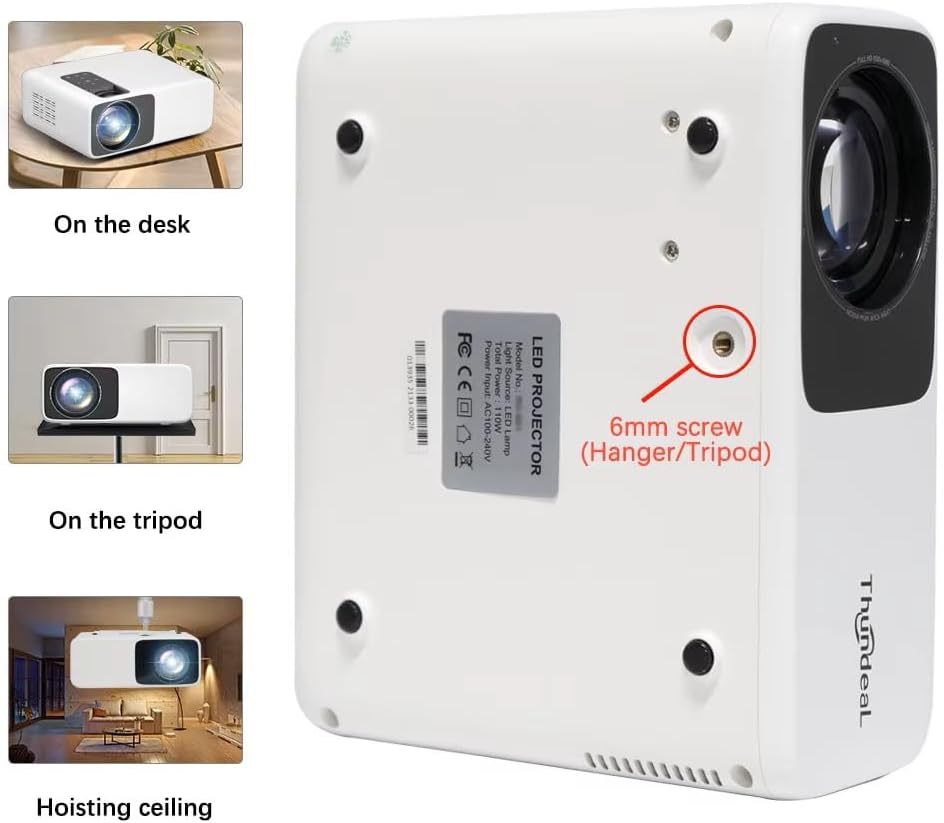
Image 4.1: Projector placement options and mounting point.
Optimal uchun viewing, ensure the projector is positioned perpendicular to the screen or wall. Adjust the projection distance (1.6 to 6.5 meters) to achieve your desired screen size (49 to 300 inches). A distance of 3-5 meters for a 93-150 inch screen is recommended for eye comfort.
4.2. Quvvatga ulanish
- Quvvat simini proyektorning quvvat kirish portiga ulang.
- Elektr simining ikkinchi uchini standart elektr rozetkaga ulang.
- Yoqish uchun proyektor yoki masofadan boshqarish pultidagi quvvat tugmasini bosing.
5. Foydalanish bo'yicha ko'rsatmalar
5.1. Multi-Media Connections
The TD93 Pro projector offers various ports for connecting external devices:
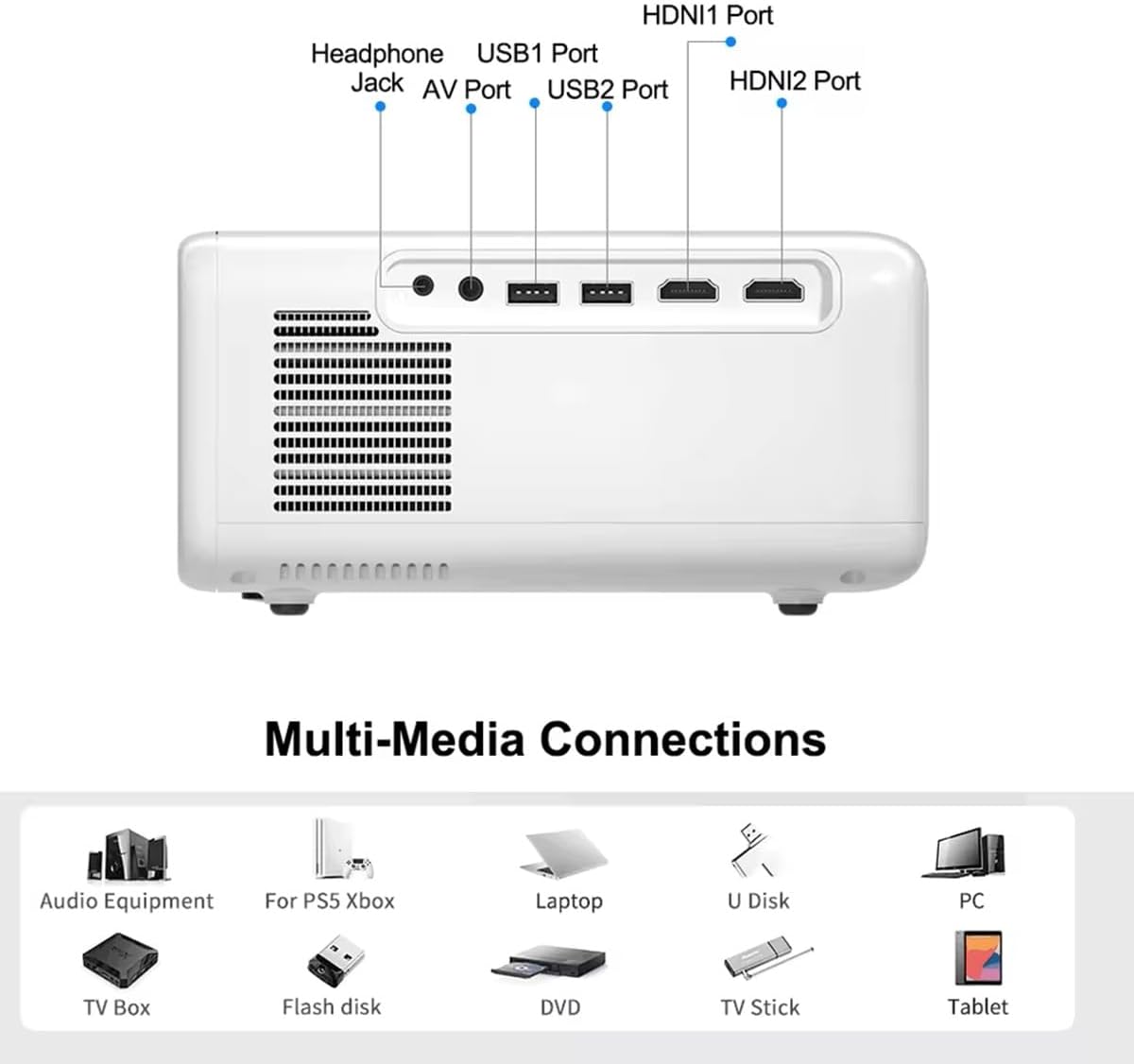
Image 5.1: Available multimedia connection ports.
- HDMI Ports (HDMI1, HDMI2): Connect devices such as TV boxes, gaming consoles (PS5, Xbox), laptops, or Blu-ray players.
- USB portlari (USB1, USB2): Connect USB flash drives for direct media playback (photos, videos, office documents).
- AV porti: Berilgan AV kabelidan foydalanib, eski qurilmalarni ulang.
- Eshitish vositasi uyasi (3.5 mm): Tashqi eshitish vositalarini yoki karnaylarni ulang.
To switch input sources, use the "Source" button on the remote control or the projector's control panel and select the desired input (HDMI1, HDMI2, AV, USB).
5.2. Simsiz ulanish
5.2.1. WiFi Connection (2.4G/5G)
The projector supports dual-band WiFi for internet access and network features:
- Navigate to the "Settings" menu on the projector's Android interface.
- "Tarmoq va Internet" ni, so'ngra "Wi-Fi" ni tanlang.
- Wi-Fi-ni yoqing va ro'yxatdan kerakli tarmoqni tanlang.
- Agar so'ralsa, parolni kiriting va ulaning.
5.2.2. Bluetooth ulanishi
Connect Bluetooth-compatible audio devices like speakers or headphones:
- Go to "Settings" > "Connected devices" > "Bluetooth".
- Bluetooth-ni yoqing.
- Bluetooth qurilmangizni ulanish rejimiga o'tkazing.
- Ulanish uchun mavjud qurilmalar ro‘yxatidan qurilmangizni tanlang.
5.3. Screen Mirroring (Airplay/WiFi-Display)
Wirelessly display content from your Android or iOS phone:

Image 5.2: Screen mirroring from iOS and Android devices.
- Ensure both your projector and mobile device are connected to the same Wi-Fi network.
- On the projector's main interface, select the "Screen Mirroring" or "Airplay/WiFi-Display" application.
- For iOS devices: Open Control Center, tap "Screen Mirroring" or "AirPlay Mirroring", and select the projector from the list.
- For Android devices: Open the notification panel, find "Cast", "Smart View", "Wireless Display", or similar function, and select the projector.
5.4. Tasvirni sozlash
5.4.1. Keystone Correction (6D)
The projector features 6D keystone correction to adjust image shape:
- Vertical Keystone: Adjust +/- 60 degrees vertically using the remote control.
- 4-Point Corner Keystone: Adjust each of the four corners independently by +/- 60 degrees for side projection or irregular surfaces. This allows for precise rectangular image alignment.
Access keystone settings via the projector's menu or dedicated buttons on the remote.
5.4.2. Kattalashtirish funksiyasi
Adjust the display size from 50% to 100% proportionally without moving the projector. This feature is useful for fine-tuning the image size to fit your screen or wall.
Access the zoom function through the projector's menu settings.
5.5. Android OS and App Usage
The integrated Android 9.0 OS allows you to download and install applications directly from the Play Store. Ensure the projector is connected to Wi-Fi to access online services and apps.
- Play Store: Access the Google Play Store to download streaming apps, games, and utilities.
- Media ijro etish: Use pre-installed media players or download alternatives (e.g., VLC player for AC3 audio support).
6. Xizmat ko'rsatish
6.1. Dust Removal
The projector is equipped with a built-in dust net for easy cleaning. Regularly clean the dust net to maintain optimal performance and prevent overheating. Press to pop out the dust net for cleaning.
6.2. Sovutish tizimi
The advanced cooling system is designed to dissipate heat efficiently and extend the lamp's lifespan. Ensure proper ventilation around the projector and avoid blocking air vents during operation.
6.3. Lamp Muddat
LED lamp has an estimated lifespan of 50,000 hours. No lamp replacement is typically required during the product's operational life under normal usage conditions.
7. Muammolarni bartaraf qilish; nosozliklarni TUZATISH
7.1. No Image Displayed
- Proyektor yoqilganligini tekshiring.
- Verify the input source is correctly selected (e.g., HDMI1, USB).
- Barcha kabellar mahkam ulanganligiga ishonch hosil qiling.
- Fokusni va kalit toshini tuzatishni sozlang.
7.2. Ovoz yo'q
- Proyektor va ulangan manba qurilmasidagi ovoz balandligini tekshiring.
- Ensure external speakers or headphones are properly connected and powered on if used.
- Agar tashqi manbadan foydalansangiz, uning audio chiqish sozlamalarini tekshiring.
- For AC3 audio, ensure you are using a compatible player like VLC.
7.3. Connectivity Issues (WiFi/Bluetooth)
- Ensure WiFi is enabled and you are connected to the correct network.
- Restart the projector and your router/Bluetooth device.
- For screen mirroring, confirm both devices are on the same Wi-Fi network.
7.4. Image is Blurry or Distorted
- Proyektor linzalaridagi fokus halqasini sozlang.
- Use the keystone correction features to correct any trapezoidal distortion.
- Proyeksiya yuzasi tekis va silliq ekanligiga ishonch hosil qiling.
8. Kafolat va qo'llab-quvvatlash
Kafolat haqida ma'lumot va texnik yordam uchun, iltimos, sotib olish vaqtida taqdim etilgan hujjatlarga qarang yoki sotuvchingizga murojaat qiling. Xarid chekingizni sotib olishni tasdiqlovchi hujjat sifatida saqlang.


