1. Kirish
This manual provides essential information for the setup, operation, maintenance, and troubleshooting of your KOOSMILE N150 8-inch 2-in-1 Mini Laptop. Please read this manual thoroughly before using the device to ensure proper functionality and to prevent damage.
2. Paket tarkibi
Paketda barcha elementlar mavjudligiga ishonch hosil qiling:
- KOOSMILE N150 8-inch 2-in-1 Mini Laptop x1
- PD Adapter x1
- Active Stylus x1
- HDMI kabeli x1
- HUB x1
- Foydalanuvchi uchun qo'llanma x1
- Data Cables x2
3. Mahsulot tugadiview
Familiarize yourself with the components and ports of your mini laptop.
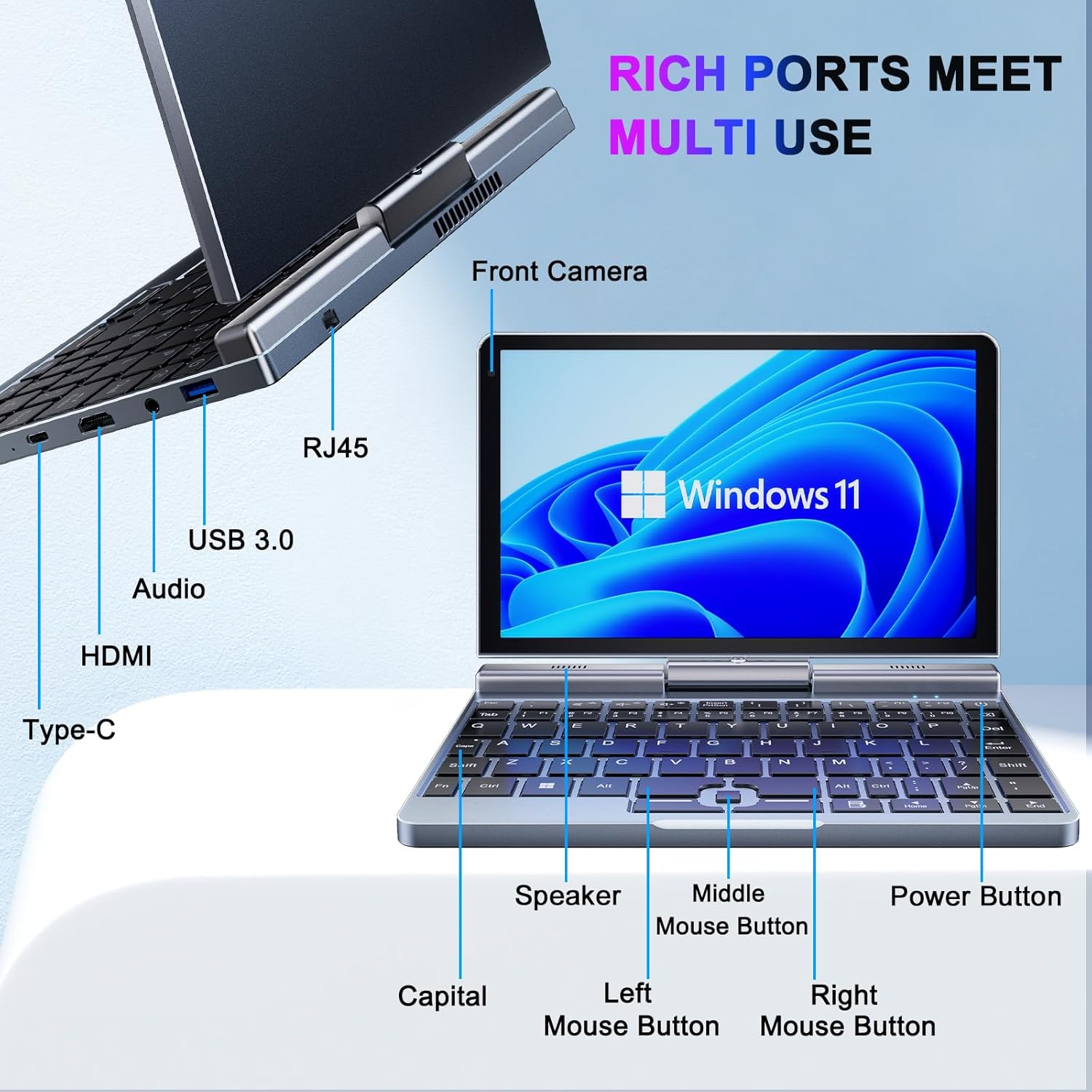
3.1-rasm: KOOSMILE N150 Mini Laptop with labeled ports and buttons. Key components include the Front Camera, RJ45 port, USB 3.0 port, Audio jack, HDMI port, Type-C port, Speaker, Middle Mouse Button, Left Mouse Button, Right Mouse Button, Capital indicator, and Power Button.
3.1 Asosiy xususiyatlar
- Protsessor: Intel N150 (4 cores/4 threads, up to 3.6GHz)
- Operatsion tizim: Windows 11 Pro
- Displey: 8-inch HD Touch Screen (1280x800 pixels)
- Xotira: 12GB LPDDR5 RAM (4800 MHz)
- Saqlash: 512GB or 1TB M.2 SSD (expandable up to 2TB)
- Ulanish: Wi-Fi 6 (802.11ax), Bluetooth 5.2, Gigabit Ethernet (via RJ45)
- Portlar: USB 3.0, USB Type-C, HDMI, Headphone Jack
- Kamera: 2 MP old kamera
- Dizayn: 180° Rotating Screen, 2-in-1 Convertible (Laptop/Tablet mode), CNC-machined full-metal body
- Og'irligi: Taxminan 0.78 kg (1.72 funt)
4. Sozlash
4.1 Dastlabki zaryadlash
- Connect the provided PD Adapter to the USB Type-C port on the laptop.
- Adapterni rozetkaga ulang.
- Allow the device to charge fully before first use. A full charge is indicated by the charging LED changing color or turning off.
- Eslatma: Use only the provided PD adapter or a compatible Type-C charger with sufficient voltage (e.g., a laptop or Steamdeck charger) to ensure proper charging. Standard phone USB blocks may not provide enough power.
4.2 Birinchi yuklash va Windows-ni sozlash
- Press and hold the Power Button (refer to Image 3.1) until the screen illuminates.
- Follow the on-screen instructions to complete the Windows 11 Pro setup process. This typically includes selecting your region, language, connecting to a Wi-Fi network, and creating a user account.
5. Foydalanish bo'yicha ko'rsatmalar
5.1 Quvvatni yoqish/o'chirish va Kutish rejimi
- Yoqilgan: Quvvat tugmasini bosing.
- Kutish rejimi: Briefly press the Power Button while the device is on. Press again to wake.
- O'chirish; yopish: Windows Ishga tushirish tugmasini, keyin Quvvat tugmasini bosing va "O'chirish" -ni tanlang.
- Qayta ishga tushirish: Windows Ishga tushirish tugmasini, keyin Quvvat tugmasini bosing va "Qayta ishga tushirish" -ni tanlang.
5.2 2-in-1 funksiyasidan foydalanish
The laptop features a 180° rotating screen, allowing it to transform into various modes.
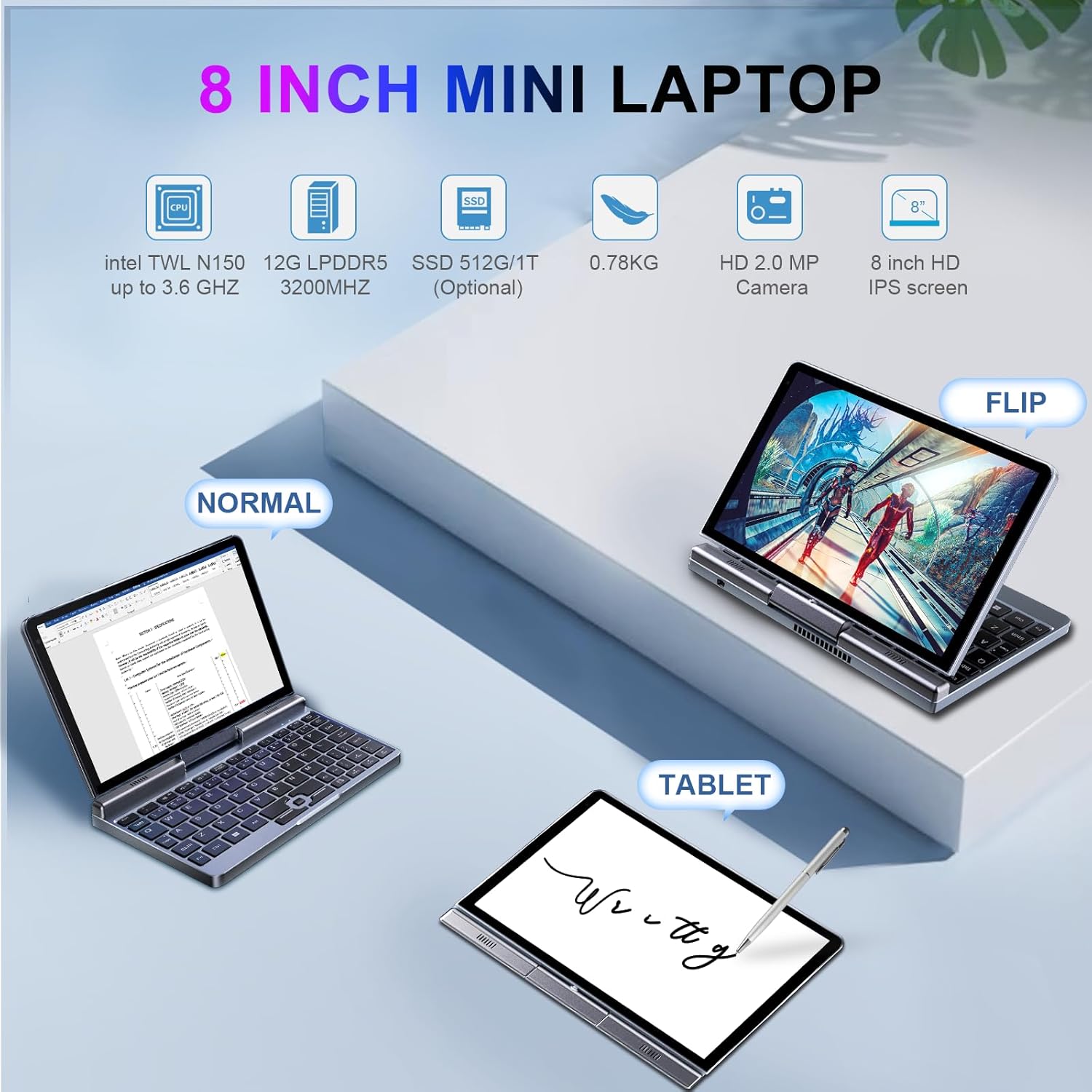
5.1-rasm: Demonstrates the KOOSMILE N150 Mini Laptop in its three primary modes: Normal (traditional laptop), Flip (tent mode), and Tablet (screen folded back). This highlights the device's versatility for different usage scenarios.
- Noutbuk rejimi: Standard configuration for typing with the physical keyboard.
- Tent Mode (Flip): Rotate the screen 180 degrees and stand the device in a tent shape for media consumption or presentations.
- Planshet rejimi: Fold the screen completely back against the base for a full touchscreen experience. The physical keyboard will automatically disable in this mode.
5.3 Touch Screen and Stylus Usage
- The 8-inch HD screen supports multi-touch gestures.
- Use the included Active Stylus for precise input, drawing, or note-taking, especially in Tablet mode.
5.4 Tashqi displeylarni ulash
The laptop supports external displays via HDMI and USB Type-C (DisplayPort out).

5.2-rasm: The KOOSMILE N150 Mini Laptop connected to an external monitor, demonstrating its capability for multi-screen display and enhanced productivity. The image shows the laptop displaying a document while the external monitor shows a larger view of the same document.

5.3-rasm: The KOOSMILE N150 Mini Laptop configured as a micro desktop, connected to two external monitors, a keyboard, and a mouse. This setup illustrates its potential for multi-tasking and extended workspace.
- Connect an HDMI cable from the laptop's HDMI port to your external display.
- Alternatively, use a USB Type-C to DisplayPort cable or adapter for compatible monitors.
- bosing Windows tugmasi + P to open the Project menu and select your desired display mode (e.g., Duplicate, Extend, Second screen only).
5.5 Tarmoqqa ulanish
- Wi-fi: Access Wi-Fi settings via the Windows taskbar icon to connect to available wireless networks.
- Bluetooth: Enable Bluetooth in Windows settings to pair with Bluetooth devices like headphones or keyboards.
- Ethernet: Simli tarmoq ulanishi uchun Ethernet kabelini RJ45 portiga ulang.
6. Xizmat ko'rsatish
6.1 Tozalash
- Ekranni va tashqi qismini tozalash uchun yumshoq, tuklarsiz matodan foydalaning.
- O'jar belgilar uchun engil dampMatoni suv yoki ekranni tozalash eritmasi bilan arting. Zararli kimyoviy moddalardan saqlaning.
- Tozalashdan oldin qurilma o'chirilgan va elektr tarmog'idan uzilganligiga ishonch hosil qiling.
6.2 Batareyani parvarish qilish
- Batareyaning ishlash muddatini uzaytirish uchun haddan tashqari haroratdan saqlaning.
- Batareyaning tez-tez to'liq zaryadsizlanishiga yo'l qo'ymang.
- If storing the device for an extended period, charge it to approximately 50-70%.
6.3 Dasturiy ta'minotni yangilash
- Optimal ishlash va xavfsizlikni ta'minlash uchun Windows yangilanishlarini muntazam ravishda tekshirib turing va o'rnating. O'ting Sozlamalar > Windows yangilash.
7. Muammolarni bartaraf qilish; nosozliklarni TUZATISH
| Muammo | Mumkin yechim |
|---|---|
| Qurilma yoqilmaydi. |
|
| Batareya zaryad olmayapti. |
|
| Wi-Fi ulanishi bilan bog'liq muammolar. |
|
| Touchscreen or stylus not responding. |
|
| Device runs hot during use. |
|
8. Texnik shartlar
| Xususiyat | Tafsilot |
|---|---|
| Model | P8 (N150) |
| Protsessor | Intel N150 (4 cores/4 threads, up to 3.6GHz) |
| Grafika | Intel UHD Grafikasi (Integratsiyalashgan) |
| Operatsion tizim | Windows 11 Pro |
| Displey | 8-inch HD Touch Screen, 1280 x 800 pixels |
| Ram | 12 Gb LPDDR5 (4800 MGts) |
| Saqlash | 512GB or 1TB M.2 SSD (Expandable up to 2TB) |
| Simsiz ulanish | Wi-Fi 6 (802.11ax), Bluetooth 5.2 |
| Portlar | 1x USB 3.0, 1x USB Type-C (DisplayPort out), 1x HDMI, 1x Headphone Jack, 1x RJ45 (Ethernet) |
| Kamera | 2 MP old kamera |
| Batareya | 36.5 WH Lithium Polymer |
| Olchamlari (UxKxY) | 7.87 x 5.51 x 0.79 dyuym |
| Og'irligi | 1.72 funt (0.78 kg) |
| Rang | Kulrang |
9. Kafolat va qo'llab-quvvatlash
KOOSMILE provides a 1-year warranty for this product. For technical support, warranty claims, or any inquiries, please contact KOOSMILE customer support. Contact details can typically be found on the KOOSMILE official websayt yoki xarid platformangiz orqali.
Onlayn resurslar va tez-tez so'raladigan savollar ham ushbu saytda mavjud bo'lishi mumkin. KOOSMILE Store.


