1. Kirish
This manual provides detailed instructions for the setup, operation, and maintenance of your XBJ K6 Mini Portable Projector. Please read this manual thoroughly before using the device to ensure proper functionality and to maximize your viewtajribasi. Kelajakda foydalanish uchun ushbu qo'llanmani saqlang.
2. Qutida nima bor
- XBJ K6 Portable Projector
- Quvvat kabeli
- Masofadan boshqarish
- Foydalanuvchi uchun qo'llanma (ushbu hujjat)
3. Mahsulot tugadiview
The XBJ K6 Mini Portable Projector is designed for versatile entertainment and presentation. It features 1080P support with 4K decoding, electric focus, auto keystone correction, and a 360° rotatable stand. Integrated with a Smart Android System, WiFi 6, and Bluetooth 5.2, it offers seamless connectivity and access to various applications.

Figure 3.1: XBJ K6 Mini Portable Projector front view asosiy xususiyatlar bilan.
4. O'rnatish bo'yicha ko'rsatmalar
4.1 Joylashtirish
Position the projector on a stable, flat surface. The 360° rotatable stand allows for flexible projection angles, including walls, ceilings, or tents. Ensure there are no obstructions in front of the lens.

Figure 4.1: Projector placement flexibility with 360° rotating stand.
4.2 Quvvatga ulanish
- Quvvat simini proyektorning quvvat kirish portiga ulang.
- Elektr simining ikkinchi uchini mos keladigan elektr rozetkasiga ulang.
- Qurilmani yoqish uchun proyektor yoki masofadan boshqarish pultidagi quvvat tugmasini bosing.
4.3 Fokusni sozlash
The projector features electric focus. Use the remote control to adjust the sharpness of the projected image. Press the 'F+' or 'F-' buttons on the remote until the image is clear.

Figure 4.2: Adjusting electric focus with the remote control.
4.4 Asosiy toshni tuzatish
The XBJ K6 projector includes automatic keystone correction. This feature automatically adjusts the image to be rectangular, even if the projector is placed at an angle. Manual adjustments may also be available through the settings menu if needed.
5. Foydalanish bo'yicha ko'rsatmalar
5.1 Navigating the Smart Android System
The projector runs on a Smart Android System, providing access to various pre-installed applications like Netflix and YouTube. Use the remote control to navigate the interface, select apps, and adjust settings.
5.2 Wi-Fi ulanishi
The projector supports Dual-Band WiFi 6 (2.4G/5G) for fast and stable internet connection.
- Go to the projector's settings menu.
- Select 'Network' or 'Wi-Fi'.
- Ro'yxatdan kerakli Wi-Fi tarmog'ini tanlang.
- Agar so'ralsa, parolni kiriting va ulaning.
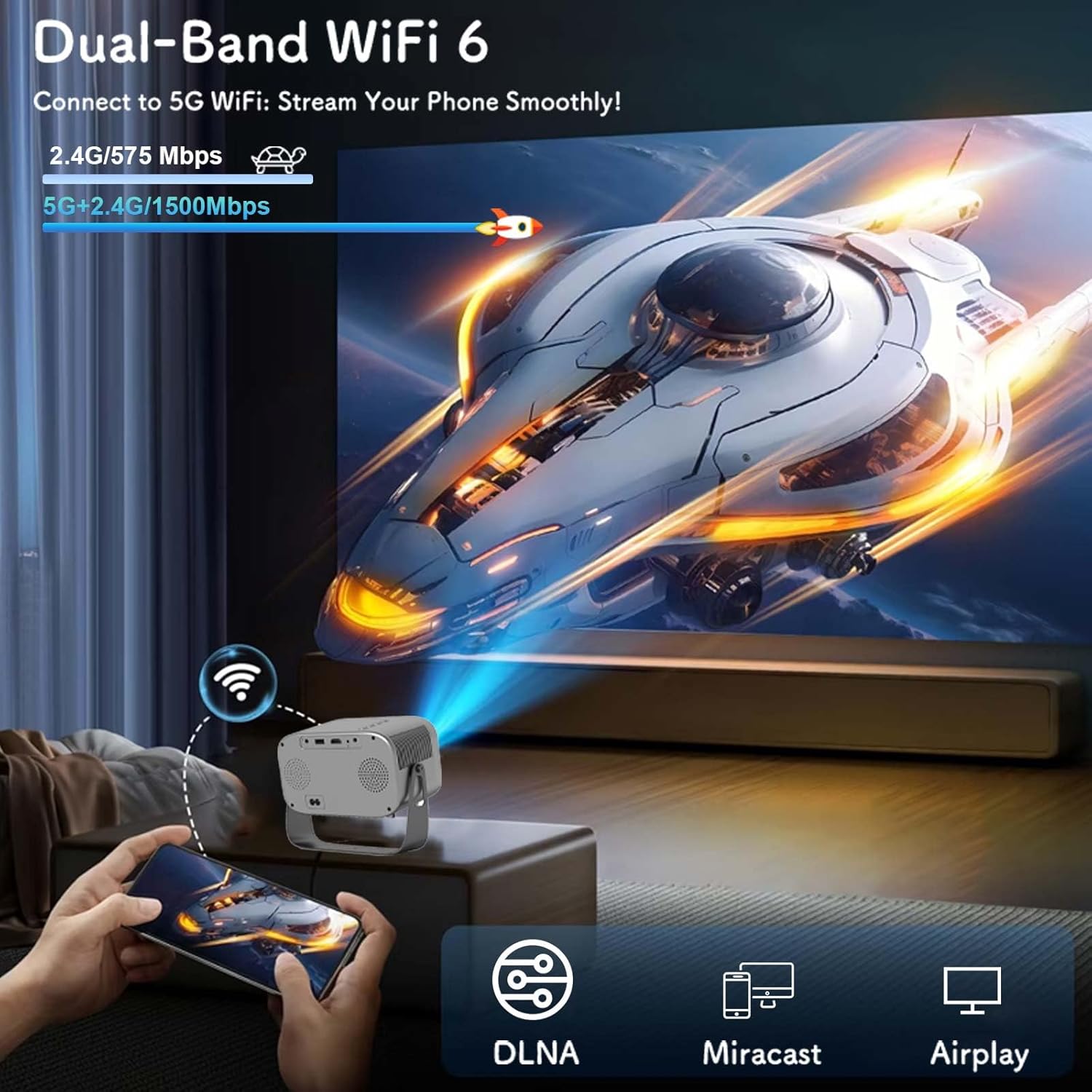
Figure 5.1: Connecting to Dual-Band WiFi 6 and screen mirroring.
5.3 Bluetooth ulanishi
The projector features Bluetooth 5.2, allowing connection to external audio devices like HiFi speakers or headphones for enhanced sound.
- Bluetooth audio qurilmangiz ulanish rejimida ekanligiga ishonch hosil qiling.
- On the projector, go to the settings menu and select 'Bluetooth'.
- Scan for available devices and select your audio device to pair.

Figure 5.2: Bluetooth 5.2 connectivity for external audio.
5.4 Ekranni aks ettirish
The projector supports DLNA, Miracast, and Airplay for screen mirroring from smartphones and other compatible devices. Ensure your device and the projector are connected to the same Wi-Fi network for optimal performance.
5.5 Tashqi qurilmalarni ulash
The projector offers multiple interfaces for connecting various devices:
- HDMI: Connect laptops, game consoles, TV sticks, etc.
- USB: Play media from USB flash drives.
- OF: Connect older devices using an AV cable (not included).
- 3.5 mm audio uyasi: Connect wired headphones or external speakers.
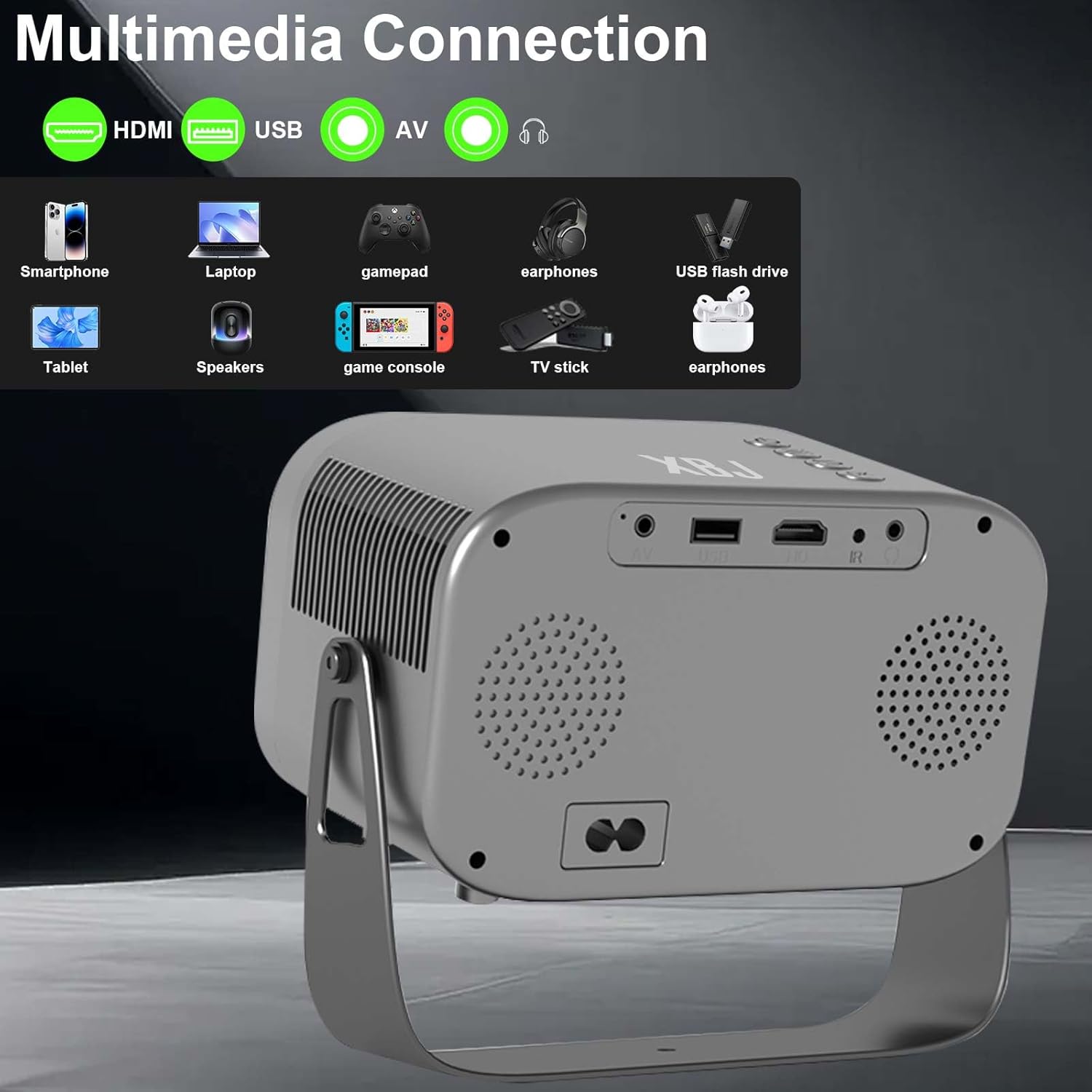
Figure 5.3: Multimedia connection ports on the XBJ K6 projector.
6. Xizmat ko'rsatish
6.1 Ob'ektivni tozalash
Proyektor linzasini muloyimlik bilan artish uchun optik linzalar uchun maxsus mo'ljallangan yumshoq, tuksiz matodan foydalaning. Linza qoplamasiga zarar yetkazishi mumkin bo'lgan abraziv materiallar yoki qattiq kimyoviy moddalardan foydalanishdan saqlaning.
6.2 Tashqi ko'rinishni tozalash
Proyektorning tashqi qismini yumshoq, quruq mato bilan arting. Qattiq izlar uchun ozgina arting.amp cloth can be used, followed by a dry cloth. Ensure no liquid enters the device.
6.3 Saqlash
When not in use for extended periods, store the projector in a cool, dry place, away from direct sunlight and extreme temperatures. It is recommended to cover the lens to protect it from dust.
7. Muammolarni bartaraf qilish; nosozliklarni TUZATISH
If you encounter issues with your XBJ K6 projector, please refer to the following common solutions:
- Quvvat yo'q: Ensure the power cord is securely connected to both the projector and the power outlet. Try a different outlet.
- Rasm yo'q: Check all cable connections (HDMI, AV). Ensure the correct input source is selected in the projector's menu. Adjust focus.
- Xira tasvir: Use the remote control's 'F+' and 'F-' buttons to adjust the electric focus. Ensure the projection surface is flat.
- Ovoz yo'q yoki past ovoz: Adjust the volume on both the projector and any connected external audio devices. Check Bluetooth connection if using wireless speakers/headphones. Ensure internal speakers are not muted.
- Wi-Fi/Bluetooth Connection Issues: Ensure the projector is within range of your router/Bluetooth device. Restart the projector and your network devices. Re-pair Bluetooth devices.
- Ilovaning funksional muammolari: Ensure the projector is connected to the internet. Check for app updates within the Android system. Some apps may have specific device compatibility requirements.
Qo'shimcha yordam uchun mijozlarni qo'llab-quvvatlash xizmatiga murojaat qiling.
8. Texnik shartlar
| Xususiyat | Spetsifikatsiya |
|---|---|
| Brend | XBJ |
| Model raqami | TYYK6SKS001 |
| Element og'irligi | 1.87 funt |
| Mahsulot o'lchamlari | 7.28 x 4.17 x 6.06 dyuym |
| Displey ravshanligi | 1280 x 720 (Supports 1080P/4K decoding) |
| Yorqinlik | 300 ta ANSI lyumeni |
| Ulanish texnologiyasi | 3.5mm Jack, Bluetooth 5.2, HDMI, USB, Wi-Fi 6 |
| Maxsus xususiyatlar | Built-In Cooling System, Built-In Speaker, Built-In Wi-Fi, Digital Keystone Correction, Portable, Electric Focus, 360° Rotatable Stand |
| Tavsiya etilgan foydalanish | Education, Gaming, Home Cinema |
9. Kafolat va qo'llab-quvvatlash
9.1 Kafolat haqida ma'lumot
New products may be damaged during shipping. If you receive a damaged item, please contact our store immediately. We are fully responsible for products sold via our official store.
9.2 Mijozlarni qo‘llab-quvvatlash
For technical support or any issues you encounter with your XBJ K6 Mini Portable Projector, please contact our customer support team. We are committed to helping you resolve any problems.
Email: ESzxkj@outlook.com
24/7 Customer Support is available.


