1. Kirish
The AOCHUAN Smart M3 is a versatile 3-in-1 device combining a selfie stick, desktop stand, and floor tripod, featuring advanced AI face tracking and remote control capabilities. Designed for content creators and everyday users, it offers hands-free video recording and photography without the need for a dedicated application. This manual provides comprehensive instructions for setting up, operating, and maintaining your Smart M3 tripod.
2. Xavfsizlik ma'lumotlari
- Qurilmani uzoq vaqt davomida haddan tashqari harorat yoki to'g'ridan-to'g'ri quyosh nuri ta'siriga qo'ymang.
- Qurilmani suv va boshqa suyuqliklardan uzoqroq tuting.
- Qurilmani yiqilib tushmaslik yoki kuchli zarbalarga duchor qilishdan saqlaning.
- Qurilmani o'zingiz qismlarga ajratish yoki ta'mirlashga urinmang. Yordam uchun mijozlarni qo'llab-quvvatlash xizmatiga murojaat qiling.
- Ensure your smartphone is securely mounted in the holder before use.
3. Paket tarkibi
Paketingizga barcha narsalar kiritilganligini tekshiring:
- Smart M3 AI Face Tracking Tripod
- Masofadan boshqarish pulti (x1)
- USB-C zaryadlash kabeli (x1)
- Mahsulot qo'llanmasi (x1)

4. Mahsulot tugadiview
The AOCHUAN Smart M3 features an integrated design with several key components:
- Telefon ushlagichi: Securely holds smartphones from 1.8 to 3.8 inches in width.
- AI Tracking Camera: Located on the main unit, it detects and follows faces.
- Quvvat tugmasi: For turning the device on/off.
- USB-C zaryadlash porti: Ichki batareyani qayta zaryadlash uchun.
- Remote Control Slot: Stores the detachable Bluetooth remote.
- Kengaytiriladigan qutb: Made from aluminum alloy, extends up to 57 inches.
- Tripod oyoqlari: Four-legged design with anti-slip rubber pads for enhanced stability.


5. Sozlash
5.1 Tripodni ochish
- Gently pull the bottom of the device to extend the tripod legs. Ensure they are fully spread for maximum stability.
- Extend the telescopic pole to your desired height. The pole can reach up to 57 inches.
5.2 Smartfoningizni ulash
- Open the phone holder by pulling the top clip upwards.
- Carefully place your smartphone into the holder, ensuring it is centered and securely gripped. The holder accommodates devices from 1.8 to 3.8 inches wide.
5.3 Quvvatni yoqish
Press and hold the power button on the main unit until the indicator light illuminates.
5.4 Masofadan boshqarish pultini juftlashtirish
The remote control uses Bluetooth. To pair, ensure the remote is charged and the tripod is powered on. Activate Bluetooth on your smartphone and select the Smart M3 remote from the list of available devices. The remote is typically pre-paired or automatically connects upon activation.
6. Foydalanish bo'yicha ko'rsatmalar
6.1 AI Face Tracking
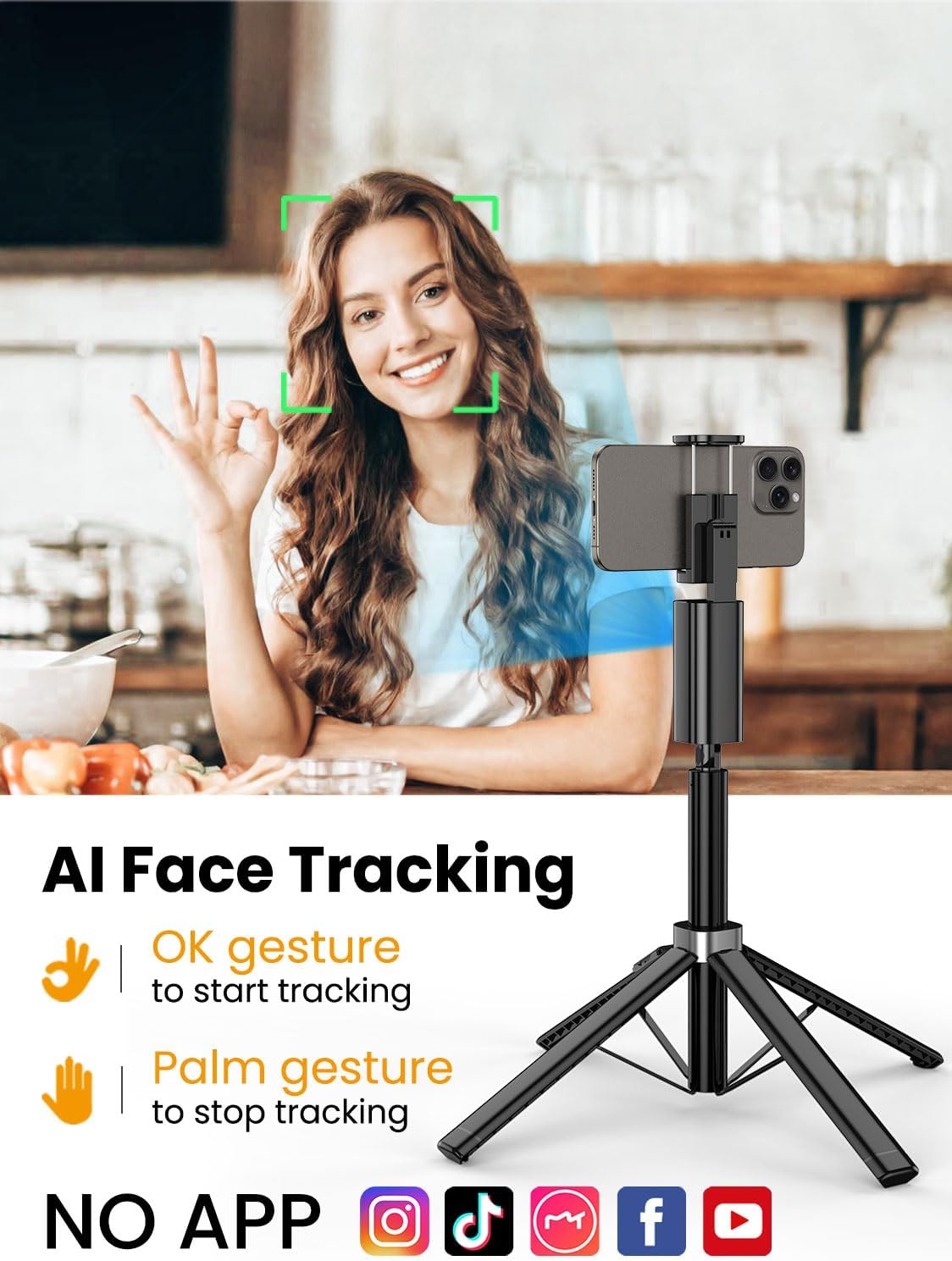
The Smart M3 features an integrated AI tracking camera that does not require an app. It automatically detects and follows faces.
- To Start Tracking: Make an "OK" gesture with your hand towards the AI tracking camera. The device will begin to rotate and follow your face.
- To Stop Tracking: Show your open palm to the AI tracking camera. The device will pause tracking.

6.2 Masofadan boshqarish funksiyasi
The detachable remote control allows you to operate your smartphone's camera from a distance of up to 10 meters (32 feet). Use it to trigger photos or start/stop video recording, ideal for group shots or solo content creation.

6.3 Extendable Pole
The built-in aluminum alloy extension pole can be adjusted to a maximum height of 57 inches, providing flexibility for various shooting scenarios and wider fields of view.

6.4 Multi-Angle Shooting
The Smart M3 offers extensive adjustability for capturing unique perspectives:
- 360 ° aylanadigan bosh: Allows for panoramic shots and seamless tracking.
- 270° Nishabni sozlash: Adjust the vertical angle of your smartphone.
- 360° Balanced Handle: Provides additional rotational flexibility.

6.5 Foydalanish rejimlari
The Smart M3 can be used in three primary modes:
- Ish stoli stend: Compact mode for stable placement on flat surfaces.
- Extended Selfie Mode: Use the extended pole for wider selfie shots.
- Floor Tripod Mode: Fully extend the pole and legs for stable, elevated recording.

7. Xizmat ko'rsatish
- Qurilmani yumshoq, quruq mato bilan tozalang. Abraziv tozalash vositalarini yoki erituvchilarni ishlatmang.
- Store the tripod in a cool, dry place when not in use.
- Ensure the remote control is securely stored in its slot to prevent loss.
8. Muammolarni bartaraf qilish; nosozliklarni TUZATISH
- Qurilma yoqilmaydi: Ensure the device is fully charged using the provided USB-C cable.
- AI Face Tracking not working: Check for sufficient lighting. Ensure your face is clearly visible to the AI tracking camera. Avoid rapid movements that might cause the tracker to lose focus.
- Remote Control not connecting: Verify that the remote's battery is functional and that Bluetooth is enabled on your smartphone. Re-pair the remote if necessary.
- Tripod instability: Ensure the four legs are fully extended and placed on a flat, stable surface. Avoid using in strong winds.
9. Texnik shartlar
| Xususiyat | Spetsifikatsiya |
|---|---|
| Mahsulot o'lchamlari | 1.77 x 1.57 x 57 dyuym |
| Element og'irligi | 1.08 funt (0.49 kilogramm) |
| Batareyalar | 1 Lityum-ion batareya kerak (qo'shiladi) |
| Ishlab chiqaruvchi | AOCHUAN |
| Brend | AOCHUAN |
| Rang | Qora |
| Mos qurilmalar | Smartfon |
| Material | alyuminiy |
| Maksimal balandlik | 57 dyuym |
| Tripod bosh turi | Pan boshlari |
| Number of Leg Sections | 4 |
| Katlangan o'lcham | 12.41 dyuym |
10. Kafolat va qo'llab-quvvatlash
For warranty information and customer support, please refer to the contact details provided on the product packaging or visit the official AOCHUAN websayt. Kafolat da'volari uchun xarid kvitansiyasini saqlang.


