1. Kirish
This manual provides essential information for the setup, operation, and maintenance of your Westinghouse 32-inch Smart TV. This HD Xumo TV features a voice remote, Dolby Atmos, Bluetooth, Apple AirPlay, Wi-Fi, and mobile connectivity, offering a comprehensive entertainment experience. Please read this manual thoroughly before using your TV to ensure proper and safe operation.

Figure 1.1: Westinghouse 32-inch Smart TV
2. Nimalar kiradi
Carefully unpack your new Westinghouse Smart TV and ensure all items listed below are present. If any items are missing or damaged, please contact customer support.
- Westinghouse 32 inch XUMO Smart TV
- Voice Remote with Batteries (2 AAA batteries included)
- Vintlar bilan turing
- Foydalanuvchi uchun qo'llanma (ushbu hujjat)
- Tez boshlash uchun qo'llanma

Figure 2.1: Package Contents and TV Dimensions
3. Sozlash
3.1 Stendni biriktirish
- Chizmalarning oldini olish uchun televizor ekranini ehtiyotkorlik bilan yumshoq va toza yuzaga qo'ying.
- Televizor stendini televizorning pastki qismidagi o'rnatish teshiklari bilan tekislang.
- Taqdim etilgan vintlar yordamida stendni mahkamlang. Stendning mahkam o'rnatilganligiga ishonch hosil qiling.
3.2 Devorga o'rnatish (ixtiyoriy)
If you prefer to wall mount your TV, ensure you use a VESA compatible wall mount (not included). The TV supports VESA 200mm x 100mm with M4x10mm screws (4PCS).

Figure 3.1: VESA Mounting Dimensions
3.3 Quvvatga ulanish
Connect the power cord to the TV's power input and then plug it into a standard electrical outlet.
3.4 Dastlabki sozlash
Upon first power-on, the TV will guide you through the initial setup process, including language selection, network connection (Wi-Fi or Ethernet), and channel scanning. Follow the on-screen prompts to complete the setup.
4. Foydalanish bo'yicha ko'rsatmalar
4.1 Televizorning asosiy funktsiyalari
- Quvvatni yoqish/oʻchirish: Masofadan boshqarish pultidagi Quvvat tugmasini bosing.
- Ovozni boshqarish: Masofadan boshqarish pultidagi Ovozni oshirish/pasaytirish tugmalaridan foydalaning.
- Kanal tanlash: Kanalni yuqoriga/pastga tugmalaridan yoki raqamlar panelidan foydalaning.
- Kirish tanlovi: Ulangan qurilmalar (HDMI, USB va boshqalar) o'rtasida almashinish uchun Kirish tugmasini bosing.
4.2 Xumo TV Interface
Your Westinghouse Smart TV features the Xumo TV platform, providing access to a wide range of streaming content. The home screen offers instant access to top apps and a curated selection of free live channels and on-demand content via the Xumo Play app.

Figure 4.1: Xumo TV Interface for Endless Entertainment
4.3 Voice Remote and Universal Search
The included voice remote allows for quick navigation and content discovery. Simply speak into the remote to search for titles, genres, actors, or keywords across all your installed streaming applications.

Figure 4.2: Using the Voice Remote for Universal Search
5. Ulanish
5.1 Kirish/chiqish portlari
Your TV is equipped with a variety of ports for connecting external devices:
- HDMI (x3): Connect Blu-ray players, game consoles, cable boxes, and other HDMI-enabled devices. HDMI 2 supports ARC (Audio Return Channel).
- USB (x1): Mediani ijro etish uchun USB xotira qurilmalarini ulash uchun files.
- Composite Video (CVBS): RCA kabellaridan foydalanadigan eski qurilmalar uchun.
- Optik raqamli audio: For connecting to soundbars or home theater systems for high-quality audio.
- Eshitish vositasi chiqishi: Eshitish vositalarini ulash uchun.
- LAN (Ethernet): Simli internet ulanishi uchun.
- RF IN (Antenna): Havo orqali eshittirishlar uchun antennani ulash uchun.

Figure 5.1: TV Connectivity Ports
5.2 Simsiz ulanish
- Wi-fi: Built-in Wi-Fi allows for wireless internet connection to access streaming services and online features.
- Bluetooth: Connect Bluetooth-enabled devices such as soundbars, headphones, or speakers for immersive audio.
- Apple AirPlay: Stream or mirror content directly from your iPhone, iPad, or Mac to the TV. This includes music, photos, and video.

Figure 5.2: Bluetooth and Apple AirPlay Connectivity
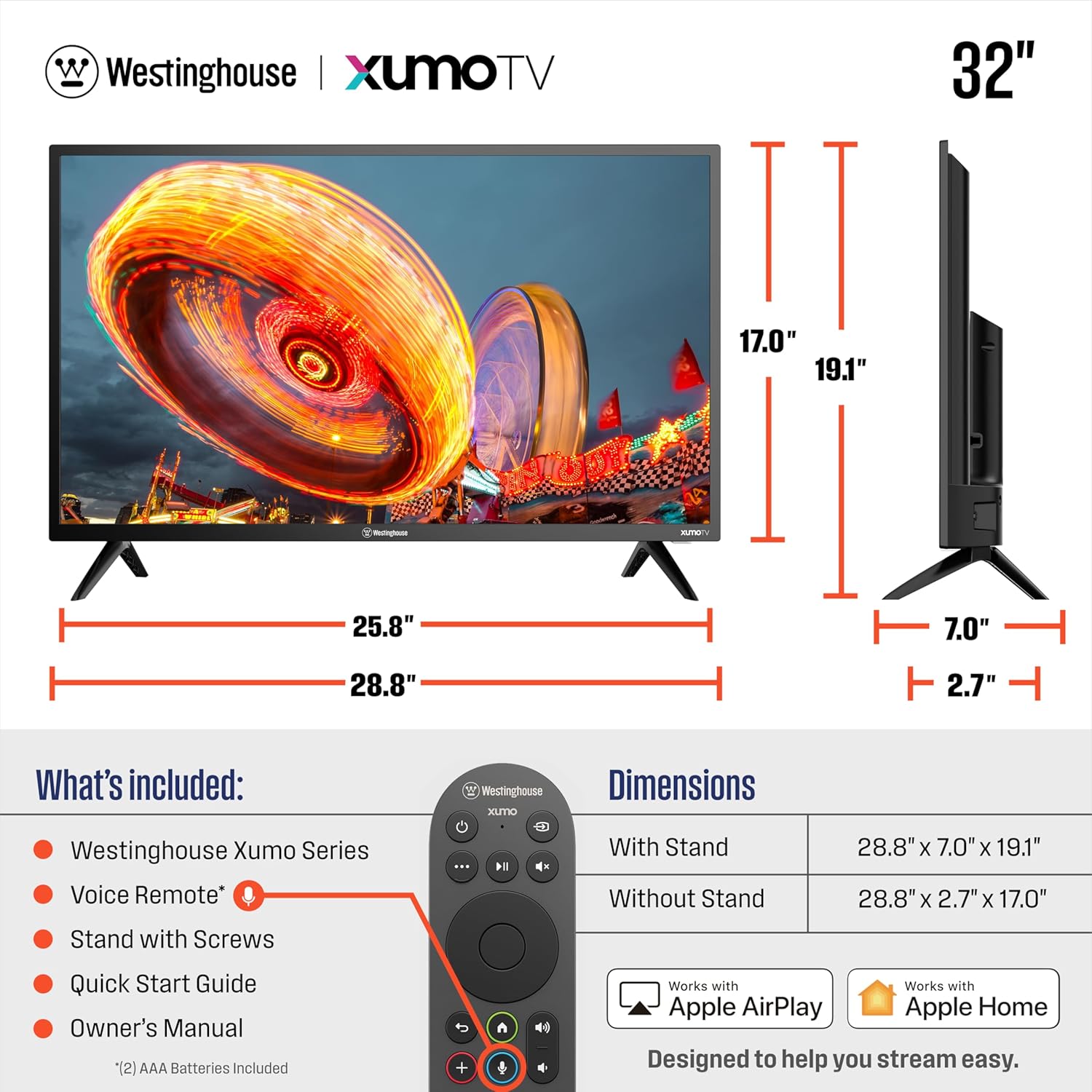
Figure 5.3: More Ways to Play with Screen Mirroring and Casting
6. Xizmat ko'rsatish
6.1 Televizorni tozalash
- Tozalashdan oldin har doim televizorni elektr tarmog'idan uzing.
- Ekran va shkafni tozalash uchun yumshoq, quruq matodan foydalaning. O'jar belgilar uchun engil dampMatoni suv yoki elektronika uchun maxsus mo'ljallangan yumshoq, abraziv bo'lmagan tozalagich bilan artib oling.
- Do not spray cleaners directly onto the TV.
6.2 Dasturiy ta'minotni yangilash
Your Smart TV may receive periodic software updates to improve performance and add new features. Ensure your TV is connected to the internet to receive these updates automatically or check for them manually through the TV's settings menu.
7. Muammolarni bartaraf qilish; nosozliklarni TUZATISH
Televizoringiz bilan bog'liq muammolarga duch kelsangiz, quyidagi umumiy muammolar va echimlarga murojaat qiling:
| Muammo | Mumkin sabab / yechim |
|---|---|
| Quvvat yo'q | Ensure the power cord is securely plugged into the TV and a working electrical outlet. Check if the outlet has power. |
| Rasm yo'q, lekin ovoz mavjud | Kirish manbasini tekshiring. Ulangan qurilma yoqilganligiga va to'g'ri ishlashiga ishonch hosil qiling. Boshqa HDMI kabelini sinab ko'ring. |
| Ovoz yo'q, lekin rasm mavjud | Check the volume level. Ensure Mute is not activated. Check audio output settings (e.g., internal speakers vs. external sound system). |
| Masofadan boshqarish pulti ishlamayapti | Pultdagi batareyalarni almashtiring. Pult va televizorning infraqizil sensori o'rtasida hech qanday to'siqlar yo'qligiga ishonch hosil qiling. |
| Wi-Fi tarmog‘iga ulanib bo‘lmadi | Wi-Fi routeringiz yoqilgan va ishlayotganiga ishonch hosil qiling. Wi-Fi parolini qayta kiriting. Televizorni ham, routerni ham qayta ishga tushirib ko'ring. |
| Ilovalar yuklanmayapti / sekin ishlash | Check your internet connection speed. Try restarting the TV. Ensure the TV's software is up to date. |
8. Texnik shartlar
| Xususiyat | Tafsilot |
|---|---|
| Brend | Westinghouse |
| Model raqami | WX32HX2800 |
| Ekran o'lchami | 32 dyuym |
| Displey texnologiyasi | LED |
| Rezolyutsiya | 720p (HD) |
| Yangilanish tezligi | 60 Gts |
| Aspekt nisbati | 16:9 |
| Mahsulot o'lchamlari (stend bilan) | 28.8"W x 7"D x 19.1"H |
| Mahsulot o'lchamlari (stendsiz) | 28.8"W x 2.7"D x 17.0"H |
| Element og'irligi | 8.8 funt |
| Rejimdagi quvvat sarfi | 55 vatt |
| Bir yillik energiya narxi | $11 (based on 16 cents per kWh and 5 hours use per day) |
| Maxsus xususiyatlar | Airplay 2, Bluetooth, Dolby Atmos, Dynamic Contrast Control, Voice Remote/ Universal Search |
| Ulanish texnologiyasi | USB, HDMI, Wi-Fi, Bluetooth, Ethernet |

Figure 8.1: Energy Guide Information
9. Kafolat va qo'llab-quvvatlash
Westinghouse products are designed for reliability and performance. For specific warranty details regarding your Westinghouse 32-inch Smart TV, please refer to the warranty card included in your product packaging or visit the official Westinghouse Electronics support website. For technical assistance, troubleshooting beyond this manual, or service inquiries, please contact Westinghouse customer support.
You can typically find contact information for support on the manufacturer's website or in the Quick Start Guide provided with your TV.


