1. Kirish
This manual provides comprehensive instructions for the KOSPET Magic R10 GPS Smart Watch. It covers device setup, operational procedures, maintenance guidelines, and troubleshooting tips to ensure optimal performance and user experience. Please read this manual thoroughly before using your device.

Image 1.1: KOSPET Magic R10 Smart Watch displaying time, date, battery, steps, and calories.
2. Qutida nima bor
Paketni ochgandan so'ng, barcha narsalar mavjudligini tekshiring:
- 1 x KOSPET Magic R10 Stainless Steel Smart Watch
- 1 x zaryadlovchi kabeli
- 1 x foydalanuvchi qo'llanmasi (ushbu hujjat)
3. Sozlash
3.1 Dastlabki zaryadlash
Before first use, fully charge your KOSPET Magic R10 Smart Watch. Connect the provided charger cable to the watch's charging port and a USB power source. The watch display will indicate charging status.
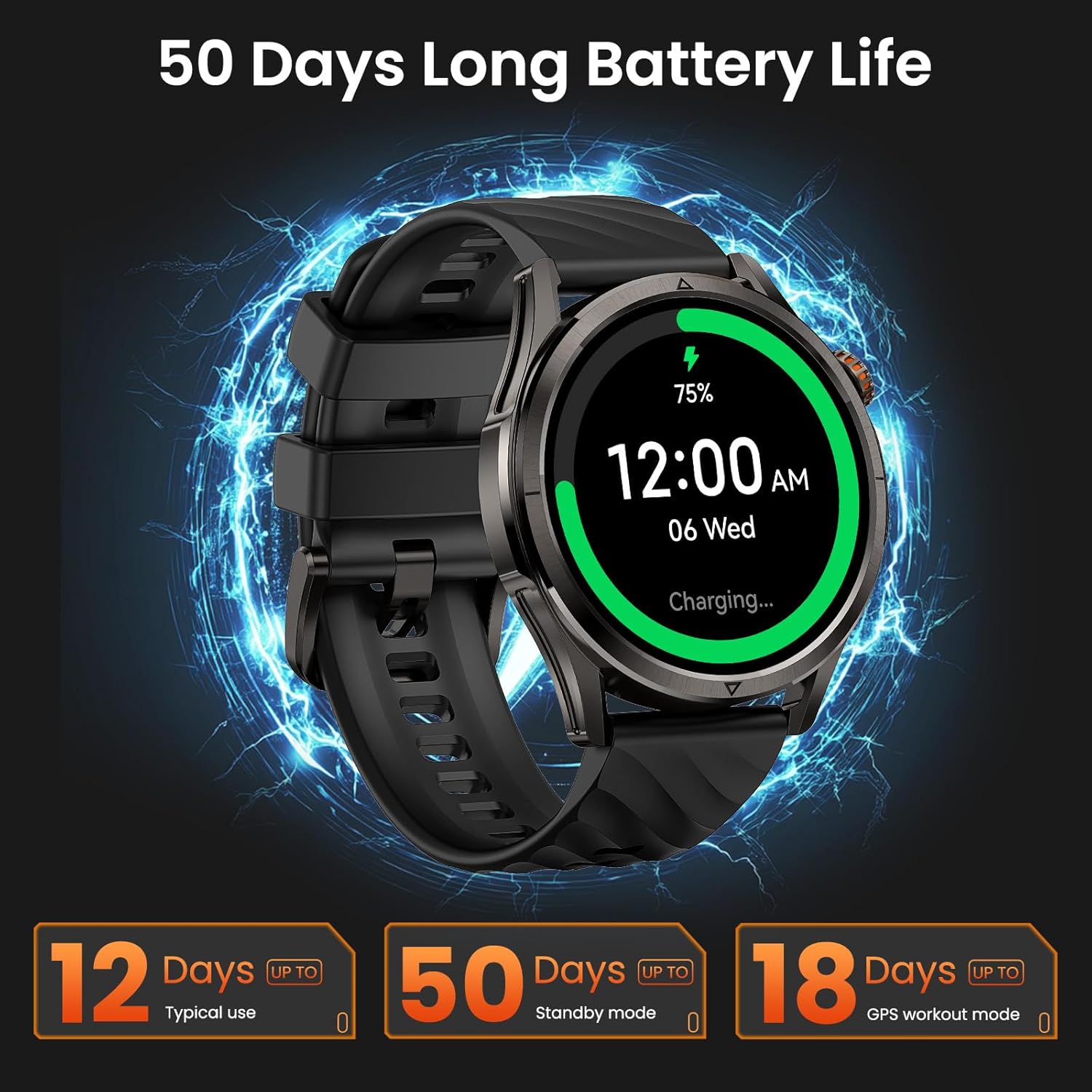
Image 3.1: KOSPET Magic R10 Smart Watch on a charger, indicating 75% battery and displaying battery life estimates.
3.2 App Installation (Apexmove)
The KOSPET Magic R10 Smart Watch requires the Apexmove application for full functionality. The app is compatible with iOS 10.0+ and Android 5.1+ devices.
- Download the 'Apexmove' app from the Apple App Store (for iOS) or Google Play Store (for Android).

Image 3.2: Download the Apexmove app from your device's app store.
3.3 Pairing with Phone
To connect your watch to your smartphone:
- Telefoningizning Bluetooth funksiyasi yoqilganligiga ishonch hosil qiling.
- Open the Apexmove app. Navigate to 'Device' and select 'Add a new device'.
- The app will search for your watch. Select 'KOSPET Magic R10' from the list.
- Telefoningizda ham, soatingizda ham ulanish so'rovini tasdiqlang.

Image 3.3: Connection steps for iOS devices.
3.4 Notification Setup
To receive messages and app notifications on your watch, follow these steps:
IOS qurilmalari uchun:
- Ensure the Apexmove app remains active in the background.
- In the Apexmove app, go to 'Device' and open 'SMS Reminder' to enable SMS notifications.
- Still in 'Device', click 'App Notification' and enable notifications for desired applications.
- Go to your iPhone's 'Settings' > 'Notifications' > 'Apexmove' and allow notifications.

Image 3.4: iOS message and app notification setup.
Android qurilmalari uchun:
- Keep the Apexmove app active (add to whitelist in settings if necessary).
- Turn off 'Do Not Disturb' and 'Low Power Mode' on your phone.
- In the Apexmove app, go to 'Device' and open 'SMS Reminder' to enable SMS notifications.
- Still in 'Device', click 'App Notification' and enable notifications for desired applications.
Image 3.5: Android message and app notification setup.
4. Foydalanish bo'yicha ko'rsatmalar
4.1 Displey va navigatsiya
The Magic R10 features a 1.43" AMOLED display with Corning Gorilla Glass for durability and clear visibility. Navigate the watch interface using touch gestures and the physical buttons.
4.2 GPS funksiyasi
The watch includes built-in GPS that connects to 6 satellite systems, providing accurate location tracking. Dual-band GNSS ensures reliable signal strength, even in challenging environments. An integrated Altitude Pressure Compass provides elevation data and directional guidance.

Image 4.1: Multi-GNSS positioning and route tracking.
4.3 ta sport rejimi
The Magic R10 supports 180 sport modes. It also features 6 smart recognition sports (walking, cycling, elliptical, etc.) that automatically detect and begin monitoring your activity without manual input.

Image 4.2: Apexmove app interface displaying activity data for various sports.
4.4 Salomatlik monitoringi
The watch is equipped with a 4PD sensor for comprehensive health tracking, including:
- Yurak urishi: Continuous 24/7 heart rate monitoring.
- SpO2: Blood oxygen saturation tracking.
- Uyqu monitoringi: Uyqu holatini kuzataditages va davomiyligi.
- Stress and Emotions: Monitors stress levels.
- Menstrual Cycles: Provides tracking for women's health.
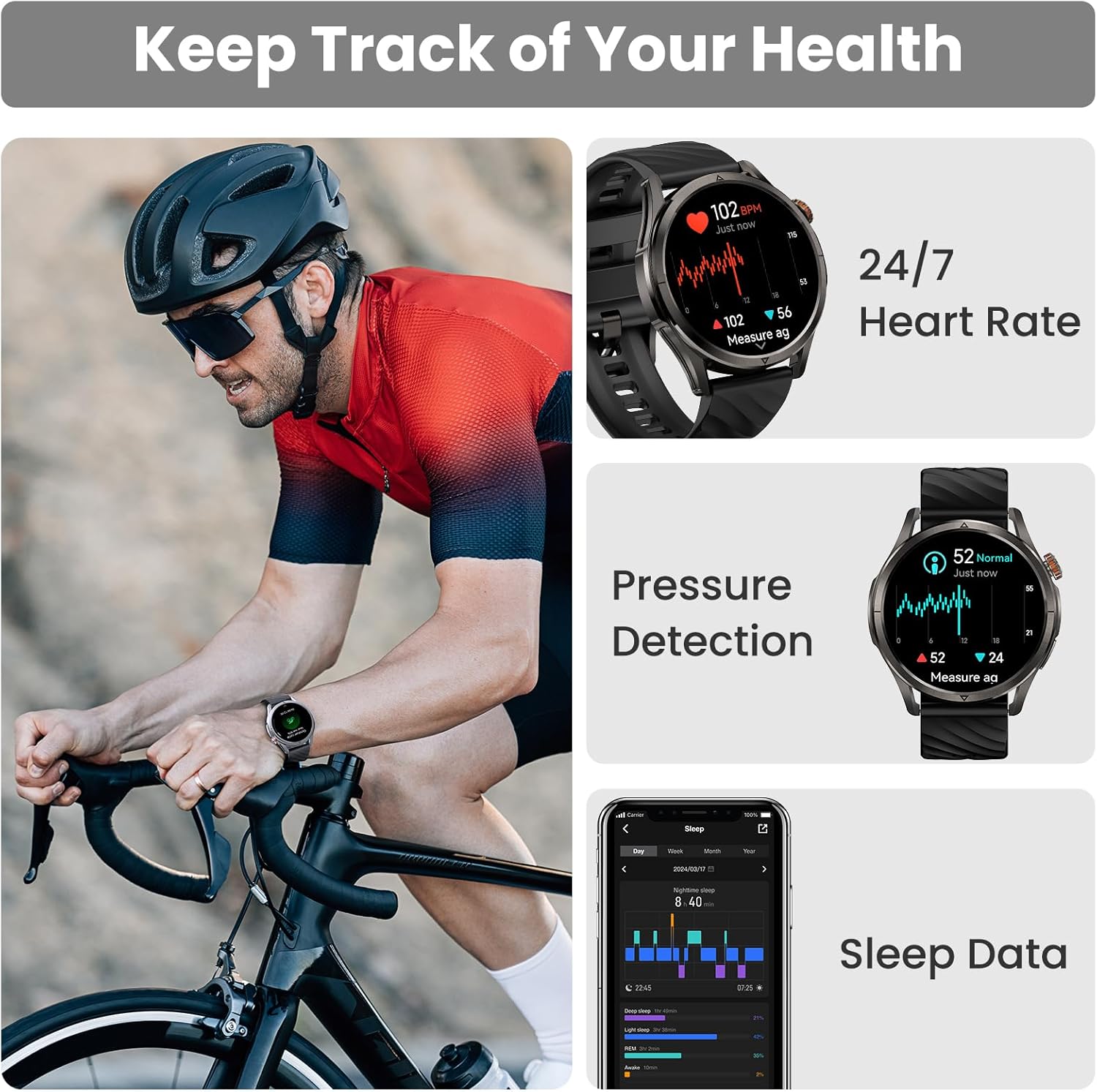
Image 4.3: Health monitoring features including heart rate, pressure, and sleep data.

Image 4.4: Menstrual cycle tracking interface.
Image 4.5: Heart rate monitoring during exercise.

Image 4.6: Sleep monitoring data display.
4.5 Calling and Notifications
The watch allows you to answer and make calls directly from your wrist when connected to your phone. It also displays message reminders and notifications from various applications.

Image 4.7: Call management, voice assistant, and message reminders.
4.6 Ovozli yordamchi
Utilize the built-in voice assistant for hands-free task execution, such as checking weather or initiating calls.
5. Xizmat ko'rsatish
5.1 Suvga chidamlilik
The Magic R10 has a 5ATM water resistance rating, making it suitable for swimming and daily exposure to water (rain, sweat). It is not recommended for diving or high-pressure water activities.

Image 5.1: Watch being used for swimming, demonstrating 5ATM water resistance.
5.2 Tozalash
Soatingiz va tasmangizni muntazam ravishda yumshoq, d bilan tozalangamp mato. Qattiq kimyoviy moddalar yoki abraziv materiallardan foydalanishdan saqlaning. Zaryadlashdan oldin zaryadlash kontaktlari toza va quruq ekanligiga ishonch hosil qiling.
5.3 Batareyani parvarish qilish
Batareyaning ishlash muddatini uzaytirish uchun:
- Haddan tashqari haroratdan saqlaning.
- Charge the watch fully before prolonged storage.
- Do not allow the battery to completely drain frequently.
6. Muammolarni bartaraf qilish; nosozliklarni TUZATISH
6.1 Bluetooth ulanish muammolari
If your watch fails to connect or maintain a Bluetooth connection:
- Telefoningiz va soatingizda Bluetooth yoqilganligiga ishonch hosil qiling.
- Telefoningizni ham, soatingizni ham qayta yoqing.
- Ensure the Apexmove app is updated to the latest version.
- Try unpairing the watch from your phone's Bluetooth settings and then re-pairing through the Apexmove app.
- Check if other Bluetooth devices are causing interference. Temporarily disconnect other devices if necessary.
6.2 Qisqa batareya muddati
Agar batareya quvvati kutilganidan qisqaroq bo'lsa:
- Ekran yorqinligini kamaytiring.
- Disable 'Always On Display' if enabled.
- Limit frequent GPS usage or long GPS tracking sessions.
- Keraksiz bildirishnomalarni o'chirib qo'ying.
- Ensure the watch is fully charged using the provided cable.
6.3 Sog'liqni saqlash bo'yicha noto'g'ri ma'lumotlar
For accurate health monitoring:
- Soat bilagingizga mahkam taqilganligiga ishonch hosil qiling, juda qattiq yoki juda bo'sh emas.
- Sensor maydonini toza tuting.
- O'lchovlar paytida ortiqcha harakatlanishdan saqlaning (masalan, SpO2).
7. Texnik shartlar
| Xususiyat | Spetsifikatsiya |
|---|---|
| Model raqami | Magic R10 |
| Ekran o'lchami | 1.43 dyuym |
| Displey turi | AMOLED |
| Tana materiali | Zanglamaydigan po'lat |
| Suvga chidamlilik | 5ATM |
| GPS | Built-in GPS (6 satellite systems, Dual-band GNSS) |
| Batareya quvvati | 450 mlnamp Soat |
| Batareya muddati (odatda foydalanish) | 12 kungacha |
| Battery Life (GPS Workout Mode) | 18 soatgacha |
| Battery Life (Standby Mode) | 50 kungacha |
| Xotirani saqlash hajmi | 128 MB |
| Operatsion tizimning muvofiqligi | Android 5.1+ va iOS 10.0+ |
| Ulanish | Bluetooth |
| Maxsus xususiyatlar | Activity Tracker, Always On Display, GPS, Notifications, Voice Assistant, Phone Call |
| Element og'irligi | 9.6 untsiya |

Image 7.1: Watch dimensions and package contents.
8. Kafolat va qo'llab-quvvatlash
For warranty information and customer support, please refer to the official KOSPET website or contact the retailer from whom you purchased the device. Keep your proof of purchase for warranty claims.