1. Kirish
This manual provides essential information for setting up, operating, maintaining, and troubleshooting your new VIBOX V-524 PC Gamer. Please read this manual thoroughly before using your computer to ensure proper functionality and longevity.
The VIBOX V-524 is a high-performance gaming PC designed for an immersive gaming experience and efficient multitasking. It features:
- Nvidia GeForce RTX 4060 (8 GB GDDR6 RAM)
- AMD Ryzen 5 5500 Processor (6 Cores, up to 4.2 GHz)
- 16 GB DDR4 RAM (3200 MHz)
- 1 TB SSD for ultra-fast storage
- Pre-installed Windows 11 Home
- Integrated Wi-Fi connectivity

2. Xavfsizlik ma'lumotlari
- Elektr xavfsizligi: Always connect the PC to a grounded power outlet. Do not overload power strips.
- Ventilyatsiya: Ensure adequate airflow around the PC. Do not block ventilation openings.
- Suyuqlik va namlik: Keep the PC away from liquids and excessive moisture.
- Harorat: Operate the PC in a well-ventilated area within recommended temperature ranges.
- Ishlov berish: Handle the PC with care. Avoid dropping or subjecting it to strong impacts.
- Ichki komponentlar: Do not open the PC case unless you are qualified to do so, as it may void your warranty and expose you to electrical hazards.
3. Paket tarkibi
Paketdan chiqargandan so'ng, quyidagi barcha narsalar kiritilganligini tekshiring:
- VIBOX V-524 PC Gamer Desktop
- Quvvat kabeli
- 300 Mbps Wi-Fi Adapter
- Hujjatlar (ushbu qo'llanmani o'z ichiga olgan holda)
- Any additional accessories specified at the time of purchase
4. Dastlabki sozlash
4.1 Qadoqdan chiqarish va joylashtirish
- Kompyuterni o'ramidan ehtiyotkorlik bilan olib tashlang. Kelajakda tashish yoki kafolat da'volari uchun barcha qadoqlash materiallarini saqlang.
- Place the PC on a stable, flat surface with sufficient space for ventilation.
- Remove any internal packing materials, such as foam inserts, that may be present inside the PC case to protect components during shipping.
4.2 Periferik qurilmalarni ulash
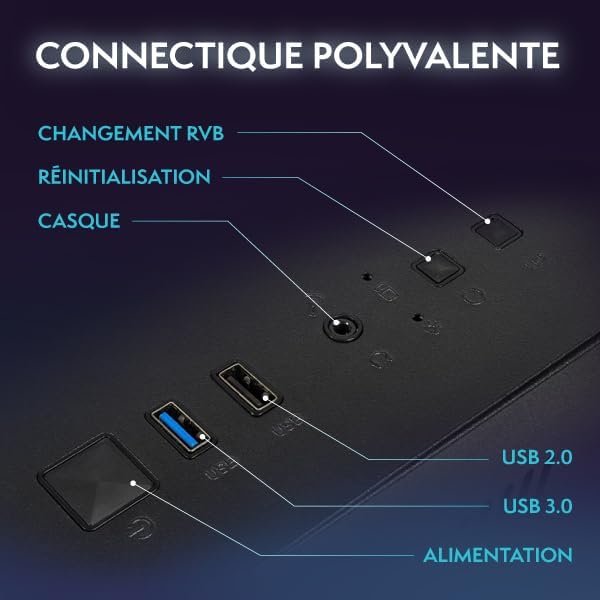
Connect your monitor, keyboard, and mouse to the appropriate ports on the rear of the PC. Refer to Image 4.1 for port identification.
- Monitor: Connect your monitor using an HDMI or DisplayPort cable to the dedicated graphics card ports.
- Klaviatura va sichqoncha: Har qanday mavjud USB portlariga ulaning.
- Wi-Fi Adapter: Plug the included Wi-Fi adapter into an available USB port.
- Ethernet (Optional): For a wired network connection, connect an Ethernet cable to the LAN port.
- Audio: Karnaylar yoki minigarnituralarni audio chiqish uyalariga ulang.
4.3 Quvvat ulanishi va birinchi yuklash
- Connect the power cable to the PC's power supply unit (PSU) and then to a grounded electrical outlet.
- Kompyuterning old qismidagi quvvat tugmasini bosing.
- Follow the on-screen instructions to complete the initial Windows 11 setup. This may include setting up your user account, language preferences, and network connection.
4.4 Wi-Fi tarmog'iga ulanish
- Once Windows 11 is set up, click on the Wi-Fi icon in the taskbar.
- Ro'yxatdan kerakli tarmoqni tanlang va so'ralganda parolni kiriting.
5. Kompyuteringizni ishlatish
5.1 Windows 11 asoslari
Your VIBOX V-524 comes with Windows 11 Home pre-installed. Familiarize yourself with the operating system's interface, Start Menu, and settings to customize your experience.
5.2 RGB yoritishni boshqarish
The PC features customizable RGB lighting for its fans and internal components. Use the dedicated RGB change button on the front panel (as shown in Image 4.1) to cycle through various colors and lighting modes. Refer to your motherboard or case manual for advanced software control options if available.

5.3 Havo oqimi va sovutish
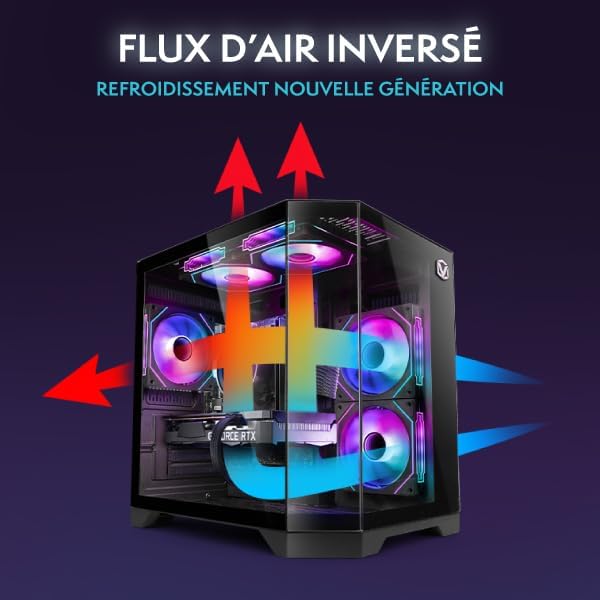
The VIBOX V-524 is designed with optimized airflow for efficient cooling, utilizing an inverse airflow system to reduce heat accumulation and enhance system performance.
6. Xizmat ko'rsatish
6.1 Jismoniy tozalash
- Tashqi: Yumshoqdan foydalaning, damp cloth to clean the exterior of the PC. Avoid abrasive cleaners.
- Chang: Periodically use compressed air to clear dust from ventilation grilles and fan blades. Ensure the PC is powered off and unplugged before cleaning.
6.2 Dasturiy ta'minotga texnik xizmat ko'rsatish
- Windows yangilanishlari: Tizim barqarorligi va xavfsizligini ta'minlash uchun muntazam ravishda Windows yangilanishlarini tekshiring va o'rnating.
- Haydovchi yangilanishlari: Keep your graphics card drivers (NVIDIA GeForce) and other component drivers updated for optimal performance, especially for gaming.
- Antivirus dasturi: Install and maintain reputable antivirus software to protect against malware.
7. Muammolarni bartaraf qilish; nosozliklarni TUZATISH
If you encounter issues with your VIBOX V-524 PC Gamer, refer to the following common troubleshooting steps:
| Muammo | Mumkin yechim |
|---|---|
| Kompyuter yoqilmaydi | Check power cable connections to the PC and wall outlet. Ensure the power switch on the PSU (at the back of the PC) is in the 'On' position. |
| Monitorda displey yo'q | Ensure the monitor is powered on and connected to the graphics card ports (not the motherboard ports). Try a different cable or monitor if possible. |
| Wi-Fi ulanishi bilan bog'liq muammolar | Ensure the Wi-Fi adapter is properly inserted. Restart your router and PC. Check Windows network settings. |
| Poor gaming performance | Ensure graphics drivers are up to date. Check game settings and reduce if necessary. Monitor system temperatures to prevent thermal throttling. Close unnecessary background applications. |
| PC freezes or crashes | Ensure all drivers and Windows are updated. Check for overheating. Run a memory diagnostic. |
If these steps do not resolve your issue, please contact VIBOX customer support for further assistance.
8. Texnik spetsifikatsiyalar
Below are the detailed technical specifications for the VIBOX V-524 PC Gamer:
| Komponent | Spetsifikatsiya |
|---|---|
| Brend | VIBOX |
| Model raqami | V-524 |
| Seriya | VTX-8 |
| Rang | VTX-8 Black |
| Operatsion tizim | Windows 11 Bosh sahifa |
| Protsessor brendi | AMD |
| Protsessor turi | Ryzen 5 |
| Protsessor tezligi | 3.6 GHz (up to 4.2 GHz boost) |
| Yadrolar soni | 6 |
| Maksimal xotira | 128 GB |
| Qattiq disk texnologiyasi | SSD |
| Qattiq disk interfeysi | SSD |
| Grafik karta | NVIDIA GeForce RTX 4060 |
| Grafik karta RAM | 8 GB GDDR6 |
| Ruxsat (maksimal) | 7680x4320 |
| Ulanish turi | Wi-Fi, Ethernet |
| Uskuna interfeysi | Ethernet, HDMI, DisplayPort, USB |
| HDMI portlari soni | 1 |
| USB 2.0 portlari soni | 3 |
| USB 3.0 portlari soni | 3 |
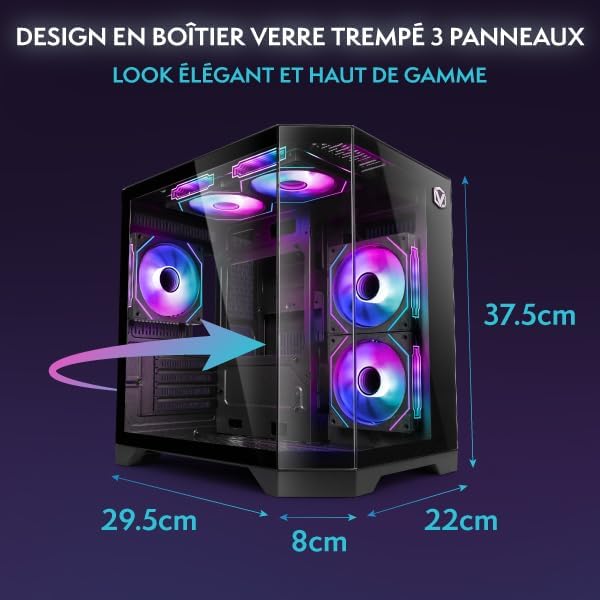
| Buyum oʻlchamlari (U x G x Y) | 35 x 28 x 38 santimetr |
| Mahsulot uchun maxsus foydalanish | Gaming, Photo Editing, Video Editing |
9. Kafolat va qo'llab-quvvatlash
9.1 Ishlab chiqaruvchi kafolati
Your VIBOX V-524 PC Gamer comes with a manufacturer's warranty of Ehtiyot qismlar uchun 2 yil va lifetime labor. Iltimos, kafolat da'volari uchun sotib olinganligingizni tasdiqlovchi hujjatingizni saqlab qo'ying.
9.2 Mijozlarni qo‘llab-quvvatlash
For technical assistance, warranty inquiries, or any other support needs, please contact VIBOX customer service. Refer to the VIBOX official webeng dolzarb aloqa ma'lumotlari uchun sayt yoki xaridingiz hujjatlari.


