Kirish
The JBL Horizon 3 is a versatile radio alarm clock designed to enhance your daily routine. It features clear digital audio via DAB/DAB+/FM radio and Bluetooth connectivity for streaming from smart devices. Key functions include a sunrise simulation alarm, customizable sleep mode with natural sounds, and internal memory for favorite stations. Its portable design makes it suitable for various environments, from bedside tables to outdoor settings, delivering powerful and clear JBL sound.
This manual provides essential information for setting up, operating, and maintaining your JBL Horizon 3 to ensure optimal performance and longevity.
Sozlash; o'rnatish
1. Paketni ochish va joylashtirish
- Paketdagi barcha komponentlarni ehtiyotkorlik bilan olib tashlang.
- Place the JBL Horizon 3 on a stable, flat surface. Ensure adequate ventilation around the unit.
- For optimal radio reception, extend the spiral antenna fully.

1-rasm: Old view of the JBL Horizon 3, displaying the time and alarm status on its digital screen.
2. Quvvatga ulanish
- Connect the provided power cable to the power input port on the back of the unit.
- Elektr kabelining ikkinchi uchini devordagi rozetkaga ulang.
- The device will power on automatically or can be turned on using the power button.
2-rasm: Pastki view of the JBL Horizon 3, illustrating the power connection point and the battery compartment.
3. Initial Setup (Time and Date)
- Upon first power-on, the device may prompt you to set the time and date. Follow the on-screen instructions.
- Alternatively, use the JBL ONE application for easier configuration.
Foydalanish bo'yicha ko'rsatmalar
1. Boshqaruvview

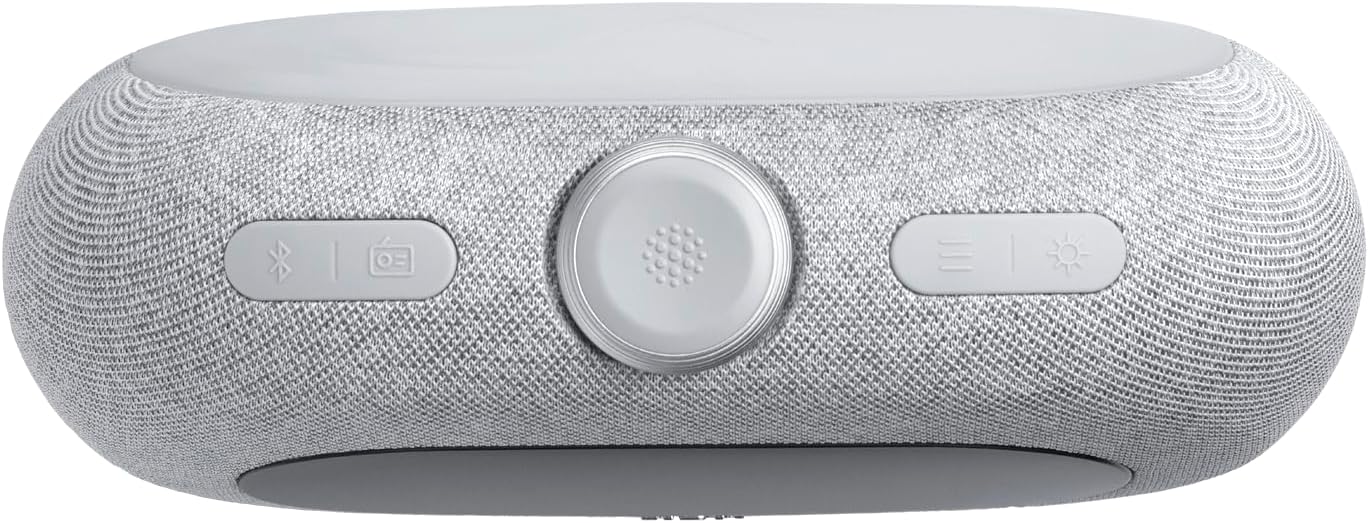
3-rasm: Yuqori view of the JBL Horizon 3, highlighting the main controls including the rotary dial, function buttons, and alarm presets.
- Aylanadigan terish: Used for adjusting volume, navigating menus, and setting time/alarms.
- Quvvat tugmasi: Jihozni yoqadi/o'chiradi.
- Bluetooth tugmasi: Bluetooth ulanish rejimini faollashtiradi.
- Radio Button (DAB/FM): Toggles between DAB and FM radio modes.
- Atrof yorug'lik tugmasi: Controls the ambient light settings.
- Alarm Presets (1, 2, 3): Quick access to saved alarm settings.
2. Radio Operation (DAB/DAB+/FM)
- ni bosing Radio button to switch between DAB/DAB+ and FM modes.
- In DAB mode, the device will automatically scan for available stations. Use the rotary dial to browse.
- In FM mode, use the rotary dial to tune to a specific frequency or press the scan buttons to find the next available station.
- To save a favorite station, long-press one of the numbered preset buttons (1-3).
3. Bluetooth Streaming
- ni bosing Bluetooth button to enter pairing mode. The display will show "Pairing".
- On your smart device, enable Bluetooth and select "JBL Horizon 3" from the list of available devices.
- Once connected, you can stream audio from your device to the JBL Horizon 3.
4. Signal sozlamalari
- Ulardan birini bosing Alarm Preset buttons (1-3) to configure an alarm.
- Use the rotary dial to set the alarm time, alarm source (radio, natural sound, Bluetooth), and volume.
- Enable the sunrise simulation feature for a gradual wake-up experience.
- To snooze, press the rotary dial when the alarm sounds.
5. Sleep Mode and Ambient Light
- Activate sleep mode to fall asleep to soothing natural sounds or a chosen radio station.
- dan foydalaning Atrof-muhit nuri button to adjust the color and brightness of the integrated LED light.
- Further customization of sleep sounds and ambient light is available through the JBL ONE application.
Xizmat
- Tozalash: Use a soft, dry cloth to clean the surface of the device. Do not use abrasive cleaners or solvents.
- Saqlash: Uzoq vaqt davomida foydalanilmaganda, qurilmani salqin va quruq joyda saqlang.
- Batareya parvarishi: If the device uses an optional battery, ensure it is charged regularly to maintain its lifespan.
Muammolarni bartaraf qilish; nosozliklarni TUZATISH
- Quvvat yo'q: Ensure the power cable is securely connected to both the device and the wall outlet. Check if the outlet is functional.
- Radioni yomon qabul qilish: Fully extend the spiral antenna. Try repositioning the unit to improve signal strength. Perform a new station scan.
- Bluetooth bilan ulanish muammolari: Ensure Bluetooth is enabled on your smart device and the JBL Horizon 3 is in pairing mode. Move your device closer to the Horizon 3.
- Signal jiringlamayapti: Verify that the alarm is enabled and the volume is set to an audible level. Check the alarm time.
- Display Too Bright/Dim: Adjust the display brightness settings via the device controls or the JBL ONE application.
Texnik xususiyatlari
| Xususiyat | Tafsilot |
|---|---|
| Mahsulot o'lchamlari (U x G x Y) | 22.5 x 3.81 x 14.2 sm |
| Og'irligi | 780 gramm |
| Brend | JBL |
| Model raqami | Ufq 3 |
| Rang | Kulrang |
| Displey turi | Raqamli |
| Maxsus xususiyatlar | Display, USB Port, LED Light |
| Quvvat manbai | Corded Electric (with optional battery) |
| Ichki/tashqi makonda foydalanish | Ichki |
| Material | Plastic, Metal (frame) |
| Batareyalar talab qilinadi | Ha |
| Kiritilgan komponentlar | 1 JBL Horizon 3 unit, 1 spiral antenna, 1 warranty card and safety instructions, 1 quick start guide, Power cables (up to 4 cables depending on regional SKUs) |
Kafolat va qo'llab-quvvatlash
Kafolat haqida ma'lumot
The JBL Horizon 3 comes with a 2 yillik kafolat. Please refer to the included warranty card and safety instructions for detailed terms and conditions.
Mijozlarni qo‘llab-quvvatlash
Qo'shimcha yordam, texnik yordam yoki kafolat da'volari uchun JBL rasmiy yordamiga tashrif buyuring website or contact their customer service. Contact information can typically be found in the included documentation or on the JBL brand websayt.


