1. Xavfsizlik bo'yicha muhim ma'lumotlar
Proyektordan foydalanishdan oldin barcha xavfsizlik ko'rsatmalarini o'qib chiqing. Kelajakda foydalanish uchun ushbu qo'llanmani saqlang.
- Shamollatish teshiklarini to'sib qo'ymang. To'g'ri havo oqimi uchun proyektor atrofida etarli joy bo'lishini ta'minlang.
- Avoid direct exposure to the projector lens light.
- Do not place the projector near heat sources or in direct sunlight.
- Faqat qurilma bilan birga kelgan quvvat adapteridan foydalaning.
- Proyektorni o'zingiz ochishga yoki ta'mirlashga urinmang. Barcha xizmat ko'rsatish ishlarini malakali mutaxassislarga topshiring.
- Proyektorni suv yoki boshqa suyuqliklardan uzoqroq tuting.
2. Paket tarkibi
Paketda barcha elementlar mavjudligiga ishonch hosil qiling:
- Aurzen Roku TV Smart Projector (D1R Cube)
- Quvvat kabeli
- Remote Control (2 AAA Batteries Required, not included)
- Foydalanuvchi uchun qo'llanma (ushbu hujjat)
3. Mahsulot tugadiview
The Aurzen D1R Cube is a compact smart projector featuring built-in Roku TV for integrated streaming. It offers 1080P Full HD resolution, Dolby Audio, and a sealed optical engine for enhanced durability and clarity.
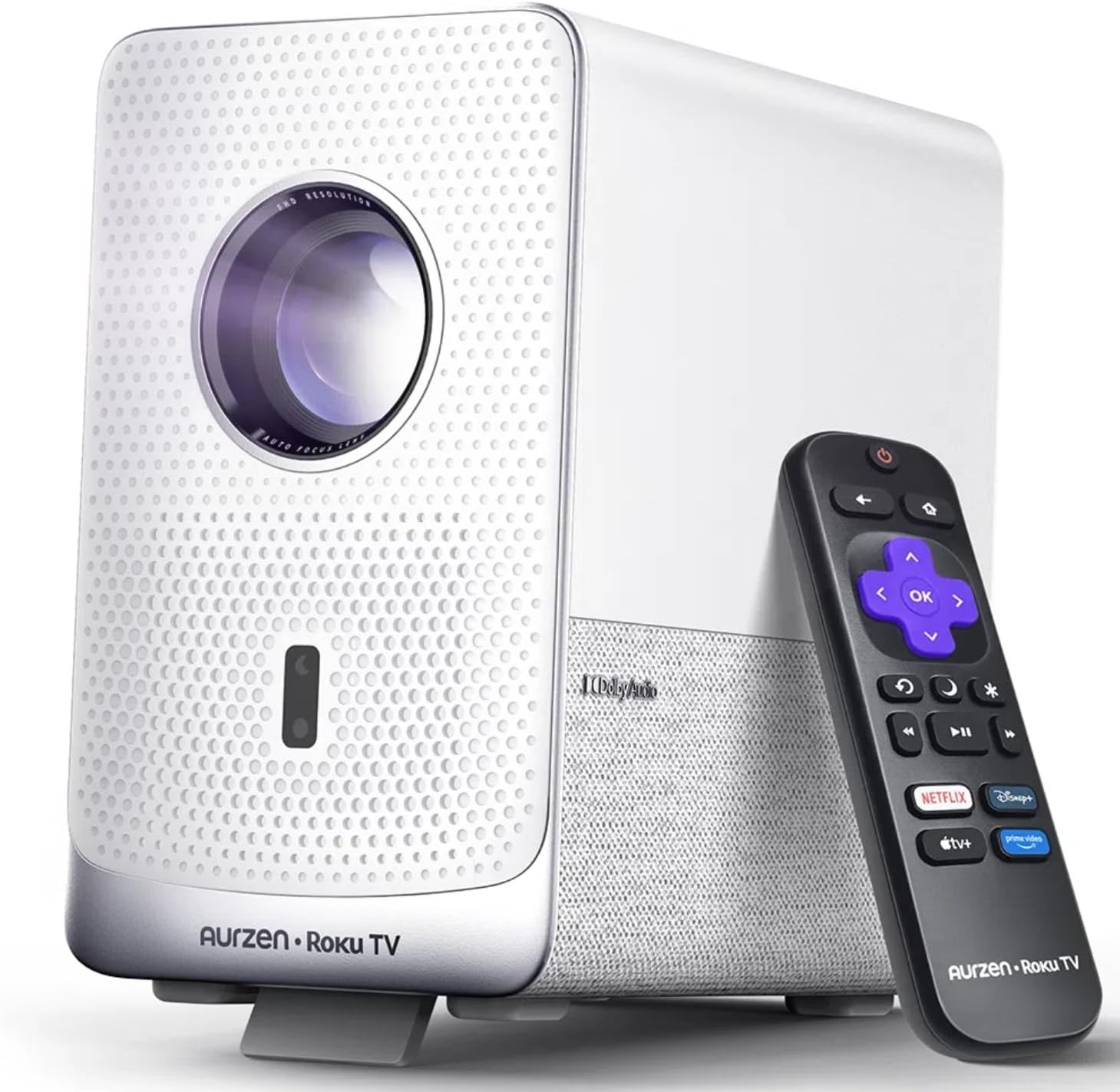
Image: The Aurzen D1R Cube Smart Projector shown with its remote control. The projector is white with a textured front panel and a visible lens.
Asosiy xususiyatlar:
- Roku TV Built-in: Access popular streaming services directly.
- Sealed Optical Engine: Protects against dust, maintaining image quality and extending lifespan.
- 1080P FHD Resolution: Delivers crisp and clear visuals.
- Dolby Audio: Provides enhanced sound experience.
- Auto Focus & Keystone Correction: Automatic image adjustment for quick setup.
- Ikki diapazonli WiFi va Bluetooth 5.2: For seamless connectivity.
- Apple AirPlay: Effortless content sharing from Apple devices.
- Smart Home muvofiqligi: Works with Apple HomeKit, Siri, Alexa, and Google Assistant.

Image: An internal diagram illustrating the sealed optical engine of the Aurzen D1R Cube projector, highlighting its dust-proof design.
4. Sozlash
4.1 Dastlabki joylashtirish
Proyektorni barqaror, tekis yuzaga qo'ying. Optimal uchun viewing, position it directly in front of your projection surface (wall or screen). The projector features automatic focus and keystone correction to adjust the image, but a relatively straight angle is recommended.

Image: A visual representation of the projector's auto-focus and auto-keystone correction features, showing how the image automatically adjusts to create a perfect rectangular display.
4.2 Quvvatga ulanish
- Quvvat simini proyektorning quvvat kirish portiga ulang.
- Elektr simining ikkinchi uchini mos keladigan elektr rozetkasiga ulang.
- The projector will power on automatically or can be turned on using the power button on the device or remote.
4.3 masofadan boshqarish pultini sozlash
Insert two AAA batteries (not included) into the remote control. Ensure correct polarity. The remote is pre-paired with the projector.
4.4 Initial Roku TV Setup
Upon first power-on, follow the on-screen instructions to set up your Roku TV. This includes:
- Tilingizni tanlash.
- Connecting to a Wi-Fi network (a stable internet connection is required).
- Activating your Roku account. If you do not have one, you will be prompted to create a free account.
- Installing desired streaming channels.
5. Foydalanish bo'yicha ko'rsatmalar
5.1 Quvvatni yoqish/o‘chirish
Qurilmani yoqish yoki o‘chirish uchun proyektor yoki masofadan boshqarish pultidagi quvvat tugmasini bosing.
5.2 Roku Home Screen Navigation
Use the directional pad and OK button on the remote to navigate the Roku home screen. Access streaming channels, search for content, and adjust settings.

Image: A screenshot of the Roku TV home screen, displaying various streaming app icons and navigation options.
5.3 Oqimli ilovalar
The Roku TV platform provides access to a wide range of streaming applications such as Netflix, Prime Video, Disney+, Hulu, YouTube, and more. Select an app from the home screen to begin streaming.

Rasm: grafik ko'rgazmaasing various popular streaming service logos available on the Roku TV platform, including Netflix, Disney+, and Hulu.
5.4 Tashqi qurilmalarni ulash
The projector includes HDMI and USB ports for connecting external devices.
- HDMI: Connect gaming consoles, Blu-ray players, or other HDMI-enabled devices. Select the corresponding HDMI input from the Roku TV menu.
- USB: Media-ni ijro etish files (fotosuratlar, videolar, musiqa) USB xotira qurilmasidan.
5.5 Bluetooth ulanishi
Connect Bluetooth headphones or speakers for an enhanced audio experience.
- Go to the Roku TV settings menu.
- Select 'Remotes & devices' then 'Bluetooth devices'.
- Bluetooth qurilmangizni ulanish rejimiga o'tkazing.
- Ulash uchun proyektor ekranidagi ro'yxatdan qurilmangizni tanlang.

Image: A diagram illustrating the Bluetooth connectivity of the Aurzen D1R Cube projector, showing it connecting to various external audio devices.
5.6 Apple AirPlay
Effortlessly share content from your Apple devices (iPhone, iPad, Mac) to the projector using Apple AirPlay.
- Ensure your Apple device and the projector are connected to the same Wi-Fi network.
- On your Apple device, open the content you wish to share (e.g., photos, videos).
- AirPlay belgisiga teging (usually a rectangle with an upward-pointing arrow).
- Select your Aurzen D1R Cube projector from the list of available devices.

Image: A family watching content projected from an Apple device onto a large screen via Apple AirPlay using the Aurzen D1R Cube projector.
5.7 Voice Control and Smart Home Integration
The projector supports voice control via the Roku mobile app and is compatible with Apple HomeKit, Siri, Alexa, and Google Assistant for broader smart home integration.
- Roku mobil ilovasi: Download the Roku mobile app to use voice commands, type easily, and control your projector from your smartphone.
- Smart Home Assistants: Link your Roku account to your preferred smart home ecosystem (Apple Home, Amazon Alexa, Google Home) to control the projector with voice commands.
6. Xizmat ko'rsatish
6.1 Sealed Optical Engine
The Aurzen D1R Cube features a sealed optical engine designed to prevent dust accumulation on internal components. This reduces the need for routine internal cleaning and helps maintain consistent image quality over time.

Image: A side-by-side comparison showing the difference in dust accumulation between a sealed optical engine (left) and an open optical engine (right) after a period of use.
6.2 Umumiy tozalash
- Tashqi: Proyektorning tashqi qismini yumshoq, quruq mato bilan arting. Abraziv tozalagichlar yoki erituvchilardan foydalanmang.
- Ob'ektiv: Gently clean the projector lens with a lens cleaning cloth or specialized lens cleaning solution. Avoid touching the lens with your fingers.
- Ventilyatsiya: Ensure ventilation openings are clear of dust and debris. Use a soft brush or compressed air to gently clean them if necessary.
6.3 Saqlash
When not in use for extended periods, store the projector in a cool, dry place, away from direct sunlight and extreme temperatures. Consider using a protective cover or case to prevent dust accumulation.
7. Muammolarni bartaraf qilish; nosozliklarni TUZATISH
If you encounter issues with your Aurzen D1R Cube projector, refer to the following common solutions:
| Muammo | Mumkin yechim |
|---|---|
| Quvvat yo'q | Ensure the power cord is securely connected to both the projector and the electrical outlet. Test the outlet with another device. |
| Rasm yo'q | Check if the projector is powered on. Verify the input source (HDMI, USB) is correctly selected. Ensure the lens cap is removed. |
| Xira tasvir | The projector has auto-focus. If the image remains blurry, try repositioning the projector or restarting it to trigger auto-focus again. Ensure the lens is clean. |
| Ovoz yo'q | Check the volume level on the projector and any connected external audio devices. Ensure Bluetooth audio is correctly paired or external speakers are properly connected. |
| Wi-Fi ulanish muammolari | Ensure your Wi-Fi router is working. Restart the projector and your router. Verify the Wi-Fi password is correct in the Roku TV settings. |
| Masofadan boshqarish pulti javob bermayapti | Replace the AAA batteries in the remote control. Ensure there are no obstructions between the remote and the projector. |
For further assistance, please refer to the online support resources or contact Aurzen customer service.
8. Texnik shartlar
Detailed technical specifications for the Aurzen D1R Cube Smart Projector:
| Xususiyat | Spetsifikatsiya |
|---|---|
| Brend | Aurzen |
| Model | D1R Cube |
| Displeyning maksimal ruxsati | 1920 x 1080 (1080P FHD) |
| Ulanish texnologiyasi | WiFi (Dual-band 2.4G/5G), Bluetooth 5.2, HDMI, USB, Audio |
| Maxsus xususiyatlar | Roku TV Smart Projector, Sealed Optical Engine, Dolby Audio, Apple AirPlay, Smart Home Compatibility |
| Element og'irligi | 5.68 funt |
| Mahsulot o'lchamlari | 7.42 x 7 x 7.83 dyuym |
| Rang | Oq |
9. Kafolat va qo'llab-quvvatlash
9.1 Mahsulot kafolati
Aurzen products are covered by a manufacturer's warranty. Please refer to the warranty card included with your product or visit the official Aurzen webmaxsus kafolat shartlari va shartlari uchun sayt.
9.2 Mijozlarni qo‘llab-quvvatlash
For technical support, troubleshooting assistance, or warranty claims, please contact Aurzen customer service through their official channels. You can find more information and contact options on the Aurzen Brand Store on Amazon.


