1. Kirish
This manual provides detailed instructions for setting up, operating, maintaining, and troubleshooting your GMKtec G10 Mini PC. Please read this manual thoroughly before using your device to ensure optimal performance and longevity.
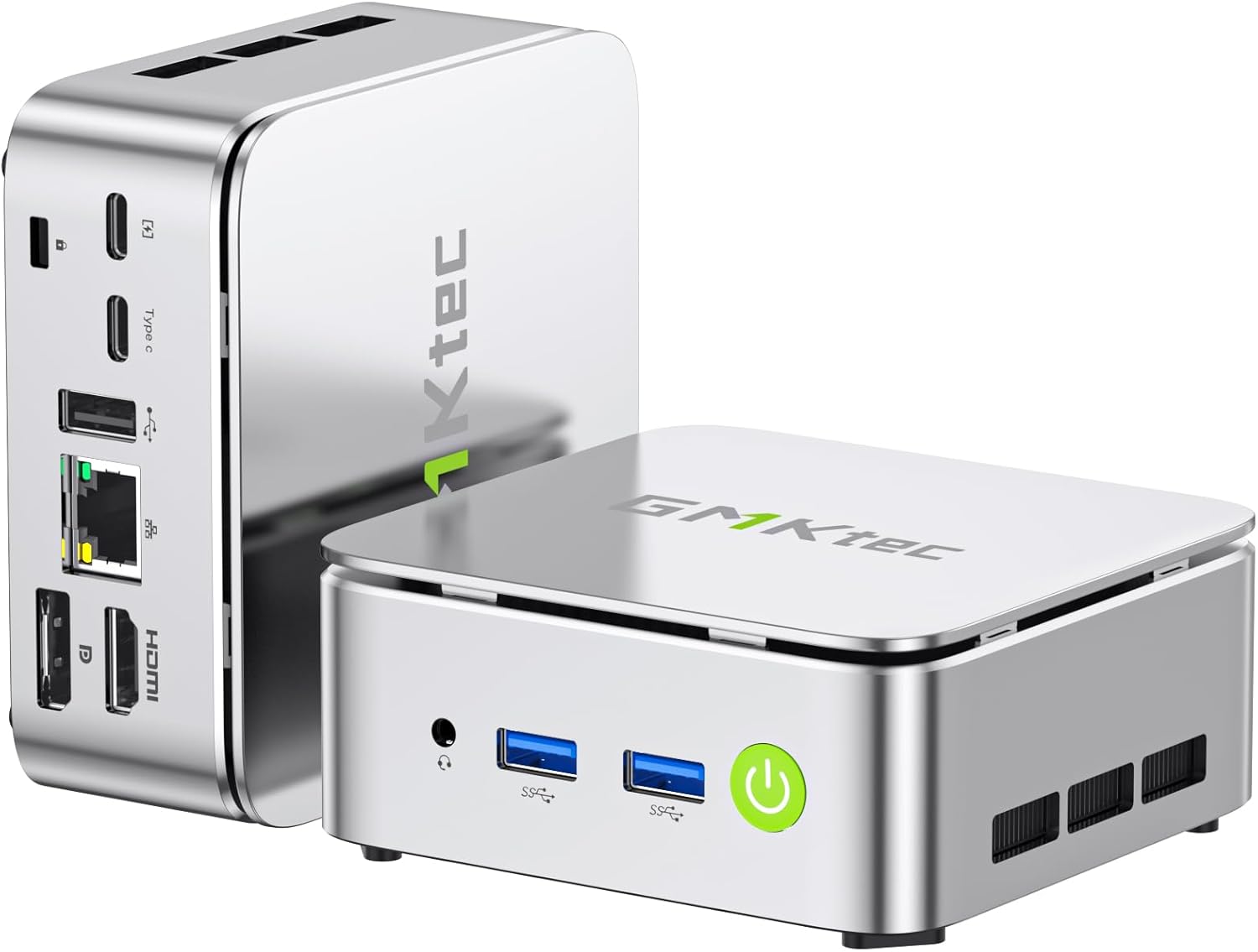
Rasm: old va orqa view of the GMKtec G10 Mini PC, highlighting its compact design and various ports.
2. Mahsulot tugadiview
The GMKtec G10 Mini PC is a compact and powerful computing solution designed for various tasks, from everyday office work to multimedia entertainment. It features an AMD Ryzen 5 3500U processor, ample memory, and flexible storage options.
2.1 Asosiy xususiyatlar
- High-Performance AMD Ryzen 5 3500U: Equipped with a 4-core, 8-thread processor with a max boost clock of 3.7GHz, offering robust performance for multitasking and light editing.
- Uch martalik displey chiqishi: Supports up to three simultaneous 4K displays via HDMI 2.1, DisplayPort 1.4, and USB-C (DP Alt Mode).
- Kengaytiriladigan xotira: Includes a 256GB NVMe SSD and supports expansion up to 16TB (8TB x 2) via additional M.2 slots.
- AmpXotira: Comes with 16GB DDR4 RAM (8GB x 2) and is expandable up to 64GB across two SO-DIMM slots.
- Yuqori tezlikdagi ulanish: Features 2.5G wired LAN, Wi-Fi 5, and Bluetooth 5.0 for stable and fast network connections.
- Compact & Quiet Design: Palm-sized form factor with an efficient, silent cooling fan, ideal for space-constrained or quiet environments.
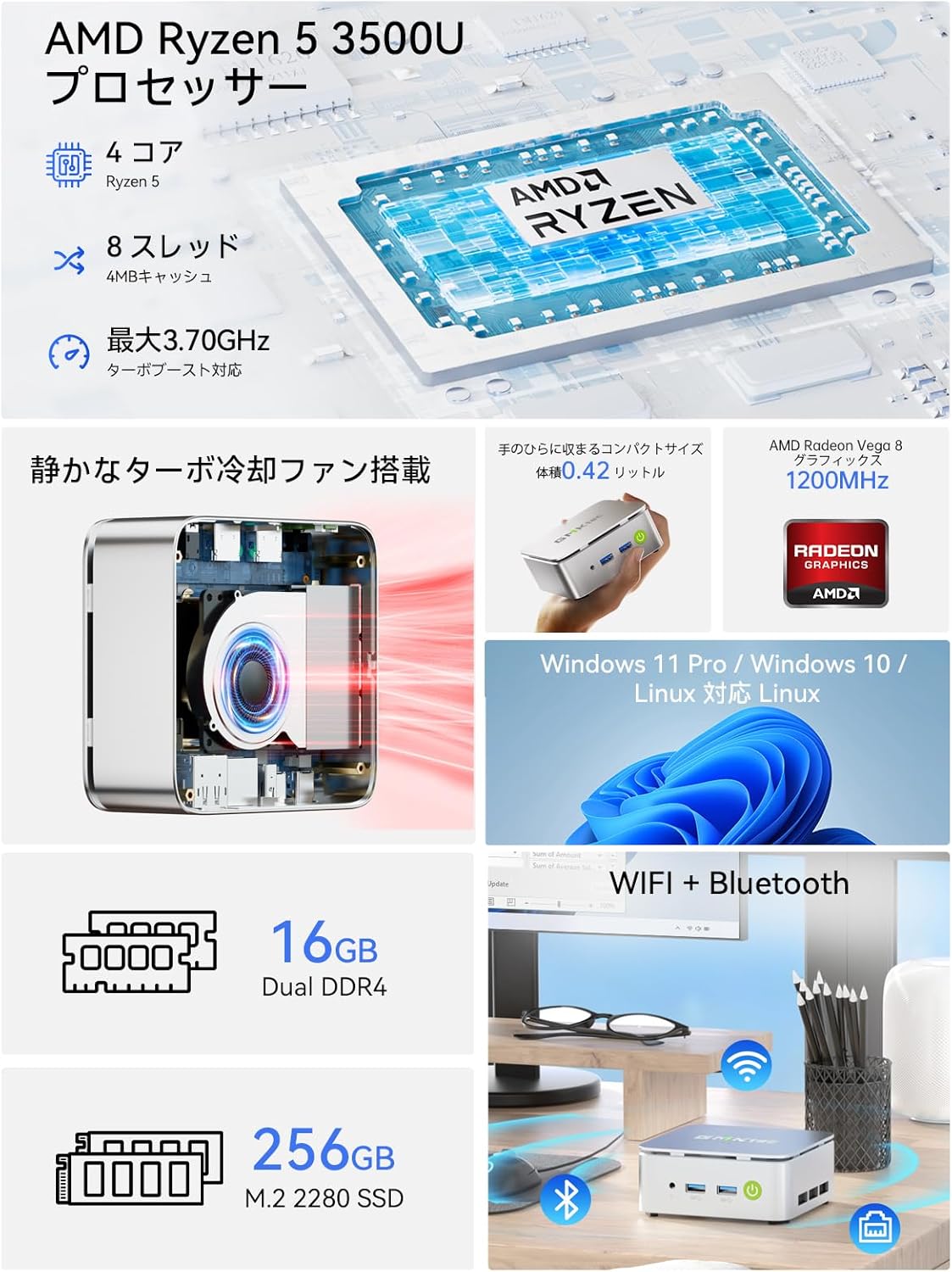
Tasvir: Bittaview of the GMKtec G10 Mini PC's main features, including its AMD Ryzen 5 3500U processor, 16GB DDR4 RAM, 256GB SSD, compact size, quiet turbo cooling fan, and support for Windows 11 Pro/Windows 10/Linux.
2.2 Protsessor va grafika
The GMKtec G10 is powered by an AMD Ryzen 5 3500U processor, featuring 4 cores and 8 threads, with a maximum boost clock of 3.7GHz. It integrates Radeon Vega 8 Graphics, providing capable performance for daily tasks and multimedia.

Image: A close-up of the AMD Ryzen 5 3500U processor, detailing its core count, thread count, cache size, and maximum clock speed.
2.3 Portlar va ulanish
The Mini PC offers a comprehensive set of ports for connecting various peripherals and displays:
- Old portlar: 3.5mm Audio Jack, USB 3.2 Gen1 x 2, Power Button.
- Orqa portlar: Kensington Lock, Type-C (PD dedicated), USB 2.0 x 1, Type-C (DP / Data / PD compatible), 2.5G Gigabit LAN (RJ45) x 1, HDMI 2.1 (4K@60Hz), DisplayPort 1.4 (4K@60Hz).
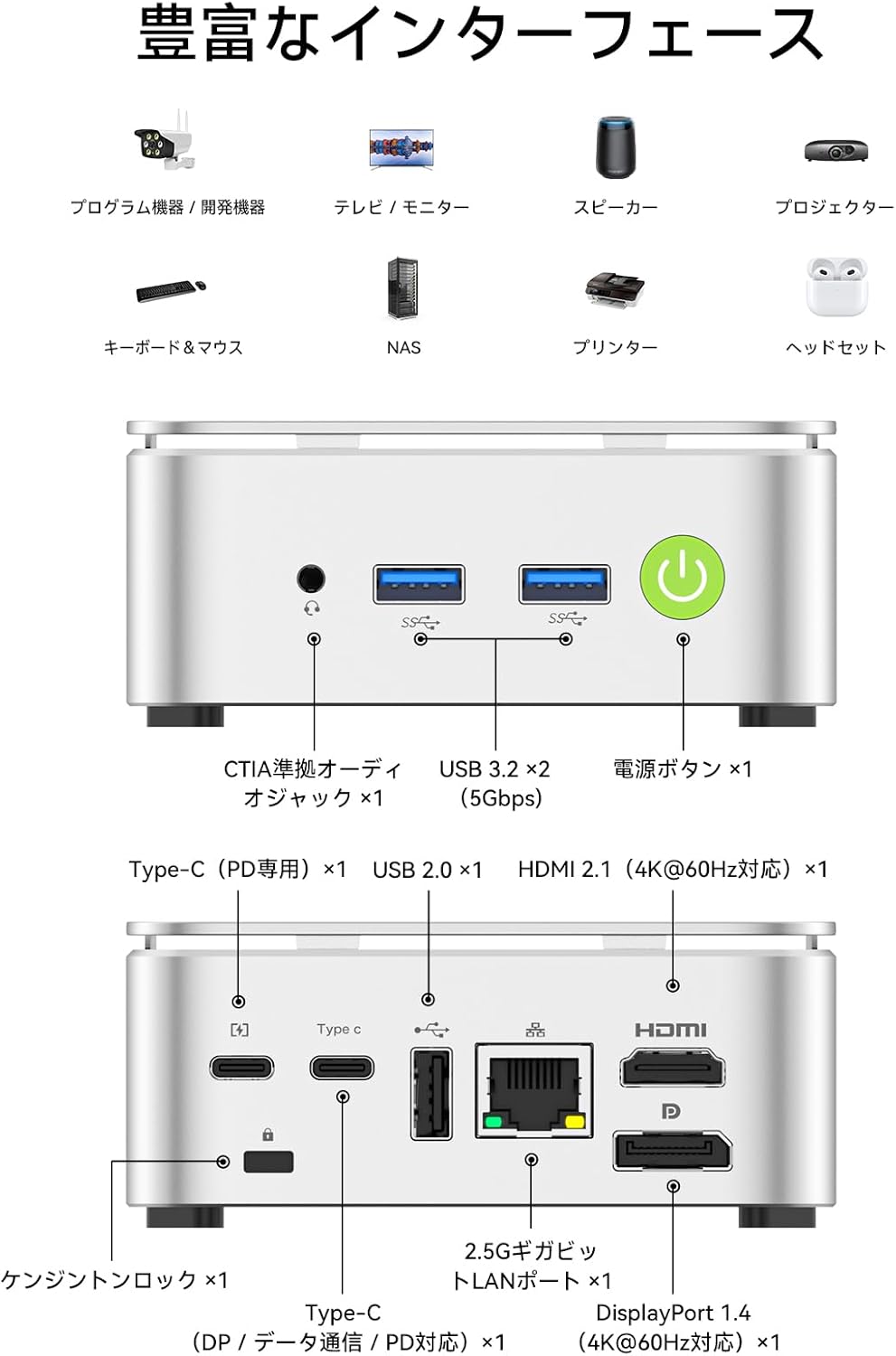
Image: A visual guide to the front and rear ports of the GMKtec G10 Mini PC, including USB, audio, power, HDMI, DisplayPort, Type-C, and LAN connections.
2.4 Xotira va saqlash
The GMKtec G10 comes with 16GB of DDR4 RAM (8GB x 2) and a 256GB NVMe SSD. Both memory and storage are expandable to meet future needs.
- Xotira: Two SO-DIMM slots support up to 64GB DDR4 RAM.
- Saqlash: Two M.2 2280 slots support up to 16TB (8TB x 2) of storage.

Rasm: portlagan view illustrating the dual-channel DDR4 memory and M.2 2280 SSD slots, highlighting the upgrade potential for RAM up to 64GB and storage up to 16TB.
3. O'rnatish bo'yicha qo'llanma
3.1 Qutidan chiqarish va paket tarkibi
Carefully unbox your GMKtec G10 Mini PC. The package should contain the following items:
- Nucbox G10 Mini PC
- Quvvat adapteri va kabel
- HDMI kabeli
- VESA Mount & Screws
- Foydalanuvchi uchun qo'llanma (ushbu hujjat)

Image: The complete package contents of the GMKtec G10 Mini PC, laid out for easy identification.
3.2 Initial Power-On and Connections
To set up your Mini PC for the first time:
- Connect the power adapter to the DC-in port on the Mini PC and plug it into a power outlet.
- Connect your monitor(s) to the HDMI, DisplayPort, or Type-C video output ports.
- Klaviatura va sichqonchani mavjud USB portlariga ulang.
- Press the power button on the front of the Mini PC to turn it on.
Watch this video for a visual guide on initial setup and connections:
Video: tugadiview of the GMKtec G10 Mini PC, demonstrating its compact size, various ports, and ease of connection to a display for initial use.
3.3 VESA o'rnatish moslamasini o'rnatish
The GMKtec G10 supports VESA mounting, allowing you to attach it to the back of a compatible monitor for a clutter-free workspace.
- VESA o'rnatish kronshteynini berilgan vintlar yordamida monitoringizning orqa tomoniga mahkamlang.
- Secure the Mini PC to the VESA mount.
For a visual demonstration of VESA mount installation, refer to this video (note: this video features a similar model, but the VESA mounting process is generally the same):
Video: Demonstration of VESA mount installation for a mini PC. The process shown is applicable to the GMKtec G10 for mounting behind a monitor.
4. Foydalanish bo'yicha ko'rsatmalar
4.1 Quvvatni yoqish/o‘chirish
- Yoqilgan: Qurilmaning old qismidagi quvvat tugmasini bosing.
- O'chirish: Operatsion tizimning o'chirish funksiyasidan foydalaning. Shu bilan bir qatorda, majburan o'chirish uchun quvvat tugmasini 5 soniya bosib turing (faqat kerak bo'lganda foydalaning).
4.2 Multi-Display Setup
The GMKtec G10 supports connecting up to three displays simultaneously, enhancing productivity for work and entertainment.

Image: A workstation setup showcasing the GMKtec G10 Mini PC driving two large monitors and a tablet, illustrating its triple HD output capability for enhanced productivity.
4.3 Tarmoqqa ulanish
- Simli LAN: Connect an Ethernet cable to the 2.5G Gigabit LAN port for high-speed internet access.
- Wi-fi: The device supports Wi-Fi 5. Configure your wireless network settings through the operating system.
- Bluetooth: Bluetooth 5.0 is supported for connecting wireless peripherals like keyboards, mice, and headphones.
5. Xizmat ko'rsatish
5.1 Tozalash
Regularly clean the exterior of the Mini PC with a soft, dry cloth. Ensure ventilation grilles are free from dust to maintain optimal cooling performance.
5.2 Component Upgrades (RAM & SSD)
The GMKtec G10 allows for upgrades to its RAM and M.2 SSD. Always ensure the device is powered off and unplugged before performing any internal modifications.
For a visual guide on upgrading RAM and SSD, please refer to this video (note: this video features a similar model, but the general procedure for installing RAM and M.2 SSDs is comparable):
Video: A tutorial demonstrating the process of expanding DDR memory and replacing an SSD in a mini PC. This guide can be used as a reference for upgrading the GMKtec G10.
5.3 Sovutish tizimi
The Mini PC features a silent cooling fan designed to maintain optimal operating temperatures while minimizing noise.

Image: A graph comparing the noise level of the G10 Mini PC (35dB) to other environments, highlighting its quiet operation, alongside a user working in a quiet room.

Image: An internal diagram of the GMKtec G10's high-efficiency cooling system, showing the airflow and heat sink design.
6. Muammolarni bartaraf qilish; nosozliklarni TUZATISH
6.1 Displey chiqishi yo'q
- Ensure all display cables (HDMI, DP, Type-C) are securely connected to both the Mini PC and the monitor.
- Monitor yoqilganligini va to'g'ri kirish manbasiga o'rnatilganligini tekshiring.
- Try connecting to a different display port or using a different cable.
6.2 Wi-Fi ulanish muammolari
- Check if Wi-Fi is enabled in the operating system settings.
- Ensure the Mini PC is within range of your wireless router.
- Restart your wireless router and the Mini PC.
- Update Wi-Fi drivers if available.
6.3 Tizim javob bermayapti
- If the system becomes unresponsive, press and hold the power button for 5 seconds to force a shutdown. Wait a few moments, then power it back on.
- Haddan tashqari issiqlikning oldini olish uchun etarli ventilyatsiyani ta'minlang.
6.4 External Graphics Card Connection
If you are connecting an external graphics card via Oculink, ensure the Mini PC is powered off before connecting or disconnecting the external GPU. Hot-plugging Oculink is not supported and may damage the motherboard.
For a demonstration of connecting an external graphics card, refer to this video (note: this video features a similar model, but the connection method is relevant):
Video: A guide on how to connect an AD-GP1 external graphics board to a GMKtec M7 Mini PC. This demonstrates the Oculink connection process, which is similar for the G10.
7. Texnik shartlar
| Xususiyat | Spetsifikatsiya |
|---|---|
| Brend | GMKtec |
| Model seriyalari | JP Nucbox G10 |
| Mahsulot o'lchamlari | 9.8 x 10.3 x 4.2 sm; 284 g |
| Rang | Oq |
| CPU markasi | AMD |
| CPU turi | Ryzen 5 3500U |
| CPU tezligi | 3.7 gigagertsli |
| Protsessorlar soni | 4 |
| RAM Memory Type | DDR4, SO-DIMM x 2 |
| Maksimal xotira hajmi | 64 GB |
| Xotira soati tezligi | 2400 MGts |
| Qattiq disk hajmi | 256 GB |
| Qattiq disk turi | SSD |
| Qattiq disk interfeysi | PCIe x 4 |
| Grafika tezlashtiruvchisi | Radeon Vega 8 Graphic |
| GPU Brand | AMD |
| Grafik karta turi | Integratsiyalashgan |
| VRAM Type | SODIMM |
| VRAM Capacity | 16 GB |
| Ulanish | Bluetooth, Wi-Fi 5, 2.5G LAN |
| USB 2.0 portlari | 1 |
| USB 3.0 portlari | 2 |
| HDMI portlari | 1 |
| Optik haydovchi turi | Yo'q |
| Operatsion tizim | Windows 11 Pro / Linux |
| Kiritilgan batareya | Ha |
| Lityum batareyaning energiya tarkibi | 5 Vatt soat |
| Lityum batareyalar qadoqlash | Battery contained in equipment |
| Lityum batareyaning og'irligi | 0.7 gramm |
| Lithium Ion Battery Count | 1 |
| Mahsulotdan foydalanish | Gaming, Business, Multimedia |
| Shaxsiy kompyuter dizayni turi | Mini kompyuter |
| O'rnatilgan RAM xotira hajmi | 16 GB |
8. Kafolat va qo'llab-quvvatlash
For warranty information and technical support, please refer to the official GMKtec websayti yoki bevosita mijozlarga xizmat ko'rsatish bilan bog'laning. Kafolat da'volari uchun xarid kvitansiyasini xaridni tasdiqlovchi hujjat sifatida saqlang.


