Kirish
This manual provides instructions for the setup, operation, maintenance, and troubleshooting of your NYXI Wizard 2 Gamecube Switch Controller. Please read this manual thoroughly before use to ensure proper functionality and to maximize your gaming experience.

1-rasm: Old view of the NYXI Wizard 2 Gamecube Switch Controller. This image displays the controller's overall design, including the dual joysticks, D-pad, action buttons (A, B, X, Y), shoulder buttons, and central function buttons, all in a white finish.
Asosiy xususiyatlar
- TMR Hall Effect Joysticks: High-precision joysticks designed to prevent drift and ensure accurate control.
- Dual-Mode Triggers: Switch between NGC Original Linear Hall Triggers for precise analog input and Mechanical Microswitch Triggers for rapid digital response.
- Mechanical Microswitches for A/B/X/Y Buttons: Offers tactile feedback and fast response times with a lifespan of up to 5 million clicks.
- Keng muvofiqlik: Supports Nintendo Switch, PC, and Wii consoles.
- NFC funktsiyasi: Integrated NFC for Amiibo support.
- HD Rumble & 6-Axis Gyroscope: Provides immersive haptic feedback and precise motion control.
- Dasturlashtiriladigan orqaga tugmalar: Customizable MR and ML buttons for enhanced gameplay.
O'rnatish va ulanish
1. Dastlabki zaryadlash
Before first use, fully charge the controller using the provided USB-C cable. Connect the cable to the controller's charging port and a compatible USB power source.
2. Connecting to Nintendo Switch
- Ensure your Nintendo Switch console is powered on and updated to the latest firmware.
- BOSH SAHIFA menyusidan "Kontrollerlar" > "Tutqichni/Tartibni o'zgartirish" ni tanlang.
- Hold down the pairing button on the top of the NYXI Wizard 2 controller until the player indicator lights begin to flash.
- Once connected, the player indicator light(s) will remain solid.
Note: The NYXI Wizard 2 is a slide-in controller but is not magnetic. It does NOT support Switch 2's handheld mode, mouse mode, or wake-up function. For optimal performance, ensure the controller firmware is up to date. Contact NYXI support for firmware update instructions if needed.
3. Kompyuterga ulanish
The controller can be connected to a PC via USB cable or wirelessly via Bluetooth (if your PC has Bluetooth capability).
- Simli ulanish: Connect the controller to your PC using a USB-C cable. The PC should automatically detect and install the necessary drivers.
- Bluetooth ulanishi:
- Kompyuteringizda "Sozlamalar" > "Qurilmalar" > "Bluetooth va boshqa qurilmalar" bo'limiga o'ting.
- Turn on Bluetooth and select "Add Bluetooth or other device" > "Bluetooth".
- Hold down the pairing button on the NYXI Wizard 2 controller until the indicator lights flash.
- Select the controller from the list of available devices to pair.
4. Connecting to Wii
Specific connection instructions for Wii may vary depending on the game and adapter used. Generally, the controller connects via a compatible GameCube controller adapter for Wii consoles. Refer to your Wii console's accessory connection guide for detailed steps.
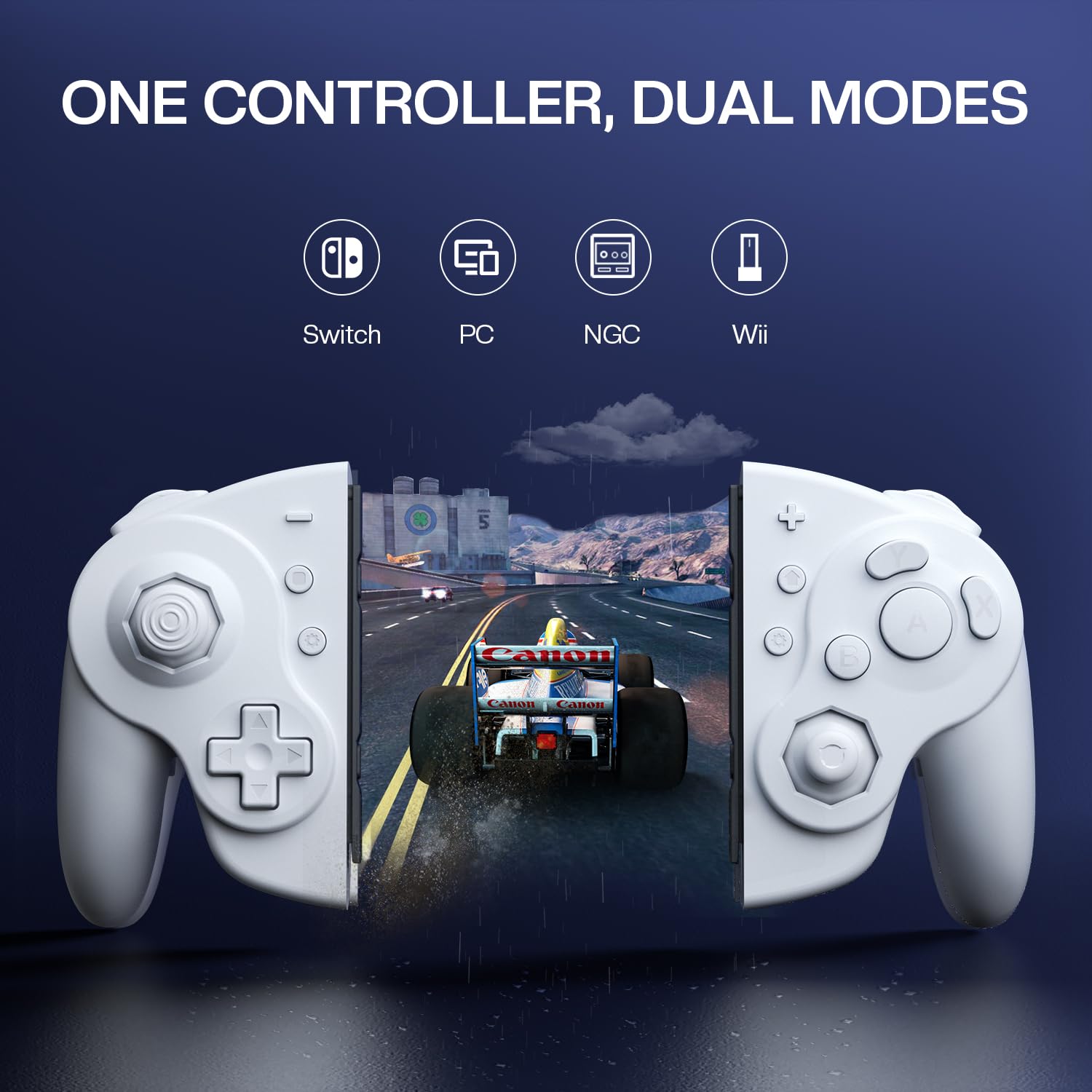
2-rasm: This image illustrates the multi-platform compatibility of the NYXI Wizard 2 controller, showing icons for Nintendo Switch, PC, NGC (GameCube), and Wii, emphasizing its versatility across different gaming systems.
Foydalanish bo'yicha ko'rsatmalar
1. TMR Hall Effect Joysticks
The TMR Hall Effect Joysticks provide precise, drift-free control. These joysticks utilize magnetic fields for input, ensuring longevity and accuracy. No calibration is typically required for these joysticks.

3-rasm: Batafsil diagramma ko'rsatildiasing the internal mechanism of the TMR Hall Effect Joystick. It highlights the TMR chips and magnetic components responsible for high-precision input and reduced power consumption.
2. Dual-Mode Triggers (NGC Linear Hall & Microswitch)
The controller features adjustable triggers that can operate in two modes:
- NGC Original Linear Hall Trigger: Provides analog input with millimeter precision, ideal for racing games or actions requiring variable input.
- Mechanical Microswitch Trigger: Offers a rapid, digital response with 3mm actuation and 0.2ms response time, suitable for FPS games or quick actions.
To switch between modes, refer to the specific instructions provided with your controller or contact NYXI support. The physical mechanism for switching is typically located near the trigger buttons.
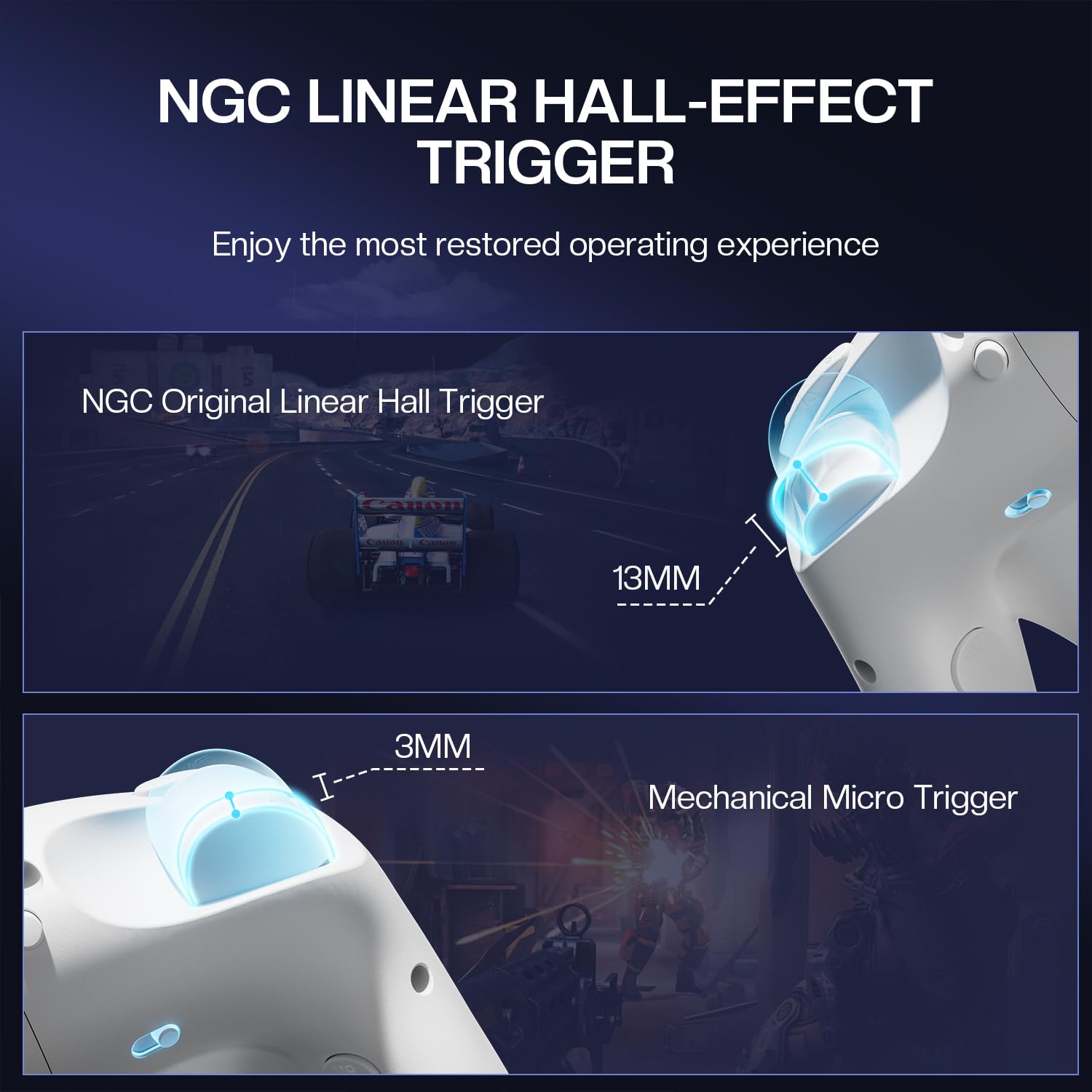
4-rasm: This image visually compares the NGC Original Linear Hall Trigger, showing its 13mm travel for analog input, with the Mechanical Micro Trigger, which has a shorter 3mm actuation for faster digital response.
3. A/B/X/Y Buttons with Mechanical Microswitches
The A, B, X, and Y buttons are equipped with mechanical microswitches, providing a distinct tactile click and rapid response. These switches are designed for durability and competitive gaming.

5-rasm: A cutaway diagram illustrating the mechanical microswitches beneath the A, B, X, and Y buttons, highlighting their internal structure and the tactile feedback mechanism.
4. NFC Functionality (Amiibo Support)
The controller includes NFC functionality for interacting with Amiibo figures. To use, place a compatible Amiibo figure over the NFC touchpoint on the controller (typically located near the center or a specific button) when prompted by a game.

6-rasm: This image shows the NYXI Wizard 2 controller interacting with an Amiibo figure, with a wireless signal icon indicating the NFC connection. The Amiibo is placed near the controller's right joystick.
5. HD Rumble and 6-Axis Gyroscope
The controller integrates HD Rumble for nuanced haptic feedback and a 6-Axis Gyroscope for precise motion control. These features are automatically enabled when supported by the game and console.

7-rasm: An illustration of the NYXI Wizard 2 controller with visual effects representing HD Rumble (vibrations in the grips) and 6-Axis Gyroscope (motion tracking around the controller), indicating immersive gameplay features.
6. Programmable Back Buttons (MR/ML) and Turbo Function
The controller includes two programmable back buttons, MR (Macro Right) and ML (Macro Left), allowing users to assign complex button sequences or single button presses for quick execution. Refer to the controller's specific programming guide for detailed instructions on how to assign functions to these buttons and activate the Turbo function.

8-rasm: Yaqindan suratga olish view of the underside of the NYXI Wizard 2 controller, highlighting the MR (Macro Right) and ML (Macro Left) programmable back buttons, which are designed for custom input assignments.
Xizmat
- Tozalash: Tekshirish moslamasini tozalash uchun yumshoq, quruq matodan foydalaning. Qattiq kimyoviy moddalar yoki abraziv materiallardan foydalanishdan saqlaning.
- Saqlash: Tekshirgichni to'g'ridan-to'g'ri quyosh nuri va haddan tashqari haroratdan uzoqda, salqin va quruq joyda saqlang.
- Batareya parvarishi: Batareya quvvatini uzaytirish uchun kontrollerni tez-tez to'liq zaryadsizlantirishdan saqlaning. Doimiy ishlatilmasa ham, uni muntazam ravishda zaryadlang.
- Dasturiy ta'minotni yangilash: Vaqti-vaqti bilan ishlab chiqaruvchini tekshiring weboptimal ishlash va moslikni ta'minlash uchun dasturiy ta'minot yangilanishlari uchun sayt.
Muammolarni bartaraf qilish; nosozliklarni TUZATISH
- Controller not connecting or experiencing lag:
- Tekshirish moslamasi to'liq zaryadlanganligiga ishonch hosil qiling.
- Verify that the console/PC's Bluetooth is enabled and the controller is in pairing mode.
- Move closer to the console/PC to reduce interference.
- Update the controller's firmware. Contact NYXI after-sales support for the upgrade method.
- Reset the controller (refer to specific reset instructions if available, usually a small pinhole button).
- Joystick drift or inaccurate input:
- The TMR Hall Effect Joysticks are designed to prevent drift. If experiencing issues, ensure the controller firmware is up to date.
- Perform a controller calibration through your console's system settings if available.
- If the problem persists, contact NYXI support.
- Tugmalar javob bermayapti:
- Tekshirish moslamasining to'g'ri ulanganligiga ishonch hosil qiling.
- Tugmalar atrofida biron bir jismoniy to'siqlar yoki axlat borligini tekshiring.
- Test the controller with another game or system to isolate the issue.
Texnik xususiyatlari
| Model raqami | Sehrgar 2 |
| Brend | NYXI |
| Moslik | Nintendo Switch, kompyuter, Wii |
| Joystik turi | TMR Hall effekti |
| Trigger turi | NGC Original Linear Hall / Mechanical Microswitch (Dual Mode) |
| Tugma turi | Mechanical Microswitches (A/B/X/Y) |
| Maxsus xususiyatlar | NFC (Amiibo support), HD Rumble, 6-Axis Gyroscope, Programmable Back Buttons (MR/ML), Turbo Function |
| Batareya | 1 nostandart batareya (shu jumladan) |
| Og'irligi | 1.15 funt (taxminan 521 gramm) |
| O'lchamlari | 8.03 x 5.87 x 3.03 dyuym |
Kafolat va qo'llab-quvvatlash
For warranty information, product support, or to obtain firmware updates, please visit the official NYXI website or contact NYXI customer service directly. Keep your proof of purchase for warranty claims.
NYXI Support Contact: Refer to the contact information provided with your product packaging or on the official NYXI websayt.


