1. Kirish
Thank you for choosing the HTC GT-288 Electric Shaver. This manual provides essential information for the safe and effective operation, maintenance, and care of your new shaver. Please read these instructions thoroughly before first use and retain them for future reference.
2. Xavfsizlik ma'lumotlari
To reduce the risk of electric shock, injury, or damage, always follow these basic safety precautions:
- Do not immerse the charging cable or power adapter in water or other liquids.
- Jihozni bolalardan uzoqroq tuting.
- Ensure the shaver is fully dry before connecting it to the charging cable.
- Do not use the shaver if the blade or foil is damaged, as this may cause injury.
- Faqat taqdim etilgan USB zaryadlash kabelidan foydalaning.
- This appliance is designed for personal use only.
3. Paket tarkibi
Paketda quyidagi elementlar mavjudligini tekshiring:
- 1 x HTC GT-288 Electric Shaver
- 1 x USB zaryadlovchi kabeli
- 3 x Precision Combs (1mm, 3mm, 5mm)
- 1 x tozalash cho'tkasi
- 1 x Lubricating Oil
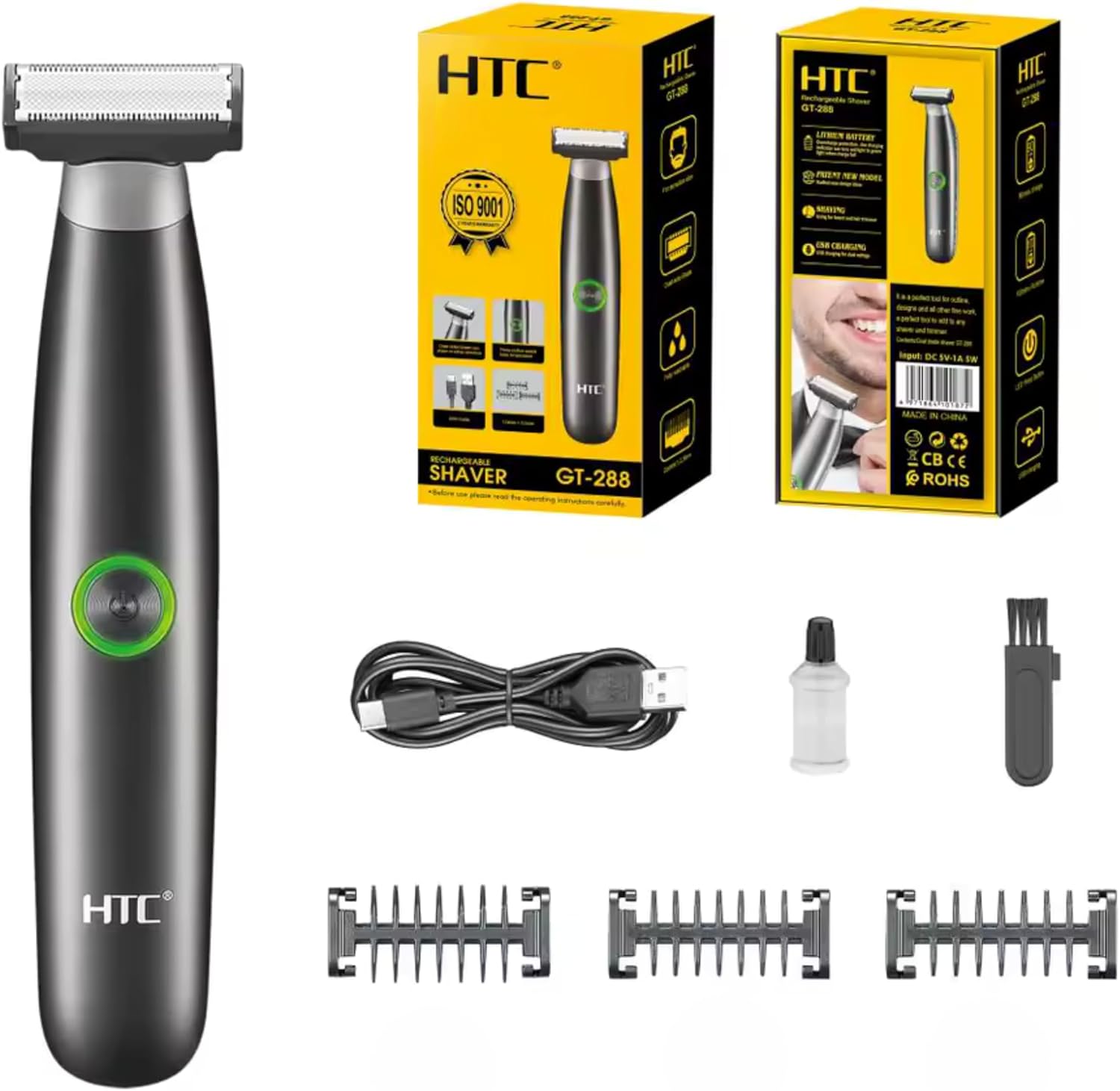
Image 3.1: Contents of the HTC GT-288 Electric Shaver package, including the shaver, USB cable, three precision combs, cleaning brush, and lubricating oil.
4. Mahsulot tugadiview
The HTC GT-288 Electric Shaver features a sleek design with a dual-sided blade for efficient trimming and shaving. It includes an easy-to-operate press-button switch and is fully washable for convenient cleaning.
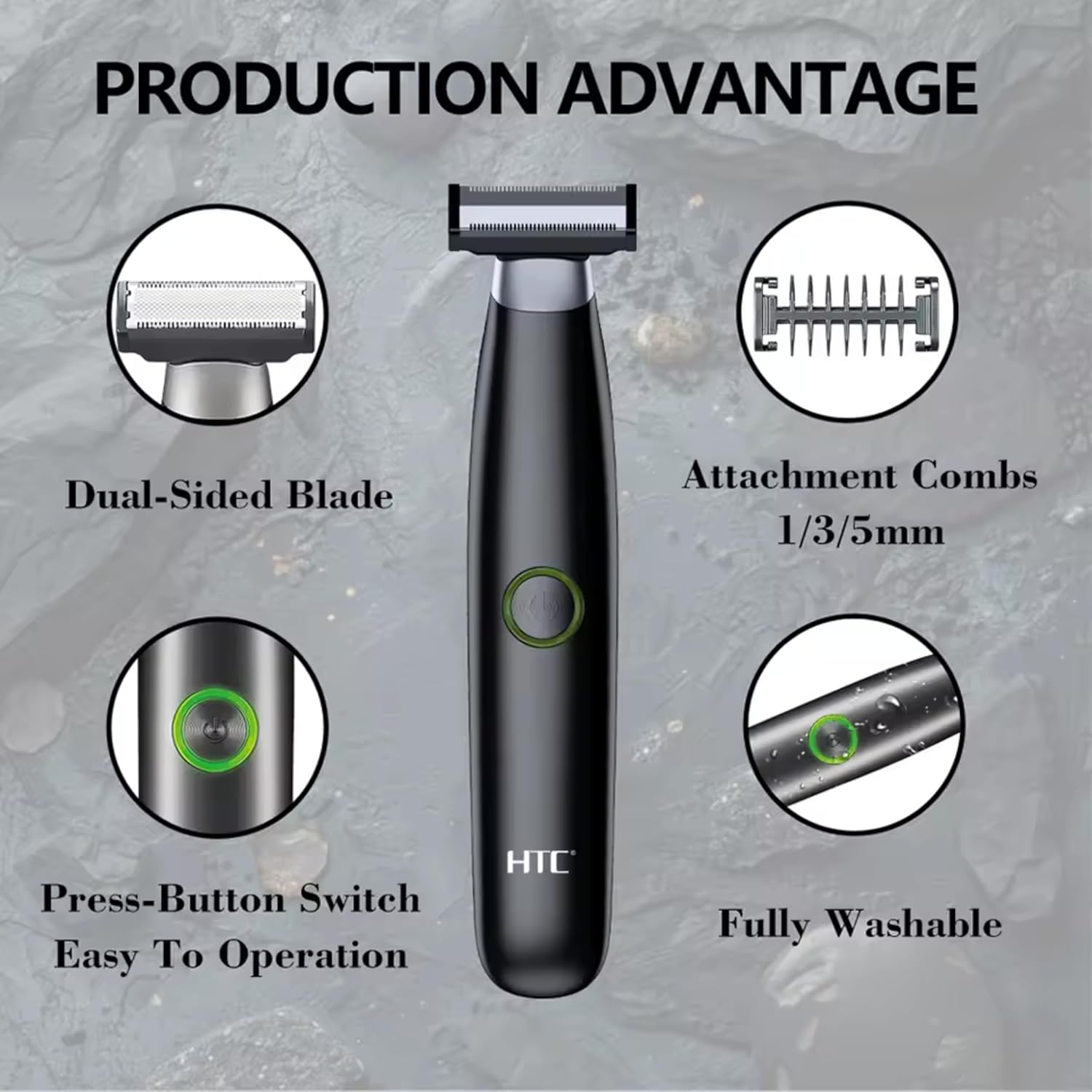
4.1-rasm: tugadiview of the HTC GT-288 Electric Shaver's key features, highlighting the dual-sided blade, attachment combs (1/3/5mm), press-button switch, and fully washable design.

Image 4.2: Detail of the LED press button, which serves as the on/off switch for easy operation.
5. Sozlash
- Paketni ochish: Paketdagi barcha komponentlarni ehtiyotkorlik bilan olib tashlang.
- Dastlabki to'lov: Before first use, fully charge the shaver. Refer to Section 6 for charging instructions.
- Attach Comb (Optional): If desired, select one of the three precision combs (1mm, 3mm, or 5mm) and slide it onto the shaver head until it clicks into place. Ensure it is securely attached.
6. Zaryadlash
The HTC GT-288 Electric Shaver is equipped with a rechargeable battery for cordless operation.
- Soqol o'chirilganligiga ishonch hosil qiling.
- Connect the small end of the USB charging cable to the charging port on the shaver.
- Connect the larger end of the USB cable to a compatible USB power source (e.g., computer, USB wall adapter).
- The LED indicator on the shaver will illuminate to show that it is charging.
- Allow the shaver to charge completely before its first use. A full charge typically takes several hours.
- To'liq zaryadlangandan so'ng, USB kabelini ajratib oling.
7. Foydalanish bo'yicha ko'rsatmalar
The HTC GT-288 shaver can be used for both wet and dry shaving.
- Yoqilgan: Press the LED button to turn on the shaver.
- Quruq soqol: For dry shaving, ensure your skin is clean and dry. Gently press the shaver against your skin and move it in slow, even strokes against the direction of hair growth.
- Nam soqol: For wet shaving, apply shaving foam or gel to your skin. The shaver is waterproof, allowing for use in the shower or with water. Move the shaver in gentle, even strokes.
- Using Precision Combs: Attach the desired 1mm, 3mm, or 5mm comb for trimming beards, sideburns, or other facial hair to a specific length. Move the shaver with the comb attached against the direction of hair growth for an even trim.
- O'chirish: Press the LED button again to turn off the shaver after use.
8. Xizmat va tozalash
Muntazam tozalash optimal ishlashni ta'minlaydi va soqolingizning ishlash muddatini uzaytiradi.
- O'chirib qo'yish: Tozalashdan oldin har doim soqolni o'chiring.
- Boshni yuvish: The shaver is fully washable (IPX6 rated). You can rinse the shaver head directly under running water to remove hair clippings.
- Tozalash cho'tkasidan foydalaning: For more thorough cleaning, use the provided cleaning brush to remove stubborn hair particles from the blade and comb attachments.
- Pichoqlarni moylash: After cleaning and drying, apply a small drop of the provided lubricating oil to the blades. Turn on the shaver for a few seconds to distribute the oil evenly. This helps maintain blade performance.
- Quruq: Saqlash yoki qayta zaryadlashdan oldin soqol mashinasini havoda to'liq quritishga ruxsat bering.

Image 8.1: The HTC GT-288 Electric Shaver being rinsed under a faucet, illustrating its IPX6 fully washable design for easy cleaning.
9. Muammolarni bartaraf qilish; nosozliklarni TUZATISH
| Muammo | Mumkin sabab | Yechim |
|---|---|---|
| Soqol mashinasi yoqilmaydi. | Batareya quvvati tugadi. | Soqol mashinasini to'liq quvvatlang. |
| Shaver does not cut effectively. | Pichoqlar sochlar bilan tiqilib qolgan yoki xira. | Clean the shaver head thoroughly. Apply lubricating oil. If problem persists, blades may need replacement. |
| Soqol sochni tortadi. | Battery is low or blades are clogged. | Charge the shaver. Clean the shaver head. |
| Soch kesish mashinasi foydalanish vaqtida to'xtaydi. | Batareya quvvati tugadi. | Soqol mashinasini qayta zaryadlang. |
10. Texnik shartlar
- Brend: HTC
- Model nomi: GT-288
- Quvvat manbai: USB qayta zaryadlanuvchi
- Maxsus xususiyatlar: USB Cable, Adjustable Combs, Rechargeable, Water Resistant, Wet & Dry Use
- Tavsiya etilgan foydalanish: Facial Shaving, Beard Trimming, Daily Use, Travel
- Kiritilgan komponentlar: Electric Shaver, USB Cable, 3 Precision Combs, Cleaning Brush, Lubricating Oil
- Mahsulot og'irligi: 250 gramm
- Rang: Qora
- Pichoq materiali: Zanglamaydigan po'lat
- Bosh turi: Nozik trimmer
11. Kafolat va qo'llab-quvvatlash
This product is manufactured by HTC. For any questions, technical support, or warranty claims, please contact the seller or manufacturer directly through your purchase platform. Please retain your proof of purchase for warranty purposes.


